Multi-Primary Mesh
Multi-Primary Mesh on OpenShift with ACM
This guide extends the result of the MultiCluster on OpenShift guide into a two-primary Istio mesh spanning two spoke clusters. The ACM hub cluster is not changed — it remains dedicated to fleet management and centralized metrics collection.
What this guide adds:
- A second spoke cluster (
ossm-kiali-spoke-two) is imported into ACM and gets OSSM 3 installed - Both spoke clusters are updated to share a single Istio mesh via East-West gateways and cross-cluster endpoint discovery
- ACM Observability is extended to collect metrics from the second spoke
- Kiali on the first spoke gains API access to the second spoke’s workloads via a remote cluster secret
- A cross-cluster demo app demonstrates traffic flowing between the two spokes
Cluster roles after this guide:
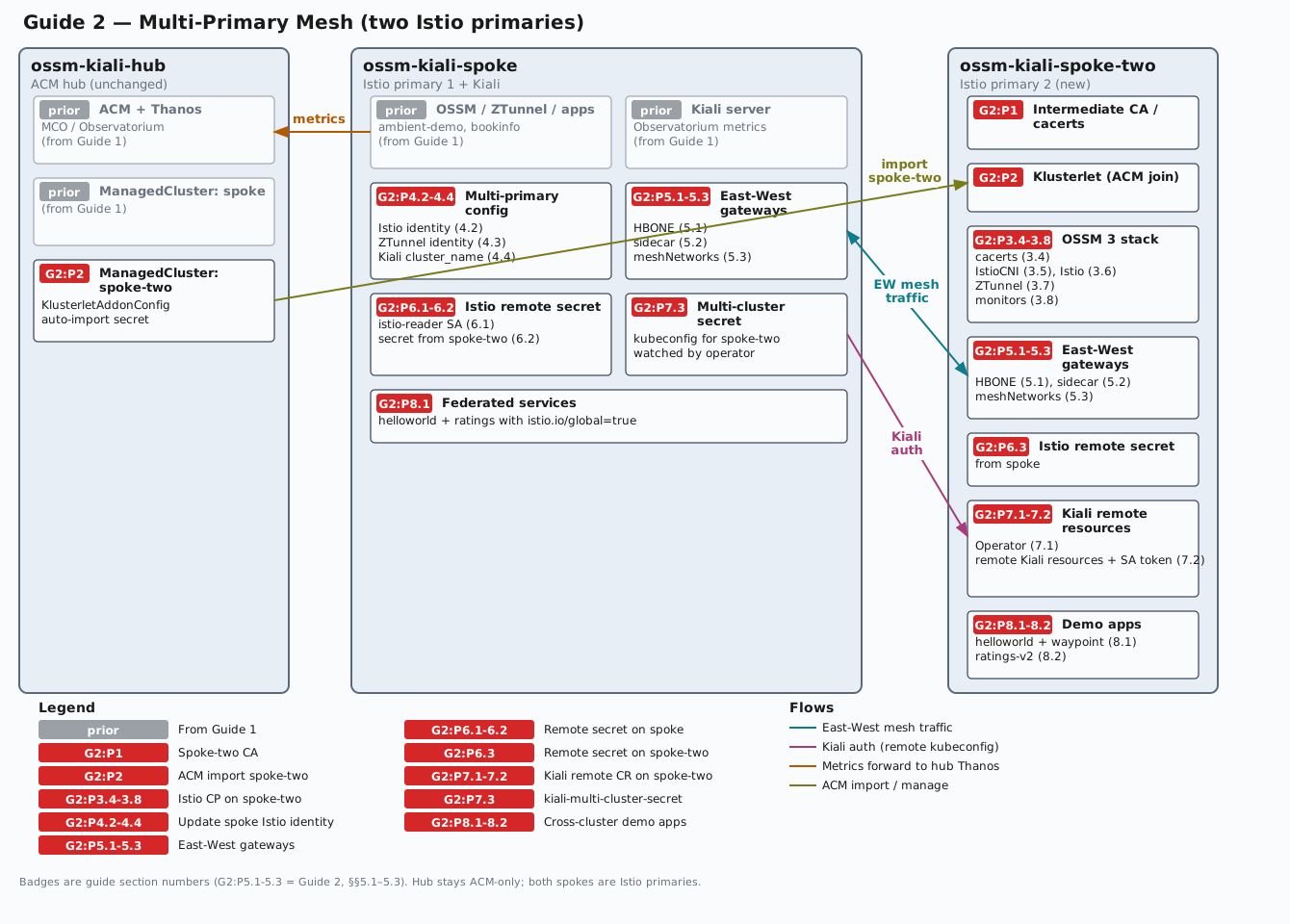
ossm-kiali-hub— ACM hub: fleet management + centralized Thanos metrics (unchanged)ossm-kiali-spoke— Istio primary cluster 1: existing mesh + Kialiossm-kiali-spoke-two— Istio primary cluster 2: new, added to the mesh
The diagram below shows the environment after this guide completes. Components from Guide 1 are marked prior; badges such as G2:P5.1-5.3 mark which guide section(s) add each piece (Guide 2, §§5.1–5.3). Click the diagram to open a full-size SVG in a new tab.
Prerequisites
- The MultiCluster on OpenShift guide completed successfully — ACM, OSSM 3, and Kiali must already be running on
ossm-kiali-hubandossm-kiali-spoke. - A second fresh OpenShift 4.19+ cluster accessible via kubeconfig context
ossm-kiali-spoke-two(same minimum as the hub/spoke guide). istioctlinstalled locally (required to create Istio cross-cluster endpoint discovery secrets). Version must match${ISTIO_VERSION}.- All three kubeconfig contexts reachable:
oc --context=ossm-kiali-hub whoami --show-server oc --context=ossm-kiali-spoke whoami --show-server oc --context=ossm-kiali-spoke-two whoami --show-server - The Istio CA root certificate from the hub/spoke guide must still be available at
/tmp/istio-certs/root-cert.pemand/tmp/istio-certs/root-key.pem. The second spoke’s intermediate CA must be signed by the same root to establish mutual trust.
Environment Setup
Set these variables in the same shell session used for the hub/spoke guide, or re-export the variables from that guide first.
# Must match the hub/spoke guide values exactly
export SPOKE_CLUSTER_NAME="spoke"
export ISTIO_VERSION="1.30.1"
export MESH_ID="mesh1"

# Network names — each cluster must be on a different network
# (no direct pod-to-pod connectivity between clusters)
export SPOKE_NETWORK="network1"
export SPOKE_TWO_NETWORK="network2"

# Spoke-two ACM cluster name — also used as the Istio cluster identity and
# Kiali cluster name so that naming is consistent across all components
export SPOKE_TWO_CLUSTER_NAME="spoke-two"
Phase 1: Generate Spoke-Two CA Certificate
The second spoke needs its own intermediate CA certificate, signed by the same root CA used for the first spoke in the hub/spoke guide. This shared root establishes mutual mTLS trust between the two control planes.
mkdir -p /tmp/istio-certs/spoke-two && cd /tmp/istio-certs

cat > spoke-two/intermediate.conf <<'CONF'
[ req ]
encrypt_key = no
prompt = no
utf8 = yes
default_md = sha256
default_bits = 4096
req_extensions = req_ext
x509_extensions = req_ext
distinguished_name = req_dn
[ req_ext ]
subjectKeyIdentifier = hash
basicConstraints = critical, CA:true, pathlen:0
keyUsage = critical, digitalSignature, nonRepudiation, keyEncipherment, keyCertSign
subjectAltName=@san
[ san ]
DNS.1 = istiod.istio-system.svc
[ req_dn ]
O = Istio
CN = Intermediate CA
L = spoke-two
CONF

openssl genrsa -out spoke-two/ca-key.pem 4096 2>/dev/null

openssl req -new \
  -config spoke-two/intermediate.conf \
  -key spoke-two/ca-key.pem \
  -out spoke-two/cluster-ca.csr 2>/dev/null

openssl x509 -req -sha256 -days 3650 \
  -CA root-cert.pem \
  -CAkey root-key.pem -CAcreateserial \
  -extensions req_ext -extfile spoke-two/intermediate.conf \
  -in spoke-two/cluster-ca.csr \
  -out spoke-two/ca-cert.pem 2>/dev/null

cat spoke-two/ca-cert.pem root-cert.pem > spoke-two/cert-chain.pem
cp root-cert.pem spoke-two/root-cert.pem

echo "Spoke-two intermediate CA: $(openssl x509 -noout -subject -in spoke-two/ca-cert.pem)"

cd -
Phase 2: Import Spoke-Two into ACM
On the hub cluster, create a ManagedCluster resource and import ossm-kiali-spoke-two using the same auto-import approach as the hub/spoke guide.
oc --context=ossm-kiali-hub create namespace "${SPOKE_TWO_CLUSTER_NAME}" 2>/dev/null || true

oc --context=ossm-kiali-hub apply -f - <<EOF
apiVersion: cluster.open-cluster-management.io/v1
kind: ManagedCluster
metadata:
  name: ${SPOKE_TWO_CLUSTER_NAME}
  labels:
    cloud: auto-detect
    vendor: auto-detect
spec:
  hubAcceptsClient: true
EOF

oc --context=ossm-kiali-hub apply -f - <<EOF
apiVersion: agent.open-cluster-management.io/v1
kind: KlusterletAddonConfig
metadata:
  name: ${SPOKE_TWO_CLUSTER_NAME}
  namespace: ${SPOKE_TWO_CLUSTER_NAME}
spec:
  applicationManager:
    enabled: true
  certPolicyController:
    enabled: true
  policyController:
    enabled: true
  searchCollector:
    enabled: true
EOF
Extract the spoke-two kubeconfig and create the auto-import secret:
oc config view --context=ossm-kiali-spoke-two --minify --flatten \
  > /tmp/spoke-two-kubeconfig.yaml

oc --kubeconfig=/tmp/spoke-two-kubeconfig.yaml whoami --show-server

oc --context=ossm-kiali-hub create secret generic auto-import-secret \
  -n "${SPOKE_TWO_CLUSTER_NAME}" \
  --from-file=kubeconfig=/tmp/spoke-two-kubeconfig.yaml

rm -f /tmp/spoke-two-kubeconfig.yaml
Wait for spoke-two to join:
echo "Waiting for ${SPOKE_TWO_CLUSTER_NAME} to join..."
while true; do
  STATUS=$(oc --context=ossm-kiali-hub get managedcluster "${SPOKE_TWO_CLUSTER_NAME}" \
    -o jsonpath='{range .status.conditions[*]}{.type}={.status}{" "}{end}' 2>/dev/null)
  echo "  Status: ${STATUS}"
  if echo "${STATUS}" | grep -q "ManagedClusterJoined=True" && \
     echo "${STATUS}" | grep -q "ManagedClusterConditionAvailable=True"; then
    echo "${SPOKE_TWO_CLUSTER_NAME} is joined and available"
    break
  fi
  sleep 15
done
Phase 3: Install OSSM 3 on Spoke-Two
3.1 Enable User Workload Monitoring
Check if UWM is already enabled on the spoke cluster:
oc --context=ossm-kiali-spoke-two get configmap cluster-monitoring-config \
  -n openshift-monitoring \
  -o jsonpath='{.data.config\.yaml}' 2>/dev/null | \
  grep -q "enableUserWorkload: true" && \
  echo "Already enabled" || echo "Not enabled"
If UWM is not yet enabled, enable it following the instructions below. The following enables UWM safely — merge enableUserWorkload: true without clobbering other monitoring settings. If you created the ConfigMap from scratch, label it so cleanup knows it is safe to remove:
if oc --context=ossm-kiali-spoke-two get configmap cluster-monitoring-config \
    -n openshift-monitoring &>/dev/null 2>&1; then
  # ConfigMap already exists — patch only the enableUserWorkload key
  EXISTING=$(oc --context=ossm-kiali-spoke-two get configmap cluster-monitoring-config \
    -n openshift-monitoring -o jsonpath='{.data.config\.yaml}' 2>/dev/null || true)
  if echo "${EXISTING}" | grep -q "enableUserWorkload:"; then
    oc --context=ossm-kiali-spoke-two get configmap cluster-monitoring-config \
      -n openshift-monitoring -o json \
      | jq '.data["config.yaml"] |= sub("enableUserWorkload:\\s*\\w+"; "enableUserWorkload: true")' \
      | oc --context=ossm-kiali-spoke-two apply -f -
  else
    oc --context=ossm-kiali-spoke-two get configmap cluster-monitoring-config \
      -n openshift-monitoring -o json \
      | jq '.data["config.yaml"] = ((.data["config.yaml"] // "") + "\nenableUserWorkload: true\n")' \
      | oc --context=ossm-kiali-spoke-two apply -f -
  fi
else
  # ConfigMap does not exist — create it and label it as tutorial-owned
  oc --context=ossm-kiali-spoke-two create configmap cluster-monitoring-config \
    -n openshift-monitoring \
    --from-literal=config.yaml="enableUserWorkload: true"
  oc --context=ossm-kiali-spoke-two label configmap cluster-monitoring-config \
    -n openshift-monitoring kiali.io/tutorial-owned=true
fi
Wait for the User Workload Monitoring Prometheus pods to be created and become ready. This can take a few minutes after UWM is enabled.
until oc --context=ossm-kiali-spoke-two get pods \
  -l app.kubernetes.io/name=prometheus \
  -n openshift-user-workload-monitoring \
  --no-headers 2>/dev/null | grep -q .; do
  sleep 5
done
oc --context=ossm-kiali-spoke-two wait pod \
  --for=condition=Ready \
  -l app.kubernetes.io/name=prometheus \
  -n openshift-user-workload-monitoring \
  --timeout=300s
3.2 Install OSSM 3 Operator
# Merge this key into the existing ConfigMap without replacing unrelated UWM settings.
oc --context=ossm-kiali-spoke-two apply -f - <<'EOF'
apiVersion: operators.coreos.com/v1alpha1
kind: Subscription
metadata:
  name: openshift-service-mesh-operator
  namespace: openshift-operators
spec:
  channel: stable
  installPlanApproval: Automatic
  name: servicemeshoperator3
  source: redhat-operators
  sourceNamespace: openshift-marketplace
EOF

until oc --context=ossm-kiali-spoke-two get pods \
  -l app.kubernetes.io/created-by=servicemeshoperator3 \
  -n openshift-operators \
  --no-headers 2>/dev/null | grep -q .; do
  sleep 5
done
oc --context=ossm-kiali-spoke-two wait pod \
  --for=condition=Ready \
  -l app.kubernetes.io/created-by=servicemeshoperator3 \
  -n openshift-operators \
  --timeout=300s
3.3 Create Namespaces and Label ztunnel for Discovery
oc --context=ossm-kiali-spoke-two create namespace istio-system 2>/dev/null || true
oc --context=ossm-kiali-spoke-two create namespace istio-cni 2>/dev/null || true
oc --context=ossm-kiali-spoke-two create namespace ztunnel 2>/dev/null || true

# ztunnel namespace must be labeled so istiod distributes the CA cert ConfigMap there
oc --context=ossm-kiali-spoke-two label namespace ztunnel istio-discovery=enabled

# istio-system must be labeled for two reasons:
# 1. topology.istio.io/network - tells istiod which network the cluster is on (required for multi-network routing)
# 2. istio-discovery: enabled - required for the Gateway API controller to process Gateways in this namespace
oc --context=ossm-kiali-spoke-two label namespace istio-system \
  topology.istio.io/network="${SPOKE_TWO_NETWORK}" \
  istio-discovery=enabled
3.4 Load CA Certificates
oc --context=ossm-kiali-spoke-two get secret cacerts -n istio-system &>/dev/null || \
oc --context=ossm-kiali-spoke-two create secret generic cacerts -n istio-system \
  --from-file=ca-cert.pem=/tmp/istio-certs/spoke-two/ca-cert.pem \
  --from-file=ca-key.pem=/tmp/istio-certs/spoke-two/ca-key.pem \
  --from-file=root-cert.pem=/tmp/istio-certs/spoke-two/root-cert.pem \
  --from-file=cert-chain.pem=/tmp/istio-certs/spoke-two/cert-chain.pem
3.5 Install IstioCNI
oc --context=ossm-kiali-spoke-two apply -f - <<EOF
apiVersion: sailoperator.io/v1
kind: IstioCNI
metadata:
  name: default
spec:
  namespace: istio-cni
  profile: openshift-ambient
  version: v${ISTIO_VERSION}
EOF

oc --context=ossm-kiali-spoke-two wait istiocni default \
  --for=condition=Ready \
  --timeout=300s
3.6 Install Istio Control Plane (with Multi-Cluster Config)
The Istio CR for spoke-two sets the cluster identity, network identity, and enables AMBIENT_ENABLE_MULTI_NETWORK for ambient cross-network routing. The clusterName must match the value in the ZTunnel CR exactly — istiod uses it to identify the local cluster, and ztunnel uses it when authenticating to istiod. A mismatch causes ztunnel pods to fail with authentication failure:
oc --context=ossm-kiali-spoke-two apply -f - <<EOF
apiVersion: sailoperator.io/v1
kind: Istio
metadata:
  name: default
spec:
  namespace: istio-system
  profile: openshift-ambient
  updateStrategy:
    type: InPlace
  values:
    global:
      meshID: ${MESH_ID}
      multiCluster:
        clusterName: ${SPOKE_TWO_CLUSTER_NAME}
      network: ${SPOKE_TWO_NETWORK}
    meshConfig:
      discoverySelectors:
      - matchLabels:
          istio-discovery: enabled
    pilot:
      trustedZtunnelNamespace: ztunnel
      env:
        AMBIENT_ENABLE_MULTI_NETWORK: "true"
  version: v${ISTIO_VERSION}
EOF

oc --context=ossm-kiali-spoke-two wait istio default \
  --for=condition=Ready \
  --timeout=300s
3.7 Install ZTunnel (with Cluster and Network Identity)
oc --context=ossm-kiali-spoke-two apply -f - <<EOF
apiVersion: sailoperator.io/v1
kind: ZTunnel
metadata:
  name: default
spec:
  namespace: ztunnel
  version: v${ISTIO_VERSION}
  values:
    ztunnel:
      multiCluster:
        clusterName: ${SPOKE_TWO_CLUSTER_NAME}
      network: ${SPOKE_TWO_NETWORK}
EOF

oc --context=ossm-kiali-spoke-two wait ztunnel default \
  --for=condition=Ready \
  --timeout=300s

oc --context=ossm-kiali-spoke-two get pods -n ztunnel -l app=ztunnel
3.8 Configure Istio Metrics Collection on Spoke-Two
The hub-side MCOA configuration resources from Guide 1 are already registered with the placement. When spoke-two joins the cluster set, MCOA propagates the shared recording rule into mesh-observability on spoke-two so UWM can aggregate workload:istio_* series from all scraped namespaces there.
Ensure the aggregation namespace exists and is exempt from UWM label enforcement on spoke-two before MCOA propagates the recording rule:
oc --context=ossm-kiali-spoke-two create namespace mesh-observability --dry-run=client -o yaml | \
  oc --context=ossm-kiali-spoke-two apply -f -
oc --context=ossm-kiali-spoke-two apply -f - <<'EOF'
apiVersion: v1
kind: ConfigMap
metadata:
  name: user-workload-monitoring-config
  namespace: openshift-user-workload-monitoring
data:
  config.yaml: |
    namespacesWithoutLabelEnforcement:
    - mesh-observability
EOF
for NS in istio-system ztunnel ambient-demo bookinfo; do
  oc --context=ossm-kiali-spoke-two create namespace "${NS}" --dry-run=client -o yaml | \
    oc --context=ossm-kiali-spoke-two apply -f -
done
Create the UWM monitors so UWM Prometheus scrapes the raw Istio metrics that MCOA will then federate to hub Thanos:
oc --context=ossm-kiali-spoke-two apply -f - <<'EOF'
apiVersion: monitoring.coreos.com/v1
kind: ServiceMonitor
metadata:
  name: istiod-monitor
  namespace: istio-system
spec:
  targetLabels:
  - app
  selector:
    matchLabels:
      istio: pilot
  endpoints:
  - port: http-monitoring
    interval: 30s
EOF

oc --context=ossm-kiali-spoke-two apply -f - <<EOF
apiVersion: monitoring.coreos.com/v1
kind: PodMonitor
metadata:
  name: ztunnel-monitor
  namespace: ztunnel
spec:
  selector:
    matchExpressions:
    - key: istio-prometheus-ignore
      operator: DoesNotExist
  podMetricsEndpoints:
  - path: /stats/prometheus
    interval: 30s
    relabelings:
    - action: keep
      sourceLabels: ["__meta_kubernetes_pod_container_name"]
      regex: "istio-proxy"
    - action: keep
      sourceLabels: ["__meta_kubernetes_pod_annotationpresent_prometheus_io_scrape"]
    - action: replace
      regex: (\d+);(([A-Fa-f0-9]{1,4}::?){1,7}[A-Fa-f0-9]{1,4})
      replacement: '[\$2]:\$1'
      sourceLabels: ["__meta_kubernetes_pod_annotation_prometheus_io_port","__meta_kubernetes_pod_ip"]
      targetLabel: "__address__"
    - action: replace
      regex: (\d+);((([0-9]+?)(\.|$)){4})
      replacement: '\$2:\$1'
      sourceLabels: ["__meta_kubernetes_pod_annotation_prometheus_io_port","__meta_kubernetes_pod_ip"]
      targetLabel: "__address__"
    - sourceLabels: ["__meta_kubernetes_pod_label_app_kubernetes_io_name","__meta_kubernetes_pod_label_app"]
      separator: ";"
      targetLabel: "app"
      action: replace
      regex: "(.+);.*|.*;(.+)"
      replacement: "\${1}\${2}"
    - sourceLabels: ["__meta_kubernetes_pod_label_app_kubernetes_io_version","__meta_kubernetes_pod_label_version"]
      separator: ";"
      targetLabel: "version"
      action: replace
      regex: "(.+);.*|.*;(.+)"
      replacement: "\${1}\${2}"
    - action: replace
      regex: "(.+)"
      replacement: "\${1}"
      sourceLabels: ["__meta_kubernetes_pod_label_app_kubernetes_io_name"]
      targetLabel: "app_kubernetes_io_name"
    - action: replace
      regex: "(.+)"
      replacement: "\${1}"
      sourceLabels: ["__meta_kubernetes_pod_label_app_kubernetes_io_version"]
      targetLabel: "app_kubernetes_io_version"
    - sourceLabels: ["__meta_kubernetes_namespace"]
      action: replace
      targetLabel: namespace
    - action: replace
      replacement: "${MESH_ID}"
      targetLabel: mesh_id
EOF
Phase 4: Update Spoke (Cluster 1) for Multi-Primary
The first spoke’s Istio and ZTunnel CRs from the hub/spoke guide did not include cluster identity or multi-network settings. Patch them now.
4.1 Label Spoke istio-system with Network Identity
oc --context=ossm-kiali-spoke label namespace istio-system \
  topology.istio.io/network="${SPOKE_NETWORK}" \
  istio-discovery=enabled
4.2 Update Spoke Istio CR
oc --context=ossm-kiali-spoke patch istio default --type=merge -p "{
  \"spec\": {
    \"values\": {
      \"global\": {
        \"multiCluster\": {\"clusterName\": \"${SPOKE_CLUSTER_NAME}\"},
        \"network\": \"${SPOKE_NETWORK}\"
      },
      \"pilot\": {
        \"env\": {
          \"AMBIENT_ENABLE_MULTI_NETWORK\": \"true\"
        }
      }
    }
  }
}"

oc --context=ossm-kiali-spoke wait istio default \
  --for=condition=Ready \
  --timeout=300s
4.3 Update Spoke ZTunnel CR
Setting clusterName in the ZTunnel CR must match the value in the Istio CR above — both istiod and ztunnel must agree on the local cluster identity (see Notes #5):
oc --context=ossm-kiali-spoke patch ztunnel default --type=merge -p "{
  \"spec\": {
    \"values\": {
      \"ztunnel\": {
        \"multiCluster\": {\"clusterName\": \"${SPOKE_CLUSTER_NAME}\"},
        \"network\": \"${SPOKE_NETWORK}\"
      }
    }
  }
}"

oc --context=ossm-kiali-spoke wait ztunnel default \
  --for=condition=Ready \
  --timeout=300s
4.4 Update Kiali with the Cluster Name
Kiali was installed in the hub/spoke guide without a cluster name because only one cluster existed. Now that spoke has multiCluster.clusterName: spoke configured, Kiali must be updated to match so it correctly identifies the home cluster — without this, the Kiali login page will redirect in an infinite loop:
oc --context=ossm-kiali-spoke patch kiali kiali -n istio-system --type=merge -p "{
  \"spec\": {
    \"kubernetes_config\": {
      \"cluster_name\": \"${SPOKE_CLUSTER_NAME}\"
    }
  }
}"

oc --context=ossm-kiali-spoke rollout status deployment/kiali \
  -n istio-system --timeout=120s
Wait until the injector ConfigMap reflects ${SPOKE_CLUSTER_NAME}, then restart the
sidecar-injected pods in bookinfo so they pick up the new cluster identity. The OSSM/Sail operator publishes injection settings in the istio-sidecar-injector ConfigMap in istio-system. The first loop below polls that ConfigMap until global.multiCluster.clusterName equals ${SPOKE_CLUSTER_NAME} (see Notes #5 for why you must wait). Only then restart bookinfo so new sidecars pick up the identity. After the rollout, the final check reads ISTIO_META_CLUSTER_ID from a sample pod’s istio-proxy container to confirm injection used the new name — not Kubernetes:
echo "Waiting for sidecar injector to publish clusterName=${SPOKE_CLUSTER_NAME}..."
while true; do
  INJECTOR_CLUSTER=$(oc --context=ossm-kiali-spoke get configmap istio-sidecar-injector \
    -n istio-system \
    -o jsonpath='{.data.values}' | \
    jq -r '.global.multiCluster.clusterName // empty')
  echo "  injector clusterName=${INJECTOR_CLUSTER:-<empty>}"
  if [ "${INJECTOR_CLUSTER}" = "${SPOKE_CLUSTER_NAME}" ]; then
    echo "Sidecar injector is ready"
    break
  fi
  sleep 5
done

oc --context=ossm-kiali-spoke rollout restart deployment -n bookinfo

# Wait on Deployments — not `oc wait pods --all`, which races with Terminating pods during the restart
oc --context=ossm-kiali-spoke wait deployment --all \
  -n bookinfo \
  --for=condition=Available \
  --timeout=180s

# Confirm sidecars were injected with the new cluster identity (must not be "Kubernetes")
SAMPLE_POD=$(oc --context=ossm-kiali-spoke get pod -n bookinfo \
  -l app=productpage \
  -o jsonpath='{.items[0].metadata.name}')
PROXY_CLUSTER=$(oc --context=ossm-kiali-spoke get pod "${SAMPLE_POD}" -n bookinfo -o json | \
  jq -r '[.spec.containers[]?, .spec.initContainers[]?
    | select(.name == "istio-proxy")
    | .env[]? | select(.name == "ISTIO_META_CLUSTER_ID")
    | .value] | first // empty')
echo "productpage ISTIO_META_CLUSTER_ID=${PROXY_CLUSTER}"
if [ "${PROXY_CLUSTER}" != "${SPOKE_CLUSTER_NAME}" ]; then
  echo "ERROR: expected ISTIO_META_CLUSTER_ID=${SPOKE_CLUSTER_NAME}, got '${PROXY_CLUSTER}'."
  echo "Re-check the injector ConfigMap above, then re-run the rollout restart."
fi
Phase 5: East-West Gateways
East-West gateways bridge the two cluster networks. Two types of cross-network traffic need separate gateways because they use different protocols:
- Ambient traffic (ztunnel → ztunnel): uses HBONE on port 15008, handled by the
istio-east-westgatewayClassName - Sidecar traffic (sidecar → sidecar): uses mTLS auto-passthrough on port 15443, handled by a standard
istiogatewayClassName gateway with TLS Passthrough
5.1 HBONE Gateway (Ambient Traffic)
Deploy the HBONE east-west gateway on each cluster. This handles cross-cluster traffic for ambient-mode workloads:
for CTX_AND_NET in "ossm-kiali-spoke:${SPOKE_NETWORK}" "ossm-kiali-spoke-two:${SPOKE_TWO_NETWORK}"; do
  CTX="${CTX_AND_NET%%:*}"
  NET="${CTX_AND_NET##*:}"
  oc --context="${CTX}" apply -f - <<EOF
apiVersion: gateway.networking.k8s.io/v1
kind: Gateway
metadata:
  name: istio-eastwestgateway
  namespace: istio-system
  labels:
    topology.istio.io/network: ${NET}
spec:
  gatewayClassName: istio-east-west
  listeners:
  - name: mesh
    port: 15008
    protocol: HBONE
    tls:
      mode: Terminate
      options:
        gateway.istio.io/tls-terminate-mode: ISTIO_MUTUAL
EOF
  oc --context="${CTX}" wait gateway/istio-eastwestgateway \
    -n istio-system \
    --for=condition=Programmed=True \
    --timeout=180s
done
5.2 Sidecar Gateway (mTLS Auto-Passthrough)
Sidecar proxies route cross-network traffic via mTLS on port 15443 — a different protocol than HBONE. The istio-east-west gatewayClassName only handles HBONE, so a second gateway using the standard istio gatewayClassName is needed.
A Gateway API resource with protocol: TLS and tls.mode: Passthrough on port 15443 is sufficient — Istio’s Gateway API implementation automatically generates SNI-based passthrough filter chains for all discovered mesh services.
Deploy the sidecar east-west gateway on each cluster:
for CTX_AND_NET in "ossm-kiali-spoke:${SPOKE_NETWORK}" "ossm-kiali-spoke-two:${SPOKE_TWO_NETWORK}"; do
  CTX="${CTX_AND_NET%%:*}"
  NET="${CTX_AND_NET##*:}"
  oc --context="${CTX}" apply -f - <<EOF
apiVersion: gateway.networking.k8s.io/v1
kind: Gateway
metadata:
  name: istio-eastwestgateway-sidecar
  namespace: istio-system
  labels:
    topology.istio.io/network: ${NET}
spec:
  gatewayClassName: istio
  listeners:
  - name: tls
    port: 15443
    protocol: TLS
    tls:
      mode: Passthrough
    allowedRoutes:
      namespaces:
        from: Same
EOF
  oc --context="${CTX}" wait gateway/istio-eastwestgateway-sidecar \
    -n istio-system \
    --for=condition=Programmed=True \
    --timeout=180s
done
5.3 Configure meshNetworks
The meshNetworks configuration tells each istiod where the East-West gateways are for each network. Each network entry has two gateways: the HBONE gateway (port 15008) for ambient workloads, and the sidecar gateway (port 15443) for sidecar-injected workloads. Istiod selects the correct gateway based on the proxy type of the requesting workload.
HBONE_IP1=$(oc --context=ossm-kiali-spoke get svc istio-eastwestgateway \
  -n istio-system -o jsonpath='{.status.loadBalancer.ingress[0].ip}')
SIDECAR_IP1=$(oc --context=ossm-kiali-spoke get svc istio-eastwestgateway-sidecar-istio \
  -n istio-system -o jsonpath='{.status.loadBalancer.ingress[0].ip}')
HBONE_IP2=$(oc --context=ossm-kiali-spoke-two get svc istio-eastwestgateway \
  -n istio-system -o jsonpath='{.status.loadBalancer.ingress[0].ip}')
SIDECAR_IP2=$(oc --context=ossm-kiali-spoke-two get svc istio-eastwestgateway-sidecar-istio \
  -n istio-system -o jsonpath='{.status.loadBalancer.ingress[0].ip}')
echo "Spoke:     HBONE=${HBONE_IP1}  Sidecar=${SIDECAR_IP1}"
echo "Spoke-two: HBONE=${HBONE_IP2}  Sidecar=${SIDECAR_IP2}"

for CTX in ossm-kiali-spoke ossm-kiali-spoke-two; do
  oc --context="${CTX}" patch istio default --type=merge -p "{
    \"spec\": {
      \"values\": {
        \"global\": {
          \"meshNetworks\": {
            \"${SPOKE_NETWORK}\": {
              \"endpoints\": [{\"fromRegistry\": \"${SPOKE_CLUSTER_NAME}\"}],
              \"gateways\": [
                {\"address\": \"${HBONE_IP1}\", \"port\": 15008},
                {\"address\": \"${SIDECAR_IP1}\", \"port\": 15443}
              ]
            },
            \"${SPOKE_TWO_NETWORK}\": {
              \"endpoints\": [{\"fromRegistry\": \"${SPOKE_TWO_CLUSTER_NAME}\"}],
              \"gateways\": [
                {\"address\": \"${HBONE_IP2}\", \"port\": 15008},
                {\"address\": \"${SIDECAR_IP2}\", \"port\": 15443}
              ]
            }
          }
        }
      }
    }
  }"
done
Phase 6: Cross-Cluster Endpoint Discovery
Each istiod must be able to watch the other cluster’s Kubernetes API server for services and endpoints. This requires a service account with cluster-reader permissions on each cluster and a cross-cluster secret generated via istioctl.
6.1 Create istio-reader Service Accounts
oc --context=ossm-kiali-spoke create serviceaccount istio-reader-service-account \
  -n istio-system 2>/dev/null || true
oc --context=ossm-kiali-spoke adm policy add-cluster-role-to-user cluster-reader \
  -z istio-reader-service-account -n istio-system

oc --context=ossm-kiali-spoke-two create serviceaccount istio-reader-service-account \
  -n istio-system 2>/dev/null || true
oc --context=ossm-kiali-spoke-two adm policy add-cluster-role-to-user cluster-reader \
  -z istio-reader-service-account -n istio-system
6.2 Install Remote Secret on Cluster 1 (from Cluster 2)
This lets cluster 1’s istiod discover cluster 2’s endpoints:
istioctl create-remote-secret \
  --context=ossm-kiali-spoke-two \
  --name="${SPOKE_TWO_CLUSTER_NAME}" \
  --create-service-account=false | \
  oc --context=ossm-kiali-spoke apply -f -
6.3 Install Remote Secret on Cluster 2 (from Cluster 1)
This lets cluster 2’s istiod discover cluster 1’s endpoints:
istioctl create-remote-secret \
  --context=ossm-kiali-spoke \
  --name="${SPOKE_CLUSTER_NAME}" \
  --create-service-account=false | \
  oc --context=ossm-kiali-spoke-two apply -f -
Verify remote secrets are present on both clusters:
oc --context=ossm-kiali-spoke get secrets \
  -n istio-system -l istio/multiCluster=true

oc --context=ossm-kiali-spoke-two get secrets \
  -n istio-system -l istio/multiCluster=true
Phase 7: Update Kiali for Multi-Cluster Access
Kiali runs on ossm-kiali-spoke and already queries ACM Thanos for metrics (set up in the hub/spoke guide). It now also needs API access to ossm-kiali-spoke-two to show workloads, services, and Istio config from that cluster.
7.1 Install Kiali Operator on Spoke-Two
The Kiali Operator on spoke-two creates the service account and RBAC that Kiali on spoke uses to access the cluster. No Kiali server is deployed on spoke-two.
oc --context=ossm-kiali-spoke-two apply -f - <<'EOF'
apiVersion: operators.coreos.com/v1alpha1
kind: Subscription
metadata:
  name: kiali-ossm
  namespace: openshift-operators
spec:
  channel: stable
  installPlanApproval: Automatic
  name: kiali-ossm
  source: redhat-operators
  sourceNamespace: openshift-marketplace
EOF

until oc --context=ossm-kiali-spoke-two get pods \
  -l app.kubernetes.io/name=kiali-operator \
  -n openshift-operators \
  --no-headers 2>/dev/null | grep -q .; do
  sleep 5
done
oc --context=ossm-kiali-spoke-two wait pod \
  --for=condition=Ready \
  -l app.kubernetes.io/name=kiali-operator \
  -n openshift-operators \
  --timeout=300s
7.2 Install Kiali CR on Spoke-Two (Remote Resources Only)
Create the Kiali CR with remote_cluster_resources_only: true. This creates the kiali-service-account ServiceAccount and RBAC but no Kiali server. The tutorial explicitly disables impersonation for compatibility with Kiali releases that do not support it.
The redirect URI points back to the home Kiali route and is required for the non-impersonation per-cluster OpenShift OAuth flow. Get the home Kiali route first:
KIALI_HOST=$(oc --context=ossm-kiali-spoke get route kiali -n istio-system \
  -o jsonpath='{.spec.host}')
echo "Kiali host: ${KIALI_HOST}"
oc --context=ossm-kiali-spoke-two apply -f - <<EOF
apiVersion: kiali.io/v1alpha1
kind: Kiali
metadata:
  name: kiali
  namespace: istio-system
spec:
  auth:
    openshift:
      impersonation:
        enabled: false
      redirect_uris:
      - "https://${KIALI_HOST}/api/auth/callback/${SPOKE_TWO_CLUSTER_NAME}"
  deployment:
    logger:
      log_level: debug
    namespace: istio-system
    remote_cluster_resources_only: true
EOF
Wait for the CR to reconcile successfully, then verify the SA and ClusterRoleBinding were created:
until oc --context=ossm-kiali-spoke-two get kiali kiali -n istio-system \
  -o jsonpath='{.status.conditions[?(@.type=="Successful")].status}' 2>/dev/null | grep -q "True"; do
  echo "Waiting for Kiali CR reconciliation..."
  sleep 10
done

oc --context=ossm-kiali-spoke-two get sa kiali-service-account -n istio-system
oc --context=ossm-kiali-spoke-two get clusterrolebinding kiali -o name
7.3 Create the Kiali Multi-Cluster Secret
Kiali reads remote cluster credentials from a secret named kiali-multi-cluster-secret in the Kiali deployment namespace. Each key in the secret is a cluster name; its value is a kubeconfig that grants Kiali API access to that cluster. This single-secret pattern scales naturally — to add more clusters later, add more keys to the same secret.
Labeling the secret with kiali.io/kiali-multi-cluster-secret: "true" tells the Kiali Operator to watch it and automatically roll out a new Kiali pod whenever the secret changes (no manual trigger needed).
In Kubernetes 1.24+, service account token secrets are not created automatically. Create one for kiali-service-account on spoke-two so that a long-lived token is available:
kubernetes.io/service-account-token Secret created below produces a token with no expiration. For production environments, consider using oc create token kiali-service-account -n istio-system --duration=720h instead to create a time-bounded token. You will need to rotate the token (and update the kiali-multi-cluster-secret on the home cluster) before it expires. Kiali detects secret changes and reloads credentials automatically without a pod restart.
oc --context=ossm-kiali-spoke-two apply -f - <<'EOF'
apiVersion: v1
kind: Secret
metadata:
  name: "kiali-service-account"
  namespace: "istio-system"
  annotations:
    kubernetes.io/service-account.name: "kiali-service-account"
type: kubernetes.io/service-account-token
EOF

until oc --context=ossm-kiali-spoke-two get secret kiali-service-account \
  -n istio-system \
  -o jsonpath='{.data.token}' 2>/dev/null | grep -q .; do
  sleep 3
done
echo "SA token secret is ready"
Collect spoke-two’s connection details and write a kubeconfig to a temporary file:
SPOKE_TWO_SERVER=$(oc --context=ossm-kiali-spoke-two whoami --show-server | tr -d '[:space:]') && \
SPOKE_TWO_CA=$(oc --context=ossm-kiali-spoke-two get secret kiali-service-account \
  -n istio-system -o jsonpath='{.data.ca\.crt}') && \
SPOKE_TWO_TOKEN=$(oc --context=ossm-kiali-spoke-two get secret kiali-service-account \
  -n istio-system -o jsonpath='{.data.token}' | base64 -d) && \
cat > /tmp/cluster2-kubeconfig.yaml <<EOF
apiVersion: v1
kind: Config
current-context: ${SPOKE_TWO_CLUSTER_NAME}
contexts:
- name: ${SPOKE_TWO_CLUSTER_NAME}
  context:
    cluster: ${SPOKE_TWO_CLUSTER_NAME}
    user: ${SPOKE_TWO_CLUSTER_NAME}
clusters:
- name: ${SPOKE_TWO_CLUSTER_NAME}
  cluster:
    server: ${SPOKE_TWO_SERVER}
    certificate-authority-data: ${SPOKE_TWO_CA}
users:
- name: ${SPOKE_TWO_CLUSTER_NAME}
  user:
    token: ${SPOKE_TWO_TOKEN}
EOF
echo "Kubeconfig written — server: ${SPOKE_TWO_SERVER}"
Create kiali-multi-cluster-secret on spoke. The file key name must match the cluster name (${SPOKE_TWO_CLUSTER_NAME}):
oc --context=ossm-kiali-spoke create secret generic kiali-multi-cluster-secret \
  -n istio-system \
  --from-file="${SPOKE_TWO_CLUSTER_NAME}=/tmp/cluster2-kubeconfig.yaml"

oc --context=ossm-kiali-spoke label secret kiali-multi-cluster-secret \
  -n istio-system \
  "kiali.io/kiali-multi-cluster-secret=true"

rm -f /tmp/cluster2-kubeconfig.yaml
Verify the secret and confirm the kubeconfig can reach spoke-two:
oc --context=ossm-kiali-spoke get secret kiali-multi-cluster-secret \
  -n istio-system --show-labels

# Extract and test the embedded kubeconfig
oc --context=ossm-kiali-spoke get secret kiali-multi-cluster-secret \
  -n istio-system \
  -o jsonpath="{.data.${SPOKE_TWO_CLUSTER_NAME}}" | base64 -d > /tmp/verify-kubeconfig.yaml

oc --kubeconfig=/tmp/verify-kubeconfig.yaml whoami --show-server
# Expected: spoke-two's API server URL

rm -f /tmp/verify-kubeconfig.yaml
The kiali.io/kiali-multi-cluster-secret: "true" label causes the Kiali Operator to automatically detect the secret and roll out a new Kiali pod with the spoke-two credentials mounted.
Wait for the rollout to complete (triggered by the multi-cluster secret being detected):
oc --context=ossm-kiali-spoke rollout status deployment/kiali \
  -n istio-system --timeout=120s
Phase 8: Demo Applications (Spoke-Two)
8.1 Ambient Demo App — Helloworld
Deploy helloworld v1 and v2 on spoke-two’s ambient-demo namespace. Both clusters now have the same service name — Istio’s multi-cluster federation merges them into a single virtual service with endpoints from both clusters. Label the service istio.io/global=true so spoke’s istiod discovers spoke-two’s endpoints.
Once deployed, the existing traffic-gen on spoke (from the hub/spoke guide) will automatically start load-balancing requests across pods on both clusters through the East-West gateway.
oc --context=ossm-kiali-spoke-two create namespace ambient-demo 2>/dev/null || true
oc --context=ossm-kiali-spoke-two label namespace ambient-demo \
  istio.io/dataplane-mode=ambient \
  istio-discovery=enabled

ISTIO_MINOR=$(echo "${ISTIO_VERSION}" | cut -d. -f1-2)

# Download the helloworld manifest once to avoid GitHub rate limits on repeated requests
curl -sL "https://raw.githubusercontent.com/openshift-service-mesh/istio/release-${ISTIO_MINOR}/samples/helloworld/helloworld.yaml" \
  -o /tmp/helloworld.yaml

oc --context=ossm-kiali-spoke-two apply -n ambient-demo -l service=helloworld -f /tmp/helloworld.yaml
oc --context=ossm-kiali-spoke-two apply -n ambient-demo -l version=v1 -f /tmp/helloworld.yaml
oc --context=ossm-kiali-spoke-two apply -n ambient-demo -l version=v2 -f /tmp/helloworld.yaml
rm -f /tmp/helloworld.yaml

oc --context=ossm-kiali-spoke-two wait deployment/helloworld-v1 \
  -n ambient-demo --for=condition=Available --timeout=120s
oc --context=ossm-kiali-spoke-two wait deployment/helloworld-v2 \
  -n ambient-demo --for=condition=Available --timeout=120s

# Label service global on BOTH clusters so each istiod discovers the other's endpoints
oc --context=ossm-kiali-spoke label svc helloworld \
  -n ambient-demo \
  istio.io/global=true
oc --context=ossm-kiali-spoke-two label svc helloworld \
  -n ambient-demo \
  istio.io/global=true

oc --context=ossm-kiali-spoke-two get pods -n ambient-demo
# Each pod should show 1/1 READY — ambient mode, no sidecars
8.1.1 Deploy a Waypoint for L7 Metrics
Without a waypoint, ztunnel only produces TCP metrics. Deploy one to get full L7 HTTP visibility on spoke-two’s side of the cross-cluster traffic. See the hub/spoke guide’s section 5.1.1 for the explanation of why istio.io/waypoint-for: service is required.
oc --context=ossm-kiali-spoke-two apply -f - <<'EOF'
apiVersion: gateway.networking.k8s.io/v1
kind: Gateway
metadata:
  name: waypoint
  namespace: ambient-demo
  labels:
    istio.io/waypoint-for: service
spec:
  gatewayClassName: istio-waypoint
  listeners:
  - name: mesh
    port: 15008
    protocol: HBONE
EOF

oc --context=ossm-kiali-spoke-two wait gateway/waypoint \
  -n ambient-demo \
  --for=condition=Programmed=True \
  --timeout=120s

oc --context=ossm-kiali-spoke-two label namespace ambient-demo \
  istio.io/use-waypoint=waypoint
Add a PodMonitor to scrape waypoint Envoy metrics:
oc --context=ossm-kiali-spoke-two apply -f - <<EOF
apiVersion: monitoring.coreos.com/v1
kind: PodMonitor
metadata:
  name: istio-proxies-monitor
  namespace: ambient-demo
spec:
  selector:
    matchExpressions:
    - key: istio-prometheus-ignore
      operator: DoesNotExist
  podMetricsEndpoints:
  - path: /stats/prometheus
    interval: 30s
    relabelings:
    - action: keep
      sourceLabels: ["__meta_kubernetes_pod_container_name"]
      regex: "istio-proxy"
    - action: keep
      sourceLabels: ["__meta_kubernetes_pod_annotationpresent_prometheus_io_scrape"]
    - action: replace
      regex: (\d+);(([A-Fa-f0-9]{1,4}::?){1,7}[A-Fa-f0-9]{1,4})
      replacement: '[\$2]:\$1'
      sourceLabels: ["__meta_kubernetes_pod_annotation_prometheus_io_port","__meta_kubernetes_pod_ip"]
      targetLabel: "__address__"
    - action: replace
      regex: (\d+);((([0-9]+?)(\.|$)){4})
      replacement: '\$2:\$1'
      sourceLabels: ["__meta_kubernetes_pod_annotation_prometheus_io_port","__meta_kubernetes_pod_ip"]
      targetLabel: "__address__"
    - sourceLabels: ["__meta_kubernetes_pod_label_app_kubernetes_io_name","__meta_kubernetes_pod_label_app"]
      separator: ";"
      targetLabel: "app"
      action: replace
      regex: "(.+);.*|.*;(.+)"
      replacement: "\${1}\${2}"
    - sourceLabels: ["__meta_kubernetes_pod_label_app_kubernetes_io_version","__meta_kubernetes_pod_label_version"]
      separator: ";"
      targetLabel: "version"
      action: replace
      regex: "(.+);.*|.*;(.+)"
      replacement: "\${1}\${2}"
    - action: replace
      regex: "(.+)"
      replacement: "\${1}"
      sourceLabels: ["__meta_kubernetes_pod_label_app_kubernetes_io_name"]
      targetLabel: "app_kubernetes_io_name"
    - action: replace
      regex: "(.+)"
      replacement: "\${1}"
      sourceLabels: ["__meta_kubernetes_pod_label_app_kubernetes_io_version"]
      targetLabel: "app_kubernetes_io_version"
    - sourceLabels: ["__meta_kubernetes_namespace"]
      action: replace
      targetLabel: namespace
    - action: replace
      replacement: "${MESH_ID}"
      targetLabel: mesh_id
EOF
8.2 Sidecar Demo — Split Bookinfo
Spoke-one already has the full Bookinfo application running (from the hub/spoke guide). Here we extend it by deploying a ratings-v2 workload on spoke-two. Because the ratings Service is federated across the mesh, reviews-v2 and reviews-v3 on spoke will occasionally route their ratings calls to spoke-two via the East-West gateway — creating cross-cluster L7 traffic visible in Kiali.
No changes to spoke’s existing bookinfo are needed. Sidecars produce full L7 HTTP metrics natively so no waypoint is required.
Create the bookinfo namespace on spoke-two with sidecar injection enabled:
oc --context=ossm-kiali-spoke-two create namespace bookinfo 2>/dev/null || true
oc --context=ossm-kiali-spoke-two label namespace bookinfo \
  istio-injection=enabled \
  istio-discovery=enabled
Deploy ratings-v2 on spoke-two. This uses the same container image as ratings-v1 but with a version: v2 label so it appears as a distinct versioned workload in Kiali:
oc --context=ossm-kiali-spoke-two apply -f - <<'EOF'
apiVersion: v1
kind: ServiceAccount
metadata:
  name: bookinfo-ratings
  namespace: bookinfo
---
apiVersion: v1
kind: Service
metadata:
  name: ratings
  namespace: bookinfo
  labels:
    app: ratings
    service: ratings
spec:
  ports:
  - port: 9080
    name: http
  selector:
    app: ratings
---
apiVersion: apps/v1
kind: Deployment
metadata:
  name: ratings-v2
  namespace: bookinfo
  labels:
    app: ratings
    version: v2
spec:
  replicas: 1
  selector:
    matchLabels:
      app: ratings
      version: v2
  template:
    metadata:
      labels:
        app: ratings
        version: v2
    spec:
      serviceAccountName: bookinfo-ratings
      containers:
      - name: ratings
        image: docker.io/istio/examples-bookinfo-ratings-v1:1.20.3
        imagePullPolicy: IfNotPresent
        ports:
        - containerPort: 9080
EOF
Wait for ratings-v2 to be ready. Each pod should show 2/2 (app container + istio-proxy sidecar):
oc --context=ossm-kiali-spoke-two wait deployment/ratings-v2 \
  -n bookinfo --for=condition=Available --timeout=120s

oc --context=ossm-kiali-spoke-two get pods -n bookinfo
# Should show 2/2 READY
Label the ratings Service as global on both clusters so each istiod discovers the other’s endpoints:
oc --context=ossm-kiali-spoke label svc ratings \
  -n bookinfo \
  istio.io/global=true
oc --context=ossm-kiali-spoke-two label svc ratings \
  -n bookinfo \
  istio.io/global=true
Add a PodMonitor for the bookinfo namespace on spoke-two so its sidecar metrics reach hub Thanos:
oc --context=ossm-kiali-spoke-two apply -f - <<EOF
apiVersion: monitoring.coreos.com/v1
kind: PodMonitor
metadata:
  name: istio-proxies-monitor
  namespace: bookinfo
spec:
  selector:
    matchExpressions:
    - key: istio-prometheus-ignore
      operator: DoesNotExist
  podMetricsEndpoints:
  - path: /stats/prometheus
    interval: 30s
    relabelings:
    - action: keep
      sourceLabels: ["__meta_kubernetes_pod_container_name"]
      regex: "istio-proxy"
    - action: keep
      sourceLabels: ["__meta_kubernetes_pod_annotationpresent_prometheus_io_scrape"]
    - action: replace
      regex: (\d+);(([A-Fa-f0-9]{1,4}::?){1,7}[A-Fa-f0-9]{1,4})
      replacement: '[\$2]:\$1'
      sourceLabels: ["__meta_kubernetes_pod_annotation_prometheus_io_port","__meta_kubernetes_pod_ip"]
      targetLabel: "__address__"
    - action: replace
      regex: (\d+);((([0-9]+?)(\.|$)){4})
      replacement: '\$2:\$1'
      sourceLabels: ["__meta_kubernetes_pod_annotation_prometheus_io_port","__meta_kubernetes_pod_ip"]
      targetLabel: "__address__"
    - sourceLabels: ["__meta_kubernetes_pod_label_app_kubernetes_io_name","__meta_kubernetes_pod_label_app"]
      separator: ";"
      targetLabel: "app"
      action: replace
      regex: "(.+);.*|.*;(.+)"
      replacement: "\${1}\${2}"
    - sourceLabels: ["__meta_kubernetes_pod_label_app_kubernetes_io_version","__meta_kubernetes_pod_label_version"]
      separator: ";"
      targetLabel: "version"
      action: replace
      regex: "(.+);.*|.*;(.+)"
      replacement: "\${1}\${2}"
    - action: replace
      regex: "(.+)"
      replacement: "\${1}"
      sourceLabels: ["__meta_kubernetes_pod_label_app_kubernetes_io_name"]
      targetLabel: "app_kubernetes_io_name"
    - action: replace
      regex: "(.+)"
      replacement: "\${1}"
      sourceLabels: ["__meta_kubernetes_pod_label_app_kubernetes_io_version"]
      targetLabel: "app_kubernetes_io_version"
    - sourceLabels: ["__meta_kubernetes_namespace"]
      action: replace
      targetLabel: namespace
    - action: replace
      replacement: "${MESH_ID}"
      targetLabel: mesh_id
EOF
The cross-cluster traffic flow is: traffic-gen → productpage → reviews-v2/v3 → ratings (load-balanced: sometimes ratings-v1 on cluster1, sometimes ratings-v2 on cluster2 via the East-West gateway). Kiali will show this as a cross-cluster edge from the reviews workloads to ratings with the cluster label distinguishing which instance served each request.
Phase 9: Verification
9.1 Verify Both Control Planes
oc --context=ossm-kiali-spoke     get istio default
oc --context=ossm-kiali-spoke     get ztunnel default
oc --context=ossm-kiali-spoke-two get istio default
oc --context=ossm-kiali-spoke-two get ztunnel default
9.2 Verify East-West Gateways
Both the HBONE (ambient) and sidecar gateways should be Programmed=True with external IPs:
oc --context=ossm-kiali-spoke     get gateway -n istio-system
oc --context=ossm-kiali-spoke-two get gateway -n istio-system
# Each cluster should show istio-eastwestgateway (HBONE) and istio-eastwestgateway-sidecar (mTLS)
9.3 Verify Remote Secrets
oc --context=ossm-kiali-spoke     get secrets -n istio-system -l istio/multiCluster=true
oc --context=ossm-kiali-spoke-two get secrets -n istio-system -l istio/multiCluster=true
# Each cluster should show a secret for the other cluster
9.4 Verify ACM Sees Both Spokes
oc --context=ossm-kiali-hub get managedclusters
# Both spoke and spoke-two should show JOINED=True, AVAILABLE=True
9.4.1 Verify MCOA Propagation on Spoke-Two
Confirm the MCOA add-on is available and the federation recording rules have propagated:
# MCOA add-on must be Available on spoke-two
oc --context=ossm-kiali-hub get managedclusteraddon \
  multicluster-observability-addon -n "${SPOKE_TWO_CLUSTER_NAME}"

# PrometheusAgent should exist on spoke-two
oc --context=ossm-kiali-spoke-two get prometheusagent \
  -n open-cluster-management-agent-addon

# The shared aggregation rule should be propagated to the exempt namespace
oc --context=ossm-kiali-spoke-two get prometheusrule \
  kiali-istio-aggregation -n mesh-observability
9.5 Verify meshNetworks Configuration
Confirm that the meshNetworks settings from the Istio CR were applied to the istio ConfigMap on both clusters. Each cluster should show both network gateways with their correct external IPs:
oc --context=ossm-kiali-spoke get configmap istio \
  -n istio-system \
  -o jsonpath='{.data.meshNetworks}'

oc --context=ossm-kiali-spoke-two get configmap istio \
  -n istio-system \
  -o jsonpath='{.data.meshNetworks}'
Expected output on each cluster — each network should have two gateway entries (HBONE on 15008, sidecar on 15443):
networks:
  network1:
    endpoints:
    - fromRegistry: spoke
    gateways:
    - address: <spoke-hbone-gw-ip>
      port: 15008
    - address: <spoke-sidecar-gw-ip>
      port: 15443
  network2:
    endpoints:
    - fromRegistry: spoke-two
    gateways:
    - address: <spoke-two-hbone-gw-ip>
      port: 15008
    - address: <spoke-two-sidecar-gw-ip>
      port: 15443
9.6 Verify Cross-Cluster Traffic
The helloworld response includes the pod instance name. First, record the pod names on each cluster so you know what to look for in the logs:
echo "=== Spoke-one helloworld pods ==="
oc --context=ossm-kiali-spoke get pods -n ambient-demo -l app=helloworld \
  -o jsonpath='{range .items[*]}{.metadata.name}{"\n"}{end}'

echo "=== Spoke-two helloworld pods ==="
oc --context=ossm-kiali-spoke-two get pods -n ambient-demo -l app=helloworld \
  -o jsonpath='{range .items[*]}{.metadata.name}{"\n"}{end}'
Now check the traffic-gen logs — you should see instance names from both clusters appearing:
oc --context=ossm-kiali-spoke logs -n ambient-demo \
  deployment/traffic-gen --tail=20
# Expect lines like:
# Hello version: v1, instance: helloworld-v1-<spoke-suffix>
# Hello version: v1, instance: helloworld-v1-<spoke-two-suffix>   ← different pod name = cross-cluster
9.7 Verify Kiali Sees Both Clusters
oc --context=ossm-kiali-spoke get route kiali -n istio-system \
  -o jsonpath='https://{.spec.host}{"\n"}'
Open the URL and log in. In the top-right cluster dropdown you should see both spoke and spoke-two. After logging into spoke-two via the Kiali OAuth flow:
- Overview: namespaces from both clusters visible
- Traffic Graph: navigate to the Traffic Graph page and select
ambient-demoandbookinfofrom the namespace dropdown — namespaces from both clusters appear in the same list. Traffic edges should appear showingtraffic-gen→helloworldinambient-demoand the bookinfo topology inbookinfo(allow 10–15 minutes for ACM metrics pipeline) - Mesh page: both control planes represented
Hub metrics for both clusters should include distinct cluster labels. Verify hub Thanos contains metrics from both spokes:
# Query raw and recorded traffic metrics independently on each spoke
for CONTEXT in ossm-kiali-spoke ossm-kiali-spoke-two; do
  echo "=== ${CONTEXT}: edge UWM ==="
  PROM_POD=$(oc --context="${CONTEXT}" \
    -n openshift-user-workload-monitoring \
    get pods -l app.kubernetes.io/name=prometheus \
    -o jsonpath='{.items[0].metadata.name}')

  # Raw counters scraped from Istio proxies
  oc --context="${CONTEXT}" \
    -n openshift-user-workload-monitoring \
    exec -c prometheus "${PROM_POD}" -- \
    wget -qO- \
    'http://localhost:9090/api/v1/query?query=sum%28istio_requests_total%29' \
    | jq '.data.result'

  # Aggregates produced by the recording rules
  oc --context="${CONTEXT}" \
    -n openshift-user-workload-monitoring \
    exec -c prometheus "${PROM_POD}" -- \
    wget -qO- \
    'http://localhost:9090/api/v1/query?query=sum%28workload%3Aistio_requests_total%29' \
    | jq '.data.result'

  # Edge UWM metric names, including workload:* recording-rule series
  oc --context="${CONTEXT}" \
    -n openshift-user-workload-monitoring \
    exec -c prometheus "${PROM_POD}" -- \
    wget -qO- \
    'http://localhost:9090/api/v1/label/__name__/values' \
    | jq -r '
    [.data[] | select(test("istio|envoy"; "i"))] | unique
    | .[] ,
    "===\nTOTAL COUNT OF istio_ AND envoy_ METRICS: \(length)"'
done

# Hub Thanos: federated and relabeled totals, separated by managed cluster
oc --context=ossm-kiali-hub get --raw \
  "/api/v1/namespaces/open-cluster-management-observability/services/http:observability-thanos-query-frontend:9090/proxy/api/v1/query?query=sum%20by%20%28cluster%29%20%28istio_requests_total%29" \
  | jq '.data.result'
# Should return non-empty values for both ${SPOKE_CLUSTER_NAME} and
# ${SPOKE_TWO_CLUSTER_NAME}.

# Hub metric names; workload:* is absent after federation relabeling
oc --context=ossm-kiali-hub get --raw \
  "/api/v1/namespaces/open-cluster-management-observability/services/http:observability-thanos-query-frontend:9090/proxy/api/v1/label/__name__/values" \
  | jq -r '
  [.data[] | select(test("istio|envoy"; "i"))] | unique
  | .[] ,
  "===\nTOTAL COUNT OF istio_ AND envoy_ METRICS: \(length)"'
Generate traffic on both spokes before running these commands. The edge raw and
recorded queries should be non-empty on each cluster. Allow at least one
five-minute MCOA collection interval for hub Thanos. Hub values lag the edge,
so compare presence and approximately corresponding counter values rather than
expecting exact point-in-time equality. Each edge should list workload:*
metrics and substantially more metric names than hub Thanos, where the
workload: prefix has been removed.
Cleanup
Remove cross-cluster additions from spoke:
oc --context=ossm-kiali-spoke delete gateway istio-eastwestgateway -n istio-system --ignore-not-found
oc --context=ossm-kiali-spoke delete gateway istio-eastwestgateway-sidecar -n istio-system --ignore-not-found
oc --context=ossm-kiali-spoke delete secrets -n istio-system -l istio/multiCluster=true --ignore-not-found
Remove OSSM, Kiali, and demo apps from spoke-two:
oc --context=ossm-kiali-spoke-two delete gateway istio-eastwestgateway-sidecar -n istio-system --ignore-not-found
oc --context=ossm-kiali-spoke-two adm policy remove-cluster-role-from-user cluster-reader \
  -z istio-reader-service-account -n istio-system 2>/dev/null || true
oc --context=ossm-kiali-spoke-two delete namespace ambient-demo bookinfo --ignore-not-found
oc --context=ossm-kiali-spoke-two delete kiali kiali -n istio-system --ignore-not-found
oc --context=ossm-kiali-spoke-two delete ztunnel default --ignore-not-found
oc --context=ossm-kiali-spoke-two delete istio default --ignore-not-found
oc --context=ossm-kiali-spoke-two delete istiocni default --ignore-not-found
oc --context=ossm-kiali-spoke-two delete namespace ztunnel istio-system istio-cni --ignore-not-found

# Remove Subscriptions
oc --context=ossm-kiali-spoke-two delete subscriptions.operators.coreos.com \
  kiali-ossm openshift-service-mesh-operator \
  -n openshift-operators --ignore-not-found

# Delete pending install plans before removing CSVs — otherwise OLM may recreate CSVs from in-flight plans
oc --context=ossm-kiali-spoke-two delete installplan -n openshift-operators --all --ignore-not-found

# Remove ALL CSVs — delete the CSV in the operator namespace only; OLM cascades deletion to all copied namespaces automatically
CSV=$(oc --context=ossm-kiali-spoke-two get csv -n openshift-operators \
  -l operators.coreos.com/kiali-ossm.openshift-operators \
  --no-headers -o custom-columns=NAME:.metadata.name 2>/dev/null | head -1)
if [ -n "${CSV}" ]; then oc --context=ossm-kiali-spoke-two delete csv "${CSV}" -n openshift-operators --ignore-not-found; fi
CSV=$(oc --context=ossm-kiali-spoke-two get csv -n openshift-operators \
  -l operators.coreos.com/servicemeshoperator3.openshift-operators \
  --no-headers -o custom-columns=NAME:.metadata.name 2>/dev/null | head -1)
if [ -n "${CSV}" ]; then oc --context=ossm-kiali-spoke-two delete csv "${CSV}" -n openshift-operators --ignore-not-found; fi

# Remove ALL CRDs — you must remove every CRD installed by the OSSM and Kiali operators or reinstallation will conflict
for suffix in sailoperator.io istio.io kiali.io; do
  CRDS=$(oc --context=ossm-kiali-spoke-two get crd \
    --no-headers -o custom-columns=NAME:.metadata.name 2>/dev/null \
    | grep "\.${suffix}$")
  [ -n "${CRDS}" ] && echo "${CRDS}" | xargs oc --context=ossm-kiali-spoke-two delete crd --ignore-not-found
done

# Remove cluster-scoped and cross-namespace resources left by Istio
oc --context=ossm-kiali-spoke-two delete gatewayclass \
  istio istio-remote istio-waypoint istio-east-west --ignore-not-found
for NS in $(oc --context=ossm-kiali-spoke-two get configmap -A \
  -o custom-columns='NS:.metadata.namespace,NAME:.metadata.name' --no-headers 2>/dev/null \
  | grep -E 'istio-ca-root-cert|istio-ca-crl' | awk '{print $1}' | sort -u); do
  oc --context=ossm-kiali-spoke-two delete configmap istio-ca-root-cert istio-ca-crl \
    -n "${NS}" --ignore-not-found
done
CRDS=$(oc --context=ossm-kiali-spoke-two get crd -o name 2>/dev/null \
  | grep -E '\.(gateway\.networking\.k8s\.io|inference\.networking\.(k8s|x-k8s)\.io)$' || true)
[ -z "${CRDS}" ] || echo "${CRDS}" \
  | xargs oc --context=ossm-kiali-spoke-two delete --ignore-not-found

# Remove the ClusterRole installed by the OSSM operator
oc --context=ossm-kiali-spoke-two delete clusterrole servicemeshoperator3-metrics-reader --ignore-not-found
Detach spoke-two from ACM — tear down the Klusterlet on spoke-two before waiting for the hub namespace, then clean up all ACM/MCOA/COO/UWM residue:
oc --context=ossm-kiali-hub delete klusterletaddonconfig "${SPOKE_TWO_CLUSTER_NAME}" \
  -n "${SPOKE_TWO_CLUSTER_NAME}" --ignore-not-found

# Tear down the Klusterlet agent on spoke-two
oc --context=ossm-kiali-spoke-two delete klusterlet klusterlet \
  --ignore-not-found --wait=false 2>/dev/null || true
until ! oc --context=ossm-kiali-spoke-two get klusterlet klusterlet &>/dev/null 2>&1; do
  echo "Waiting for Klusterlet removal on spoke-two..."
  sleep 10
done
oc --context=ossm-kiali-spoke-two delete namespace \
  open-cluster-management-agent open-cluster-management-agent-addon \
  open-cluster-management-policies \
  --ignore-not-found --wait=false 2>/dev/null || true

oc --context=ossm-kiali-hub delete managedcluster "${SPOKE_TWO_CLUSTER_NAME}" \
  --ignore-not-found --wait=false
until ! oc --context=ossm-kiali-hub get managedcluster "${SPOKE_TWO_CLUSTER_NAME}" &>/dev/null 2>&1; do
  echo "Waiting for ManagedCluster removal..."
  sleep 10
done
oc --context=ossm-kiali-hub delete namespace "${SPOKE_TWO_CLUSTER_NAME}" --ignore-not-found

# Clean up spoke-two ACM residue (objects that linger after Klusterlet teardown)
if oc --context=ossm-kiali-spoke-two get crd appliedmanifestworks.work.open-cluster-management.io &>/dev/null; then
  AMWS=$(oc --context=ossm-kiali-spoke-two get appliedmanifestwork -o name 2>/dev/null || true)
  [ -n "${AMWS}" ] && echo "${AMWS}" | xargs oc --context=ossm-kiali-spoke-two delete --ignore-not-found
fi

# Release orphaned ConfigurationPolicy finalizers — scoped to the spoke-two
# namespace, cluster-name label, terminating state, and the specific finalizer
SPOKE_TWO_NS="${SPOKE_TWO_CLUSTER_NAME}"
if oc --context=ossm-kiali-spoke-two get crd \
    configurationpolicies.policy.open-cluster-management.io &>/dev/null 2>&1; then
  oc --context=ossm-kiali-spoke-two get configurationpolicy \
    -n "${SPOKE_TWO_NS}" -o json 2>/dev/null | \
    jq -r --arg cluster "${SPOKE_TWO_NS}" '.items[] |
      select(.metadata.deletionTimestamp != null) |
      select(.metadata.labels["policy.open-cluster-management.io/cluster-name"] == $cluster) |
      select(any(.metadata.finalizers[]?;
        . == "policy.open-cluster-management.io/delete-related-objects")) |
      .metadata.name' | \
  while read -r policy; do
    echo "Releasing finalizer: ${SPOKE_TWO_NS}/${policy}"
    oc --context=ossm-kiali-spoke-two patch configurationpolicy "${policy}" \
      -n "${SPOKE_TWO_NS}" \
      --type=merge -p '{"metadata":{"finalizers":[]}}' 2>/dev/null || true
  done
fi

PROM_RULES=$(oc --context=ossm-kiali-spoke-two get prometheusrule \
  -n openshift-monitoring -o name 2>/dev/null | grep '/acm-rs-' || true)
[ -n "${PROM_RULES}" ] && echo "${PROM_RULES}" | xargs oc --context=ossm-kiali-spoke-two \
  -n openshift-monitoring delete --ignore-not-found

RBAC=$(oc --context=ossm-kiali-spoke-two get clusterrole,clusterrolebinding -o name 2>/dev/null | \
  grep -E '/(ocm:|.*open-cluster-management|.*multicluster-observability|.*observability.*mco)' || true)
[ -n "${RBAC}" ] && echo "${RBAC}" | xargs oc --context=ossm-kiali-spoke-two delete --ignore-not-found

WEBHOOKS=$(oc --context=ossm-kiali-spoke-two get \
  validatingwebhookconfiguration,mutatingwebhookconfiguration -o name 2>/dev/null | \
  grep -E '/.*(open-cluster-management|multicluster|observability)' || true)
[ -n "${WEBHOOKS}" ] && echo "${WEBHOOKS}" | xargs oc --context=ossm-kiali-spoke-two delete --ignore-not-found

# APIServices: ACM/MCE + Observatorium; Hive only when no live workloads
APIS=$(oc --context=ossm-kiali-spoke-two get apiservice -o name 2>/dev/null | \
  grep -E '\.(open-cluster-management\.io|multicluster\.openshift\.io|multicluster\.x-k8s\.io|observatorium\.io)$' || true)
[ -n "${APIS}" ] && echo "${APIS}" | xargs oc --context=ossm-kiali-spoke-two delete --ignore-not-found
HIVE_WORKLOADS=$(oc --context=ossm-kiali-spoke-two get deploy,statefulset,daemonset,pod \
  -n hive -o name 2>/dev/null || true)
if ! oc --context=ossm-kiali-spoke-two get namespace hive &>/dev/null || \
   [ -z "${HIVE_WORKLOADS}" ]; then
  HIVE_APIS=$(oc --context=ossm-kiali-spoke-two get apiservice -o name 2>/dev/null | \
    grep -E '\.(hive\.openshift\.io|hiveinternal\.openshift\.io)$' || true)
  [ -n "${HIVE_APIS}" ] && echo "${HIVE_APIS}" | xargs oc --context=ossm-kiali-spoke-two delete --ignore-not-found
fi

# CRDs last — the cleanup above still needs their APIs
ACM_CRDS=$(oc --context=ossm-kiali-spoke-two get crd -o name 2>/dev/null | \
  grep -E '\.(open-cluster-management\.io|multicluster\.openshift\.io|multicluster\.x-k8s\.io|observatorium\.io)$' || true)
[ -n "${ACM_CRDS}" ] && echo "${ACM_CRDS}" | xargs oc --context=ossm-kiali-spoke-two delete --ignore-not-found
HIVE_WORKLOADS=$(oc --context=ossm-kiali-spoke-two get deploy,statefulset,daemonset,pod \
  -n hive -o name 2>/dev/null || true)
if ! oc --context=ossm-kiali-spoke-two get namespace hive &>/dev/null || \
   [ -z "${HIVE_WORKLOADS}" ]; then
  HIVE_CRDS=$(oc --context=ossm-kiali-spoke-two get crd -o name 2>/dev/null | \
    grep -E '\.(hive\.openshift\.io|hiveinternal\.openshift\.io)$' || true)
  [ -n "${HIVE_CRDS}" ] && echo "${HIVE_CRDS}" | xargs oc --context=ossm-kiali-spoke-two delete --ignore-not-found
fi

# Remove UWM config from spoke-two — only if the tutorial created it
# (skip if cluster-monitoring-config was pre-existing or not labeled as tutorial-owned)
OWNED=$(oc --context=ossm-kiali-spoke-two get configmap cluster-monitoring-config \
  -n openshift-monitoring \
  -o jsonpath='{.metadata.labels.kiali\.io/tutorial-owned}' 2>/dev/null || true)
[ "${OWNED}" = "true" ] && oc --context=ossm-kiali-spoke-two delete configmap \
  cluster-monitoring-config -n openshift-monitoring --ignore-not-found
Remove Kiali remote access and endpoint discovery resources from spoke:
# Remove Kiali remote cluster secret
oc --context=ossm-kiali-spoke delete secret kiali-multi-cluster-secret -n istio-system --ignore-not-found

# Remove istio-reader SA — unbind the role first while the SA still exists
oc --context=ossm-kiali-spoke adm policy remove-cluster-role-from-user cluster-reader \
  -z istio-reader-service-account -n istio-system 2>/dev/null || true
oc --context=ossm-kiali-spoke delete serviceaccount istio-reader-service-account -n istio-system --ignore-not-found
Revert spoke Istio, ZTunnel, and Kiali CRs to single-cluster configuration:
oc --context=ossm-kiali-spoke patch istio default --type=json \
  -p '[{"op":"remove","path":"/spec/values/global/multiCluster"},{"op":"remove","path":"/spec/values/global/network"},{"op":"remove","path":"/spec/values/global/meshNetworks"},{"op":"remove","path":"/spec/values/pilot/env"}]'

oc --context=ossm-kiali-spoke patch ztunnel default --type=json \
  -p '[{"op":"remove","path":"/spec/values/ztunnel/multiCluster"},{"op":"remove","path":"/spec/values/ztunnel/network"}]'

# Remove the multi-cluster network and discovery labels from istio-system
oc --context=ossm-kiali-spoke label namespace istio-system \
  topology.istio.io/network- \
  istio-discovery-

# Revert Kiali cluster name to default
oc --context=ossm-kiali-spoke patch kiali kiali -n istio-system --type=json \
  -p '[{"op":"remove","path":"/spec/kubernetes_config/cluster_name"}]'
Notes and Considerations
1. Hub Stays ACM-Only
The hub cluster (ossm-kiali-hub) is not changed by this guide. It remains dedicated to fleet management and centralized Thanos metrics collection. Istio is not installed on the hub. All mesh control planes run on the spoke clusters.
2. Two East-West Gateways: Ambient and Sidecar Use Different Cross-Network Protocols
Cross-cluster traffic uses different protocols depending on the proxy type:
- Ambient workloads (ztunnel): use HBONE on port 15008. The
istio-east-westgatewayClassName handles this. - Sidecar workloads (envoy sidecar proxy): use mTLS auto-passthrough on port 15443. A standard
istiogatewayClassName gateway withprotocol: TLS, tls.mode: Passthroughon port 15443 provides this — Istio’s Gateway API implementation automatically generates the required SNI-based passthrough filter chains.
The istio-east-west gatewayClassName only processes HBONE — it does not create a 15443 listener. That is why this guide deploys two east-west gateways per cluster: one for ambient (HBONE, port 15008) and one for sidecar (TLS passthrough, port 15443). Both gateways are registered in meshNetworks so istiod can route each proxy type to the correct gateway.
3. East-West Gateways Require External Load Balancers
Both east-west gateways (istio-eastwestgateway and istio-eastwestgateway-sidecar) create LoadBalancer-type Services. On bare-metal or on-premise OpenShift without cloud load balancers, install and configure the MetalLB Operator to assign external IPs. Alternatively, you can patch the Services to use NodePort and provide the node IP manually — Istio will use spec.externalIPs or the Service status address for routing, so as long as ports 15008 and 15443 are reachable from the remote cluster, either approach works.
4. istio.io/global=true Required for Cross-Cluster Service Discovery
In multi-primary multi-network mode, a Service must be labeled istio.io/global=true on both clusters for its endpoints to be discoverable across the mesh. This applies to both ambient mode services (such as helloworld in ambient-demo) and sidecar mode services (such as ratings in bookinfo). Without this label on a given cluster, the remote cluster’s istiod will not import that cluster’s endpoints and cross-cluster traffic will not be routed to it.
5. Cluster Naming Must Be Consistent Across All Components
In a multi-primary setup, the same cluster name must be used in every place that references cluster identity. A mismatch between any of these will cause failures ranging from Kiali redirect loops to Istio endpoint discovery silently not working.
The table below shows where each cluster’s name appears. Each cluster (spoke and spoke-two) has its own name applied in all the same locations:
| Component | Field / location | Cluster name value |
|---|---|---|
ACM ManagedCluster resource |
metadata.name on the hub |
spoke or spoke-two |
| Istio CR | spec.values.global.multiCluster.clusterName |
spoke or spoke-two |
| ZTunnel CR | spec.values.ztunnel.multiCluster.clusterName |
must match the Istio CR on the same cluster |
| Istio CR | spec.values.global.meshNetworks.<network>.endpoints[].fromRegistry |
spoke and spoke-two (one per network entry) |
| Istio remote secrets | --name= passed to istioctl create-remote-secret |
name of the remote cluster being described |
| Kiali CR (home cluster) | spec.kubernetes_config.cluster_name |
spoke (spoke's own name) |
| Kiali CR (remote cluster) | spec.auth.openshift.redirect_uris — the /api/auth/callback/<name> path segment used by the non-impersonation per-cluster OAuth flow |
spoke-two |
kiali-multi-cluster-secret key |
secret key name in the secret on spoke | spoke-two (the remote cluster being added) |
OTEL collector resource processor (tracing only) |
k8s.cluster.name attribute stamped on spans — only required if setting up distributed tracing (see the Dashboards and Tracing guide) |
spoke or spoke-two |
Critical rule for Istio and ZTunnel CRs: clusterName must be set in both the Istio CR and the ZTunnel CR with the same value on each cluster. istiod uses the Istio CR value to register the local cluster identity; ztunnel uses the ZTunnel CR value when authenticating to istiod. If they differ, istiod rejects ztunnel connections with:
client claims to be in cluster "spoke-two", but we only know about local cluster "Kubernetes"
The same error appears for sidecar proxies when ISTIO_META_CLUSTER_ID does not match istiod’s local cluster name. The sidecar injector template sets that env var from global.multiCluster.clusterName and defaults to Kubernetes when the value is missing. After you patch clusterName on an existing mesh (Phase 4.2), wait until istio-sidecar-injector’s .data.values shows the new name before restarting sidecar-injected workloads (Phase 4.4). Istio Ready alone is not enough — Sail updates the injector ConfigMap asynchronously. Restarting too early permanently bakes Kubernetes into the pod spec until another restart runs against the updated injector. Confirm a sample pod’s istio-proxy env shows ISTIO_META_CLUSTER_ID=<your-cluster-name> (for example spoke), not Kubernetes.
6. Kiali OAuth Redirect / Optional Kiali Impersonation Mode
Impersonation is disabled by default in this tutorial.
When not using impersonation, logging into spoke-two through Kiali’s multi-cluster UI will cause Kiali to redirect to spoke-two’s OpenShift OAuth endpoint. The redirect URI must therefore be reachable from the user’s browser. If spoke-two’s OAuth route is on a different domain, ensure the redirect back to the Kiali URL is reachable.
If your installed Kiali version supports OpenShift impersonation and you want users to only need to authenticate once to the home cluster, set spec.auth.openshift.impersonation.enabled to true on both Kiali CRs. Kiali then accesses remote clusters on the user’s behalf, subject to the user’s RBAC permissions. Keep the remote redirect_uris entry as a fallback if you later disable impersonation, but it is not needed when impersonation is enabled. See the Kiali impersonation documentation for configuration and security considerations.