Multi-mesh
Running multiple meshes within a single cluster is an important use case for multi-tenancy, isolation of environments (e.g. production vs. staging), or supporting different teams with independent control planes. Istio supports deploying multiple independent control planes on the same cluster using revisions and unique mesh IDs. Kiali can visualize and monitor these multi-mesh deployments.
Long-Lived Meshes vs. Revision-Based Upgrades
It is important to distinguish between two scenarios where multiple control planes coexist on a single cluster:
-
Long-lived independent meshes: Multiple control planes are deployed permanently, each managing a distinct set of namespaces. These represent independent meshes intended for multi-tenancy or environment separation. Each mesh has its own mesh ID.
-
Temporary revision-based upgrades: During a canary upgrade, two control plane revisions coexist temporarily. The old and new revisions share the same mesh ID; namespaces are gradually migrated from the old revision to the new one. Once the upgrade completes, the old revision is removed. Kiali can assist with this migration — see Canary Upgrade Actions below.
Kiali’s Mesh page distinguishes between these cases by grouping control planes based on their mesh ID. Control planes sharing the same mesh ID are displayed together (as part of a single logical mesh), while control planes with different mesh IDs are shown as separate meshes.
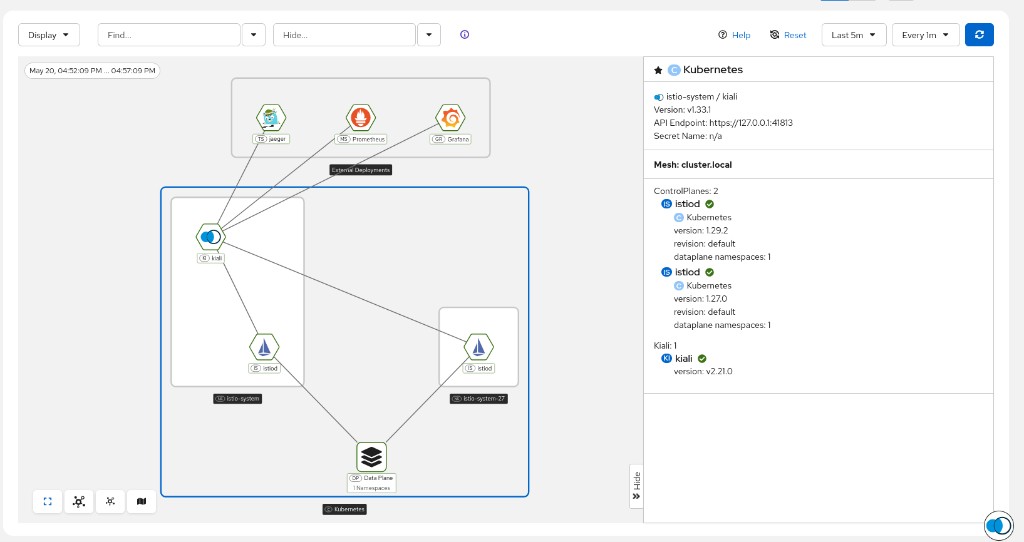
The following screenshot shows two sidecar control planes (Istio 1.29.2 and Istio 1.27.0 in different namespaces) sharing the same mesh ID cluster.local. Kiali groups them under a single “Mesh: cluster.local” entry with “ControlPlanes: 2”, representing a canary upgrade scenario where both revisions manage data plane namespaces within the same logical mesh.
Supported Mesh Combinations
Kiali can visualize the following multi-mesh configurations on a single cluster:
| Configuration | Support Level | Notes |
|---|---|---|
| Sidecar + Sidecar | Supported | Each mesh uses a distinct revision and mesh ID |
| Sidecar + Ambient | Supported | One mesh uses sidecars, another uses ambient mode |
| Ambient + Ambient | Supported | Each ambient mesh requires its own ztunnel and control plane |
In all cases, each independent mesh must have:
- A unique Istio revision name.
- A unique mesh ID (
meshConfig.meshId). - Its own control plane namespace (e.g.
istio-system-mesh1,istio-system-mesh2).
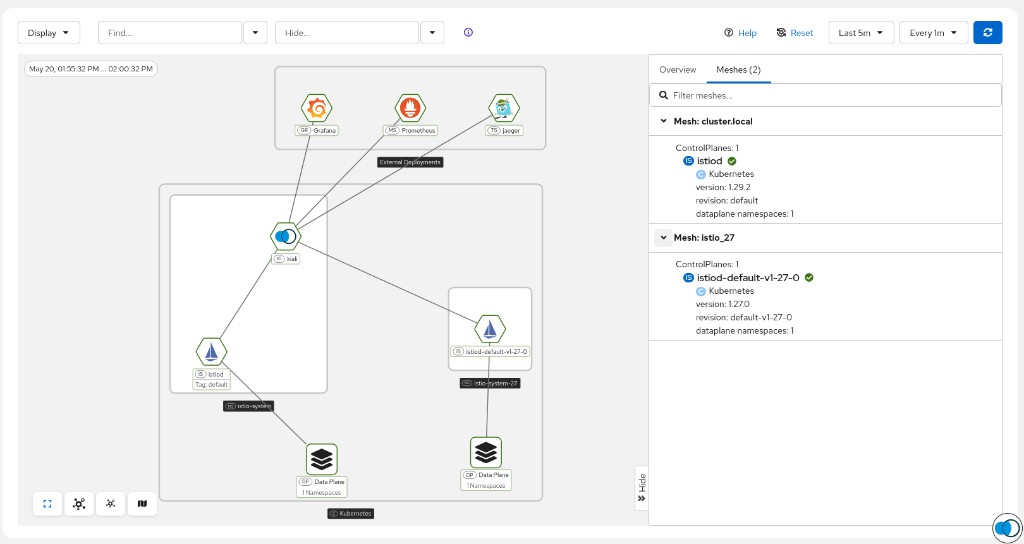
The following screenshot shows a single cluster running two sidecar-based meshes: cluster.local (Istio 1.29.2, revision default in istio-system) and istio_27 (Istio 1.27.0, revision default-v1-27-0 in istio-system-27). The Meshes tab in the side panel lists both meshes with their control plane details and dataplane namespace counts.
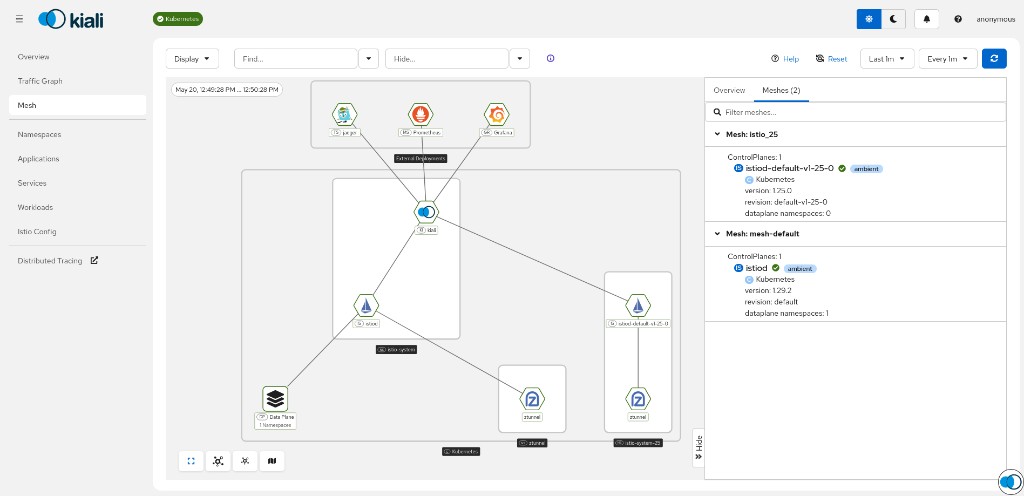
The following screenshot shows two ambient meshes on a single cluster: mesh-default (Istio 1.29.2, revision default) and istio_25 (Istio 1.25.0, revision default-v1-25-0). Both control planes display the “ambient” badge, and each has its own ztunnel nodes in the graph.
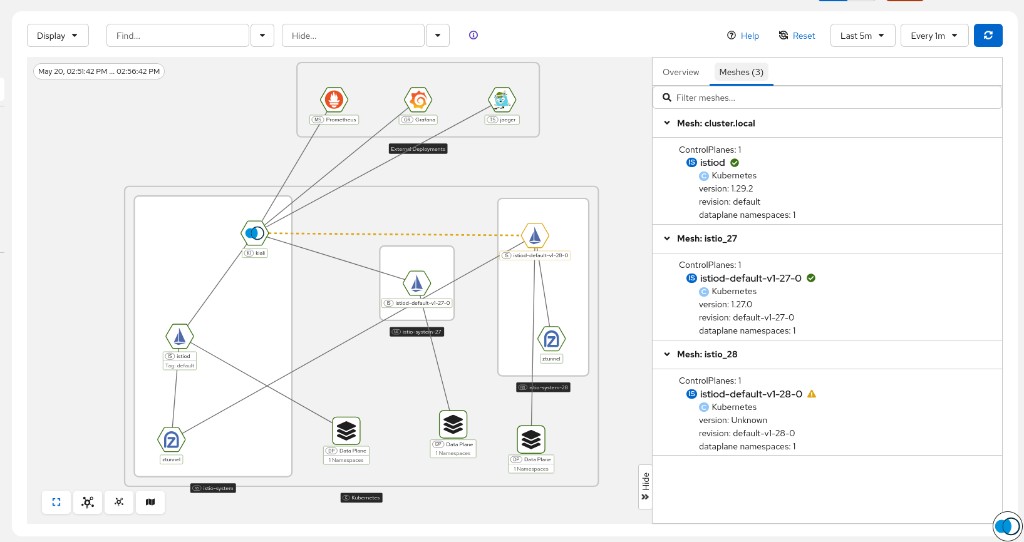
The following screenshot shows a more advanced combination with three meshes on a single cluster: cluster.local (Istio 1.29.2 with ambient support, shown by the ztunnel nodes), istio_27 (Istio 1.27.0 sidecar), and istio_28 (revision default-v1-28-0 with a degraded health warning). This demonstrates that Kiali can monitor any number of coexisting meshes regardless of their data plane mode.
How Kiali Monitors Multiple Meshes
When configured with cluster-wide access or appropriate discovery selectors, a single Kiali instance can discover and display all control planes on the cluster. The Mesh page renders each mesh as a separate grouping, showing:
- The control plane(s) for each mesh and their health status.
- Data plane namespaces managed by each control plane.
- Ztunnel and waypoint proxy nodes for ambient meshes.
- Edges connecting data plane components to their managing control plane.
Kiali matches data plane components (sidecars, ztunnels, waypoints) to their respective control planes using revision labels and version information to disambiguate when multiple control planes exist on the same cluster.
Canary Upgrade Actions
When multiple control plane revisions coexist on a cluster (whether as long-lived meshes or during a canary upgrade), Kiali can help migrate data plane namespaces from one revision to another. This is enabled by setting the istio_upgrade_action feature flag:
spec:
  kiali_feature_flags:
    istio_upgrade_action: true
With this flag enabled, the namespace detail page displays a “Switch to default revision” option (or the appropriate target revision) in the Actions dropdown. This allows operators to move a namespace’s data plane from its current control plane revision to another available revision on the cluster, triggering a rolling restart of workloads to pick up the new sidecar proxy version.
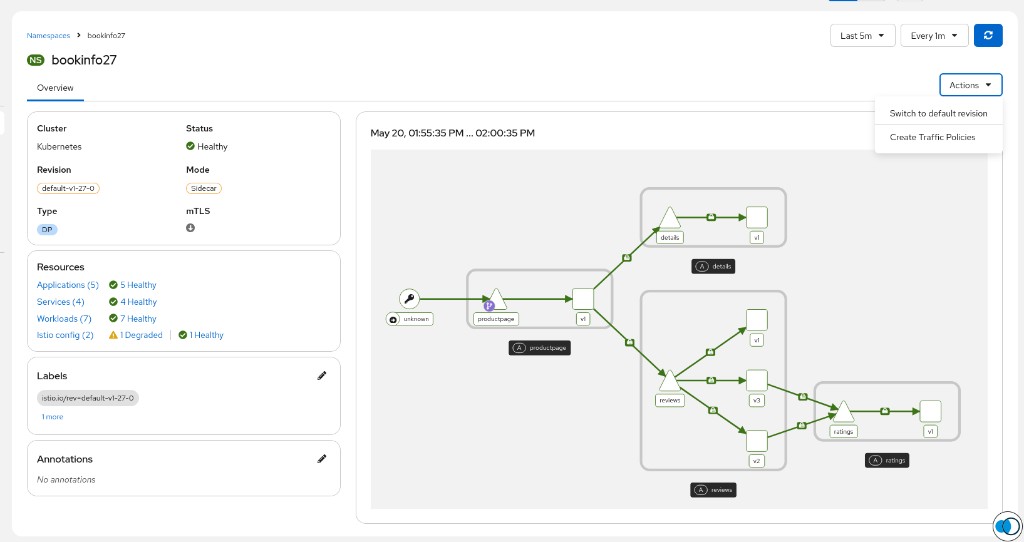
istio_upgrade_action feature flag defaults to false. Enable it when you need to perform revision-based upgrades or want to allow operators to migrate namespaces between control planes.
Limitations
Users should be aware of the following limitations when using Kiali with multiple meshes:
-
Single metrics store: Kiali connects to a single Prometheus endpoint. All meshes on the cluster must report metrics to the same Prometheus instance for Kiali to display traffic data across all meshes. If each mesh uses a separate Prometheus, a single Kiali instance will only show metrics from one.
-
Single tracing store: Similarly, Kiali connects to a single tracing backend (e.g. Tempo, Jaeger). Traces from all meshes must be aggregated into one endpoint.
-
Traffic graph scope: The traffic graph shows traffic for namespaces within the Kiali instance’s configured scope. Cross-mesh traffic (traffic between namespaces belonging to different meshes on the same cluster) is generally not expected in properly isolated multi-mesh deployments, but if it occurs it will be displayed.
-
Istio configuration validations: Kiali validates Istio resources within the context of each control plane’s managed namespaces. Resources belonging to one mesh are validated independently of resources in another mesh.
-
Mesh page overview: While the Mesh page can display multiple control planes and their data planes, the masthead status indicators aggregate health across all visible meshes. Users should inspect individual mesh groupings on the Mesh page for per-mesh health assessment.
Single vs. Multiple Kiali Instances
You can choose between deploying a single Kiali instance that monitors all meshes, or separate Kiali instances scoped to individual meshes.
Single Kiali Instance (Shared Monitoring)
A single Kiali instance with cluster-wide access can observe all meshes on the cluster. This is the simplest deployment:
spec:
  deployment:
    cluster_wide_access: true
Advantages:
- Single point of access for all mesh infrastructure.
- Mesh page shows all control planes and their relationships.
- Simpler operational overhead.
Disadvantages:
- All users see all meshes (unless further restricted via namespace access control).
- Requires a shared Prometheus and tracing endpoint for all meshes.
Multiple Kiali Instances (Scoped per Mesh)
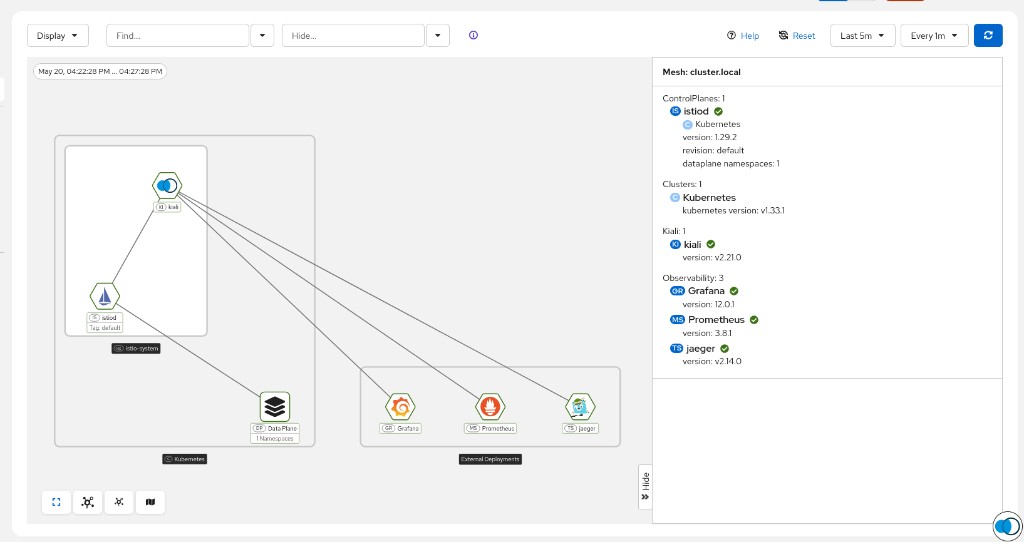
For multi-tenant environments where mesh tenants should not see each other’s infrastructure, deploy a separate Kiali instance per mesh. Each instance is scoped to only the namespaces belonging to its assigned mesh. The following screenshot shows what a tenant-scoped Kiali instance looks like — it only sees its own mesh (cluster.local with a single control plane), its data plane namespaces, and its observability stack.
Advantages:
- Strong tenant isolation at the monitoring layer.
- Each instance can use a mesh-specific Prometheus or tracing endpoint.
- Users only see their own mesh and data plane.
Disadvantages:
- Increased operational complexity (multiple deployments, configurations, and routes).
- No single unified view across all meshes.
Scoping Kiali for Multi-Mesh Multi-Tenancy
To restrict a Kiali instance so that it only observes a particular mesh (control plane + data plane namespaces), use the following configuration approach:
1. Disable cluster-wide access and configure discovery selectors:
Use deployment.discovery_selectors to limit Kiali to the namespaces of a specific mesh. Label the namespaces belonging to each mesh (both the control plane namespace and the application namespaces) with a common label.
For example, if the first mesh’s namespaces are all labeled mesh: mesh1:
spec:
  deployment:
    cluster_wide_access: false
    instance_name: kiali-mesh1
    discovery_selectors:
      default:
      - matchLabels:
          mesh: mesh1
And a second Kiali instance for mesh2:
spec:
  deployment:
    cluster_wide_access: false
    instance_name: kiali-mesh2
    discovery_selectors:
      default:
      - matchLabels:
          mesh: mesh2
deployment.instance_name. Additionally, the deployment.discovery_selectors.default for each instance must be mutually exclusive — a namespace should only match the discovery selectors of one Kiali instance.
2. Include the control plane namespace in the discovery selectors:
Ensure that the discovery selectors for each Kiali instance include the control plane namespace for its mesh. Kiali auto-discovers Istio control planes within its accessible namespaces, so as long as the control plane namespace (e.g. istio-system-mesh1) is labeled to match the instance’s discovery selectors, Kiali will automatically detect and monitor that control plane.
spec:
  deployment:
    cluster_wide_access: false
    instance_name: kiali-mesh1
    namespace: kiali-mesh1
    discovery_selectors:
      default:
      - matchLabels:
          mesh: mesh1
In this example, the namespace istio-system-mesh1 must also carry the label mesh: mesh1.
3. Optional — Enable require_namespace_get for RBAC-based filtering:
In environments where users authenticate with individual credentials (e.g. via OpenID Connect), enable stricter namespace access checking so that even within a Kiali instance’s visible scope, users only see namespaces they have GET permission for:
spec:
  kiali_feature_flags:
    authz:
      require_namespace_get: true
See Namespace access control for details on this setting.
4. Ensure each Kiali instance has its own metrics scope:
If all meshes share the same Prometheus, use query_scope to narrow metrics to a specific mesh:
spec:
  external_services:
    prometheus:
      query_scope:
        mesh_id: "mesh1"
This ensures that metrics from other meshes on the same Prometheus are excluded from this Kiali instance’s queries.
Example: Two Isolated Sidecar Meshes
The following summarizes a complete multi-mesh multi-tenant deployment with two isolated sidecar meshes on a single cluster:
| Component | Mesh 1 | Mesh 2 |
|---|---|---|
| Control plane namespace | istio-system-mesh1 |
istio-system-mesh2 |
| Revision | mesh1 |
mesh2 |
| Mesh ID | mesh1 |
mesh2 |
| Application namespaces | Labeled mesh: mesh1 |
Labeled mesh: mesh2 |
| Kiali instance name | kiali-mesh1 |
kiali-mesh2 |
| Kiali namespace | kiali-mesh1 |
kiali-mesh2 |
| Discovery selectors | matchLabels: {mesh: mesh1} |
matchLabels: {mesh: mesh2} |
Each Kiali instance will show only its own mesh’s control plane, data plane namespaces, traffic, and Istio configuration — providing complete tenant isolation at the observability layer.