Perses
Perses configuration
The Perses community dashboards provide preconfigured Perses dashboards for the most relevant mesh metrics. Although Kiali offers similar views in its metrics dashboards, it is not in Kiali’s goals to provide the advanced querying options, nor the highly customizable settings, that are available in Perses. They are the same as those provided by Istio’s Grafana add-on. Thus, it is recommended that you use Perses if you need those advanced options.
Kiali, from version v2.15, can provide a direct link from its metric dashboards to the equivalent or most similar Perses dashboard, which is convenient if you need the powerful Perses options.
The Perses links will appear in the Kiali metrics pages. For example:
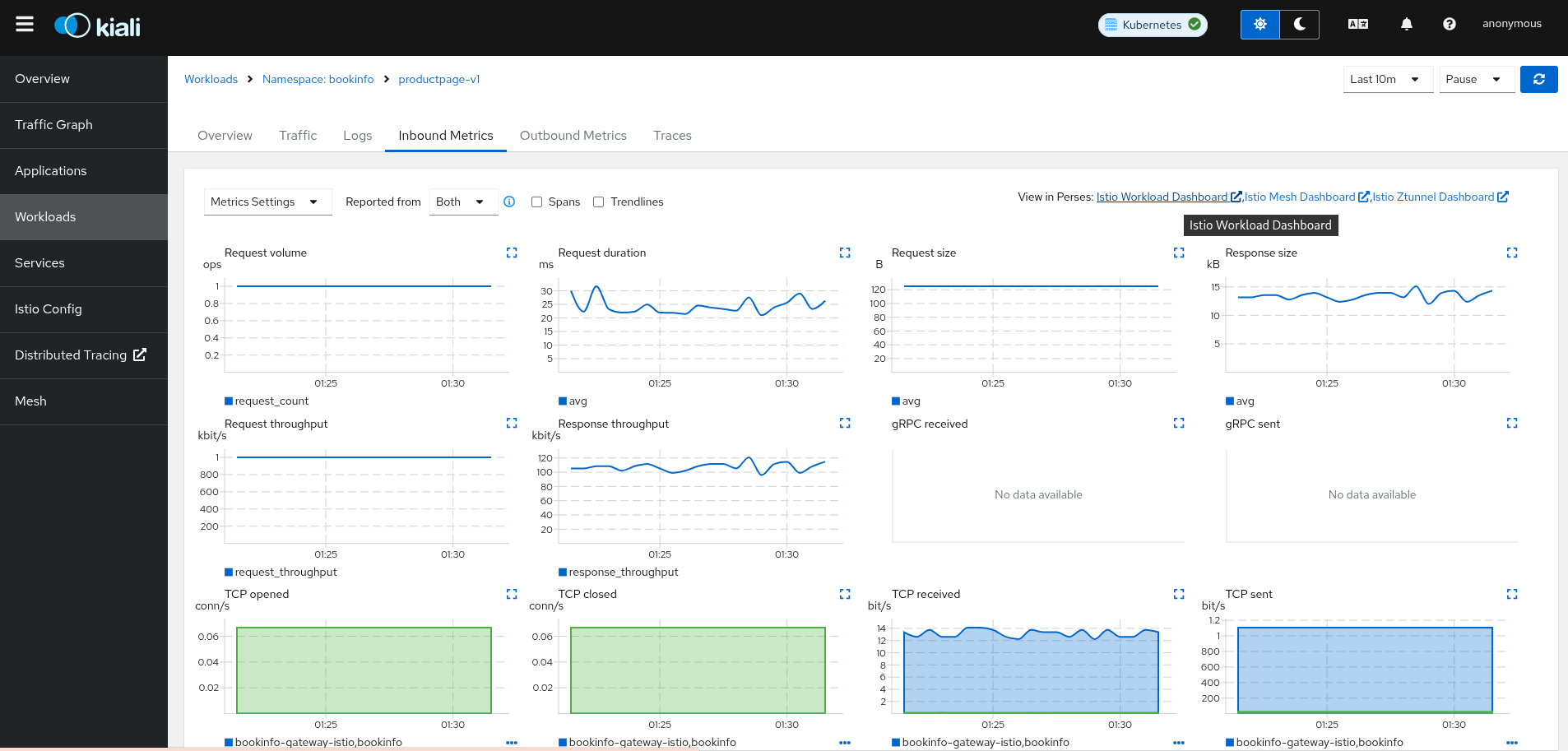
For these links to appear in Kiali you need to manually configure the Perses URL and the dashboards that come preconfigured with Istio, like in the following example:
spec:
  external_services:
    perses:
      enabled: true
      # Perses service name is "perses" and is in the "telemetry" namespace.
      internal_url: 'http://perses.telemetry:4000/'
      # Public facing URL of Perses
      external_url: 'http://my-ingress-host/perses'
      dashboards:
        - name: "Istio Service Dashboard"
          variables:
            namespace: "var-namespace"
            service: "var-service"
            datasource: "var-datasource"
        - name: "Istio Workload Dashboard"
          variables:
            namespace: "var-namespace"
            workload: "var-workload"
        - name: "Istio Mesh Dashboard"

        - name: "Istio Ztunnel Dashboard"
          variables:
            namespace: "var-namespace"
            workload: "var-workload"
      # Perses project
      project: "istio"
When running Perses with the cluster observability operator in OpenShift, it requires an additional configuration item (Available from Kiali >2.17), so the url format can be compatible with the plugin UI URL:
spec:
  external_services:
    perses:
      ...
      url_format: "openshift"
The internal URL shouldn’t be set to avoid an internal validation of the Dashboards. The external URL should be set to the OpenShift cluster, without the additional path.
Perses authentication configuration
The Kiali CR provides authentication configuration that will be used to connect to your Perses instance and for detecting your Perses version in the Mesh graph.
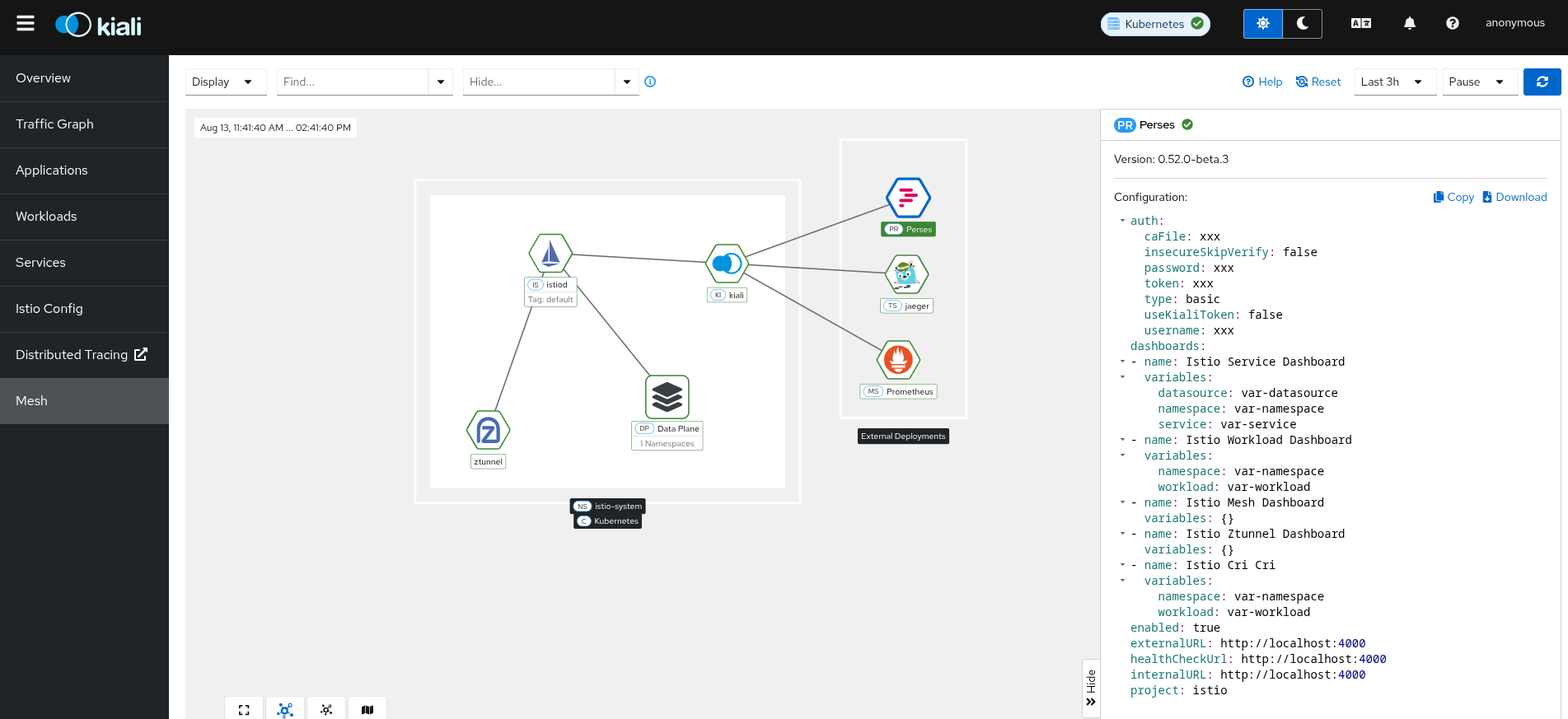
Basic and OAuth2 client_credentials authentication are supported.
spec:
  external_services:
    perses:
      enabled: true
      auth:
        insecure_skip_verify: false
        password: "pwd"
        type: "basic"
        username: "user"
      health_check_url: ""
To configure a secret to be used as a user or password, see this FAQ entry.
To authenticate using OAuth2 client_credentials flow, set type: "oauth2" and provide the oauth2 block:
spec:
  external_services:
    perses:
      auth:
        type: "oauth2"
        oauth2:
          client_id: "my-client-id"
          client_secret: "secret:my-oauth2-secret:client_secret"
          token_url: "https://idp.example.com/token"
          scopes: []            # optional: list of OAuth2 scopes to request
          audience: ""          # optional: some providers require this
          auth_style: "header"  # "header" (default) or "params"
The client_secret field supports the secret:<secretName>:<secretKey> pattern for automatic secret mounting and rotation without pod restart. See the FAQ entry for details.
insecure_skip_verify applies only to the Perses connection, not to the OAuth2 token endpoint. The token endpoint always validates TLS certificates. To trust a private CA for the token endpoint, add the CA to the kiali-cabundle ConfigMap as described in the TLS Configuration page.
TLS Certificate Configuration
If your Perses server uses HTTPS with a certificate issued by a private CA, see the TLS Configuration page to learn how to configure Kiali to trust your CA.