MultiCluster on OpenShift
This guide sets up a two-cluster OpenShift environment from scratch where:
- The hub cluster runs Red Hat Advanced Cluster Management (ACM) for fleet management and centralized metrics collection (ACM Observability / Thanos)
- The spoke cluster is imported into ACM and runs OpenShift Service Mesh 3 (OSSM 3) with Kiali
- The spoke mesh has two demo application namespaces: one using Istio ambient mode (via the
ZTunnelCR), one using Istio sidecar injection - Kiali queries metrics via the ACM Observatorium API on the hub cluster (mTLS), giving it access to Istio metrics collected and forwarded by ACM from the spoke’s User Workload Monitoring Prometheus
The result is a working Kiali installation that shows traffic graphs, metrics, and mesh topology across both the ambient-mode and sidecar-mode workloads running on the spoke.
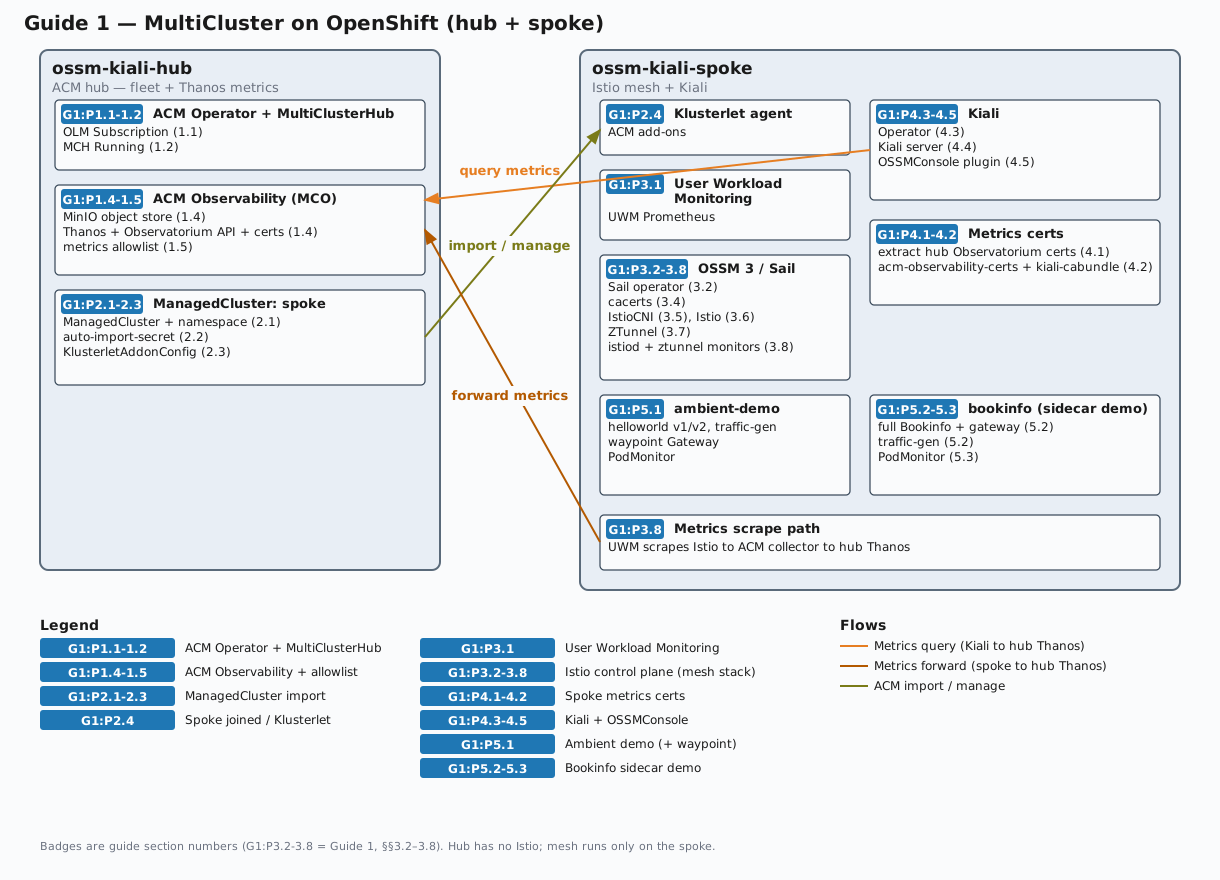
The diagram below shows the environment after this guide completes. Badges such as G1:P3.2-3.8 mark which guide section(s) install each component (Guide 1, §§3.2–3.8). Click the diagram to open a full-size SVG in a new tab.
Prerequisites
Before starting, you need:
- Hub cluster kubeconfig context named
ossm-kiali-hub— everyoccommand in this guide that targets the hub passes--context=ossm-kiali-hub - Spoke cluster kubeconfig context named
ossm-kiali-spoke— everyoccommand that targets the spoke passes--context=ossm-kiali-spoke ocCLI installed and both contexts present in~/.kube/config(orKUBECONFIG). Verify with:oc --context=ossm-kiali-hub whoami --show-server oc --context=ossm-kiali-spoke whoami --show-serveropensslinstalled locally (for generating Istio CA certificates)- Both clusters must be OpenShift 4.19 or later (required for OSSM 3 and Istio 1.30 as used in this guide)
- Both clusters must have access to Red Hat OperatorHub (i.e., connected to the Red Hat operator catalog)
jqavailable locally (used in verification commands)
Environment Setup
Set these variables in your shell before running any commands. They are referenced throughout this guide.
# Name for the spoke cluster in ACM (must be a valid Kubernetes resource name)
export SPOKE_CLUSTER_NAME="spoke"
# Istio version to install. Must be a version supported by the installed OSSM operator.
# After installing the operator (Phase 3.2), you can list supported versions with:
# oc --context=ossm-kiali-spoke get crd istios.sailoperator.io \
# -o jsonpath='{.spec.versions[0].schema.openAPIV3Schema.properties.spec.properties.version.enum}'
# Must be >= 1.30 for ambient cross-cluster traffic routing.
export ISTIO_VERSION="1.30.1"
# meshID - arbitrary identifier for this mesh
export MESH_ID="mesh1"
# SeaweedFS S3 credentials for in-cluster Thanos object storage (ACM Observability)
# These are only used inside the cluster — no external storage account is required
export SEAWEEDFS_ACCESS_KEY="seaweedfs"
export SEAWEEDFS_SECRET_KEY="seaweedfs123"
Verify both kubeconfig contexts are reachable:
oc --context=ossm-kiali-hub   whoami --show-server
oc --context=ossm-kiali-spoke whoami --show-server
Phase 1: ACM on the Hub Cluster
1.1 Install ACM Operator
Detect the latest available ACM channel, then create the open-cluster-management namespace and install the operator via OLM. ACM channels follow the naming pattern release-X.Y (e.g. release-2.17):
ACM_CHANNEL=$(oc --context=ossm-kiali-hub get packagemanifest advanced-cluster-management \
  -n openshift-marketplace \
  -o jsonpath='{.status.channels[*].name}' | \
  tr ' ' '\n' | sort -V | tail -1)
echo "Using ACM channel: ${ACM_CHANNEL}"

oc --context=ossm-kiali-hub create namespace open-cluster-management 2>/dev/null || true

oc --context=ossm-kiali-hub apply -f - <<'EOF'
apiVersion: operators.coreos.com/v1
kind: OperatorGroup
metadata:
  name: open-cluster-management
  namespace: open-cluster-management
spec:
  targetNamespaces:
  - open-cluster-management
EOF

oc --context=ossm-kiali-hub apply -f - <<EOF
apiVersion: operators.coreos.com/v1alpha1
kind: Subscription
metadata:
  name: acm-operator-subscription
  namespace: open-cluster-management
spec:
  sourceNamespace: openshift-marketplace
  source: redhat-operators
  channel: ${ACM_CHANNEL}
  installPlanApproval: Automatic
  name: advanced-cluster-management
EOF
Wait for the ACM operator to install its CRDs. The multiclusterhubs CRD being Established confirms the operator is running and ready:
until oc --context=ossm-kiali-hub get crd \
  multiclusterhubs.operator.open-cluster-management.io &>/dev/null; do
  echo "Waiting for MCH CRD to appear..."
  sleep 5
done

oc --context=ossm-kiali-hub wait crd/multiclusterhubs.operator.open-cluster-management.io \
  --for=condition=Established \
  --timeout=300s
1.2 Create the MultiClusterHub
Wait for the operator pod to be fully ready before creating the MultiClusterHub. The MCH CR is validated by an admission webhook served by the operator — applying the CR before the webhook endpoint is ready causes an immediate rejection:
until oc --context=ossm-kiali-hub get pods \
  -l name=multiclusterhub-operator \
  -n open-cluster-management \
  --no-headers 2>/dev/null | grep -q .; do
  sleep 5
done

oc --context=ossm-kiali-hub wait pod \
  -l name=multiclusterhub-operator \
  -n open-cluster-management \
  --for=condition=Ready \
  --timeout=300s
oc --context=ossm-kiali-hub apply -f - <<'EOF'
apiVersion: operator.open-cluster-management.io/v1
kind: MultiClusterHub
metadata:
  name: multiclusterhub
  namespace: open-cluster-management
spec: {}
EOF
Wait for ACM to be fully ready. This typically takes 5–10 minutes on a fresh cluster:
echo "Waiting for MultiClusterHub to reach Running status..."
while true; do
  PHASE=$(oc --context=ossm-kiali-hub get mch multiclusterhub \
    -n open-cluster-management \
    -o jsonpath='{.status.phase}' 2>/dev/null)
  if [ "${PHASE}" = "Running" ]; then
    echo "MultiClusterHub is Running"
    break
  fi
  echo "  Current phase: ${PHASE} — waiting..."
  sleep 15
done
1.3 Verify ACM is Ready
oc --context=ossm-kiali-hub get multiclusterhub multiclusterhub -n open-cluster-management \
  -o jsonpath='{.status.phase}{"\n"}'
# Expected: Running
1.4 Enable ACM Observability (MultiClusterObservability)
ACM Observability collects metrics from all managed clusters and stores them in Thanos on the hub. Kiali will query these aggregated metrics via the Observatorium API.
ACM needs an S3-compatible object store as its Thanos backend. This guide deploys SeaweedFS in-cluster so that no external storage account is required.
Create the observability namespace:
oc --context=ossm-kiali-hub create namespace open-cluster-management-observability 2>/dev/null || true
Deploy SeaweedFS as a single-pod in-cluster object store. Its mini mode runs the S3 gateway and storage services in one process and creates the thanos bucket at startup:
oc --context=ossm-kiali-hub apply -f - <<EOF
apiVersion: apps/v1
kind: Deployment
metadata:
  name: seaweedfs
  namespace: open-cluster-management-observability
spec:
  replicas: 1
  selector:
    matchLabels:
      app: seaweedfs
  template:
    metadata:
      labels:
        app: seaweedfs
    spec:
      containers:
      - name: seaweedfs
        image: ghcr.io/chrislusf/seaweedfs:4.47
        args:
        - mini
        - -dir=/data
        - -admin.port=12646
        - -master.telemetry=false
        env:
        - name: AWS_ACCESS_KEY_ID
          value: "${SEAWEEDFS_ACCESS_KEY}"
        - name: AWS_SECRET_ACCESS_KEY
          value: "${SEAWEEDFS_SECRET_KEY}"
        - name: S3_BUCKET
          value: thanos
        ports:
        - containerPort: 8333
          name: s3
        volumeMounts:
        - name: data
          mountPath: /data
        readinessProbe:
          tcpSocket:
            port: 8333
          initialDelaySeconds: 10
          periodSeconds: 5
        livenessProbe:
          tcpSocket:
            port: 8333
          initialDelaySeconds: 10
          periodSeconds: 5
      volumes:
      - name: data
        emptyDir: {}
---
apiVersion: v1
kind: Service
metadata:
  name: seaweedfs
  namespace: open-cluster-management-observability
spec:
  ports:
  - port: 8333
    name: s3
    targetPort: 8333
  selector:
    app: seaweedfs
EOF
Wait for SeaweedFS and its pre-created Thanos bucket to be ready:
oc --context=ossm-kiali-hub rollout status deployment/seaweedfs \
  -n open-cluster-management-observability \
  --timeout=120s
Create the Thanos object storage secret pointing at the in-cluster SeaweedFS S3 endpoint:
oc --context=ossm-kiali-hub apply -f - <<EOF
apiVersion: v1
kind: Secret
metadata:
  name: thanos-object-storage
  namespace: open-cluster-management-observability
type: Opaque
stringData:
  thanos.yaml: |
    type: s3
    config:
      bucket: thanos
      endpoint: seaweedfs.open-cluster-management-observability.svc:8333
      insecure: true
      access_key: ${SEAWEEDFS_ACCESS_KEY}
      secret_key: ${SEAWEEDFS_SECRET_KEY}
EOF
Create the MultiClusterObservability CR on the hub. This deploys the hub-side Thanos and Observatorium services and enables the MCOA control plane. For managed clusters selected by the MCOA add-on placement, MCOA deploys PrometheusAgent collectors that federate platform and—after UWM is enabled separately—user-workload metrics to the hub.
The capabilities block enables both the platform and user-workload metric collection paths that MCOA uses to federate Istio and container metrics. The retention configuration is explicit: retentionInLocal is set to 24h for short-lived local hub storage, while raw, 5-minute, and 1-hour Thanos blocks are retained for 365d in the long-lived aggregated store. Kiali queries that aggregated Thanos data, so its thanos_proxy.retention_period is also set to 365d:
oc --context=ossm-kiali-hub apply -f - <<'EOF'
apiVersion: observability.open-cluster-management.io/v1beta2
kind: MultiClusterObservability
metadata:
  name: observability
spec:
  capabilities:
    platform:
      metrics:
        default:
          enabled: true
    userWorkloads:
      metrics:
        default:
          enabled: true
  observabilityAddonSpec: {}
  storageConfig:
    metricObjectStorage:
      name: thanos-object-storage
      key: thanos.yaml
    alertmanagerStorageSize: 1Gi
    compactStorageSize: 10Gi
    receiveStorageSize: 10Gi
    ruleStorageSize: 1Gi
    storeStorageSize: 10Gi
  advanced:
    retentionConfig:
      retentionInLocal: 24h
      retentionResolution1h: 365d
      retentionResolution5m: 365d
      retentionResolutionRaw: 365d
    alertmanager:
      replicas: 1
      resources:
        requests:
          cpu: 20m
          memory: 64Mi
    compact:
      resources:
        requests:
          cpu: 50m
          memory: 128Mi
    grafana:
      replicas: 1
      resources:
        requests:
          cpu: 20m
          memory: 64Mi
    observatoriumAPI:
      replicas: 1
      resources:
        requests:
          cpu: 20m
          memory: 64Mi
    query:
      replicas: 1
      resources:
        requests:
          cpu: 50m
          memory: 128Mi
    queryFrontend:
      replicas: 1
      resources:
        requests:
          cpu: 50m
          memory: 64Mi
    queryFrontendMemcached:
      replicas: 1
      resources:
        requests:
          cpu: 20m
          memory: 64Mi
    rbacQueryProxy:
      replicas: 1
      resources:
        requests:
          cpu: 20m
          memory: 64Mi
    receive:
      resources:
        requests:
          cpu: 50m
          memory: 128Mi
    rule:
      replicas: 1
      resources:
        requests:
          cpu: 50m
          memory: 128Mi
    store:
      replicas: 1
      resources:
        requests:
          cpu: 50m
          memory: 128Mi
    storeMemcached:
      replicas: 1
      resources:
        requests:
          cpu: 20m
          memory: 64Mi
EOF
Wait for ACM Observability to be ready. This can take 5–10 minutes as Thanos components start up:
echo "Waiting for MultiClusterObservability to be ready..."
while true; do
  READY=$(oc --context=ossm-kiali-hub get mco observability \
    -o jsonpath='{.status.conditions[?(@.type=="Ready")].status}' 2>/dev/null || true)
  READY=${READY:-Unknown}
  if [ "${READY}" = "True" ]; then
    echo "MultiClusterObservability is Ready"
    break
  fi
  echo "  Ready=${READY} — waiting..."
  sleep 15
done
Verify the Observatorium API route exists:
oc --context=ossm-kiali-hub get route observatorium-api \
  -n open-cluster-management-observability \
  -o jsonpath='{.spec.host}{"\n"}'
1.5 Configure MCOA Federation
How the metrics pipeline works: User Workload Monitoring (UWM) on each
spoke is the short-lived edge metrics store. It scrapes raw istio_* series
and other user-workload metrics. Recording rules aggregate the selected
high-cardinality Istio series into workload:istio_* series. MCOA federates
those aggregated series and other core metrics from UWM to hub Thanos. A
separate cluster-wide platform federation job collects container CPU and memory
metrics from all namespaces. Hub Thanos is the data source Kiali ultimately
queries. For the interval relationships, timing expectations, and the
consequences of changing an interval, see Scrape Intervals.
Hub Thanos retains its own local data for 24 hours and retains raw, 5-minute,
and 1-hour aggregate data for 365 days. Kiali queries hub Thanos through the
Observatorium API; its thanos_proxy.retention_period is set to match the
hub’s 365-day aggregate retention.
First, identify which MCOA placement to use. A “placement” selects the managed clusters that receive the MCOA add-on configuration. The tutorial uses the placement already referenced by ACM’s multicluster-observability-addon, so the recording rules and federation configuration are propagated only to the clusters selected by that placement.
Read the ClusterManagementAddOn and capture the placement name and namespace:
ADDON_JSON=$(oc --context=ossm-kiali-hub get clustermanagementaddon \
  multicluster-observability-addon -o json)

PLACEMENT_COUNT=$(echo "${ADDON_JSON}" | \
  jq '(.spec.installStrategy.placements // []) | length')

if [ "${PLACEMENT_COUNT}" -eq 1 ]; then
  MCOA_PLACEMENT_NAME=$(echo "${ADDON_JSON}" | \
    jq -r '.spec.installStrategy.placements[0].name')
  MCOA_PLACEMENT_NS=$(echo "${ADDON_JSON}" | \
    jq -r '.spec.installStrategy.placements[0].namespace')
  echo "Using placement: ${MCOA_PLACEMENT_NS}/${MCOA_PLACEMENT_NAME}"
elif [ "${PLACEMENT_COUNT}" -gt 1 ]; then
  echo "Multiple placements found — set MCOA_PLACEMENT_NAME and MCOA_PLACEMENT_NS manually:"
  echo "${ADDON_JSON}" | jq -r \
    '(.spec.installStrategy.placements // [])[] | "  name=\(.name) namespace=\(.namespace)"'
else
  echo "ERROR: no MCOA placements found; ensure MCO is Ready"
fi
Create the shared user-workload ScrapeConfig. This federates aggregated Istio traffic metrics and other core Kiali metrics from UWM. Container CPU and memory are excluded here — they come from platform monitoring and require separate jobs below. The metric relabeling rule renames workload:istio_* series back to istio_* so Kiali queries work unchanged:
oc --context=ossm-kiali-hub apply -f - <<'EOF'
apiVersion: monitoring.rhobs/v1alpha1
kind: ScrapeConfig
metadata:
  labels:
    app.kubernetes.io/component: user-workload-metrics-collector
    app.kubernetes.io/managed-by: kiali-mcoa-federation
  name: kiali-istio-federation
  namespace: open-cluster-management-observability
spec:
  honorLabels: true
  jobName: kiali-istio-federation
  metricRelabelings:
  - action: replace
    regex: 'workload:(.*)'
    replacement: '${1}'
    sourceLabels: [__name__]
    targetLabel: __name__
  - action: replace
    regex: 'kiali:(.*)'
    replacement: '${1}'
    sourceLabels: [__name__]
    targetLabel: __name__
  metricsPath: /federate
  params:
    match[]:
    # CORE TIER
    # Istio traffic (pod-aggregated on edge via recording rules)
    - '{__name__=~"workload:istio_requests_total"}'
    - '{__name__=~"workload:istio_request_bytes_(bucket|count|sum)"}'
    - '{__name__=~"workload:istio_request_duration_milliseconds_(bucket|count|sum)"}'
    - '{__name__=~"workload:istio_request_messages_total"}'
    - '{__name__=~"workload:istio_response_bytes_(bucket|count|sum)"}'
    - '{__name__=~"workload:istio_response_messages_total"}'
    - '{__name__=~"workload:istio_tcp_connections_(opened|closed)_total"}'
    - '{__name__=~"workload:istio_tcp_(received|sent)_bytes_total"}'
    # Istio info (not aggregated)
    - '{__name__=~"istio_build"}'
    # Control plane overview (Kiali mesh page)
    - '{__name__=~"process_cpu_seconds_total"}'
    - '{__name__=~"process_resident_memory_bytes"}'
    - '{__name__=~"pilot_info"}'
    - '{__name__=~"pilot_proxy_convergence_time_(sum|count)"}'
    - '{__name__=~"pilot_services"}'
    - '{__name__=~"pilot_xds$"}'
    - '{__name__=~"pilot_xds_pushes"}'
    - '{__name__=~"workload_manager_active_proxy_count"}'
    # Envoy workload details (all metrics used by Kiali Envoy tab)
    - '{__name__=~"envoy_cluster_upstream_cx_active"}'
    - '{__name__=~"envoy_cluster_upstream_rq_total"}'
    - '{__name__=~"envoy_listener_downstream_cx_active"}'
    - '{__name__=~"envoy_listener_http_downstream_rq"}'
    - '{__name__=~"envoy_server_memory_allocated"}'
    - '{__name__=~"envoy_server_memory_heap_size"}'
    - '{__name__=~"envoy_server_uptime"}'
    # KIALI TIER
    # Kiali self-monitoring metrics
    - '{__name__=~"kiali:kiali_.*"}'
    # ISTIO DASHBOARD TIER
    # istio-control-plane + istio-performance (Istiod runtime)
    - '{__name__=~"pilot_k8s_(reg|cfg)_events"}'
    - '{__name__=~"pilot_push_triggers"}'
    - '{__name__=~"pilot_total_xds_(rejects|internal_errors)"}'
    - '{__name__=~"pilot_xds_push_time_bucket"}'
    - '{__name__=~"pilot_xds_config_size_bytes_bucket"}'
    - '{__name__=~"go_goroutines"}'
    - '{__name__=~"go_memstats_(alloc_bytes|alloc_bytes_total|heap_alloc_bytes|heap_inuse_bytes|heap_sys_bytes|mallocs_total|stack_inuse_bytes)"}'
    # istio-performance (container/process detail)
    - '{__name__=~"container_fs_usage_bytes"}'
    - '{__name__=~"process_open_fds"}'
    - '{__name__=~"process_virtual_memory_bytes"}'
    # istio-ztunnel-dashboard (ambient)
    - '{__name__=~"istio_dns_requests_total"}'
    - '{__name__=~"istio_tcp_sockets_open"}'
    - '{__name__=~"istio_xds_connection_terminations_total"}'
    - '{__name__=~"istio_xds_message_total"}'
    - '{__name__=~"workload_manager_pending_proxy_count"}'
    # istio-extension-dashboard (WASM)
    - '{__name__=~"envoy_wasm_.*"}'
  scrapeInterval: 5m
EOF
Create one cluster-wide platform ScrapeConfig for container CPU and memory. Platform monitoring (not UWM) owns these series, so they require a separate federation job. This job intentionally federates those metrics from all namespaces.
The tutorial creates one platform ScrapeConfig for the cluster. In a production deployment, create the same single cluster-wide resource in the observability namespace used by your Kiali instance.
oc --context=ossm-kiali-hub apply -f - <<'EOF'
apiVersion: monitoring.rhobs/v1alpha1
kind: ScrapeConfig
metadata:
  labels:
    app.kubernetes.io/component: platform-metrics-collector
    app.kubernetes.io/managed-by: kiali-mcoa-federation
  name: kiali-istio-platform-federation
  namespace: open-cluster-management-observability
spec:
  jobName: kiali-istio-platform-federation
  metricsPath: /federate
  params:
    match[]:
    - '{__name__=~"container_cpu_usage_seconds_total|container_memory_working_set_bytes"}'
  scrapeInterval: 5m
EOF
Create one aggregation PrometheusRule in a dedicated namespace. MCOA propagates it into mesh-observability on every managed cluster. Exempt that namespace from UWM label enforcement so the rule can select and record metrics from all scraped application namespaces. If user-workload-monitoring-config already exists, merge this key into its existing config.yaml rather than replacing unrelated UWM settings.
oc --context=ossm-kiali-spoke create namespace mesh-observability --dry-run=client -o yaml | \
  oc --context=ossm-kiali-spoke apply -f -
oc --context=ossm-kiali-spoke apply -f - <<'EOF'
apiVersion: v1
kind: ConfigMap
metadata:
  name: user-workload-monitoring-config
  namespace: openshift-user-workload-monitoring
data:
  config.yaml: |
    namespacesWithoutLabelEnforcement:
    - mesh-observability
EOF
PrometheusRule and ScrapeConfig resources have distinct roles. The PrometheusRule is applied to the spoke’s UWM Prometheus and evaluates sum without (...) recording rules. Those rules reduce many per-pod/per-proxy istio_* series into lower-cardinality workload:istio_* series while preserving the labels Kiali needs. The ScrapeConfig configures MCOA’s PrometheusAgent to fetch those already-aggregated workload:istio_* series from UWM’s /federate endpoint, remove the workload: prefix so they again use standard istio_* names, and remote-write them to hub Thanos. Without the PrometheusRule, MCOA could federate raw per-proxy metrics, but the aggregated hub store would retain much higher-cardinality data. Without the ScrapeConfig, the aggregated recording-rule series would remain only on the spoke and would never reach hub Thanos.
oc --context=ossm-kiali-hub apply -f - <<'EOF'
apiVersion: monitoring.coreos.com/v1
kind: PrometheusRule
metadata:
  annotations:
    observability.open-cluster-management.io/target-namespace: mesh-observability
  labels:
    app.kubernetes.io/component: user-workload-metrics-collector
    app.kubernetes.io/managed-by: kiali-mcoa-federation
    openshift.io/prometheus-rule-evaluation-scope: leaf-prometheus
  name: kiali-istio-aggregation
  namespace: open-cluster-management-observability
spec:
  groups:
  - interval: 30s
    name: istio.workload-aggregation
    rules:
    # CORE TIER
    - expr: sum without (pod, pod_template_hash, instance, job, node) (istio_requests_total)
      record: workload:istio_requests_total
    - expr: sum without (pod, pod_template_hash, instance, job, node) (istio_request_messages_total)
      record: workload:istio_request_messages_total
    - expr: sum without (pod, pod_template_hash, instance, job, node) (istio_response_messages_total)
      record: workload:istio_response_messages_total
    - expr: sum without (pod, pod_template_hash, instance, job, node) (istio_tcp_sent_bytes_total)
      record: workload:istio_tcp_sent_bytes_total
    - expr: sum without (pod, pod_template_hash, instance, job, node) (istio_tcp_received_bytes_total)
      record: workload:istio_tcp_received_bytes_total
    - expr: sum without (pod, pod_template_hash, instance, job, node) (istio_tcp_connections_opened_total)
      record: workload:istio_tcp_connections_opened_total
    - expr: sum without (pod, pod_template_hash, instance, job, node) (istio_tcp_connections_closed_total)
      record: workload:istio_tcp_connections_closed_total
    - expr: sum without (pod, pod_template_hash, instance, job, node) (istio_request_duration_milliseconds_bucket)
      record: workload:istio_request_duration_milliseconds_bucket
    - expr: sum without (pod, pod_template_hash, instance, job, node) (istio_request_duration_milliseconds_sum)
      record: workload:istio_request_duration_milliseconds_sum
    - expr: sum without (pod, pod_template_hash, instance, job, node) (istio_request_duration_milliseconds_count)
      record: workload:istio_request_duration_milliseconds_count
    - expr: sum without (pod, pod_template_hash, instance, job, node) (istio_request_bytes_bucket)
      record: workload:istio_request_bytes_bucket
    - expr: sum without (pod, pod_template_hash, instance, job, node) (istio_request_bytes_sum)
      record: workload:istio_request_bytes_sum
    - expr: sum without (pod, pod_template_hash, instance, job, node) (istio_request_bytes_count)
      record: workload:istio_request_bytes_count
    - expr: sum without (pod, pod_template_hash, instance, job, node) (istio_response_bytes_bucket)
      record: workload:istio_response_bytes_bucket
    - expr: sum without (pod, pod_template_hash, instance, job, node) (istio_response_bytes_sum)
      record: workload:istio_response_bytes_sum
    - expr: sum without (pod, pod_template_hash, instance, job, node) (istio_response_bytes_count)
      record: workload:istio_response_bytes_count
    # KIALI TIER
    # Counters
    - expr: sum without (pod, pod_template_hash, instance, job, node) (kiali_ai_requests_total)
      record: kiali:kiali_ai_requests_total
    - expr: sum without (pod, pod_template_hash, instance, job, node) (kiali_ai_store_evictions_total)
      record: kiali:kiali_ai_store_evictions_total
    - expr: sum without (pod, pod_template_hash, instance, job, node) (kiali_api_failures_total)
      record: kiali:kiali_api_failures_total
    - expr: sum without (pod, pod_template_hash, instance, job, node) (kiali_cache_hits_total)
      record: kiali:kiali_cache_hits_total
    - expr: sum without (pod, pod_template_hash, instance, job, node) (kiali_cache_requests_total)
      record: kiali:kiali_cache_requests_total
    - expr: sum without (pod, pod_template_hash, instance, job, node) (kiali_graph_cache_evictions_total)
      record: kiali:kiali_graph_cache_evictions_total
    - expr: sum without (pod, pod_template_hash, instance, job, node) (kiali_graph_cache_hits_total)
      record: kiali:kiali_graph_cache_hits_total
    - expr: sum without (pod, pod_template_hash, instance, job, node) (kiali_graph_cache_misses_total)
      record: kiali:kiali_graph_cache_misses_total
    - expr: sum without (pod, pod_template_hash, instance, job, node) (kiali_health_cache_hits_total)
      record: kiali:kiali_health_cache_hits_total
    - expr: sum without (pod, pod_template_hash, instance, job, node) (kiali_health_cache_misses_total)
      record: kiali:kiali_health_cache_misses_total
    # Gauges
    - expr: sum without (pod, pod_template_hash, instance, job, node) (kiali_ai_store_conversations_total)
      record: kiali:kiali_ai_store_conversations_total
    - expr: max without (pod, pod_template_hash, instance, job, node) (kiali_graph_nodes)
      record: kiali:kiali_graph_nodes
    - expr: max without (pod, pod_template_hash, instance, job, node) (kiali_kubernetes_clients)
      record: kiali:kiali_kubernetes_clients
    - expr: max without (pod, pod_template_hash, instance, job, node) (kiali_health_status)
      record: kiali:kiali_health_status
    # Histograms
    - expr: sum without (pod, pod_template_hash, instance, job, node) (kiali_ai_request_duration_seconds_bucket)
      record: kiali:kiali_ai_request_duration_seconds_bucket
    - expr: sum without (pod, pod_template_hash, instance, job, node) (kiali_ai_request_duration_seconds_sum)
      record: kiali:kiali_ai_request_duration_seconds_sum
    - expr: sum without (pod, pod_template_hash, instance, job, node) (kiali_ai_request_duration_seconds_count)
      record: kiali:kiali_ai_request_duration_seconds_count
    - expr: sum without (pod, pod_template_hash, instance, job, node) (kiali_api_processing_duration_seconds_bucket)
      record: kiali:kiali_api_processing_duration_seconds_bucket
    - expr: sum without (pod, pod_template_hash, instance, job, node) (kiali_api_processing_duration_seconds_sum)
      record: kiali:kiali_api_processing_duration_seconds_sum
    - expr: sum without (pod, pod_template_hash, instance, job, node) (kiali_api_processing_duration_seconds_count)
      record: kiali:kiali_api_processing_duration_seconds_count
    - expr: sum without (pod, pod_template_hash, instance, job, node) (kiali_checker_processing_duration_seconds_bucket)
      record: kiali:kiali_checker_processing_duration_seconds_bucket
    - expr: sum without (pod, pod_template_hash, instance, job, node) (kiali_checker_processing_duration_seconds_sum)
      record: kiali:kiali_checker_processing_duration_seconds_sum
    - expr: sum without (pod, pod_template_hash, instance, job, node) (kiali_checker_processing_duration_seconds_count)
      record: kiali:kiali_checker_processing_duration_seconds_count
    - expr: sum without (pod, pod_template_hash, instance, job, node) (kiali_graph_appender_duration_seconds_bucket)
      record: kiali:kiali_graph_appender_duration_seconds_bucket
    - expr: sum without (pod, pod_template_hash, instance, job, node) (kiali_graph_appender_duration_seconds_sum)
      record: kiali:kiali_graph_appender_duration_seconds_sum
    - expr: sum without (pod, pod_template_hash, instance, job, node) (kiali_graph_appender_duration_seconds_count)
      record: kiali:kiali_graph_appender_duration_seconds_count
    - expr: sum without (pod, pod_template_hash, instance, job, node) (kiali_graph_generation_duration_seconds_bucket)
      record: kiali:kiali_graph_generation_duration_seconds_bucket
    - expr: sum without (pod, pod_template_hash, instance, job, node) (kiali_graph_generation_duration_seconds_sum)
      record: kiali:kiali_graph_generation_duration_seconds_sum
    - expr: sum without (pod, pod_template_hash, instance, job, node) (kiali_graph_generation_duration_seconds_count)
      record: kiali:kiali_graph_generation_duration_seconds_count
    - expr: sum without (pod, pod_template_hash, instance, job, node) (kiali_graph_marshal_duration_seconds_bucket)
      record: kiali:kiali_graph_marshal_duration_seconds_bucket
    - expr: sum without (pod, pod_template_hash, instance, job, node) (kiali_graph_marshal_duration_seconds_sum)
      record: kiali:kiali_graph_marshal_duration_seconds_sum
    - expr: sum without (pod, pod_template_hash, instance, job, node) (kiali_graph_marshal_duration_seconds_count)
      record: kiali:kiali_graph_marshal_duration_seconds_count
    - expr: sum without (pod, pod_template_hash, instance, job, node) (kiali_health_refresh_duration_seconds_bucket)
      record: kiali:kiali_health_refresh_duration_seconds_bucket
    - expr: sum without (pod, pod_template_hash, instance, job, node) (kiali_health_refresh_duration_seconds_sum)
      record: kiali:kiali_health_refresh_duration_seconds_sum
    - expr: sum without (pod, pod_template_hash, instance, job, node) (kiali_health_refresh_duration_seconds_count)
      record: kiali:kiali_health_refresh_duration_seconds_count
    - expr: sum without (pod, pod_template_hash, instance, job, node) (kiali_prometheus_processing_duration_seconds_bucket)
      record: kiali:kiali_prometheus_processing_duration_seconds_bucket
    - expr: sum without (pod, pod_template_hash, instance, job, node) (kiali_prometheus_processing_duration_seconds_sum)
      record: kiali:kiali_prometheus_processing_duration_seconds_sum
    - expr: sum without (pod, pod_template_hash, instance, job, node) (kiali_prometheus_processing_duration_seconds_count)
      record: kiali:kiali_prometheus_processing_duration_seconds_count
    - expr: sum without (pod, pod_template_hash, instance, job, node) (kiali_single_validation_processing_duration_seconds_bucket)
      record: kiali:kiali_single_validation_processing_duration_seconds_bucket
    - expr: sum without (pod, pod_template_hash, instance, job, node) (kiali_single_validation_processing_duration_seconds_sum)
      record: kiali:kiali_single_validation_processing_duration_seconds_sum
    - expr: sum without (pod, pod_template_hash, instance, job, node) (kiali_single_validation_processing_duration_seconds_count)
      record: kiali:kiali_single_validation_processing_duration_seconds_count
    - expr: sum without (pod, pod_template_hash, instance, job, node) (kiali_tracing_processing_duration_seconds_bucket)
      record: kiali:kiali_tracing_processing_duration_seconds_bucket
    - expr: sum without (pod, pod_template_hash, instance, job, node) (kiali_tracing_processing_duration_seconds_sum)
      record: kiali:kiali_tracing_processing_duration_seconds_sum
    - expr: sum without (pod, pod_template_hash, instance, job, node) (kiali_tracing_processing_duration_seconds_count)
      record: kiali:kiali_tracing_processing_duration_seconds_count
    - expr: sum without (pod, pod_template_hash, instance, job, node) (kiali_validation_processing_duration_seconds_bucket)
      record: kiali:kiali_validation_processing_duration_seconds_bucket
    - expr: sum without (pod, pod_template_hash, instance, job, node) (kiali_validation_processing_duration_seconds_sum)
      record: kiali:kiali_validation_processing_duration_seconds_sum
    - expr: sum without (pod, pod_template_hash, instance, job, node) (kiali_validation_processing_duration_seconds_count)
      record: kiali:kiali_validation_processing_duration_seconds_count
EOF
Register the ScrapeConfig and PrometheusRule resources you just created above with the selected MCOA placement in ACM’s cluster-scoped ClusterManagementAddon named multicluster-observability-addon. Specifically, add them to that placement’s configs list. This instructs MCOA to propagate those resources from the hub to every managed cluster selected by the placement.
The jq-based merge in the code below is idempotent — it skips any reference that is already present:
add_mcoa_ref() {
  local group=$1 resource=$2 name=$3
  local patch exists
  exists=$(oc --context=ossm-kiali-hub get clustermanagementaddon \
    multicluster-observability-addon -o json | jq -r \
    --arg g "${group}" --arg r "${resource}" --arg n "${name}" \
    --arg ns "open-cluster-management-observability" \
    --arg pn "${MCOA_PLACEMENT_NAME}" --arg pns "${MCOA_PLACEMENT_NS}" \
    '[.spec.installStrategy.placements[] |
      select(.name == $pn and .namespace == $pns) |
      .configs[]? |
      select(.group == $g and .resource == $r and .name == $n and .namespace == $ns)] | length')
  if [ "${exists}" -eq 0 ]; then
    local idx
    idx=$(oc --context=ossm-kiali-hub get clustermanagementaddon \
      multicluster-observability-addon -o json | jq -r \
      --arg pn "${MCOA_PLACEMENT_NAME}" --arg pns "${MCOA_PLACEMENT_NS}" \
      '.spec.installStrategy.placements | to_entries[] |
        select(.value.name == $pn and .value.namespace == $pns) | .key')
    local configs
    configs=$(oc --context=ossm-kiali-hub get clustermanagementaddon \
      multicluster-observability-addon -o json | jq -r \
      --argjson i "${idx}" \
      '.spec.installStrategy.placements[$i].configs | type == "array"')
    local op path
    if [ "${configs}" = true ]; then
      op="add"; path="/spec/installStrategy/placements/${idx}/configs/-"
    else
      op="add"; path="/spec/installStrategy/placements/${idx}/configs"
    fi
    oc --context=ossm-kiali-hub patch clustermanagementaddon \
      multicluster-observability-addon --type=json -p="[{
        \"op\": \"${op}\",
        \"path\": \"${path}\",
        \"value\": {\"group\": \"${group}\", \"resource\": \"${resource}\",
                    \"name\": \"${name}\",
                    \"namespace\": \"open-cluster-management-observability\"}
      }]"
    echo "Added ${resource}/${name} to placement ${MCOA_PLACEMENT_NS}/${MCOA_PLACEMENT_NAME}"
  else
    echo "Reference ${resource}/${name} already present — skipping"
  fi
}

# User-workload ScrapeConfig (shared)
add_mcoa_ref monitoring.rhobs scrapeconfigs kiali-istio-federation

# Cluster-wide platform ScrapeConfig
add_mcoa_ref monitoring.rhobs scrapeconfigs kiali-istio-platform-federation

# Shared aggregation PrometheusRule
add_mcoa_ref monitoring.coreos.com prometheusrules kiali-istio-aggregation
The hub-side MCOA configuration resources are now registered with the MCOA placement. To verify, in the ClusterManagementAddon named multicluster-observability-addon, look for the selected placement’s configs list:
oc --context=ossm-kiali-hub get clustermanagementaddon multicluster-observability-addon \
  -o jsonpath-as-json='{.spec.installStrategy.placements[*].configs}'
It should now contain references to the Kiali resources created in this section: the shared kiali-istio-federation ScrapeConfig, the cluster-wide kiali-istio-platform-federation ScrapeConfig, and the single kiali-istio-aggregation PrometheusRule.
Once the spoke is imported, MCOA propagates the PrometheusRule into mesh-observability and the ScrapeConfig objects to the managed-cluster agent. The agent federates metrics from the local UWM.
Phase 2: Import the Spoke Cluster into ACM
2.1 Create the ManagedCluster Resource and Namespace
oc --context=ossm-kiali-hub create namespace "${SPOKE_CLUSTER_NAME}" 2>/dev/null || true

oc --context=ossm-kiali-hub apply -f - <<EOF
apiVersion: cluster.open-cluster-management.io/v1
kind: ManagedCluster
metadata:
  name: ${SPOKE_CLUSTER_NAME}
  labels:
    cloud: auto-detect
    vendor: auto-detect
spec:
  hubAcceptsClient: true
EOF
2.2 Create the Auto-Import Secret
The simplest way to import a spoke is to give ACM the spoke’s kubeconfig directly. ACM’s import controller detects the auto-import-secret and installs the klusterlet agent on the spoke automatically.
Extract the spoke’s kubeconfig context into a standalone file:
oc config view --context=ossm-kiali-spoke --minify --flatten \
  > /tmp/spoke-kubeconfig.yaml

# Verify it connects to the spoke
oc --kubeconfig=/tmp/spoke-kubeconfig.yaml whoami --show-server
Create the auto-import secret on the hub:
oc --context=ossm-kiali-hub create secret generic auto-import-secret \
  -n "${SPOKE_CLUSTER_NAME}" \
  --from-file=kubeconfig=/tmp/spoke-kubeconfig.yaml
ACM consumes and deletes this secret automatically once the klusterlet is installed.
2.3 Create a KlusterletAddonConfig
This enables the standard ACM add-ons on the spoke:
oc --context=ossm-kiali-hub apply -f - <<EOF
apiVersion: agent.open-cluster-management.io/v1
kind: KlusterletAddonConfig
metadata:
  name: ${SPOKE_CLUSTER_NAME}
  namespace: ${SPOKE_CLUSTER_NAME}
spec:
  applicationManager:
    enabled: true
  certPolicyController:
    enabled: true
  policyController:
    enabled: true
  searchCollector:
    enabled: true
EOF
2.4 Wait for the Spoke to Join
echo "Waiting for ${SPOKE_CLUSTER_NAME} to join and become available..."
while true; do
  STATUS=$(oc --context=ossm-kiali-hub get managedcluster "${SPOKE_CLUSTER_NAME}" \
    -o jsonpath='{range .status.conditions[*]}{.type}={.status}{" "}{end}' 2>/dev/null)
  echo "  Status: ${STATUS}"
  if echo "${STATUS}" | grep -q "ManagedClusterJoined=True" && \
     echo "${STATUS}" | grep -q "ManagedClusterConditionAvailable=True"; then
    echo "${SPOKE_CLUSTER_NAME} is joined and available"
    break
  fi
  sleep 15
done
Clean up the temporary kubeconfig:
rm -f /tmp/spoke-kubeconfig.yaml
Verify both clusters are managed:
oc --context=ossm-kiali-hub get managedclusters
# Should show local-cluster and ${SPOKE_CLUSTER_NAME} both with JOINED=True, AVAILABLE=True
Phase 3: OpenShift Service Mesh 3 (Spoke Cluster)
3.1 Enable User Workload Monitoring
Check if UWM is already enabled on the spoke cluster:
oc --context=ossm-kiali-spoke get configmap cluster-monitoring-config \
  -n openshift-monitoring \
  -o jsonpath='{.data.config\.yaml}' 2>/dev/null | \
  grep -q "enableUserWorkload: true" && \
  echo "Already enabled" || echo "Not enabled"
If UWM is not yet enabled, enable it following the instructions below.
This tutorial intentionally does not configure a retention period for the spoke’s UWM Prometheus. OpenShift therefore uses its default 24-hour retention for user-workload metrics. This is appropriate because UWM is the short-lived edge metrics store. MCOA will federate the metrics to hub Thanos, where this tutorial retains the aggregated data for a longer period – 365 days.
If you need a different UWM retention period other than 24 hours, configure it independently on each spoke in the user-workload-monitoring-config ConfigMap (see example yaml below). If you already have this ConfigMap, you will want to merge this prometheus.retention setting with any existing data in your ConfigMap.
apiVersion: v1
kind: ConfigMap
metadata:
  name: user-workload-monitoring-config
  namespace: openshift-user-workload-monitoring
data:
  config.yaml: |
    prometheus:
      retention: 24h
The following enables UWM safely by merging enableUserWorkload: true without clobbering other monitoring settings.
if oc --context=ossm-kiali-spoke get configmap cluster-monitoring-config \
    -n openshift-monitoring &>/dev/null 2>&1; then
  # ConfigMap already exists — patch only the enableUserWorkload key
  EXISTING=$(oc --context=ossm-kiali-spoke get configmap cluster-monitoring-config \
    -n openshift-monitoring -o jsonpath='{.data.config\.yaml}' 2>/dev/null || true)
  if echo "${EXISTING}" | grep -q "enableUserWorkload:"; then
    oc --context=ossm-kiali-spoke get configmap cluster-monitoring-config \
      -n openshift-monitoring -o json \
      | jq '.data["config.yaml"] |= sub("enableUserWorkload:\\s*\\w+"; "enableUserWorkload: true")' \
      | oc --context=ossm-kiali-spoke apply -f -
  else
    oc --context=ossm-kiali-spoke get configmap cluster-monitoring-config \
      -n openshift-monitoring -o json \
      | jq '.data["config.yaml"] = ((.data["config.yaml"] // "") + "\nenableUserWorkload: true\n")' \
      | oc --context=ossm-kiali-spoke apply -f -
  fi
else
  # ConfigMap does not exist — create it and label it as tutorial-owned
  oc --context=ossm-kiali-spoke create configmap cluster-monitoring-config \
    -n openshift-monitoring \
    --from-literal=config.yaml="enableUserWorkload: true"
  oc --context=ossm-kiali-spoke label configmap cluster-monitoring-config \
    -n openshift-monitoring kiali.io/tutorial-owned=true
fi
Wait for UWM pods to appear and become ready. The pods take a moment to be created after the ConfigMap is applied:
until oc --context=ossm-kiali-spoke get pods \
  -l app.kubernetes.io/name=prometheus \
  -n openshift-user-workload-monitoring \
  --no-headers 2>/dev/null | grep -q .; do
  sleep 5
done

oc --context=ossm-kiali-spoke wait pod \
  --for=condition=Ready \
  -l app.kubernetes.io/name=prometheus \
  -n openshift-user-workload-monitoring \
  --timeout=300s
3.2 Install OpenShift Service Mesh 3 Operator
Install the OSSM 3 operator cluster-wide via OLM. The operator manages Istio control planes across all namespaces:
oc --context=ossm-kiali-spoke apply -f - <<'EOF'
apiVersion: operators.coreos.com/v1alpha1
kind: Subscription
metadata:
  name: openshift-service-mesh-operator
  namespace: openshift-operators
spec:
  channel: stable
  installPlanApproval: Automatic
  name: servicemeshoperator3
  source: redhat-operators
  sourceNamespace: openshift-marketplace
EOF
Wait for the operator pod to appear and become ready:
until oc --context=ossm-kiali-spoke get pods \
  -l app.kubernetes.io/created-by=servicemeshoperator3 \
  -n openshift-operators \
  --no-headers 2>/dev/null | grep -q .; do
  sleep 5
done

oc --context=ossm-kiali-spoke wait pod \
  --for=condition=Ready \
  -l app.kubernetes.io/created-by=servicemeshoperator3 \
  -n openshift-operators \
  --timeout=300s
3.3 Create Required Namespaces
The ztunnel namespace must have the istio-discovery: enabled label so that istiod discovers it and distributes the istio-ca-root-cert ConfigMap there — without which ztunnel pods fail to start:
oc --context=ossm-kiali-spoke create namespace istio-system 2>/dev/null || true
oc --context=ossm-kiali-spoke create namespace istio-cni 2>/dev/null || true
oc --context=ossm-kiali-spoke create namespace ztunnel 2>/dev/null || true

oc --context=ossm-kiali-spoke label namespace ztunnel istio-discovery=enabled
3.4 Generate and Apply Istio CA Certificates
A self-signed Istio root CA is required for mTLS within the mesh:
mkdir -p /tmp/istio-certs && cd /tmp/istio-certs

# Root CA key and certificate
openssl genrsa -out root-key.pem 4096

cat > root-ca.conf <<'CONF'
encrypt_key = no
prompt = no
utf8 = yes
default_md = sha256
default_bits = 4096
req_extensions = req_ext
x509_extensions = req_ext
distinguished_name = req_dn
[ req_ext ]
subjectKeyIdentifier = hash
basicConstraints = critical, CA:true
keyUsage = critical, digitalSignature, nonRepudiation, keyEncipherment, keyCertSign
[ req_dn ]
O = Istio
CN = Root CA
CONF

openssl req -sha256 -new \
  -key root-key.pem \
  -config root-ca.conf \
  -out root-cert.csr

openssl x509 -req -sha256 -days 3650 \
  -signkey root-key.pem \
  -extensions req_ext -extfile root-ca.conf \
  -in root-cert.csr \
  -out root-cert.pem

# Intermediate CA for the spoke
cat > intermediate.conf <<'CONF'
[ req ]
encrypt_key = no
prompt = no
utf8 = yes
default_md = sha256
default_bits = 4096
req_extensions = req_ext
x509_extensions = req_ext
distinguished_name = req_dn
[ req_ext ]
subjectKeyIdentifier = hash
basicConstraints = critical, CA:true, pathlen:0
keyUsage = critical, digitalSignature, nonRepudiation, keyEncipherment, keyCertSign
subjectAltName=@san
[ san ]
DNS.1 = istiod.istio-system.svc
[ req_dn ]
O = Istio
CN = Intermediate CA
L = spoke
CONF

openssl genrsa -out ca-key.pem 4096

openssl req -new \
  -config intermediate.conf \
  -key ca-key.pem \
  -out cluster-ca.csr

openssl x509 -req -sha256 -days 3650 \
  -CA root-cert.pem \
  -CAkey root-key.pem -CAcreateserial \
  -extensions req_ext -extfile intermediate.conf \
  -in cluster-ca.csr \
  -out ca-cert.pem

cat ca-cert.pem root-cert.pem > cert-chain.pem

cd -
Load the CA certificates into the istio-system namespace:
oc --context=ossm-kiali-spoke get secret cacerts -n istio-system &>/dev/null || \
oc --context=ossm-kiali-spoke create secret generic cacerts -n istio-system \
  --from-file=ca-cert.pem=/tmp/istio-certs/ca-cert.pem \
  --from-file=ca-key.pem=/tmp/istio-certs/ca-key.pem \
  --from-file=root-cert.pem=/tmp/istio-certs/root-cert.pem \
  --from-file=cert-chain.pem=/tmp/istio-certs/cert-chain.pem
3.5 Install IstioCNI
IstioCNI is required on OpenShift for both sidecar and ambient modes. It handles pod network setup:
oc --context=ossm-kiali-spoke apply -f - <<EOF
apiVersion: sailoperator.io/v1
kind: IstioCNI
metadata:
  name: default
spec:
  namespace: istio-cni
  profile: openshift-ambient
  version: v${ISTIO_VERSION}
EOF
Wait for IstioCNI to be ready:
oc --context=ossm-kiali-spoke wait istiocni default \
  --for=condition=Ready \
  --timeout=300s
3.6 Install the Istio Control Plane
The Istio CR uses the openshift-ambient profile and discoverySelectors to scope which namespaces Istio manages. The trustedZtunnelNamespace field tells istiod where the ZTunnel CR will deploy ztunnel:
oc --context=ossm-kiali-spoke apply -f - <<EOF
apiVersion: sailoperator.io/v1
kind: Istio
metadata:
  name: default
spec:
  namespace: istio-system
  profile: openshift-ambient
  updateStrategy:
    type: InPlace
  values:
    global:
      meshID: ${MESH_ID}
    meshConfig:
      discoverySelectors:
      - matchLabels:
          istio-discovery: enabled
    pilot:
      trustedZtunnelNamespace: ztunnel
  version: v${ISTIO_VERSION}
EOF
Wait for the Istio control plane to be ready:
oc --context=ossm-kiali-spoke wait istio default \
  --for=condition=Ready \
  --timeout=300s
3.7 Install ZTunnel
ZTunnel is the Ambient mode per-node L4 proxy. The dedicated ZTunnel CR is the recommended way to manage ztunnel in OSSM 3 — it gives you independent lifecycle control over the ztunnel DaemonSet.
oc --context=ossm-kiali-spoke apply -f - <<EOF
apiVersion: sailoperator.io/v1
kind: ZTunnel
metadata:
  name: default
spec:
  namespace: ztunnel
  version: v${ISTIO_VERSION}
EOF
Wait for the ZTunnel DaemonSet to be ready:
oc --context=ossm-kiali-spoke wait ztunnel default \
  --for=condition=Ready \
  --timeout=300s

# Confirm ztunnel pods are running on all nodes
oc --context=ossm-kiali-spoke get pods -n ztunnel -l app=ztunnel
3.8 Configure Istio Metrics Collection
MCOA deploys the managed-cluster Prometheus operator it needs on each selected spoke. A separate COO subscription is not required for metric federation; Guide 3 installs the full COO product only when its Perses dashboards are needed.
Ensure the aggregation namespace exists and is exempt from UWM label enforcement. The other namespaces below are created for their mesh monitors, not as MCOA rule targets:
for NS in mesh-observability istio-system ztunnel ambient-demo bookinfo; do
  oc --context=ossm-kiali-spoke create namespace "${NS}" --dry-run=client -o yaml | \
    oc --context=ossm-kiali-spoke apply -f -
done
Create the ServiceMonitors and PodMonitors that tell UWM Prometheus what to scrape.
ServiceMonitor for istiod (control plane metrics):
oc --context=ossm-kiali-spoke apply -f - <<'EOF'
apiVersion: monitoring.coreos.com/v1
kind: ServiceMonitor
metadata:
  name: istiod-monitor
  namespace: istio-system
spec:
  targetLabels:
  - app
  selector:
    matchLabels:
      istio: pilot
  endpoints:
  - port: http-monitoring
    interval: 30s
EOF
PodMonitor for ztunnel (L4 TCP metrics for ambient-mode traffic):
oc --context=ossm-kiali-spoke apply -f - <<EOF
apiVersion: monitoring.coreos.com/v1
kind: PodMonitor
metadata:
  name: ztunnel-monitor
  namespace: ztunnel
spec:
  selector:
    matchExpressions:
    - key: istio-prometheus-ignore
      operator: DoesNotExist
  podMetricsEndpoints:
  - path: /stats/prometheus
    interval: 30s
    relabelings:
    - action: keep
      sourceLabels: ["__meta_kubernetes_pod_container_name"]
      regex: "istio-proxy"
    - action: keep
      sourceLabels: ["__meta_kubernetes_pod_annotationpresent_prometheus_io_scrape"]
    - action: replace
      regex: (\d+);(([A-Fa-f0-9]{1,4}::?){1,7}[A-Fa-f0-9]{1,4})
      replacement: '[\$2]:\$1'
      sourceLabels: ["__meta_kubernetes_pod_annotation_prometheus_io_port","__meta_kubernetes_pod_ip"]
      targetLabel: "__address__"
    - action: replace
      regex: (\d+);((([0-9]+?)(\.|$)){4})
      replacement: '\$2:\$1'
      sourceLabels: ["__meta_kubernetes_pod_annotation_prometheus_io_port","__meta_kubernetes_pod_ip"]
      targetLabel: "__address__"
    - sourceLabels: ["__meta_kubernetes_pod_label_app_kubernetes_io_name","__meta_kubernetes_pod_label_app"]
      separator: ";"
      targetLabel: "app"
      action: replace
      regex: "(.+);.*|.*;(.+)"
      replacement: "\${1}\${2}"
    - sourceLabels: ["__meta_kubernetes_pod_label_app_kubernetes_io_version","__meta_kubernetes_pod_label_version"]
      separator: ";"
      targetLabel: "version"
      action: replace
      regex: "(.+);.*|.*;(.+)"
      replacement: "\${1}\${2}"
    - action: replace
      regex: "(.+)"
      replacement: "\${1}"
      sourceLabels: ["__meta_kubernetes_pod_label_app_kubernetes_io_name"]
      targetLabel: "app_kubernetes_io_name"
    - action: replace
      regex: "(.+)"
      replacement: "\${1}"
      sourceLabels: ["__meta_kubernetes_pod_label_app_kubernetes_io_version"]
      targetLabel: "app_kubernetes_io_version"
    - sourceLabels: ["__meta_kubernetes_namespace"]
      action: replace
      targetLabel: namespace
    - action: replace
      replacement: "${MESH_ID}"
      targetLabel: mesh_id
EOF
Phase 4: Kiali — Metrics Certs (Hub) then Install (Spoke)
Kiali on the spoke queries metrics from the hub’s ACM Observatorium API using mTLS. This phase has two parts: first extract the necessary certificates from the hub, then install and configure Kiali on the spoke.
4.1 Extract ACM Observatorium Certificates (Hub Cluster)
Get the Observatorium API URL — you will need this for the Kiali CR:
export OBSERVATORIUM_URL=$(oc --context=ossm-kiali-hub get route observatorium-api \
  -n open-cluster-management-observability \
  -o jsonpath='https://{.spec.host}/api/metrics/v1/default')
echo "Observatorium URL: ${OBSERVATORIUM_URL}"
Extract the client certificate and key. ACM automatically creates long-lived (1 year) client certificates in the observability-grafana-certs secret:
oc --context=ossm-kiali-hub get secret observability-grafana-certs \
  -n open-cluster-management-observability \
  -o jsonpath='{.data.tls\.crt}' | base64 -d > /tmp/obs-tls.crt

oc --context=ossm-kiali-hub get secret observability-grafana-certs \
  -n open-cluster-management-observability \
  -o jsonpath='{.data.tls\.key}' | base64 -d > /tmp/obs-tls.key
Identify which CA signed the Observatorium API’s server certificate, then extract it:
HOST=$(oc --context=ossm-kiali-hub get route observatorium-api \
  -n open-cluster-management-observability \
  -o jsonpath='{.spec.host}')

echo | openssl s_client \
  -connect "${HOST}:443" \
  -servername "${HOST}" \
  -showcerts 2>/dev/null | openssl x509 -noout -issuer
If the issuer CN is observability-server-ca-certificate:
oc --context=ossm-kiali-hub get secret observability-server-ca-certs \
  -n open-cluster-management-observability \
  -o jsonpath='{.data.ca\.crt}' | base64 -d > /tmp/obs-server-ca.crt
If the issuer CN is observability-client-ca-certificate:
oc --context=ossm-kiali-hub get secret observability-client-ca-certs \
  -n open-cluster-management-observability \
  -o jsonpath='{.data.ca\.crt}' | base64 -d > /tmp/obs-server-ca.crt
4.2 Create Cert Resources on the Spoke
Load the extracted certificates into the istio-system namespace where Kiali runs on the spoke:
Create the mTLS client certificate secret:
oc --context=ossm-kiali-spoke create secret generic acm-observability-certs \
  -n istio-system \
  --from-file=tls.crt=/tmp/obs-tls.crt \
  --from-file=tls.key=/tmp/obs-tls.key
Create the CA bundle ConfigMap so Kiali trusts the Observatorium API’s server certificate:
oc --context=ossm-kiali-spoke create configmap kiali-cabundle \
  -n istio-system \
  --from-file=additional-ca-bundle.pem=/tmp/obs-server-ca.crt
4.3 Install the Kiali Operator (Spoke)
oc --context=ossm-kiali-spoke apply -f - <<'EOF'
apiVersion: operators.coreos.com/v1alpha1
kind: Subscription
metadata:
  name: kiali-ossm
  namespace: openshift-operators
spec:
  channel: stable
  installPlanApproval: Automatic
  name: kiali-ossm
  source: redhat-operators
  sourceNamespace: openshift-marketplace
EOF
Wait for the Kiali operator pod to appear and become ready:
until oc --context=ossm-kiali-spoke get pods \
  -l app.kubernetes.io/name=kiali-operator \
  -n openshift-operators \
  --no-headers 2>/dev/null | grep -q .; do
  sleep 5
done

oc --context=ossm-kiali-spoke wait pod \
  --for=condition=Ready \
  -l app.kubernetes.io/name=kiali-operator \
  -n openshift-operators \
  --timeout=300s
4.4 Install Kiali
Kiali is deployed in istio-system and queries metrics from the hub’s Observatorium API using the mTLS certificates created above. The openshift auth strategy authenticates users with the home cluster’s OpenShift OAuth. This tutorial explicitly disables Kiali impersonation for compatibility with Kiali releases that do not support it. If your Kiali version supports impersonation and you want users to authenticate only once, enable it on both Kiali CRs.
The scrape_interval: "5m" matches the default ACM metrics collection interval. The retention_period: "365d" matches the long-lived aggregate retention configured in the MCO CR above:
oc --context=ossm-kiali-spoke apply -f - <<EOF
apiVersion: kiali.io/v1alpha1
kind: Kiali
metadata:
  name: kiali
  namespace: istio-system
spec:
  auth:
    strategy: openshift
    openshift:
      impersonation:
        enabled: false
  deployment:
    cluster_wide_access: true
    instance_name: kiali
    logger:
      log_level: debug
    namespace: istio-system
    replicas: 1
  external_services:
    grafana:
      enabled: false
    prometheus:
      auth:
        cert_file: secret:acm-observability-certs:tls.crt
        key_file: secret:acm-observability-certs:tls.key
        type: none
        use_kiali_token: false
      thanos_proxy:
        enabled: true
        retention_period: "365d"
        scrape_interval: "5m"
      url: "${OBSERVATORIUM_URL}"
  version: default
EOF
Wait for the Kiali CR to reconcile successfully:
oc --context=ossm-kiali-spoke wait kiali kiali \
  -n istio-system \
  --for=condition=Successful \
  --timeout=300s
Wait for the Kiali deployment to roll out:
oc --context=ossm-kiali-spoke rollout status deployment/kiali -n istio-system
4.5 Install the OpenShift Service Mesh Console Plugin
The OSSMConsole CR instructs the Kiali Operator to register a console plugin that adds the Service Mesh menu to the OpenShift console, providing an integrated Kiali view within the OCP UI:
oc --context=ossm-kiali-spoke apply -f - <<'EOF'
apiVersion: kiali.io/v1alpha1
kind: OSSMConsole
metadata:
  name: ossmconsole
  namespace: istio-system
spec: {}
EOF

until oc --context=ossm-kiali-spoke get ossmconsole ossmconsole \
  -n istio-system \
  -o jsonpath='{.status.conditions[?(@.type=="Successful")].status}' 2>/dev/null | grep -q "True"; do
  echo "Waiting for OSSMConsole reconciliation..."
  sleep 10
done
echo "OSSMConsole ready"
Phase 5: Demo Applications (Spoke Cluster)
Two demo namespaces are created: one in ambient mode (ztunnel handles L4), one with sidecar injection (envoy proxy per pod). Both namespaces are labeled istio-discovery: enabled so that istiod’s discoverySelectors includes them.
5.1 Ambient Demo App — Helloworld
This namespace uses ambient mode. Ztunnel provides L4 TCP mTLS automatically — no sidecar containers are injected. The demo deploys the standard Istio helloworld application in two versions (v1 and v2), which allows Kiali to show version-differentiated traffic distribution in the topology graph.
Create the ambient-demo namespace with the ambient mode and discovery labels:
oc --context=ossm-kiali-spoke apply -f - <<'EOF'
apiVersion: v1
kind: Namespace
metadata:
  name: ambient-demo
  labels:
    istio.io/dataplane-mode: ambient
    istio-discovery: enabled
EOF
Deploy the helloworld service and both versions using the OSSM sample manifests:
ISTIO_MINOR=$(echo "${ISTIO_VERSION}" | cut -d. -f1-2)

# Download the helloworld manifest once to avoid GitHub rate limits on repeated requests
curl -sL "https://raw.githubusercontent.com/openshift-service-mesh/istio/release-${ISTIO_MINOR}/samples/helloworld/helloworld.yaml" \
  -o /tmp/helloworld.yaml

oc --context=ossm-kiali-spoke apply -n ambient-demo -l service=helloworld -f /tmp/helloworld.yaml
oc --context=ossm-kiali-spoke apply -n ambient-demo -l version=v1 -f /tmp/helloworld.yaml
oc --context=ossm-kiali-spoke apply -n ambient-demo -l version=v2 -f /tmp/helloworld.yaml
rm -f /tmp/helloworld.yaml
Wait for both versions to be ready:
oc --context=ossm-kiali-spoke wait deployment/helloworld-v1 \
  -n ambient-demo --for=condition=Available --timeout=120s
oc --context=ossm-kiali-spoke wait deployment/helloworld-v2 \
  -n ambient-demo --for=condition=Available --timeout=120s
Deploy a traffic generator that continuously calls the helloworld service. Requests are round-robined between v1 and v2 by kube-proxy, which Kiali will show as weighted traffic edges to each version:
oc --context=ossm-kiali-spoke apply -f - <<'EOF'
apiVersion: apps/v1
kind: Deployment
metadata:
  name: traffic-gen
  namespace: ambient-demo
spec:
  replicas: 1
  selector:
    matchLabels:
      app: traffic-gen
  template:
    metadata:
      labels:
        app: traffic-gen
    spec:
      containers:
      - name: client
        image: registry.access.redhat.com/ubi9/ubi-minimal:latest
        command: ["/bin/sh", "-c"]
        args:
        - |
          while true; do
            curl -s --max-time 5 http://helloworld:5000/hello || echo "failed"
            sleep 2
          done
EOF
Verify all pods are running. No pod should have more than one container — ambient mode adds no sidecars:
oc --context=ossm-kiali-spoke get pods -n ambient-demo
# Each pod should show 1/1 READY (no istio-proxy sidecar)
5.1.1 Deploy a Waypoint for L7 Metrics
Without a waypoint, ztunnel only processes L4 traffic. Kiali will show traffic edges and TCP-level metrics (istio_tcp_*) but no HTTP details — no response codes, no latency, no request rates. A waypoint proxy is an Envoy-based L7 proxy that intercepts traffic inside the ambient mesh and produces the full set of HTTP metrics Kiali needs for its traffic graph and workload dashboards.
Deploy a waypoint for the ambient-demo namespace. The istio.io/waypoint-for: service label tells ztunnel that this waypoint handles traffic addressed to Kubernetes Services (not pod IPs). Valid values are service, workload, all, and none — service is the default and the right choice here since traffic-gen calls helloworld via its Service VIP:
oc --context=ossm-kiali-spoke apply -f - <<'EOF'
apiVersion: gateway.networking.k8s.io/v1
kind: Gateway
metadata:
  name: waypoint
  namespace: ambient-demo
  labels:
    istio.io/waypoint-for: service
spec:
  gatewayClassName: istio-waypoint
  listeners:
  - name: mesh
    port: 15008
    protocol: HBONE
EOF
Wait for the waypoint to be programmed, then enroll the namespace — this label tells ztunnel to redirect traffic to services in ambient-demo through the waypoint for L7 processing:
oc --context=ossm-kiali-spoke wait gateway/waypoint \
  -n ambient-demo \
  --for=condition=Programmed=True \
  --timeout=120s

oc --context=ossm-kiali-spoke label namespace ambient-demo \
  istio.io/use-waypoint=waypoint
Verify the Gateway and namespace are configured correctly:
# Confirm the Gateway has istio.io/waypoint-for: service
oc --context=ossm-kiali-spoke get gateway waypoint -n ambient-demo \
  -o jsonpath='waypoint-for={.metadata.labels.istio\.io/waypoint-for}{"\n"}'
# Expected: waypoint-for=service

# Confirm the namespace is enrolled
oc --context=ossm-kiali-spoke get namespace ambient-demo \
  -o jsonpath='use-waypoint={.metadata.labels.istio\.io/use-waypoint}{"\n"}'
# Expected: use-waypoint=waypoint

# Confirm the waypoint pod is running
oc --context=ossm-kiali-spoke get pods -n ambient-demo \
  -l gateway.networking.k8s.io/gateway-name=waypoint
ambient-demo — one from ztunnel (TCP/L4 metrics) and one from the waypoint (HTTP/L7 metrics). This is expected. Use the Traffic menu in the Kiali graph toolbar and select Waypoint to filter to L7-only edges, or select ZTunnel to see L4-only edges.
Create a PodMonitor so UWM Prometheus scrapes the waypoint’s Envoy metrics:
oc --context=ossm-kiali-spoke apply -f - <<EOF
apiVersion: monitoring.coreos.com/v1
kind: PodMonitor
metadata:
  name: istio-proxies-monitor
  namespace: ambient-demo
spec:
  selector:
    matchExpressions:
    - key: istio-prometheus-ignore
      operator: DoesNotExist
  podMetricsEndpoints:
  - path: /stats/prometheus
    interval: 30s
    relabelings:
    - action: keep
      sourceLabels: ["__meta_kubernetes_pod_container_name"]
      regex: "istio-proxy"
    - action: keep
      sourceLabels: ["__meta_kubernetes_pod_annotationpresent_prometheus_io_scrape"]
    - action: replace
      regex: (\d+);(([A-Fa-f0-9]{1,4}::?){1,7}[A-Fa-f0-9]{1,4})
      replacement: '[\$2]:\$1'
      sourceLabels: ["__meta_kubernetes_pod_annotation_prometheus_io_port","__meta_kubernetes_pod_ip"]
      targetLabel: "__address__"
    - action: replace
      regex: (\d+);((([0-9]+?)(\.|$)){4})
      replacement: '\$2:\$1'
      sourceLabels: ["__meta_kubernetes_pod_annotation_prometheus_io_port","__meta_kubernetes_pod_ip"]
      targetLabel: "__address__"
    - sourceLabels: ["__meta_kubernetes_pod_label_app_kubernetes_io_name","__meta_kubernetes_pod_label_app"]
      separator: ";"
      targetLabel: "app"
      action: replace
      regex: "(.+);.*|.*;(.+)"
      replacement: "\${1}\${2}"
    - sourceLabels: ["__meta_kubernetes_pod_label_app_kubernetes_io_version","__meta_kubernetes_pod_label_version"]
      separator: ";"
      targetLabel: "version"
      action: replace
      regex: "(.+);.*|.*;(.+)"
      replacement: "\${1}\${2}"
    - action: replace
      regex: "(.+)"
      replacement: "\${1}"
      sourceLabels: ["__meta_kubernetes_pod_label_app_kubernetes_io_name"]
      targetLabel: "app_kubernetes_io_name"
    - action: replace
      regex: "(.+)"
      replacement: "\${1}"
      sourceLabels: ["__meta_kubernetes_pod_label_app_kubernetes_io_version"]
      targetLabel: "app_kubernetes_io_version"
    - sourceLabels: ["__meta_kubernetes_namespace"]
      action: replace
      targetLabel: namespace
    - action: replace
      replacement: "${MESH_ID}"
      targetLabel: mesh_id
EOF
Generate traffic, then follow the timing guidance in Scrape Intervals before querying hub Thanos for reporter=waypoint:
oc --context=ossm-kiali-hub get --raw \
  "/api/v1/namespaces/open-cluster-management-observability/services/http:observability-thanos-query-frontend:9090/proxy/api/v1/query?query=istio_requests_total%7Breporter%3D%22waypoint%22%7D" \
  | jq '.data.result | length'
# Returns the count of waypoint reporter timeseries — must be > 0
5.2 Sidecar Demo App — Bookinfo
The Bookinfo application is the standard Istio demo app. It consists of four microservices (productpage, details, ratings, reviews) connected via Envoy sidecar proxies, producing rich L7 HTTP metrics that Kiali uses for its traffic graph and workload views.
Create the bookinfo namespace and label it for sidecar injection and Istio discovery:
oc --context=ossm-kiali-spoke create namespace bookinfo 2>/dev/null || true

oc --context=ossm-kiali-spoke label namespace bookinfo \
  istio-injection=enabled \
  istio-discovery=enabled
Deploy the Bookinfo application using the OSSM-maintained sample manifests. The Istio version in the URL should match your installed Istio version:
ISTIO_MINOR=$(echo "${ISTIO_VERSION}" | cut -d. -f1-2)

oc --context=ossm-kiali-spoke apply -n bookinfo \
  -f "https://raw.githubusercontent.com/openshift-service-mesh/istio/release-${ISTIO_MINOR}/samples/bookinfo/platform/kube/bookinfo.yaml"
Wait for all Bookinfo pods to be ready. Each pod should show 2/2 containers (app + istio-proxy sidecar):
oc --context=ossm-kiali-spoke wait pods \
  --for=condition=Ready \
  --all \
  -n bookinfo \
  --timeout=180s

oc --context=ossm-kiali-spoke get pods -n bookinfo
Verify the app is reachable inside the cluster:
oc --context=ossm-kiali-spoke exec \
  "$(oc --context=ossm-kiali-spoke get pod -l app=ratings -n bookinfo \
     -o jsonpath='{.items[0].metadata.name}')" \
  -c ratings -n bookinfo -- \
  curl -sS productpage:9080/productpage | grep -o "<title>.*</title>"
# Expected: <title>Simple Bookstore App</title>
Expose the Bookinfo productpage externally using Gateway API:
oc --context=ossm-kiali-spoke apply -n bookinfo \
  -f "https://raw.githubusercontent.com/openshift-service-mesh/istio/release-${ISTIO_MINOR}/samples/bookinfo/gateway-api/bookinfo-gateway.yaml"

oc --context=ossm-kiali-spoke wait \
  --for=condition=Programmed \
  gateway/bookinfo-gateway \
  -n bookinfo \
  --timeout=120s

export BOOKINFO_URL="http://$(oc --context=ossm-kiali-spoke get gateway bookinfo-gateway \
  -n bookinfo \
  -o jsonpath='{.status.addresses[0].value}'):$(oc --context=ossm-kiali-spoke get gateway bookinfo-gateway \
  -n bookinfo \
  -o jsonpath='{.spec.listeners[?(@.name=="http")].port}')/productpage"
echo "Bookinfo URL: ${BOOKINFO_URL}"
Open ${BOOKINFO_URL} in a browser to verify the app. To generate continuous traffic for Kiali’s graph without manual browser interaction, deploy a traffic generator:
oc --context=ossm-kiali-spoke apply -f - <<'EOF'
apiVersion: apps/v1
kind: Deployment
metadata:
  name: traffic-gen
  namespace: bookinfo
spec:
  replicas: 1
  selector:
    matchLabels:
      app: traffic-gen
  template:
    metadata:
      labels:
        app: traffic-gen
    spec:
      containers:
      - name: client
        image: registry.access.redhat.com/ubi9/ubi-minimal:latest
        command: ["/bin/sh", "-c"]
        args:
        - |
          while true; do
            curl -s -o /dev/null -w "%{http_code}\n" --max-time 5 http://productpage:9080/productpage || echo "failed"
            sleep 2
          done
EOF
5.3 PodMonitor for the Bookinfo Namespace
Sidecar (Envoy proxy) metrics must be scraped by UWM Prometheus. OpenShift UWM does not support namespaceSelector in PodMonitors, so a PodMonitor must be created in each namespace that has sidecar-injected pods:
oc --context=ossm-kiali-spoke apply -f - <<EOF
apiVersion: monitoring.coreos.com/v1
kind: PodMonitor
metadata:
  name: istio-proxies-monitor
  namespace: bookinfo
spec:
  selector:
    matchExpressions:
    - key: istio-prometheus-ignore
      operator: DoesNotExist
  podMetricsEndpoints:
  - path: /stats/prometheus
    interval: 30s
    relabelings:
    - action: keep
      sourceLabels: ["__meta_kubernetes_pod_container_name"]
      regex: "istio-proxy"
    - action: keep
      sourceLabels: ["__meta_kubernetes_pod_annotationpresent_prometheus_io_scrape"]
    - action: replace
      regex: (\d+);(([A-Fa-f0-9]{1,4}::?){1,7}[A-Fa-f0-9]{1,4})
      replacement: '[\$2]:\$1'
      sourceLabels: ["__meta_kubernetes_pod_annotation_prometheus_io_port","__meta_kubernetes_pod_ip"]
      targetLabel: "__address__"
    - action: replace
      regex: (\d+);((([0-9]+?)(\.|$)){4})
      replacement: '\$2:\$1'
      sourceLabels: ["__meta_kubernetes_pod_annotation_prometheus_io_port","__meta_kubernetes_pod_ip"]
      targetLabel: "__address__"
    - sourceLabels: ["__meta_kubernetes_pod_label_app_kubernetes_io_name","__meta_kubernetes_pod_label_app"]
      separator: ";"
      targetLabel: "app"
      action: replace
      regex: "(.+);.*|.*;(.+)"
      replacement: "\${1}\${2}"
    - sourceLabels: ["__meta_kubernetes_pod_label_app_kubernetes_io_version","__meta_kubernetes_pod_label_version"]
      separator: ";"
      targetLabel: "version"
      action: replace
      regex: "(.+);.*|.*;(.+)"
      replacement: "\${1}\${2}"
    - action: replace
      regex: "(.+)"
      replacement: "\${1}"
      sourceLabels: ["__meta_kubernetes_pod_label_app_kubernetes_io_name"]
      targetLabel: "app_kubernetes_io_name"
    - action: replace
      regex: "(.+)"
      replacement: "\${1}"
      sourceLabels: ["__meta_kubernetes_pod_label_app_kubernetes_io_version"]
      targetLabel: "app_kubernetes_io_version"
    - sourceLabels: ["__meta_kubernetes_namespace"]
      action: replace
      targetLabel: namespace
    - action: replace
      replacement: "${MESH_ID}"
      targetLabel: mesh_id
EOF
Phase 6: Verification
6.1 Verify Mesh Components
Check that all Istio and ztunnel components are healthy on the spoke:
oc --context=ossm-kiali-spoke get istio default
# Expect READY=1, IN USE=1, and STATUS=Healthy.

oc --context=ossm-kiali-spoke get istiocni default
# Expect READY=True and STATUS=Healthy.

oc --context=ossm-kiali-spoke get ztunnel default
# Expect READY=True and STATUS=Healthy.

oc --context=ossm-kiali-spoke get pods -n istio-system
# The istiod pod should be 1/1 Ready and Running.

oc --context=ossm-kiali-spoke get pods -n istio-cni
# Each istio-cni-node DaemonSet pod should be 1/1 Ready and Running.

oc --context=ossm-kiali-spoke get pods -n ztunnel
# Each ztunnel DaemonSet pod should be 1/1 Ready and Running.
6.2 Verify Traffic is Flowing
Check that traffic-gen pods are successfully sending requests:
# Ambient demo (expect "Hello version: v1" or "Hello version: v2" responses)
oc --context=ossm-kiali-spoke logs -n ambient-demo deployment/traffic-gen --tail=5

# Sidecar demo (expect HTTP 200 status codes)
oc --context=ossm-kiali-spoke logs -n bookinfo deployment/traffic-gen --tail=5
6.3 Verify Istio Metrics from Edge UWM to Hub Thanos
The metrics pipeline has two hops (spoke UWM → MCOA federation → hub Thanos). Query all three stages to isolate scrape, recording-rule, and federation failures:
# Locate the spoke's user-workload Prometheus pod
PROM_POD=$(oc --context=ossm-kiali-spoke \
  -n openshift-user-workload-monitoring \
  get pods -l app.kubernetes.io/name=prometheus \
  -o jsonpath='{.items[0].metadata.name}')

# Edge UWM: raw counters scraped from Istio proxies
oc --context=ossm-kiali-spoke \
  -n openshift-user-workload-monitoring \
  exec -c prometheus "${PROM_POD}" -- \
  wget -qO- \
  'http://localhost:9090/api/v1/query?query=istio_requests_total' \
  | jq '.data.result'

# Edge UWM: aggregates produced by the recording rules
oc --context=ossm-kiali-spoke \
  -n openshift-user-workload-monitoring \
  exec -c prometheus "${PROM_POD}" -- \
  wget -qO- \
  'http://localhost:9090/api/v1/query?query=workload%3Aistio_requests_total' \
  | jq '.data.result'

# Hub Thanos: federated aggregates, relabeled back to istio_requests_total
oc --context=ossm-kiali-hub get --raw \
  "/api/v1/namespaces/open-cluster-management-observability/services/http:observability-thanos-query-frontend:9090/proxy/api/v1/query?query=istio_requests_total%7Bcluster%3D%22${SPOKE_CLUSTER_NAME}%22%7D" \
  | jq '.data.result'

# List all Istio metric names present in hub Thanos
oc --context=ossm-kiali-hub get --raw \
  "/api/v1/namespaces/open-cluster-management-observability/services/http:observability-thanos-query-frontend:9090/proxy/api/v1/label/__name__/values" \
  | jq -r '.data[]' | grep "^istio_"
Generate traffic before running the queries. The edge queries should become non-empty after UWM scrapes and evaluates its rules. Hub values follow the MCOA federation cadence, so review Scrape Intervals for the expected delay and rate-query timing. Compare presence and approximately corresponding counter values rather than expecting exact point-in-time equality.
List the Istio and Envoy metric names in edge UWM. This output includes the
workload:* series produced by the recording rules:
oc --context=ossm-kiali-spoke \
  -n openshift-user-workload-monitoring \
  exec -c prometheus "${PROM_POD}" -- \
  wget -qO- \
  'http://localhost:9090/api/v1/label/__name__/values' \
  | jq -r '
  [.data[] | select(test("istio|envoy"; "i"))] | unique
  | .[] ,
  "===\nTOTAL COUNT OF istio_ AND envoy_ METRICS: \(length)"'
Now list the metrics stored in hub Thanos. The result does not contain
workload:* names because federation relabels those series, and it should have
far fewer metric names than the edge:
oc --context=ossm-kiali-hub get --raw \
  "/api/v1/namespaces/open-cluster-management-observability/services/http:observability-thanos-query-frontend:9090/proxy/api/v1/label/__name__/values" \
  | jq -r '
  [.data[] | select(test("istio|envoy"; "i"))] | unique
  | .[] ,
  "===\nTOTAL COUNT OF istio_ AND envoy_ METRICS: \(length)"'
You should see istio_tcp_sent_bytes_total, istio_tcp_connections_opened_total (from ztunnel for the ambient namespace) and istio_requests_total (from sidecar proxies for the sidecar namespace).
If no Istio metrics appear after 15 minutes, verify the MCOA federation pipeline:
# Confirm MCOA capabilities are enabled on the MCO
oc --context=ossm-kiali-hub get mco observability \
  -o jsonpath='{.spec.capabilities}' | jq .

# Confirm hub-side ScrapeConfigs exist
oc --context=ossm-kiali-hub get scrapeconfig \
  -n open-cluster-management-observability | grep kiali

# Confirm hub-side PrometheusRules exist
oc --context=ossm-kiali-hub get prometheusrule \
  -n open-cluster-management-observability | grep kiali

# Confirm the MCOA add-on is Available on the spoke
oc --context=ossm-kiali-hub get managedclusteraddon \
  multicluster-observability-addon -n "${SPOKE_CLUSTER_NAME}"

# Confirm the MCOA PrometheusAgent exists on the spoke
oc --context=ossm-kiali-spoke get prometheusagent \
  -n open-cluster-management-agent-addon

# Confirm the shared aggregation PrometheusRule propagated into the exempt namespace
oc --context=ossm-kiali-spoke get prometheusrule \
  kiali-istio-aggregation -n mesh-observability

# Confirm PodMonitors and ServiceMonitors are in place
oc --context=ossm-kiali-spoke get podmonitor,servicemonitor -A | \
  grep -E "ztunnel|istiod|bookinfo|ambient"

# Confirm UWM Prometheus pods are running
oc --context=ossm-kiali-spoke get pods -n openshift-user-workload-monitoring
6.4 Verify ACM Can See the Spoke
On the hub cluster, confirm the spoke cluster is healthy and visible to ACM:
oc --context=ossm-kiali-hub get managedcluster "${SPOKE_CLUSTER_NAME}"
oc --context=ossm-kiali-hub get managedclusteraddons -n "${SPOKE_CLUSTER_NAME}"
6.5 Access the Kiali UI
Kiali is accessible in two ways:
Standalone UI — the Kiali route URL:
oc --context=ossm-kiali-spoke get route kiali -n istio-system -o jsonpath='https://{.spec.host}{"\n"}'
OpenShift console — the Service Mesh item in the left-hand menu found at the spoke OpenShift console URL:
oc --context=ossm-kiali-spoke get route console -n openshift-console \
  -o jsonpath='https://{.spec.host}{"\n"}'
Open either URL and log in with your OpenShift credentials. You should see:
- Overview page: shows 2 data planes - 1 ambient and 1 sidecar. Viewing data planes shows
ambient-demoandbookinfo - Traffic Graph: navigate to the Traffic Graph page and select
ambient-demoandbookinfofrom the namespace dropdown at the top. Traffic edges should appear for each namespace:ambient-demo:traffic-gen→helloworldsplit tohelloworld-v1andhelloworld-v2. To control what is shown, open the Display menu in the graph toolbar and toggle “Waypoint Proxies”. In the Traffic menu in the graph toolbar under the Ambient section you will findWaypoint,Ztunnel, andTotaltoggles. Enable Waypoint to see L7 HTTP edges; enable Ztunnel to see L4 TCP edges. If only TCP edges appear, the waypoint’s L7 metrics may need another ACM collection cycle (~5 minutes) before appearing.bookinfo: full L7 graph acrossproductpage→details,reviews→ratingswith HTTP response codes and latency
- Mesh page: navigate to the Mesh page to see the overall mesh topology — the control plane, ztunnel, and the
istio-systemnamespace can all be represented in the mesh graph.
6.5.1 Verify Waypoint Metrics in Kiali
The waypoint emits the HTTP/L7 metrics, but Kiali displays those metrics on the application workloads and services involved in the request. The waypoint workload page is primarily for checking the waypoint status, enrolled services and workloads, and Envoy details; its normal inbound and outbound workload metric views are not the right place to validate application traffic.
After traffic-gen has generated requests to the helloworld Service, use
the following Kiali views:
- Workload details →
helloworld-v1orhelloworld-v2→ Inbound Metrics: shows HTTP/L7 traffic received by the workload through the waypoint. - Workload details →
traffic-gen→ Outbound Metrics: shows the HTTP/L7 traffic sent from the traffic generator through the waypoint. - Service details →
helloworld→ Inbound Metrics: shows inbound traffic for thehelloworldService. - Traffic Graph → Traffic → Waypoint: filters the graph to the waypoint’s L7 HTTP edges. Select Ztunnel to see the separate L4/TCP edges, or Total to see both.
Seeing both a waypoint edge and a ztunnel edge is expected in ambient mode.
The waypoint provides HTTP details such as response codes and latency, while
ztunnel provides L4/TCP telemetry. If the waypoint views are empty, first
confirm that the hub Thanos query for reporter="waypoint" in section 5.1.1
returns a result, then allow another ACM collection cycle for the metrics to
reach hub Thanos.
ztunnel namespace. The cluster_wide_access: true setting in the Kiali CR (configured in Phase 4) covers this automatically.
Because Kiali queries ACM’s hub Thanos rather than the spoke’s local Prometheus, the graph follows the MCOA federation cadence. See Scrape Intervals for the expected latency and warm-up behavior.
Cleanup
The cleanup order below mirrors the install order in reverse and is dependency-safe: MCOA federation resources are removed while ACM is still running, then ACM is removed.
Step 1 — Remove workloads from the spoke:
oc --context=ossm-kiali-spoke delete gateway waypoint -n ambient-demo --ignore-not-found
oc --context=ossm-kiali-spoke delete namespace ambient-demo bookinfo --ignore-not-found
oc --context=ossm-kiali-spoke delete ossmconsole ossmconsole -n istio-system --ignore-not-found
oc --context=ossm-kiali-spoke delete kiali kiali -n istio-system --ignore-not-found
oc --context=ossm-kiali-spoke delete secret acm-observability-certs cacerts -n istio-system --ignore-not-found
oc --context=ossm-kiali-spoke delete configmap kiali-cabundle -n istio-system --ignore-not-found
oc --context=ossm-kiali-spoke delete ztunnel default --ignore-not-found
oc --context=ossm-kiali-spoke delete istio default --ignore-not-found
oc --context=ossm-kiali-spoke delete istiocni default --ignore-not-found
oc --context=ossm-kiali-spoke delete namespace ztunnel istio-system istio-cni --ignore-not-found
Step 2 — Remove MCOA federation resources from the hub (must happen while ACM is still running):
# Read the placement so we know which index to remove from
ADDON_JSON=$(oc --context=ossm-kiali-hub get clustermanagementaddon \
  multicluster-observability-addon -o json 2>/dev/null || true)

if [ -n "${ADDON_JSON}" ]; then
  remove_mcoa_ref() {
    local group=$1 resource=$2 name=$3
    local patch
    patch=$(echo "${ADDON_JSON}" | jq -c \
      --arg g "${group}" --arg r "${resource}" --arg n "${name}" \
      --arg ns "open-cluster-management-observability" \
      '[(.spec.installStrategy.placements // []) | to_entries[] as $p |
        ($p.value.configs // []) | to_entries[] |
        select(.value.group == $g and .value.resource == $r and
               .value.name == $n and .value.namespace == $ns) |
        {op:"remove",
         path:("/spec/installStrategy/placements/"+($p.key|tostring)+"/configs/"+(.key|tostring))}]
      | sort_by(.path) | reverse')
    [ "${patch}" = "[]" ] || \
      oc --context=ossm-kiali-hub patch clustermanagementaddon \
        multicluster-observability-addon --type=json -p="${patch}"
    ADDON_JSON=$(oc --context=ossm-kiali-hub get clustermanagementaddon \
      multicluster-observability-addon -o json 2>/dev/null || echo "${ADDON_JSON}")
  }

  # Remove in reverse order: the PrometheusRule first, then the platform and shared ScrapeConfigs
  remove_mcoa_ref monitoring.coreos.com prometheusrules kiali-istio-aggregation
  remove_mcoa_ref monitoring.rhobs scrapeconfigs kiali-istio-platform-federation
  remove_mcoa_ref monitoring.rhobs scrapeconfigs kiali-istio-federation
fi

# Delete the hub-side MCOA configuration resources
oc --context=ossm-kiali-hub delete prometheusrule kiali-istio-aggregation \
  -n open-cluster-management-observability --ignore-not-found
oc --context=ossm-kiali-hub delete scrapeconfig kiali-istio-platform-federation \
  -n open-cluster-management-observability --ignore-not-found
oc --context=ossm-kiali-hub delete scrapeconfig kiali-istio-federation \
  -n open-cluster-management-observability --ignore-not-found
Step 3 — Remove ACM Observability from the hub. Delete the MCO first and wait for it to be gone before removing SeaweedFS:
oc --context=ossm-kiali-hub delete mco observability --ignore-not-found
oc --context=ossm-kiali-hub wait mco observability --for=delete --timeout=120s 2>/dev/null || true
oc --context=ossm-kiali-hub delete deployment seaweedfs -n open-cluster-management-observability --ignore-not-found
oc --context=ossm-kiali-hub delete service seaweedfs -n open-cluster-management-observability --ignore-not-found
oc --context=ossm-kiali-hub delete secret thanos-object-storage -n open-cluster-management-observability --ignore-not-found
oc --context=ossm-kiali-hub delete namespace open-cluster-management-observability --ignore-not-found
Step 4 — Detach the spoke from ACM:
# Delete the Klusterlet on the spoke and wait for it to be gone
oc --context=ossm-kiali-spoke delete klusterlet klusterlet --ignore-not-found --wait=false 2>/dev/null || true
until ! oc --context=ossm-kiali-spoke get klusterlet klusterlet &>/dev/null 2>&1; do
  echo "Waiting for Klusterlet removal..."
  sleep 10
done

# Remove ACM agent namespaces from spoke (may already be gone after Klusterlet removal)
oc --context=ossm-kiali-spoke delete namespace \
  open-cluster-management-agent \
  open-cluster-management-agent-addon \
  open-cluster-management-policies \
  --ignore-not-found --wait=false 2>/dev/null || true

# Delete the ManagedCluster on the hub
oc --context=ossm-kiali-hub delete managedcluster "${SPOKE_CLUSTER_NAME}" \
  --ignore-not-found --wait=false
until ! oc --context=ossm-kiali-hub get managedcluster "${SPOKE_CLUSTER_NAME}" &>/dev/null 2>&1; do
  echo "Waiting for ManagedCluster removal..."
  sleep 10
done
oc --context=ossm-kiali-hub delete namespace "${SPOKE_CLUSTER_NAME}" --ignore-not-found
Step 5 — Clean up spoke ACM residue (objects that can linger if hub-side deletion completed after the Klusterlet stopped):
# Remove residual AppliedManifestWork objects
if oc --context=ossm-kiali-spoke get crd appliedmanifestworks.work.open-cluster-management.io &>/dev/null; then
  AMWS=$(oc --context=ossm-kiali-spoke get appliedmanifestwork -o name 2>/dev/null || true)
  if [ -n "${AMWS}" ]; then
    echo "${AMWS}" | xargs oc --context=ossm-kiali-spoke delete --ignore-not-found
  fi
fi

# Release orphaned ConfigurationPolicy finalizers on the spoke. The stranded
# policies live in the namespace named after the spoke cluster. Scope to that
# namespace, the cluster-name label, terminating state, and the specific ACM
# finalizer to avoid touching unrelated policies.
SPOKE_NAME="ossm-kiali-spoke"   # substitute your SPOKE_CLUSTER_NAME if different
if oc --context=ossm-kiali-spoke get crd \
    configurationpolicies.policy.open-cluster-management.io &>/dev/null 2>&1; then
  oc --context=ossm-kiali-spoke get configurationpolicy \
    -n "${SPOKE_NAME}" -o json 2>/dev/null | \
    jq -r --arg cluster "${SPOKE_NAME}" '.items[] |
      select(.metadata.deletionTimestamp != null) |
      select(.metadata.labels["policy.open-cluster-management.io/cluster-name"] == $cluster) |
      select(any(.metadata.finalizers[]?;
        . == "policy.open-cluster-management.io/delete-related-objects")) |
      .metadata.name' | \
  while read -r policy; do
    echo "Releasing finalizer: ${SPOKE_NAME}/${policy}"
    oc --context=ossm-kiali-spoke patch configurationpolicy "${policy}" \
      -n "${SPOKE_NAME}" \
      --type=merge -p '{"metadata":{"finalizers":[]}}' 2>/dev/null || true
  done
fi

# Remove ACM platform recording rules left in openshift-monitoring
PROM_RULES=$(oc --context=ossm-kiali-spoke get prometheusrule \
  -n openshift-monitoring -o name 2>/dev/null | grep '/acm-rs-' || true)
if [ -n "${PROM_RULES}" ]; then
  echo "${PROM_RULES}" | xargs oc --context=ossm-kiali-spoke \
    -n openshift-monitoring delete --ignore-not-found
fi

# Remove residual ACM RBAC from spoke
RBAC=$(oc --context=ossm-kiali-spoke get clusterrole,clusterrolebinding -o name 2>/dev/null | \
  grep -E '/(ocm:|.*open-cluster-management|.*multicluster-observability|.*observability.*mco)' || true)
if [ -n "${RBAC}" ]; then echo "${RBAC}" | xargs oc --context=ossm-kiali-spoke delete --ignore-not-found; fi

# Remove residual ACM admission webhooks from spoke
WEBHOOKS=$(oc --context=ossm-kiali-spoke get \
  validatingwebhookconfiguration,mutatingwebhookconfiguration -o name 2>/dev/null | \
  grep -E '/.*(open-cluster-management|multicluster|observability)' || true)
if [ -n "${WEBHOOKS}" ]; then echo "${WEBHOOKS}" | xargs oc --context=ossm-kiali-spoke delete --ignore-not-found; fi

# Remove residual ACM and Observatorium APIServices from spoke
APIS=$(oc --context=ossm-kiali-spoke get apiservice -o name 2>/dev/null | \
  grep -E '\.(open-cluster-management\.io|multicluster\.openshift\.io|multicluster\.x-k8s\.io|observatorium\.io)$' || true)
if [ -n "${APIS}" ]; then echo "${APIS}" | xargs oc --context=ossm-kiali-spoke delete --ignore-not-found; fi

# Remove residual ACM-installed Hive APIServices from spoke (only when no live Hive workloads)
HIVE_WORKLOADS=$(oc --context=ossm-kiali-spoke get deploy,statefulset,daemonset,pod \
  -n hive -o name 2>/dev/null || true)
if ! oc --context=ossm-kiali-spoke get namespace hive &>/dev/null || \
   [ -z "${HIVE_WORKLOADS}" ]; then
  HIVE_APIS=$(oc --context=ossm-kiali-spoke get apiservice -o name 2>/dev/null | \
    grep -E '\.(hive\.openshift\.io|hiveinternal\.openshift\.io)$' || true)
  if [ -n "${HIVE_APIS}" ]; then echo "${HIVE_APIS}" | xargs oc --context=ossm-kiali-spoke delete --ignore-not-found; fi
fi

# Remove residual ACM, Observatorium, and Hive CRDs from spoke (last — the cleanup above still needs their APIs)
ACM_CRDS=$(oc --context=ossm-kiali-spoke get crd -o name 2>/dev/null | \
  grep -E '\.(open-cluster-management\.io|multicluster\.openshift\.io|multicluster\.x-k8s\.io|observatorium\.io)$' || true)
if [ -n "${ACM_CRDS}" ]; then echo "${ACM_CRDS}" | xargs oc --context=ossm-kiali-spoke delete --ignore-not-found; fi

HIVE_WORKLOADS=$(oc --context=ossm-kiali-spoke get deploy,statefulset,daemonset,pod \
  -n hive -o name 2>/dev/null || true)
if ! oc --context=ossm-kiali-spoke get namespace hive &>/dev/null || \
   [ -z "${HIVE_WORKLOADS}" ]; then
  HIVE_CRDS=$(oc --context=ossm-kiali-spoke get crd -o name 2>/dev/null | \
    grep -E '\.(hive\.openshift\.io|hiveinternal\.openshift\.io)$' || true)
  if [ -n "${HIVE_CRDS}" ]; then echo "${HIVE_CRDS}" | xargs oc --context=ossm-kiali-spoke delete --ignore-not-found; fi
fi
Step 6 — Remove ACM from the hub (deleting MultiClusterHub cascades all ACM components; this takes 5–15 minutes):
oc --context=ossm-kiali-hub delete multiclusterhub multiclusterhub \
  -n open-cluster-management --ignore-not-found

echo "Waiting for MultiClusterHub deletion (5–15 minutes)..."
while oc --context=ossm-kiali-hub get multiclusterhub multiclusterhub \
  -n open-cluster-management &>/dev/null 2>&1; do
  echo "  Still deleting..."
  sleep 15
done
echo "MultiClusterHub deleted"

oc --context=ossm-kiali-hub delete subscriptions.operators.coreos.com acm-operator-subscription \
  -n open-cluster-management --ignore-not-found
oc --context=ossm-kiali-hub delete csv \
  -n open-cluster-management --all --ignore-not-found
oc --context=ossm-kiali-hub delete namespace open-cluster-management --ignore-not-found --timeout=300s
Step 6b — Clean up hub-side ACM/MCE/Hive/Observatorium residue (CRDs, RBAC, webhooks, and APIService registrations that survive after the ACM namespace and operators are removed):
# Hub RBAC
HUB_RBAC=$(oc --context=ossm-kiali-hub get clusterrole,clusterrolebinding -o name 2>/dev/null | \
  grep -E '/(ocm:|.*open-cluster-management|.*multiclusterengine|.*multicluster-observability|.*observability.*mco)' || true)
[ -n "${HUB_RBAC}" ] && echo "${HUB_RBAC}" | xargs oc --context=ossm-kiali-hub delete --ignore-not-found

# Hub admission webhooks
HUB_WEBHOOKS=$(oc --context=ossm-kiali-hub get \
  validatingwebhookconfiguration,mutatingwebhookconfiguration -o name 2>/dev/null | \
  grep -E '/.*(open-cluster-management|multicluster|observability)' || true)
[ -n "${HUB_WEBHOOKS}" ] && echo "${HUB_WEBHOOKS}" | xargs oc --context=ossm-kiali-hub delete --ignore-not-found

# Hub APIServices: ACM/MCE + Observatorium; Hive only when no live workloads
HUB_APIS=$(oc --context=ossm-kiali-hub get apiservice -o name 2>/dev/null | \
  grep -E '\.(open-cluster-management\.io|multicluster\.openshift\.io|multicluster\.x-k8s\.io|observatorium\.io)$' || true)
[ -n "${HUB_APIS}" ] && echo "${HUB_APIS}" | xargs oc --context=ossm-kiali-hub delete --ignore-not-found
HIVE_WORKLOADS=$(oc --context=ossm-kiali-hub get deploy,statefulset,daemonset,pod \
  -n hive -o name 2>/dev/null || true)
if ! oc --context=ossm-kiali-hub get namespace hive &>/dev/null || \
   [ -z "${HIVE_WORKLOADS}" ]; then
  HIVE_APIS=$(oc --context=ossm-kiali-hub get apiservice -o name 2>/dev/null | \
    grep -E '\.(hive\.openshift\.io|hiveinternal\.openshift\.io)$' || true)
  [ -n "${HIVE_APIS}" ] && echo "${HIVE_APIS}" | xargs oc --context=ossm-kiali-hub delete --ignore-not-found
fi

# Hub CRDs last — the cleanup above still needs their APIs
HUB_CRDS=$(oc --context=ossm-kiali-hub get crd -o name 2>/dev/null | \
  grep -E '\.(open-cluster-management\.io|multicluster\.openshift\.io|multicluster\.x-k8s\.io|observatorium\.io)$' || true)
[ -n "${HUB_CRDS}" ] && echo "${HUB_CRDS}" | xargs oc --context=ossm-kiali-hub delete --ignore-not-found
HIVE_WORKLOADS=$(oc --context=ossm-kiali-hub get deploy,statefulset,daemonset,pod \
  -n hive -o name 2>/dev/null || true)
if ! oc --context=ossm-kiali-hub get namespace hive &>/dev/null || \
   [ -z "${HIVE_WORKLOADS}" ]; then
  HIVE_CRDS=$(oc --context=ossm-kiali-hub get crd -o name 2>/dev/null | \
    grep -E '\.(hive\.openshift\.io|hiveinternal\.openshift\.io)$' || true)
  [ -n "${HIVE_CRDS}" ] && echo "${HIVE_CRDS}" | xargs oc --context=ossm-kiali-hub delete --ignore-not-found
  # Remove the empty hive namespace ACM installed Hive into
  oc --context=ossm-kiali-hub delete namespace hive \
    --ignore-not-found --timeout=120s 2>/dev/null || true
fi
Step 7 — Remove OSSM and Kiali operators from the spoke. Skip this block if other workloads on the cluster use these operators:
# Remove Subscriptions
oc --context=ossm-kiali-spoke delete subscriptions.operators.coreos.com \
  kiali-ossm openshift-service-mesh-operator \
  -n openshift-operators --ignore-not-found

# Delete this tutorial's pending InstallPlans before removing CSVs — otherwise OLM may recreate CSVs from in-flight plans
for SUBSCRIPTION_LABEL in \
  operators.coreos.com/kiali-ossm.openshift-operators \
  operators.coreos.com/servicemeshoperator3.openshift-operators
do
  oc --context=ossm-kiali-spoke delete installplan -n openshift-operators \
    -l "${SUBSCRIPTION_LABEL}" --ignore-not-found
done

# Remove ALL CSVs — delete the CSV in the operator namespace only; OLM cascades deletion to all copied namespaces automatically
CSV=$(oc --context=ossm-kiali-spoke get csv -n openshift-operators \
  -l operators.coreos.com/kiali-ossm.openshift-operators \
  --no-headers -o custom-columns=NAME:.metadata.name 2>/dev/null | head -1)
if [ -n "${CSV}" ]; then oc --context=ossm-kiali-spoke delete csv "${CSV}" -n openshift-operators --ignore-not-found; fi
CSV=$(oc --context=ossm-kiali-spoke get csv -n openshift-operators \
  -l operators.coreos.com/servicemeshoperator3.openshift-operators \
  --no-headers -o custom-columns=NAME:.metadata.name 2>/dev/null | head -1)
if [ -n "${CSV}" ]; then oc --context=ossm-kiali-spoke delete csv "${CSV}" -n openshift-operators --ignore-not-found; fi

# Remove ALL CRDs — you must remove every CRD installed by the OSSM and Kiali operators or reinstallation will conflict
for suffix in sailoperator.io istio.io kiali.io; do
  CRDS=$(oc --context=ossm-kiali-spoke get crd \
    --no-headers -o custom-columns=NAME:.metadata.name 2>/dev/null \
    | grep "\.${suffix}$")
  if [ -n "${CRDS}" ]; then
    echo "${CRDS}" | xargs oc --context=ossm-kiali-spoke delete crd --ignore-not-found
  fi
done

# Remove cluster-scoped and cross-namespace resources left by Istio
oc --context=ossm-kiali-spoke delete gatewayclass \
  istio istio-remote istio-waypoint istio-east-west --ignore-not-found
for NS in $(oc --context=ossm-kiali-spoke get configmap -A \
  -o custom-columns='NS:.metadata.namespace,NAME:.metadata.name' --no-headers 2>/dev/null \
  | grep -E 'istio-ca-root-cert|istio-ca-crl' | awk '{print $1}' | sort -u); do
  oc --context=ossm-kiali-spoke delete configmap istio-ca-root-cert istio-ca-crl \
    -n "${NS}" --ignore-not-found
done
CRDS=$(oc --context=ossm-kiali-spoke get crd -o name 2>/dev/null \
  | grep -E '\.(gateway\.networking\.k8s\.io|inference\.networking\.(k8s|x-k8s)\.io)$' || true)
[ -z "${CRDS}" ] || echo "${CRDS}" \
  | xargs oc --context=ossm-kiali-spoke delete --ignore-not-found

# Remove the ClusterRole installed by the OSSM operator
oc --context=ossm-kiali-spoke delete clusterrole servicemeshoperator3-metrics-reader --ignore-not-found
Step 8 — Remove UWM configuration (only if the tutorial created it). The automation script labels the ConfigMap kiali.io/tutorial-owned=true when it creates it from scratch, and skips deletion when that label is absent. Reproduce that behavior manually:
# Remove the spoke ConfigMap only if the tutorial created it
OWNED=$(oc --context=ossm-kiali-spoke get configmap cluster-monitoring-config \
  -n openshift-monitoring \
  -o jsonpath='{.metadata.labels.kiali\.io/tutorial-owned}' 2>/dev/null || true)
[ "${OWNED}" = "true" ] && oc --context=ossm-kiali-spoke delete configmap \
  cluster-monitoring-config -n openshift-monitoring --ignore-not-found

# The hub ConfigMap is never created by this tutorial — do not touch it.
Notes and Considerations
1. discoverySelectors Require Explicit Namespace Labeling
If the Istio CR uses meshConfig.discoverySelectors, every namespace that should be part of the mesh — including app namespaces and the ztunnel namespace — must carry the matching label (e.g., istio-discovery: enabled). Without it, istiod ignores the namespace: sidecar injection won’t work and ztunnel won’t route ambient traffic.
The ztunnel namespace must be labeled with istio-discovery: enabled. Even though it is referenced via pilot.trustedZtunnelNamespace, istiod still needs to discover the namespace via discoverySelectors in order to distribute the istio-ca-root-cert ConfigMap there — without which ztunnel pods fail to start with a MountVolume.SetUp failed error.
2. Sidecar PodMonitors Must Be Per-Namespace
OpenShift’s User Workload Monitoring does not honor namespaceSelector in PodMonitor resources. A separate PodMonitor named istio-proxies-monitor must be created in every namespace that has sidecar-injected pods. Forgetting this is the most common reason Kiali shows an empty traffic graph for sidecar-mode namespaces.
3. Restricting Kiali’s Visible Namespaces with Discovery Selectors
By default, the Kiali CR in this guide uses cluster_wide_access: true, which gives Kiali access to — and makes visible — every namespace on the cluster. In an environment with many namespaces this can be noisy and affect performance.
Kiali has its own deployment.discovery_selectors that control which namespaces appear in the UI. These are independent of Istio’s meshConfig.discoverySelectors — Kiali does not read Istio’s selectors automatically. If you want Kiali to show only mesh namespaces, configure matching selectors in the Kiali CR.
For example, to restrict Kiali to namespaces labeled istio-discovery: enabled (the same label used by the Istio CR in this guide):
spec:
  deployment:
    cluster_wide_access: true   # keep ClusterRole for performance
    discovery_selectors:
      default:
      - matchLabels:
          istio-discovery: enabled
With cluster_wide_access: true and discovery_selectors set, Kiali retains efficient cluster-wide watches but only surfaces matching namespaces to users in the UI. To apply this, patch the Kiali CR on the spoke:
oc --context=ossm-kiali-spoke patch kiali kiali -n istio-system --type=merge -p '{
  "spec": {
    "deployment": {
      "discovery_selectors": {
        "default": [{"matchLabels": {"istio-discovery": "enabled"}}]
      }
    }
  }
}'
See the Namespace Management documentation for the full set of options, including per-cluster selectors for multi-cluster deployments.