1 - MultiCluster on OpenShift
Install ACM, import a spoke cluster, deploy OSSM 3 with ambient and sidecar demo apps, and configure Kiali to query aggregated metrics from ACM’s central Thanos.
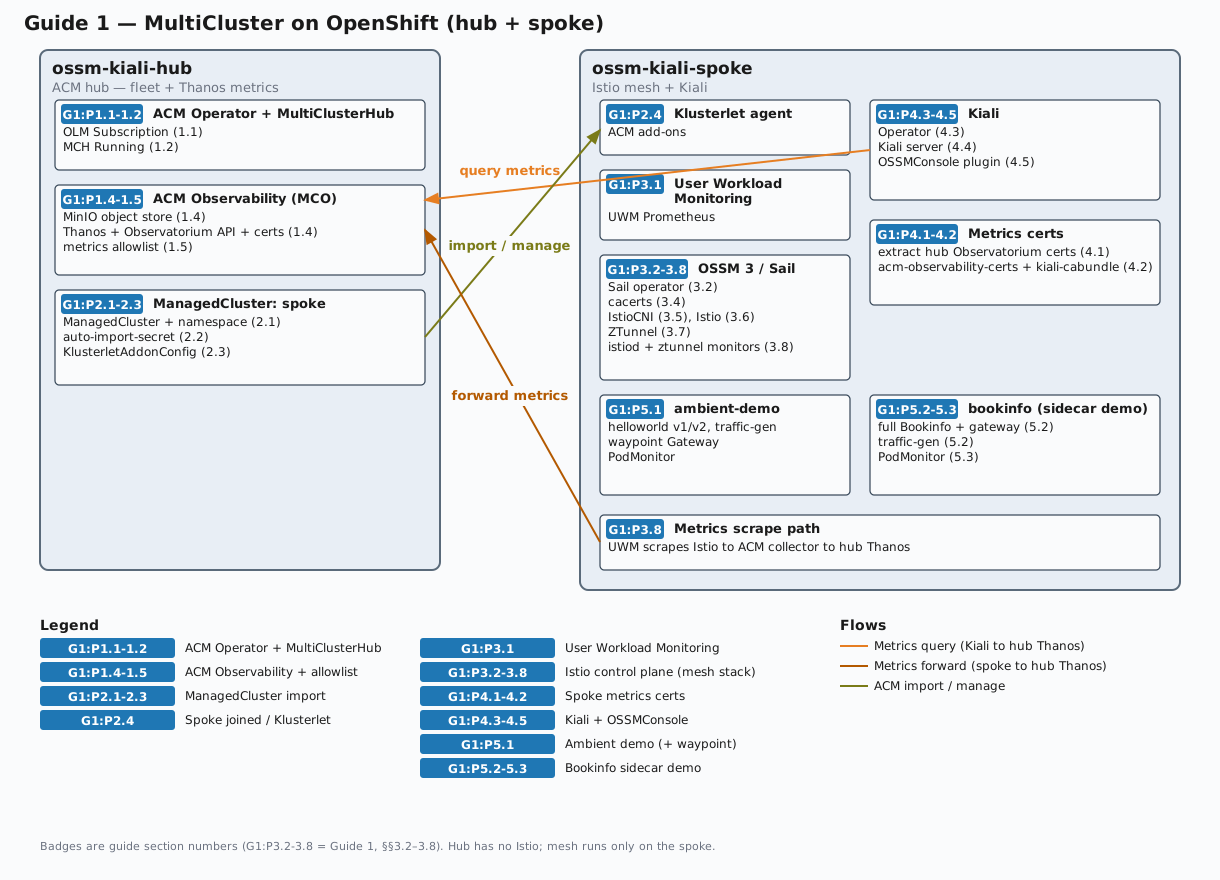
This guide sets up a two-cluster OpenShift environment from scratch where:
- The hub cluster runs Red Hat Advanced Cluster Management (ACM) for fleet management and centralized metrics collection (ACM Observability / Thanos)
- The spoke cluster is imported into ACM and runs OpenShift Service Mesh 3 (OSSM 3) with Kiali
- The spoke mesh has two demo application namespaces: one using Istio ambient mode (via the
ZTunnel CR), one using Istio sidecar injection
- Kiali queries metrics via the ACM Observatorium API on the hub cluster (mTLS), giving it access to Istio metrics collected and forwarded by ACM from the spoke’s User Workload Monitoring Prometheus
The result is a working Kiali installation that shows traffic graphs, metrics, and mesh topology across both the ambient-mode and sidecar-mode workloads running on the spoke.
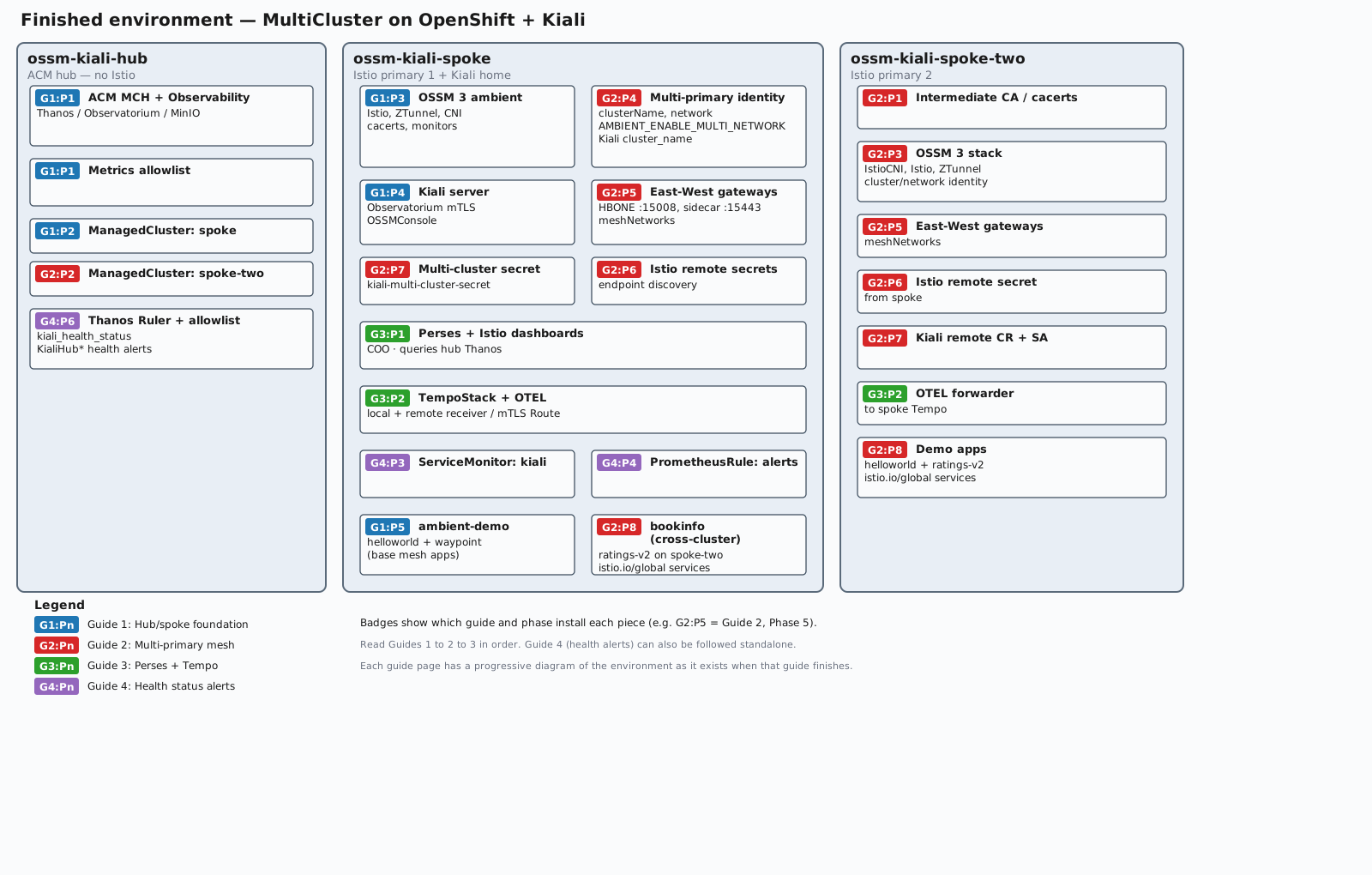
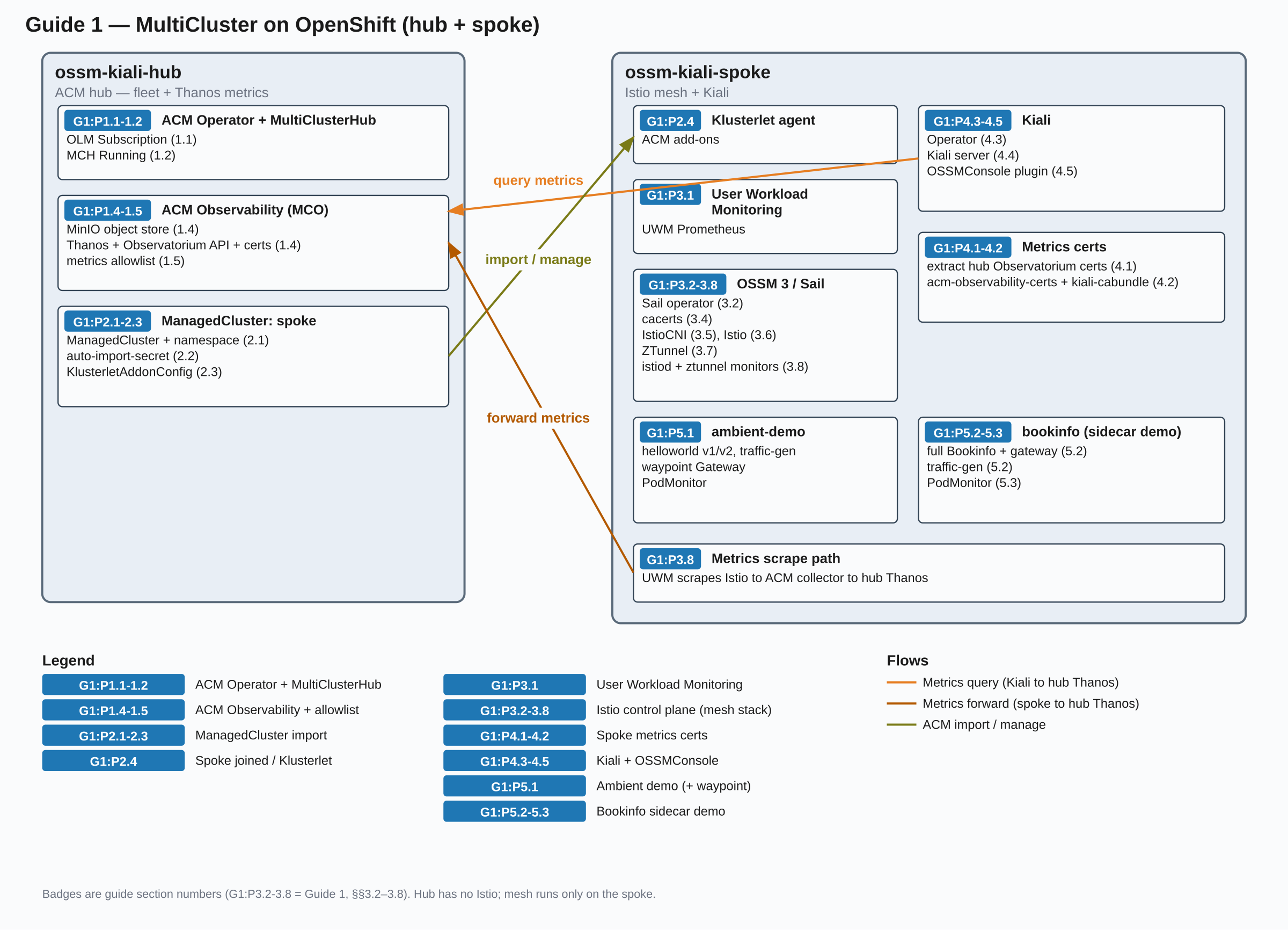
The diagram below shows the environment after this guide completes. Badges such as G1:P3.2-3.8 mark which guide section(s) install each component (Guide 1, §§3.2–3.8). Click the diagram to open a full-size SVG in a new tab.
Prerequisites
Before starting, you need:
- Hub cluster kubeconfig context named
ossm-kiali-hub — every oc command in this guide that targets the hub passes --context=ossm-kiali-hub
- Spoke cluster kubeconfig context named
ossm-kiali-spoke — every oc command that targets the spoke passes --context=ossm-kiali-spoke
oc CLI installed and both contexts present in ~/.kube/config (or KUBECONFIG). Verify with:
oc --context=ossm-kiali-hub   whoami --show-server
oc --context=ossm-kiali-spoke whoami --show-server
openssl installed locally (for generating Istio CA certificates)- Both clusters must be OpenShift 4.19 or later (required for OSSM 3 and Istio 1.30 as used in this guide)
- Both clusters must have access to Red Hat OperatorHub (i.e., connected to the Red Hat operator catalog)
jq available locally (used in verification commands)
Environment Setup
Set these variables in your shell before running any commands. They are referenced throughout this guide.
# Name for the spoke cluster in ACM (must be a valid Kubernetes resource name)
export SPOKE_CLUSTER_NAME="spoke"

# Istio version to install. Must be a version supported by the installed OSSM operator.
# After installing the operator (Phase 3.2), you can list supported versions with:
#   oc --context=ossm-kiali-spoke get crd istios.sailoperator.io \
#     -o jsonpath='{.spec.versions[0].schema.openAPIV3Schema.properties.spec.properties.version.enum}'
# Must be >= 1.30 for ambient cross-cluster traffic routing.
export ISTIO_VERSION="1.30.1"

# meshID - arbitrary identifier for this mesh
export MESH_ID="mesh1"

# SeaweedFS S3 credentials for in-cluster Thanos object storage (ACM Observability)
# These are only used inside the cluster — no external storage account is required
export SEAWEEDFS_ACCESS_KEY="seaweedfs"
export SEAWEEDFS_SECRET_KEY="seaweedfs123"
Verify both kubeconfig contexts are reachable:
oc --context=ossm-kiali-hub   whoami --show-server
oc --context=ossm-kiali-spoke whoami --show-server
Phase 1: ACM on the Hub Cluster
1.1 Install ACM Operator
Detect the latest available ACM channel, then create the open-cluster-management namespace and install the operator via OLM. ACM channels follow the naming pattern release-X.Y (e.g. release-2.17):
ACM_CHANNEL=$(oc --context=ossm-kiali-hub get packagemanifest advanced-cluster-management \
  -n openshift-marketplace \
  -o jsonpath='{.status.channels[*].name}' | \
  tr ' ' '\n' | sort -V | tail -1)
echo "Using ACM channel: ${ACM_CHANNEL}"

oc --context=ossm-kiali-hub create namespace open-cluster-management 2>/dev/null || true

oc --context=ossm-kiali-hub apply -f - <<'EOF'
apiVersion: operators.coreos.com/v1
kind: OperatorGroup
metadata:
  name: open-cluster-management
  namespace: open-cluster-management
spec:
  targetNamespaces:
  - open-cluster-management
EOF

oc --context=ossm-kiali-hub apply -f - <<EOF
apiVersion: operators.coreos.com/v1alpha1
kind: Subscription
metadata:
  name: acm-operator-subscription
  namespace: open-cluster-management
spec:
  sourceNamespace: openshift-marketplace
  source: redhat-operators
  channel: ${ACM_CHANNEL}
  installPlanApproval: Automatic
  name: advanced-cluster-management
EOF
Wait for the ACM operator to install its CRDs. The multiclusterhubs CRD being Established confirms the operator is running and ready:
until oc --context=ossm-kiali-hub get crd \
  multiclusterhubs.operator.open-cluster-management.io &>/dev/null; do
  echo "Waiting for MCH CRD to appear..."
  sleep 5
done

oc --context=ossm-kiali-hub wait crd/multiclusterhubs.operator.open-cluster-management.io \
  --for=condition=Established \
  --timeout=300s
1.2 Create the MultiClusterHub
Wait for the operator pod to be fully ready before creating the MultiClusterHub. The MCH CR is validated by an admission webhook served by the operator — applying the CR before the webhook endpoint is ready causes an immediate rejection:
until oc --context=ossm-kiali-hub get pods \
  -l name=multiclusterhub-operator \
  -n open-cluster-management \
  --no-headers 2>/dev/null | grep -q .; do
  sleep 5
done

oc --context=ossm-kiali-hub wait pod \
  -l name=multiclusterhub-operator \
  -n open-cluster-management \
  --for=condition=Ready \
  --timeout=300s
oc --context=ossm-kiali-hub apply -f - <<'EOF'
apiVersion: operator.open-cluster-management.io/v1
kind: MultiClusterHub
metadata:
  name: multiclusterhub
  namespace: open-cluster-management
spec: {}
EOF
Wait for ACM to be fully ready. This typically takes 5–10 minutes on a fresh cluster:
echo "Waiting for MultiClusterHub to reach Running status..."
while true; do
  PHASE=$(oc --context=ossm-kiali-hub get mch multiclusterhub \
    -n open-cluster-management \
    -o jsonpath='{.status.phase}' 2>/dev/null)
  if [ "${PHASE}" = "Running" ]; then
    echo "MultiClusterHub is Running"
    break
  fi
  echo "  Current phase: ${PHASE} — waiting..."
  sleep 15
done
1.3 Verify ACM is Ready
oc --context=ossm-kiali-hub get multiclusterhub multiclusterhub -n open-cluster-management \
  -o jsonpath='{.status.phase}{"\n"}'
# Expected: Running
1.4 Enable ACM Observability (MultiClusterObservability)
ACM Observability collects metrics from all managed clusters and stores them in Thanos on the hub. Kiali will query these aggregated metrics via the Observatorium API.
ACM needs an S3-compatible object store as its Thanos backend. This guide deploys SeaweedFS in-cluster so that no external storage account is required.
Create the observability namespace:
oc --context=ossm-kiali-hub create namespace open-cluster-management-observability 2>/dev/null || true
Deploy SeaweedFS as a single-pod in-cluster object store. Its mini mode runs the S3 gateway and storage services in one process and creates the thanos bucket at startup:
oc --context=ossm-kiali-hub apply -f - <<EOF
apiVersion: apps/v1
kind: Deployment
metadata:
  name: seaweedfs
  namespace: open-cluster-management-observability
spec:
  replicas: 1
  selector:
    matchLabels:
      app: seaweedfs
  template:
    metadata:
      labels:
        app: seaweedfs
    spec:
      containers:
      - name: seaweedfs
        image: ghcr.io/chrislusf/seaweedfs:4.47
        args:
        - mini
        - -dir=/data
        - -admin.port=12646
        - -master.telemetry=false
        env:
        - name: AWS_ACCESS_KEY_ID
          value: "${SEAWEEDFS_ACCESS_KEY}"
        - name: AWS_SECRET_ACCESS_KEY
          value: "${SEAWEEDFS_SECRET_KEY}"
        - name: S3_BUCKET
          value: thanos
        ports:
        - containerPort: 8333
          name: s3
        volumeMounts:
        - name: data
          mountPath: /data
        readinessProbe:
          tcpSocket:
            port: 8333
          initialDelaySeconds: 10
          periodSeconds: 5
        livenessProbe:
          tcpSocket:
            port: 8333
          initialDelaySeconds: 10
          periodSeconds: 5
      volumes:
      - name: data
        emptyDir: {}
---
apiVersion: v1
kind: Service
metadata:
  name: seaweedfs
  namespace: open-cluster-management-observability
spec:
  ports:
  - port: 8333
    name: s3
    targetPort: 8333
  selector:
    app: seaweedfs
EOF
Wait for SeaweedFS and its pre-created Thanos bucket to be ready:
oc --context=ossm-kiali-hub rollout status deployment/seaweedfs \
  -n open-cluster-management-observability \
  --timeout=120s
Create the Thanos object storage secret pointing at the in-cluster SeaweedFS S3 endpoint:
oc --context=ossm-kiali-hub apply -f - <<EOF
apiVersion: v1
kind: Secret
metadata:
  name: thanos-object-storage
  namespace: open-cluster-management-observability
type: Opaque
stringData:
  thanos.yaml: |
    type: s3
    config:
      bucket: thanos
      endpoint: seaweedfs.open-cluster-management-observability.svc:8333
      insecure: true
      access_key: ${SEAWEEDFS_ACCESS_KEY}
      secret_key: ${SEAWEEDFS_SECRET_KEY}
EOF
Create the MultiClusterObservability CR on the hub. This deploys the hub-side Thanos and Observatorium services and enables the MCOA control plane. For managed clusters selected by the MCOA add-on placement, MCOA deploys PrometheusAgent collectors that federate platform and—after UWM is enabled separately—user-workload metrics to the hub.
The capabilities block enables both the platform and user-workload metric collection paths that MCOA uses to federate Istio and container metrics. The retention configuration is explicit: retentionInLocal is set to 24h for short-lived local hub storage, while raw, 5-minute, and 1-hour Thanos blocks are retained for 365d in the long-lived aggregated store. Kiali queries that aggregated Thanos data, so its thanos_proxy.retention_period is also set to 365d:
oc --context=ossm-kiali-hub apply -f - <<'EOF'
apiVersion: observability.open-cluster-management.io/v1beta2
kind: MultiClusterObservability
metadata:
  name: observability
spec:
  capabilities:
    platform:
      metrics:
        default:
          enabled: true
    userWorkloads:
      metrics:
        default:
          enabled: true
  observabilityAddonSpec: {}
  storageConfig:
    metricObjectStorage:
      name: thanos-object-storage
      key: thanos.yaml
    alertmanagerStorageSize: 1Gi
    compactStorageSize: 10Gi
    receiveStorageSize: 10Gi
    ruleStorageSize: 1Gi
    storeStorageSize: 10Gi
  advanced:
    retentionConfig:
      retentionInLocal: 24h
      retentionResolution1h: 365d
      retentionResolution5m: 365d
      retentionResolutionRaw: 365d
    alertmanager:
      replicas: 1
      resources:
        requests:
          cpu: 20m
          memory: 64Mi
    compact:
      resources:
        requests:
          cpu: 50m
          memory: 128Mi
    grafana:
      replicas: 1
      resources:
        requests:
          cpu: 20m
          memory: 64Mi
    observatoriumAPI:
      replicas: 1
      resources:
        requests:
          cpu: 20m
          memory: 64Mi
    query:
      replicas: 1
      resources:
        requests:
          cpu: 50m
          memory: 128Mi
    queryFrontend:
      replicas: 1
      resources:
        requests:
          cpu: 50m
          memory: 64Mi
    queryFrontendMemcached:
      replicas: 1
      resources:
        requests:
          cpu: 20m
          memory: 64Mi
    rbacQueryProxy:
      replicas: 1
      resources:
        requests:
          cpu: 20m
          memory: 64Mi
    receive:
      resources:
        requests:
          cpu: 50m
          memory: 128Mi
    rule:
      replicas: 1
      resources:
        requests:
          cpu: 50m
          memory: 128Mi
    store:
      replicas: 1
      resources:
        requests:
          cpu: 50m
          memory: 128Mi
    storeMemcached:
      replicas: 1
      resources:
        requests:
          cpu: 20m
          memory: 64Mi
EOF
Wait for ACM Observability to be ready. This can take 5–10 minutes as Thanos components start up:
echo "Waiting for MultiClusterObservability to be ready..."
while true; do
  READY=$(oc --context=ossm-kiali-hub get mco observability \
    -o jsonpath='{.status.conditions[?(@.type=="Ready")].status}' 2>/dev/null || true)
  READY=${READY:-Unknown}
  if [ "${READY}" = "True" ]; then
    echo "MultiClusterObservability is Ready"
    break
  fi
  echo "  Ready=${READY} — waiting..."
  sleep 15
done
Verify the Observatorium API route exists:
oc --context=ossm-kiali-hub get route observatorium-api \
  -n open-cluster-management-observability \
  -o jsonpath='{.spec.host}{"\n"}'
How the metrics pipeline works: User Workload Monitoring (UWM) on each
spoke is the short-lived edge metrics store. It scrapes raw istio_* series
and other user-workload metrics. Recording rules aggregate the selected
high-cardinality Istio series into workload:istio_* series. MCOA federates
those aggregated series and other core metrics from UWM to hub Thanos. A
separate cluster-wide platform federation job collects container CPU and memory
metrics from all namespaces. Hub Thanos is the data source Kiali ultimately
queries. For the interval relationships, timing expectations, and the
consequences of changing an interval, see Scrape Intervals.
Hub Thanos retains its own local data for 24 hours and retains raw, 5-minute,
and 1-hour aggregate data for 365 days. Kiali queries hub Thanos through the
Observatorium API; its thanos_proxy.retention_period is set to match the
hub’s 365-day aggregate retention.
First, identify which MCOA placement to use. A “placement” selects the managed clusters that receive the MCOA add-on configuration. The tutorial uses the placement already referenced by ACM’s multicluster-observability-addon, so the recording rules and federation configuration are propagated only to the clusters selected by that placement.
Read the ClusterManagementAddOn and capture the placement name and namespace:
ADDON_JSON=$(oc --context=ossm-kiali-hub get clustermanagementaddon \
  multicluster-observability-addon -o json)

PLACEMENT_COUNT=$(echo "${ADDON_JSON}" | \
  jq '(.spec.installStrategy.placements // []) | length')

if [ "${PLACEMENT_COUNT}" -eq 1 ]; then
  MCOA_PLACEMENT_NAME=$(echo "${ADDON_JSON}" | \
    jq -r '.spec.installStrategy.placements[0].name')
  MCOA_PLACEMENT_NS=$(echo "${ADDON_JSON}" | \
    jq -r '.spec.installStrategy.placements[0].namespace')
  echo "Using placement: ${MCOA_PLACEMENT_NS}/${MCOA_PLACEMENT_NAME}"
elif [ "${PLACEMENT_COUNT}" -gt 1 ]; then
  echo "Multiple placements found — set MCOA_PLACEMENT_NAME and MCOA_PLACEMENT_NS manually:"
  echo "${ADDON_JSON}" | jq -r \
    '(.spec.installStrategy.placements // [])[] | "  name=\(.name) namespace=\(.namespace)"'
else
  echo "ERROR: no MCOA placements found; ensure MCO is Ready"
fi
Create the shared user-workload ScrapeConfig. This federates aggregated Istio traffic metrics and other core Kiali metrics from UWM. Container CPU and memory are excluded here — they come from platform monitoring and require separate jobs below. The metric relabeling rule renames workload:istio_* series back to istio_* so Kiali queries work unchanged:
oc --context=ossm-kiali-hub apply -f - <<'EOF'
apiVersion: monitoring.rhobs/v1alpha1
kind: ScrapeConfig
metadata:
  labels:
    app.kubernetes.io/component: user-workload-metrics-collector
    app.kubernetes.io/managed-by: kiali-mcoa-federation
  name: kiali-istio-federation
  namespace: open-cluster-management-observability
spec:
  honorLabels: true
  jobName: kiali-istio-federation
  metricRelabelings:
  - action: replace
    regex: 'workload:(.*)'
    replacement: '${1}'
    sourceLabels: [__name__]
    targetLabel: __name__
  - action: replace
    regex: 'kiali:(.*)'
    replacement: '${1}'
    sourceLabels: [__name__]
    targetLabel: __name__
  metricsPath: /federate
  params:
    match[]:
    # CORE TIER
    # Istio traffic (pod-aggregated on edge via recording rules)
    - '{__name__=~"workload:istio_requests_total"}'
    - '{__name__=~"workload:istio_request_bytes_(bucket|count|sum)"}'
    - '{__name__=~"workload:istio_request_duration_milliseconds_(bucket|count|sum)"}'
    - '{__name__=~"workload:istio_request_messages_total"}'
    - '{__name__=~"workload:istio_response_bytes_(bucket|count|sum)"}'
    - '{__name__=~"workload:istio_response_messages_total"}'
    - '{__name__=~"workload:istio_tcp_connections_(opened|closed)_total"}'
    - '{__name__=~"workload:istio_tcp_(received|sent)_bytes_total"}'
    # Istio info (not aggregated)
    - '{__name__=~"istio_build"}'
    # Control plane overview (Kiali mesh page)
    - '{__name__=~"process_cpu_seconds_total"}'
    - '{__name__=~"process_resident_memory_bytes"}'
    - '{__name__=~"pilot_info"}'
    - '{__name__=~"pilot_proxy_convergence_time_(sum|count)"}'
    - '{__name__=~"pilot_services"}'
    - '{__name__=~"pilot_xds$"}'
    - '{__name__=~"pilot_xds_pushes"}'
    - '{__name__=~"workload_manager_active_proxy_count"}'
    # Envoy workload details (all metrics used by Kiali Envoy tab)
    - '{__name__=~"envoy_cluster_upstream_cx_active"}'
    - '{__name__=~"envoy_cluster_upstream_rq_total"}'
    - '{__name__=~"envoy_listener_downstream_cx_active"}'
    - '{__name__=~"envoy_listener_http_downstream_rq"}'
    - '{__name__=~"envoy_server_memory_allocated"}'
    - '{__name__=~"envoy_server_memory_heap_size"}'
    - '{__name__=~"envoy_server_uptime"}'
    # KIALI TIER
    # Kiali self-monitoring metrics
    - '{__name__=~"kiali:kiali_.*"}'
    # ISTIO DASHBOARD TIER
    # istio-control-plane + istio-performance (Istiod runtime)
    - '{__name__=~"pilot_k8s_(reg|cfg)_events"}'
    - '{__name__=~"pilot_push_triggers"}'
    - '{__name__=~"pilot_total_xds_(rejects|internal_errors)"}'
    - '{__name__=~"pilot_xds_push_time_bucket"}'
    - '{__name__=~"pilot_xds_config_size_bytes_bucket"}'
    - '{__name__=~"go_goroutines"}'
    - '{__name__=~"go_memstats_(alloc_bytes|alloc_bytes_total|heap_alloc_bytes|heap_inuse_bytes|heap_sys_bytes|mallocs_total|stack_inuse_bytes)"}'
    # istio-performance (container/process detail)
    - '{__name__=~"container_fs_usage_bytes"}'
    - '{__name__=~"process_open_fds"}'
    - '{__name__=~"process_virtual_memory_bytes"}'
    # istio-ztunnel-dashboard (ambient)
    - '{__name__=~"istio_dns_requests_total"}'
    - '{__name__=~"istio_tcp_sockets_open"}'
    - '{__name__=~"istio_xds_connection_terminations_total"}'
    - '{__name__=~"istio_xds_message_total"}'
    - '{__name__=~"workload_manager_pending_proxy_count"}'
    # istio-extension-dashboard (WASM)
    - '{__name__=~"envoy_wasm_.*"}'
  scrapeInterval: 5m
EOF
Create one cluster-wide platform ScrapeConfig for container CPU and memory. Platform monitoring (not UWM) owns these series, so they require a separate federation job. This job intentionally federates those metrics from all namespaces.
The tutorial creates one platform ScrapeConfig for the cluster. In a production deployment, create the same single cluster-wide resource in the observability namespace used by your Kiali instance.
oc --context=ossm-kiali-hub apply -f - <<'EOF'
apiVersion: monitoring.rhobs/v1alpha1
kind: ScrapeConfig
metadata:
  labels:
    app.kubernetes.io/component: platform-metrics-collector
    app.kubernetes.io/managed-by: kiali-mcoa-federation
  name: kiali-istio-platform-federation
  namespace: open-cluster-management-observability
spec:
  jobName: kiali-istio-platform-federation
  metricsPath: /federate
  params:
    match[]:
    - '{__name__=~"container_cpu_usage_seconds_total|container_memory_working_set_bytes"}'
  scrapeInterval: 5m
EOF
Create one aggregation PrometheusRule in a dedicated namespace. MCOA propagates it into mesh-observability on every managed cluster. Exempt that namespace from UWM label enforcement so the rule can select and record metrics from all scraped application namespaces. If user-workload-monitoring-config already exists, merge this key into its existing config.yaml rather than replacing unrelated UWM settings.
oc --context=ossm-kiali-spoke create namespace mesh-observability --dry-run=client -o yaml | \
  oc --context=ossm-kiali-spoke apply -f -
oc --context=ossm-kiali-spoke apply -f - <<'EOF'
apiVersion: v1
kind: ConfigMap
metadata:
  name: user-workload-monitoring-config
  namespace: openshift-user-workload-monitoring
data:
  config.yaml: |
    namespacesWithoutLabelEnforcement:
    - mesh-observability
EOF
The PrometheusRule and ScrapeConfig resources have distinct roles. The PrometheusRule is applied to the spoke’s UWM Prometheus and evaluates sum without (...) recording rules. Those rules reduce many per-pod/per-proxy istio_* series into lower-cardinality workload:istio_* series while preserving the labels Kiali needs. The ScrapeConfig configures MCOA’s PrometheusAgent to fetch those already-aggregated workload:istio_* series from UWM’s /federate endpoint, remove the workload: prefix so they again use standard istio_* names, and remote-write them to hub Thanos. Without the PrometheusRule, MCOA could federate raw per-proxy metrics, but the aggregated hub store would retain much higher-cardinality data. Without the ScrapeConfig, the aggregated recording-rule series would remain only on the spoke and would never reach hub Thanos.
oc --context=ossm-kiali-hub apply -f - <<'EOF'
apiVersion: monitoring.coreos.com/v1
kind: PrometheusRule
metadata:
  annotations:
    observability.open-cluster-management.io/target-namespace: mesh-observability
  labels:
    app.kubernetes.io/component: user-workload-metrics-collector
    app.kubernetes.io/managed-by: kiali-mcoa-federation
    openshift.io/prometheus-rule-evaluation-scope: leaf-prometheus
  name: kiali-istio-aggregation
  namespace: open-cluster-management-observability
spec:
  groups:
  - interval: 30s
    name: istio.workload-aggregation
    rules:
    # CORE TIER
    - expr: sum without (pod, pod_template_hash, instance, job, node) (istio_requests_total)
      record: workload:istio_requests_total
    - expr: sum without (pod, pod_template_hash, instance, job, node) (istio_request_messages_total)
      record: workload:istio_request_messages_total
    - expr: sum without (pod, pod_template_hash, instance, job, node) (istio_response_messages_total)
      record: workload:istio_response_messages_total
    - expr: sum without (pod, pod_template_hash, instance, job, node) (istio_tcp_sent_bytes_total)
      record: workload:istio_tcp_sent_bytes_total
    - expr: sum without (pod, pod_template_hash, instance, job, node) (istio_tcp_received_bytes_total)
      record: workload:istio_tcp_received_bytes_total
    - expr: sum without (pod, pod_template_hash, instance, job, node) (istio_tcp_connections_opened_total)
      record: workload:istio_tcp_connections_opened_total
    - expr: sum without (pod, pod_template_hash, instance, job, node) (istio_tcp_connections_closed_total)
      record: workload:istio_tcp_connections_closed_total
    - expr: sum without (pod, pod_template_hash, instance, job, node) (istio_request_duration_milliseconds_bucket)
      record: workload:istio_request_duration_milliseconds_bucket
    - expr: sum without (pod, pod_template_hash, instance, job, node) (istio_request_duration_milliseconds_sum)
      record: workload:istio_request_duration_milliseconds_sum
    - expr: sum without (pod, pod_template_hash, instance, job, node) (istio_request_duration_milliseconds_count)
      record: workload:istio_request_duration_milliseconds_count
    - expr: sum without (pod, pod_template_hash, instance, job, node) (istio_request_bytes_bucket)
      record: workload:istio_request_bytes_bucket
    - expr: sum without (pod, pod_template_hash, instance, job, node) (istio_request_bytes_sum)
      record: workload:istio_request_bytes_sum
    - expr: sum without (pod, pod_template_hash, instance, job, node) (istio_request_bytes_count)
      record: workload:istio_request_bytes_count
    - expr: sum without (pod, pod_template_hash, instance, job, node) (istio_response_bytes_bucket)
      record: workload:istio_response_bytes_bucket
    - expr: sum without (pod, pod_template_hash, instance, job, node) (istio_response_bytes_sum)
      record: workload:istio_response_bytes_sum
    - expr: sum without (pod, pod_template_hash, instance, job, node) (istio_response_bytes_count)
      record: workload:istio_response_bytes_count
    # KIALI TIER
    # Counters
    - expr: sum without (pod, pod_template_hash, instance, job, node) (kiali_ai_requests_total)
      record: kiali:kiali_ai_requests_total
    - expr: sum without (pod, pod_template_hash, instance, job, node) (kiali_ai_store_evictions_total)
      record: kiali:kiali_ai_store_evictions_total
    - expr: sum without (pod, pod_template_hash, instance, job, node) (kiali_api_failures_total)
      record: kiali:kiali_api_failures_total
    - expr: sum without (pod, pod_template_hash, instance, job, node) (kiali_cache_hits_total)
      record: kiali:kiali_cache_hits_total
    - expr: sum without (pod, pod_template_hash, instance, job, node) (kiali_cache_requests_total)
      record: kiali:kiali_cache_requests_total
    - expr: sum without (pod, pod_template_hash, instance, job, node) (kiali_graph_cache_evictions_total)
      record: kiali:kiali_graph_cache_evictions_total
    - expr: sum without (pod, pod_template_hash, instance, job, node) (kiali_graph_cache_hits_total)
      record: kiali:kiali_graph_cache_hits_total
    - expr: sum without (pod, pod_template_hash, instance, job, node) (kiali_graph_cache_misses_total)
      record: kiali:kiali_graph_cache_misses_total
    - expr: sum without (pod, pod_template_hash, instance, job, node) (kiali_health_cache_hits_total)
      record: kiali:kiali_health_cache_hits_total
    - expr: sum without (pod, pod_template_hash, instance, job, node) (kiali_health_cache_misses_total)
      record: kiali:kiali_health_cache_misses_total
    # Gauges
    - expr: sum without (pod, pod_template_hash, instance, job, node) (kiali_ai_store_conversations_total)
      record: kiali:kiali_ai_store_conversations_total
    - expr: max without (pod, pod_template_hash, instance, job, node) (kiali_graph_nodes)
      record: kiali:kiali_graph_nodes
    - expr: max without (pod, pod_template_hash, instance, job, node) (kiali_kubernetes_clients)
      record: kiali:kiali_kubernetes_clients
    - expr: max without (pod, pod_template_hash, instance, job, node) (kiali_health_status)
      record: kiali:kiali_health_status
    # Histograms
    - expr: sum without (pod, pod_template_hash, instance, job, node) (kiali_ai_request_duration_seconds_bucket)
      record: kiali:kiali_ai_request_duration_seconds_bucket
    - expr: sum without (pod, pod_template_hash, instance, job, node) (kiali_ai_request_duration_seconds_sum)
      record: kiali:kiali_ai_request_duration_seconds_sum
    - expr: sum without (pod, pod_template_hash, instance, job, node) (kiali_ai_request_duration_seconds_count)
      record: kiali:kiali_ai_request_duration_seconds_count
    - expr: sum without (pod, pod_template_hash, instance, job, node) (kiali_api_processing_duration_seconds_bucket)
      record: kiali:kiali_api_processing_duration_seconds_bucket
    - expr: sum without (pod, pod_template_hash, instance, job, node) (kiali_api_processing_duration_seconds_sum)
      record: kiali:kiali_api_processing_duration_seconds_sum
    - expr: sum without (pod, pod_template_hash, instance, job, node) (kiali_api_processing_duration_seconds_count)
      record: kiali:kiali_api_processing_duration_seconds_count
    - expr: sum without (pod, pod_template_hash, instance, job, node) (kiali_checker_processing_duration_seconds_bucket)
      record: kiali:kiali_checker_processing_duration_seconds_bucket
    - expr: sum without (pod, pod_template_hash, instance, job, node) (kiali_checker_processing_duration_seconds_sum)
      record: kiali:kiali_checker_processing_duration_seconds_sum
    - expr: sum without (pod, pod_template_hash, instance, job, node) (kiali_checker_processing_duration_seconds_count)
      record: kiali:kiali_checker_processing_duration_seconds_count
    - expr: sum without (pod, pod_template_hash, instance, job, node) (kiali_graph_appender_duration_seconds_bucket)
      record: kiali:kiali_graph_appender_duration_seconds_bucket
    - expr: sum without (pod, pod_template_hash, instance, job, node) (kiali_graph_appender_duration_seconds_sum)
      record: kiali:kiali_graph_appender_duration_seconds_sum
    - expr: sum without (pod, pod_template_hash, instance, job, node) (kiali_graph_appender_duration_seconds_count)
      record: kiali:kiali_graph_appender_duration_seconds_count
    - expr: sum without (pod, pod_template_hash, instance, job, node) (kiali_graph_generation_duration_seconds_bucket)
      record: kiali:kiali_graph_generation_duration_seconds_bucket
    - expr: sum without (pod, pod_template_hash, instance, job, node) (kiali_graph_generation_duration_seconds_sum)
      record: kiali:kiali_graph_generation_duration_seconds_sum
    - expr: sum without (pod, pod_template_hash, instance, job, node) (kiali_graph_generation_duration_seconds_count)
      record: kiali:kiali_graph_generation_duration_seconds_count
    - expr: sum without (pod, pod_template_hash, instance, job, node) (kiali_graph_marshal_duration_seconds_bucket)
      record: kiali:kiali_graph_marshal_duration_seconds_bucket
    - expr: sum without (pod, pod_template_hash, instance, job, node) (kiali_graph_marshal_duration_seconds_sum)
      record: kiali:kiali_graph_marshal_duration_seconds_sum
    - expr: sum without (pod, pod_template_hash, instance, job, node) (kiali_graph_marshal_duration_seconds_count)
      record: kiali:kiali_graph_marshal_duration_seconds_count
    - expr: sum without (pod, pod_template_hash, instance, job, node) (kiali_health_refresh_duration_seconds_bucket)
      record: kiali:kiali_health_refresh_duration_seconds_bucket
    - expr: sum without (pod, pod_template_hash, instance, job, node) (kiali_health_refresh_duration_seconds_sum)
      record: kiali:kiali_health_refresh_duration_seconds_sum
    - expr: sum without (pod, pod_template_hash, instance, job, node) (kiali_health_refresh_duration_seconds_count)
      record: kiali:kiali_health_refresh_duration_seconds_count
    - expr: sum without (pod, pod_template_hash, instance, job, node) (kiali_prometheus_processing_duration_seconds_bucket)
      record: kiali:kiali_prometheus_processing_duration_seconds_bucket
    - expr: sum without (pod, pod_template_hash, instance, job, node) (kiali_prometheus_processing_duration_seconds_sum)
      record: kiali:kiali_prometheus_processing_duration_seconds_sum
    - expr: sum without (pod, pod_template_hash, instance, job, node) (kiali_prometheus_processing_duration_seconds_count)
      record: kiali:kiali_prometheus_processing_duration_seconds_count
    - expr: sum without (pod, pod_template_hash, instance, job, node) (kiali_single_validation_processing_duration_seconds_bucket)
      record: kiali:kiali_single_validation_processing_duration_seconds_bucket
    - expr: sum without (pod, pod_template_hash, instance, job, node) (kiali_single_validation_processing_duration_seconds_sum)
      record: kiali:kiali_single_validation_processing_duration_seconds_sum
    - expr: sum without (pod, pod_template_hash, instance, job, node) (kiali_single_validation_processing_duration_seconds_count)
      record: kiali:kiali_single_validation_processing_duration_seconds_count
    - expr: sum without (pod, pod_template_hash, instance, job, node) (kiali_tracing_processing_duration_seconds_bucket)
      record: kiali:kiali_tracing_processing_duration_seconds_bucket
    - expr: sum without (pod, pod_template_hash, instance, job, node) (kiali_tracing_processing_duration_seconds_sum)
      record: kiali:kiali_tracing_processing_duration_seconds_sum
    - expr: sum without (pod, pod_template_hash, instance, job, node) (kiali_tracing_processing_duration_seconds_count)
      record: kiali:kiali_tracing_processing_duration_seconds_count
    - expr: sum without (pod, pod_template_hash, instance, job, node) (kiali_validation_processing_duration_seconds_bucket)
      record: kiali:kiali_validation_processing_duration_seconds_bucket
    - expr: sum without (pod, pod_template_hash, instance, job, node) (kiali_validation_processing_duration_seconds_sum)
      record: kiali:kiali_validation_processing_duration_seconds_sum
    - expr: sum without (pod, pod_template_hash, instance, job, node) (kiali_validation_processing_duration_seconds_count)
      record: kiali:kiali_validation_processing_duration_seconds_count
EOF
Register the ScrapeConfig and PrometheusRule resources you just created above with the selected MCOA placement in ACM’s cluster-scoped ClusterManagementAddon named multicluster-observability-addon. Specifically, add them to that placement’s configs list. This instructs MCOA to propagate those resources from the hub to every managed cluster selected by the placement.
The jq-based merge in the code below is idempotent — it skips any reference that is already present:
add_mcoa_ref() {
  local group=$1 resource=$2 name=$3
  local patch exists
  exists=$(oc --context=ossm-kiali-hub get clustermanagementaddon \
    multicluster-observability-addon -o json | jq -r \
    --arg g "${group}" --arg r "${resource}" --arg n "${name}" \
    --arg ns "open-cluster-management-observability" \
    --arg pn "${MCOA_PLACEMENT_NAME}" --arg pns "${MCOA_PLACEMENT_NS}" \
    '[.spec.installStrategy.placements[] |
      select(.name == $pn and .namespace == $pns) |
      .configs[]? |
      select(.group == $g and .resource == $r and .name == $n and .namespace == $ns)] | length')
  if [ "${exists}" -eq 0 ]; then
    local idx
    idx=$(oc --context=ossm-kiali-hub get clustermanagementaddon \
      multicluster-observability-addon -o json | jq -r \
      --arg pn "${MCOA_PLACEMENT_NAME}" --arg pns "${MCOA_PLACEMENT_NS}" \
      '.spec.installStrategy.placements | to_entries[] |
        select(.value.name == $pn and .value.namespace == $pns) | .key')
    local configs
    configs=$(oc --context=ossm-kiali-hub get clustermanagementaddon \
      multicluster-observability-addon -o json | jq -r \
      --argjson i "${idx}" \
      '.spec.installStrategy.placements[$i].configs | type == "array"')
    local op path
    if [ "${configs}" = true ]; then
      op="add"; path="/spec/installStrategy/placements/${idx}/configs/-"
    else
      op="add"; path="/spec/installStrategy/placements/${idx}/configs"
    fi
    oc --context=ossm-kiali-hub patch clustermanagementaddon \
      multicluster-observability-addon --type=json -p="[{
        \"op\": \"${op}\",
        \"path\": \"${path}\",
        \"value\": {\"group\": \"${group}\", \"resource\": \"${resource}\",
                    \"name\": \"${name}\",
                    \"namespace\": \"open-cluster-management-observability\"}
      }]"
    echo "Added ${resource}/${name} to placement ${MCOA_PLACEMENT_NS}/${MCOA_PLACEMENT_NAME}"
  else
    echo "Reference ${resource}/${name} already present — skipping"
  fi
}

# User-workload ScrapeConfig (shared)
add_mcoa_ref monitoring.rhobs scrapeconfigs kiali-istio-federation

# Cluster-wide platform ScrapeConfig
add_mcoa_ref monitoring.rhobs scrapeconfigs kiali-istio-platform-federation

# Shared aggregation PrometheusRule
add_mcoa_ref monitoring.coreos.com prometheusrules kiali-istio-aggregation
The hub-side MCOA configuration resources are now registered with the MCOA placement. To verify, in the ClusterManagementAddon named multicluster-observability-addon, look for the selected placement’s configs list:
oc --context=ossm-kiali-hub get clustermanagementaddon multicluster-observability-addon \
  -o jsonpath-as-json='{.spec.installStrategy.placements[*].configs}'
It should now contain references to the Kiali resources created in this section: the shared kiali-istio-federation ScrapeConfig, the cluster-wide kiali-istio-platform-federation ScrapeConfig, and the single kiali-istio-aggregation PrometheusRule.
Once the spoke is imported, MCOA propagates the PrometheusRule into mesh-observability and the ScrapeConfig objects to the managed-cluster agent. The agent federates metrics from the local UWM.
Phase 2: Import the Spoke Cluster into ACM
2.1 Create the ManagedCluster Resource and Namespace
oc --context=ossm-kiali-hub create namespace "${SPOKE_CLUSTER_NAME}" 2>/dev/null || true

oc --context=ossm-kiali-hub apply -f - <<EOF
apiVersion: cluster.open-cluster-management.io/v1
kind: ManagedCluster
metadata:
  name: ${SPOKE_CLUSTER_NAME}
  labels:
    cloud: auto-detect
    vendor: auto-detect
spec:
  hubAcceptsClient: true
EOF
2.2 Create the Auto-Import Secret
The simplest way to import a spoke is to give ACM the spoke’s kubeconfig directly. ACM’s import controller detects the auto-import-secret and installs the klusterlet agent on the spoke automatically.
Extract the spoke’s kubeconfig context into a standalone file:
oc config view --context=ossm-kiali-spoke --minify --flatten \
  > /tmp/spoke-kubeconfig.yaml

# Verify it connects to the spoke
oc --kubeconfig=/tmp/spoke-kubeconfig.yaml whoami --show-server
Create the auto-import secret on the hub:
oc --context=ossm-kiali-hub create secret generic auto-import-secret \
  -n "${SPOKE_CLUSTER_NAME}" \
  --from-file=kubeconfig=/tmp/spoke-kubeconfig.yaml
ACM consumes and deletes this secret automatically once the klusterlet is installed.
2.3 Create a KlusterletAddonConfig
This enables the standard ACM add-ons on the spoke:
oc --context=ossm-kiali-hub apply -f - <<EOF
apiVersion: agent.open-cluster-management.io/v1
kind: KlusterletAddonConfig
metadata:
  name: ${SPOKE_CLUSTER_NAME}
  namespace: ${SPOKE_CLUSTER_NAME}
spec:
  applicationManager:
    enabled: true
  certPolicyController:
    enabled: true
  policyController:
    enabled: true
  searchCollector:
    enabled: true
EOF
2.4 Wait for the Spoke to Join
echo "Waiting for ${SPOKE_CLUSTER_NAME} to join and become available..."
while true; do
  STATUS=$(oc --context=ossm-kiali-hub get managedcluster "${SPOKE_CLUSTER_NAME}" \
    -o jsonpath='{range .status.conditions[*]}{.type}={.status}{" "}{end}' 2>/dev/null)
  echo "  Status: ${STATUS}"
  if echo "${STATUS}" | grep -q "ManagedClusterJoined=True" && \
     echo "${STATUS}" | grep -q "ManagedClusterConditionAvailable=True"; then
    echo "${SPOKE_CLUSTER_NAME} is joined and available"
    break
  fi
  sleep 15
done
Clean up the temporary kubeconfig:
rm -f /tmp/spoke-kubeconfig.yaml
Verify both clusters are managed:
oc --context=ossm-kiali-hub get managedclusters
# Should show local-cluster and ${SPOKE_CLUSTER_NAME} both with JOINED=True, AVAILABLE=True
Phase 3: OpenShift Service Mesh 3 (Spoke Cluster)
3.1 Enable User Workload Monitoring
Check if UWM is already enabled on the spoke cluster:
oc --context=ossm-kiali-spoke get configmap cluster-monitoring-config \
  -n openshift-monitoring \
  -o jsonpath='{.data.config\.yaml}' 2>/dev/null | \
  grep -q "enableUserWorkload: true" && \
  echo "Already enabled" || echo "Not enabled"
If UWM is not yet enabled, enable it following the instructions below.
This tutorial intentionally does not configure a retention period for the spoke’s UWM Prometheus. OpenShift therefore uses its default 24-hour retention for user-workload metrics. This is appropriate because UWM is the short-lived edge metrics store. MCOA will federate the metrics to hub Thanos, where this tutorial retains the aggregated data for a longer period – 365 days.
If you need a different UWM retention period other than 24 hours, configure it independently on each spoke in the user-workload-monitoring-config ConfigMap (see example yaml below). If you already have this ConfigMap, you will want to merge this prometheus.retention setting with any existing data in your ConfigMap.
apiVersion: v1
kind: ConfigMap
metadata:
  name: user-workload-monitoring-config
  namespace: openshift-user-workload-monitoring
data:
  config.yaml: |
    prometheus:
      retention: 24h
The following enables UWM safely by merging enableUserWorkload: true without clobbering other monitoring settings.
if oc --context=ossm-kiali-spoke get configmap cluster-monitoring-config \
    -n openshift-monitoring &>/dev/null 2>&1; then
  # ConfigMap already exists — patch only the enableUserWorkload key
  EXISTING=$(oc --context=ossm-kiali-spoke get configmap cluster-monitoring-config \
    -n openshift-monitoring -o jsonpath='{.data.config\.yaml}' 2>/dev/null || true)
  if echo "${EXISTING}" | grep -q "enableUserWorkload:"; then
    oc --context=ossm-kiali-spoke get configmap cluster-monitoring-config \
      -n openshift-monitoring -o json \
      | jq '.data["config.yaml"] |= sub("enableUserWorkload:\\s*\\w+"; "enableUserWorkload: true")' \
      | oc --context=ossm-kiali-spoke apply -f -
  else
    oc --context=ossm-kiali-spoke get configmap cluster-monitoring-config \
      -n openshift-monitoring -o json \
      | jq '.data["config.yaml"] = ((.data["config.yaml"] // "") + "\nenableUserWorkload: true\n")' \
      | oc --context=ossm-kiali-spoke apply -f -
  fi
else
  # ConfigMap does not exist — create it and label it as tutorial-owned
  oc --context=ossm-kiali-spoke create configmap cluster-monitoring-config \
    -n openshift-monitoring \
    --from-literal=config.yaml="enableUserWorkload: true"
  oc --context=ossm-kiali-spoke label configmap cluster-monitoring-config \
    -n openshift-monitoring kiali.io/tutorial-owned=true
fi
Wait for UWM pods to appear and become ready. The pods take a moment to be created after the ConfigMap is applied:
until oc --context=ossm-kiali-spoke get pods \
  -l app.kubernetes.io/name=prometheus \
  -n openshift-user-workload-monitoring \
  --no-headers 2>/dev/null | grep -q .; do
  sleep 5
done

oc --context=ossm-kiali-spoke wait pod \
  --for=condition=Ready \
  -l app.kubernetes.io/name=prometheus \
  -n openshift-user-workload-monitoring \
  --timeout=300s
3.2 Install OpenShift Service Mesh 3 Operator
Install the OSSM 3 operator cluster-wide via OLM. The operator manages Istio control planes across all namespaces:
oc --context=ossm-kiali-spoke apply -f - <<'EOF'
apiVersion: operators.coreos.com/v1alpha1
kind: Subscription
metadata:
  name: openshift-service-mesh-operator
  namespace: openshift-operators
spec:
  channel: stable
  installPlanApproval: Automatic
  name: servicemeshoperator3
  source: redhat-operators
  sourceNamespace: openshift-marketplace
EOF
Wait for the operator pod to appear and become ready:
until oc --context=ossm-kiali-spoke get pods \
  -l app.kubernetes.io/created-by=servicemeshoperator3 \
  -n openshift-operators \
  --no-headers 2>/dev/null | grep -q .; do
  sleep 5
done

oc --context=ossm-kiali-spoke wait pod \
  --for=condition=Ready \
  -l app.kubernetes.io/created-by=servicemeshoperator3 \
  -n openshift-operators \
  --timeout=300s
3.3 Create Required Namespaces
The ztunnel namespace must have the istio-discovery: enabled label so that istiod discovers it and distributes the istio-ca-root-cert ConfigMap there — without which ztunnel pods fail to start:
oc --context=ossm-kiali-spoke create namespace istio-system 2>/dev/null || true
oc --context=ossm-kiali-spoke create namespace istio-cni 2>/dev/null || true
oc --context=ossm-kiali-spoke create namespace ztunnel 2>/dev/null || true

oc --context=ossm-kiali-spoke label namespace ztunnel istio-discovery=enabled
3.4 Generate and Apply Istio CA Certificates
A self-signed Istio root CA is required for mTLS within the mesh:
mkdir -p /tmp/istio-certs && cd /tmp/istio-certs

# Root CA key and certificate
openssl genrsa -out root-key.pem 4096

cat > root-ca.conf <<'CONF'
encrypt_key = no
prompt = no
utf8 = yes
default_md = sha256
default_bits = 4096
req_extensions = req_ext
x509_extensions = req_ext
distinguished_name = req_dn
[ req_ext ]
subjectKeyIdentifier = hash
basicConstraints = critical, CA:true
keyUsage = critical, digitalSignature, nonRepudiation, keyEncipherment, keyCertSign
[ req_dn ]
O = Istio
CN = Root CA
CONF

openssl req -sha256 -new \
  -key root-key.pem \
  -config root-ca.conf \
  -out root-cert.csr

openssl x509 -req -sha256 -days 3650 \
  -signkey root-key.pem \
  -extensions req_ext -extfile root-ca.conf \
  -in root-cert.csr \
  -out root-cert.pem

# Intermediate CA for the spoke
cat > intermediate.conf <<'CONF'
[ req ]
encrypt_key = no
prompt = no
utf8 = yes
default_md = sha256
default_bits = 4096
req_extensions = req_ext
x509_extensions = req_ext
distinguished_name = req_dn
[ req_ext ]
subjectKeyIdentifier = hash
basicConstraints = critical, CA:true, pathlen:0
keyUsage = critical, digitalSignature, nonRepudiation, keyEncipherment, keyCertSign
subjectAltName=@san
[ san ]
DNS.1 = istiod.istio-system.svc
[ req_dn ]
O = Istio
CN = Intermediate CA
L = spoke
CONF

openssl genrsa -out ca-key.pem 4096

openssl req -new \
  -config intermediate.conf \
  -key ca-key.pem \
  -out cluster-ca.csr

openssl x509 -req -sha256 -days 3650 \
  -CA root-cert.pem \
  -CAkey root-key.pem -CAcreateserial \
  -extensions req_ext -extfile intermediate.conf \
  -in cluster-ca.csr \
  -out ca-cert.pem

cat ca-cert.pem root-cert.pem > cert-chain.pem

cd -
Load the CA certificates into the istio-system namespace:
oc --context=ossm-kiali-spoke get secret cacerts -n istio-system &>/dev/null || \
oc --context=ossm-kiali-spoke create secret generic cacerts -n istio-system \
  --from-file=ca-cert.pem=/tmp/istio-certs/ca-cert.pem \
  --from-file=ca-key.pem=/tmp/istio-certs/ca-key.pem \
  --from-file=root-cert.pem=/tmp/istio-certs/root-cert.pem \
  --from-file=cert-chain.pem=/tmp/istio-certs/cert-chain.pem
3.5 Install IstioCNI
IstioCNI is required on OpenShift for both sidecar and ambient modes. It handles pod network setup:
oc --context=ossm-kiali-spoke apply -f - <<EOF
apiVersion: sailoperator.io/v1
kind: IstioCNI
metadata:
  name: default
spec:
  namespace: istio-cni
  profile: openshift-ambient
  version: v${ISTIO_VERSION}
EOF
Wait for IstioCNI to be ready:
oc --context=ossm-kiali-spoke wait istiocni default \
  --for=condition=Ready \
  --timeout=300s
3.6 Install the Istio Control Plane
The Istio CR uses the openshift-ambient profile and discoverySelectors to scope which namespaces Istio manages. The trustedZtunnelNamespace field tells istiod where the ZTunnel CR will deploy ztunnel:
oc --context=ossm-kiali-spoke apply -f - <<EOF
apiVersion: sailoperator.io/v1
kind: Istio
metadata:
  name: default
spec:
  namespace: istio-system
  profile: openshift-ambient
  updateStrategy:
    type: InPlace
  values:
    global:
      meshID: ${MESH_ID}
    meshConfig:
      discoverySelectors:
      - matchLabels:
          istio-discovery: enabled
    pilot:
      trustedZtunnelNamespace: ztunnel
  version: v${ISTIO_VERSION}
EOF
Wait for the Istio control plane to be ready:
oc --context=ossm-kiali-spoke wait istio default \
  --for=condition=Ready \
  --timeout=300s
3.7 Install ZTunnel
ZTunnel is the Ambient mode per-node L4 proxy. The dedicated ZTunnel CR is the recommended way to manage ztunnel in OSSM 3 — it gives you independent lifecycle control over the ztunnel DaemonSet.
oc --context=ossm-kiali-spoke apply -f - <<EOF
apiVersion: sailoperator.io/v1
kind: ZTunnel
metadata:
  name: default
spec:
  namespace: ztunnel
  version: v${ISTIO_VERSION}
EOF
Wait for the ZTunnel DaemonSet to be ready:
oc --context=ossm-kiali-spoke wait ztunnel default \
  --for=condition=Ready \
  --timeout=300s

# Confirm ztunnel pods are running on all nodes
oc --context=ossm-kiali-spoke get pods -n ztunnel -l app=ztunnel
MCOA deploys the managed-cluster Prometheus operator it needs on each selected spoke. A separate COO subscription is not required for metric federation; Guide 3 installs the full COO product only when its Perses dashboards are needed.
Ensure the aggregation namespace exists and is exempt from UWM label enforcement. The other namespaces below are created for their mesh monitors, not as MCOA rule targets:
for NS in mesh-observability istio-system ztunnel ambient-demo bookinfo; do
  oc --context=ossm-kiali-spoke create namespace "${NS}" --dry-run=client -o yaml | \
    oc --context=ossm-kiali-spoke apply -f -
done
Create the ServiceMonitors and PodMonitors that tell UWM Prometheus what to scrape.
ServiceMonitor for istiod (control plane metrics):
oc --context=ossm-kiali-spoke apply -f - <<'EOF'
apiVersion: monitoring.coreos.com/v1
kind: ServiceMonitor
metadata:
  name: istiod-monitor
  namespace: istio-system
spec:
  targetLabels:
  - app
  selector:
    matchLabels:
      istio: pilot
  endpoints:
  - port: http-monitoring
    interval: 30s
EOF
PodMonitor for ztunnel (L4 TCP metrics for ambient-mode traffic):
oc --context=ossm-kiali-spoke apply -f - <<EOF
apiVersion: monitoring.coreos.com/v1
kind: PodMonitor
metadata:
  name: ztunnel-monitor
  namespace: ztunnel
spec:
  selector:
    matchExpressions:
    - key: istio-prometheus-ignore
      operator: DoesNotExist
  podMetricsEndpoints:
  - path: /stats/prometheus
    interval: 30s
    relabelings:
    - action: keep
      sourceLabels: ["__meta_kubernetes_pod_container_name"]
      regex: "istio-proxy"
    - action: keep
      sourceLabels: ["__meta_kubernetes_pod_annotationpresent_prometheus_io_scrape"]
    - action: replace
      regex: (\d+);(([A-Fa-f0-9]{1,4}::?){1,7}[A-Fa-f0-9]{1,4})
      replacement: '[\$2]:\$1'
      sourceLabels: ["__meta_kubernetes_pod_annotation_prometheus_io_port","__meta_kubernetes_pod_ip"]
      targetLabel: "__address__"
    - action: replace
      regex: (\d+);((([0-9]+?)(\.|$)){4})
      replacement: '\$2:\$1'
      sourceLabels: ["__meta_kubernetes_pod_annotation_prometheus_io_port","__meta_kubernetes_pod_ip"]
      targetLabel: "__address__"
    - sourceLabels: ["__meta_kubernetes_pod_label_app_kubernetes_io_name","__meta_kubernetes_pod_label_app"]
      separator: ";"
      targetLabel: "app"
      action: replace
      regex: "(.+);.*|.*;(.+)"
      replacement: "\${1}\${2}"
    - sourceLabels: ["__meta_kubernetes_pod_label_app_kubernetes_io_version","__meta_kubernetes_pod_label_version"]
      separator: ";"
      targetLabel: "version"
      action: replace
      regex: "(.+);.*|.*;(.+)"
      replacement: "\${1}\${2}"
    - action: replace
      regex: "(.+)"
      replacement: "\${1}"
      sourceLabels: ["__meta_kubernetes_pod_label_app_kubernetes_io_name"]
      targetLabel: "app_kubernetes_io_name"
    - action: replace
      regex: "(.+)"
      replacement: "\${1}"
      sourceLabels: ["__meta_kubernetes_pod_label_app_kubernetes_io_version"]
      targetLabel: "app_kubernetes_io_version"
    - sourceLabels: ["__meta_kubernetes_namespace"]
      action: replace
      targetLabel: namespace
    - action: replace
      replacement: "${MESH_ID}"
      targetLabel: mesh_id
EOF
Phase 4: Kiali — Metrics Certs (Hub) then Install (Spoke)
Kiali on the spoke queries metrics from the hub’s ACM Observatorium API using mTLS. This phase has two parts: first extract the necessary certificates from the hub, then install and configure Kiali on the spoke.
Get the Observatorium API URL — you will need this for the Kiali CR:
export OBSERVATORIUM_URL=$(oc --context=ossm-kiali-hub get route observatorium-api \
  -n open-cluster-management-observability \
  -o jsonpath='https://{.spec.host}/api/metrics/v1/default')
echo "Observatorium URL: ${OBSERVATORIUM_URL}"
Extract the client certificate and key. ACM automatically creates long-lived (1 year) client certificates in the observability-grafana-certs secret:
oc --context=ossm-kiali-hub get secret observability-grafana-certs \
  -n open-cluster-management-observability \
  -o jsonpath='{.data.tls\.crt}' | base64 -d > /tmp/obs-tls.crt

oc --context=ossm-kiali-hub get secret observability-grafana-certs \
  -n open-cluster-management-observability \
  -o jsonpath='{.data.tls\.key}' | base64 -d > /tmp/obs-tls.key
Identify which CA signed the Observatorium API’s server certificate, then extract it:
HOST=$(oc --context=ossm-kiali-hub get route observatorium-api \
  -n open-cluster-management-observability \
  -o jsonpath='{.spec.host}')

echo | openssl s_client \
  -connect "${HOST}:443" \
  -servername "${HOST}" \
  -showcerts 2>/dev/null | openssl x509 -noout -issuer
If the issuer CN is observability-server-ca-certificate:
oc --context=ossm-kiali-hub get secret observability-server-ca-certs \
  -n open-cluster-management-observability \
  -o jsonpath='{.data.ca\.crt}' | base64 -d > /tmp/obs-server-ca.crt
If the issuer CN is observability-client-ca-certificate:
oc --context=ossm-kiali-hub get secret observability-client-ca-certs \
  -n open-cluster-management-observability \
  -o jsonpath='{.data.ca\.crt}' | base64 -d > /tmp/obs-server-ca.crt
4.2 Create Cert Resources on the Spoke
Load the extracted certificates into the istio-system namespace where Kiali runs on the spoke:
Create the mTLS client certificate secret:
oc --context=ossm-kiali-spoke create secret generic acm-observability-certs \
  -n istio-system \
  --from-file=tls.crt=/tmp/obs-tls.crt \
  --from-file=tls.key=/tmp/obs-tls.key
Create the CA bundle ConfigMap so Kiali trusts the Observatorium API’s server certificate:
oc --context=ossm-kiali-spoke create configmap kiali-cabundle \
  -n istio-system \
  --from-file=additional-ca-bundle.pem=/tmp/obs-server-ca.crt
4.3 Install the Kiali Operator (Spoke)
oc --context=ossm-kiali-spoke apply -f - <<'EOF'
apiVersion: operators.coreos.com/v1alpha1
kind: Subscription
metadata:
  name: kiali-ossm
  namespace: openshift-operators
spec:
  channel: stable
  installPlanApproval: Automatic
  name: kiali-ossm
  source: redhat-operators
  sourceNamespace: openshift-marketplace
EOF
Wait for the Kiali operator pod to appear and become ready:
until oc --context=ossm-kiali-spoke get pods \
  -l app.kubernetes.io/name=kiali-operator \
  -n openshift-operators \
  --no-headers 2>/dev/null | grep -q .; do
  sleep 5
done

oc --context=ossm-kiali-spoke wait pod \
  --for=condition=Ready \
  -l app.kubernetes.io/name=kiali-operator \
  -n openshift-operators \
  --timeout=300s
4.4 Install Kiali
Kiali is deployed in istio-system and queries metrics from the hub’s Observatorium API using the mTLS certificates created above. The openshift auth strategy authenticates users with the home cluster’s OpenShift OAuth. This tutorial explicitly disables Kiali impersonation for compatibility with Kiali releases that do not support it. If your Kiali version supports impersonation and you want users to authenticate only once, enable it on both Kiali CRs.
The scrape_interval: "5m" matches the default ACM metrics collection interval. The retention_period: "365d" matches the long-lived aggregate retention configured in the MCO CR above:
oc --context=ossm-kiali-spoke apply -f - <<EOF
apiVersion: kiali.io/v1alpha1
kind: Kiali
metadata:
  name: kiali
  namespace: istio-system
spec:
  auth:
    strategy: openshift
    openshift:
      impersonation:
        enabled: false
  deployment:
    cluster_wide_access: true
    instance_name: kiali
    logger:
      log_level: debug
    namespace: istio-system
    replicas: 1
  external_services:
    grafana:
      enabled: false
    prometheus:
      auth:
        cert_file: secret:acm-observability-certs:tls.crt
        key_file: secret:acm-observability-certs:tls.key
        type: none
        use_kiali_token: false
      thanos_proxy:
        enabled: true
        retention_period: "365d"
        scrape_interval: "5m"
      url: "${OBSERVATORIUM_URL}"
  version: default
EOF
Wait for the Kiali CR to reconcile successfully:
oc --context=ossm-kiali-spoke wait kiali kiali \
  -n istio-system \
  --for=condition=Successful \
  --timeout=300s
Wait for the Kiali deployment to roll out:
oc --context=ossm-kiali-spoke rollout status deployment/kiali -n istio-system
4.5 Install the OpenShift Service Mesh Console Plugin
The OSSMConsole CR instructs the Kiali Operator to register a console plugin that adds the Service Mesh menu to the OpenShift console, providing an integrated Kiali view within the OCP UI:
oc --context=ossm-kiali-spoke apply -f - <<'EOF'
apiVersion: kiali.io/v1alpha1
kind: OSSMConsole
metadata:
  name: ossmconsole
  namespace: istio-system
spec: {}
EOF

until oc --context=ossm-kiali-spoke get ossmconsole ossmconsole \
  -n istio-system \
  -o jsonpath='{.status.conditions[?(@.type=="Successful")].status}' 2>/dev/null | grep -q "True"; do
  echo "Waiting for OSSMConsole reconciliation..."
  sleep 10
done
echo "OSSMConsole ready"
Phase 5: Demo Applications (Spoke Cluster)
Two demo namespaces are created: one in ambient mode (ztunnel handles L4), one with sidecar injection (envoy proxy per pod). Both namespaces are labeled istio-discovery: enabled so that istiod’s discoverySelectors includes them.
5.1 Ambient Demo App — Helloworld
This namespace uses ambient mode. Ztunnel provides L4 TCP mTLS automatically — no sidecar containers are injected. The demo deploys the standard Istio helloworld application in two versions (v1 and v2), which allows Kiali to show version-differentiated traffic distribution in the topology graph.
Create the ambient-demo namespace with the ambient mode and discovery labels:
oc --context=ossm-kiali-spoke apply -f - <<'EOF'
apiVersion: v1
kind: Namespace
metadata:
  name: ambient-demo
  labels:
    istio.io/dataplane-mode: ambient
    istio-discovery: enabled
EOF
Deploy the helloworld service and both versions using the OSSM sample manifests:
ISTIO_MINOR=$(echo "${ISTIO_VERSION}" | cut -d. -f1-2)

# Download the helloworld manifest once to avoid GitHub rate limits on repeated requests
curl -sL "https://raw.githubusercontent.com/openshift-service-mesh/istio/release-${ISTIO_MINOR}/samples/helloworld/helloworld.yaml" \
  -o /tmp/helloworld.yaml

oc --context=ossm-kiali-spoke apply -n ambient-demo -l service=helloworld -f /tmp/helloworld.yaml
oc --context=ossm-kiali-spoke apply -n ambient-demo -l version=v1 -f /tmp/helloworld.yaml
oc --context=ossm-kiali-spoke apply -n ambient-demo -l version=v2 -f /tmp/helloworld.yaml
rm -f /tmp/helloworld.yaml
Wait for both versions to be ready:
oc --context=ossm-kiali-spoke wait deployment/helloworld-v1 \
  -n ambient-demo --for=condition=Available --timeout=120s
oc --context=ossm-kiali-spoke wait deployment/helloworld-v2 \
  -n ambient-demo --for=condition=Available --timeout=120s
Deploy a traffic generator that continuously calls the helloworld service. Requests are round-robined between v1 and v2 by kube-proxy, which Kiali will show as weighted traffic edges to each version:
oc --context=ossm-kiali-spoke apply -f - <<'EOF'
apiVersion: apps/v1
kind: Deployment
metadata:
  name: traffic-gen
  namespace: ambient-demo
spec:
  replicas: 1
  selector:
    matchLabels:
      app: traffic-gen
  template:
    metadata:
      labels:
        app: traffic-gen
    spec:
      containers:
      - name: client
        image: registry.access.redhat.com/ubi9/ubi-minimal:latest
        command: ["/bin/sh", "-c"]
        args:
        - |
          while true; do
            curl -s --max-time 5 http://helloworld:5000/hello || echo "failed"
            sleep 2
          done
EOF
Verify all pods are running. No pod should have more than one container — ambient mode adds no sidecars:
oc --context=ossm-kiali-spoke get pods -n ambient-demo
# Each pod should show 1/1 READY (no istio-proxy sidecar)
5.1.1 Deploy a Waypoint for L7 Metrics
Without a waypoint, ztunnel only processes L4 traffic. Kiali will show traffic edges and TCP-level metrics (istio_tcp_*) but no HTTP details — no response codes, no latency, no request rates. A waypoint proxy is an Envoy-based L7 proxy that intercepts traffic inside the ambient mesh and produces the full set of HTTP metrics Kiali needs for its traffic graph and workload dashboards.
Deploy a waypoint for the ambient-demo namespace. The istio.io/waypoint-for: service label tells ztunnel that this waypoint handles traffic addressed to Kubernetes Services (not pod IPs). Valid values are service, workload, all, and none — service is the default and the right choice here since traffic-gen calls helloworld via its Service VIP:
oc --context=ossm-kiali-spoke apply -f - <<'EOF'
apiVersion: gateway.networking.k8s.io/v1
kind: Gateway
metadata:
  name: waypoint
  namespace: ambient-demo
  labels:
    istio.io/waypoint-for: service
spec:
  gatewayClassName: istio-waypoint
  listeners:
  - name: mesh
    port: 15008
    protocol: HBONE
EOF
Wait for the waypoint to be programmed, then enroll the namespace — this label tells ztunnel to redirect traffic to services in ambient-demo through the waypoint for L7 processing:
oc --context=ossm-kiali-spoke wait gateway/waypoint \
  -n ambient-demo \
  --for=condition=Programmed=True \
  --timeout=120s

oc --context=ossm-kiali-spoke label namespace ambient-demo \
  istio.io/use-waypoint=waypoint
Verify the Gateway and namespace are configured correctly:
# Confirm the Gateway has istio.io/waypoint-for: service
oc --context=ossm-kiali-spoke get gateway waypoint -n ambient-demo \
  -o jsonpath='waypoint-for={.metadata.labels.istio\.io/waypoint-for}{"\n"}'
# Expected: waypoint-for=service

# Confirm the namespace is enrolled
oc --context=ossm-kiali-spoke get namespace ambient-demo \
  -o jsonpath='use-waypoint={.metadata.labels.istio\.io/use-waypoint}{"\n"}'
# Expected: use-waypoint=waypoint

# Confirm the waypoint pod is running
oc --context=ossm-kiali-spoke get pods -n ambient-demo \
  -l gateway.networking.k8s.io/gateway-name=waypoint
Double edges in Kiali: Once the waypoint is active, Kiali will show two edges between workloads in ambient-demo — one from ztunnel (TCP/L4 metrics) and one from the waypoint (HTTP/L7 metrics). This is expected. Use the Traffic menu in the Kiali graph toolbar and select Waypoint to filter to L7-only edges, or select ZTunnel to see L4-only edges.
Create a PodMonitor so UWM Prometheus scrapes the waypoint’s Envoy metrics:
oc --context=ossm-kiali-spoke apply -f - <<EOF
apiVersion: monitoring.coreos.com/v1
kind: PodMonitor
metadata:
  name: istio-proxies-monitor
  namespace: ambient-demo
spec:
  selector:
    matchExpressions:
    - key: istio-prometheus-ignore
      operator: DoesNotExist
  podMetricsEndpoints:
  - path: /stats/prometheus
    interval: 30s
    relabelings:
    - action: keep
      sourceLabels: ["__meta_kubernetes_pod_container_name"]
      regex: "istio-proxy"
    - action: keep
      sourceLabels: ["__meta_kubernetes_pod_annotationpresent_prometheus_io_scrape"]
    - action: replace
      regex: (\d+);(([A-Fa-f0-9]{1,4}::?){1,7}[A-Fa-f0-9]{1,4})
      replacement: '[\$2]:\$1'
      sourceLabels: ["__meta_kubernetes_pod_annotation_prometheus_io_port","__meta_kubernetes_pod_ip"]
      targetLabel: "__address__"
    - action: replace
      regex: (\d+);((([0-9]+?)(\.|$)){4})
      replacement: '\$2:\$1'
      sourceLabels: ["__meta_kubernetes_pod_annotation_prometheus_io_port","__meta_kubernetes_pod_ip"]
      targetLabel: "__address__"
    - sourceLabels: ["__meta_kubernetes_pod_label_app_kubernetes_io_name","__meta_kubernetes_pod_label_app"]
      separator: ";"
      targetLabel: "app"
      action: replace
      regex: "(.+);.*|.*;(.+)"
      replacement: "\${1}\${2}"
    - sourceLabels: ["__meta_kubernetes_pod_label_app_kubernetes_io_version","__meta_kubernetes_pod_label_version"]
      separator: ";"
      targetLabel: "version"
      action: replace
      regex: "(.+);.*|.*;(.+)"
      replacement: "\${1}\${2}"
    - action: replace
      regex: "(.+)"
      replacement: "\${1}"
      sourceLabels: ["__meta_kubernetes_pod_label_app_kubernetes_io_name"]
      targetLabel: "app_kubernetes_io_name"
    - action: replace
      regex: "(.+)"
      replacement: "\${1}"
      sourceLabels: ["__meta_kubernetes_pod_label_app_kubernetes_io_version"]
      targetLabel: "app_kubernetes_io_version"
    - sourceLabels: ["__meta_kubernetes_namespace"]
      action: replace
      targetLabel: namespace
    - action: replace
      replacement: "${MESH_ID}"
      targetLabel: mesh_id
EOF
Generate traffic, then follow the timing guidance in Scrape Intervals before querying hub Thanos for reporter=waypoint:
oc --context=ossm-kiali-hub get --raw \
  "/api/v1/namespaces/open-cluster-management-observability/services/http:observability-thanos-query-frontend:9090/proxy/api/v1/query?query=istio_requests_total%7Breporter%3D%22waypoint%22%7D" \
  | jq '.data.result | length'
# Returns the count of waypoint reporter timeseries — must be > 0
5.2 Sidecar Demo App — Bookinfo
The Bookinfo application is the standard Istio demo app. It consists of four microservices (productpage, details, ratings, reviews) connected via Envoy sidecar proxies, producing rich L7 HTTP metrics that Kiali uses for its traffic graph and workload views.
Create the bookinfo namespace and label it for sidecar injection and Istio discovery:
oc --context=ossm-kiali-spoke create namespace bookinfo 2>/dev/null || true

oc --context=ossm-kiali-spoke label namespace bookinfo \
  istio-injection=enabled \
  istio-discovery=enabled
Deploy the Bookinfo application using the OSSM-maintained sample manifests. The Istio version in the URL should match your installed Istio version:
ISTIO_MINOR=$(echo "${ISTIO_VERSION}" | cut -d. -f1-2)

oc --context=ossm-kiali-spoke apply -n bookinfo \
  -f "https://raw.githubusercontent.com/openshift-service-mesh/istio/release-${ISTIO_MINOR}/samples/bookinfo/platform/kube/bookinfo.yaml"
Wait for all Bookinfo pods to be ready. Each pod should show 2/2 containers (app + istio-proxy sidecar):
oc --context=ossm-kiali-spoke wait pods \
  --for=condition=Ready \
  --all \
  -n bookinfo \
  --timeout=180s

oc --context=ossm-kiali-spoke get pods -n bookinfo
Verify the app is reachable inside the cluster:
oc --context=ossm-kiali-spoke exec \
  "$(oc --context=ossm-kiali-spoke get pod -l app=ratings -n bookinfo \
     -o jsonpath='{.items[0].metadata.name}')" \
  -c ratings -n bookinfo -- \
  curl -sS productpage:9080/productpage | grep -o "<title>.*</title>"
# Expected: <title>Simple Bookstore App</title>
Expose the Bookinfo productpage externally using Gateway API:
oc --context=ossm-kiali-spoke apply -n bookinfo \
  -f "https://raw.githubusercontent.com/openshift-service-mesh/istio/release-${ISTIO_MINOR}/samples/bookinfo/gateway-api/bookinfo-gateway.yaml"

oc --context=ossm-kiali-spoke wait \
  --for=condition=Programmed \
  gateway/bookinfo-gateway \
  -n bookinfo \
  --timeout=120s

export BOOKINFO_URL="http://$(oc --context=ossm-kiali-spoke get gateway bookinfo-gateway \
  -n bookinfo \
  -o jsonpath='{.status.addresses[0].value}'):$(oc --context=ossm-kiali-spoke get gateway bookinfo-gateway \
  -n bookinfo \
  -o jsonpath='{.spec.listeners[?(@.name=="http")].port}')/productpage"
echo "Bookinfo URL: ${BOOKINFO_URL}"
Open ${BOOKINFO_URL} in a browser to verify the app. To generate continuous traffic for Kiali’s graph without manual browser interaction, deploy a traffic generator:
oc --context=ossm-kiali-spoke apply -f - <<'EOF'
apiVersion: apps/v1
kind: Deployment
metadata:
  name: traffic-gen
  namespace: bookinfo
spec:
  replicas: 1
  selector:
    matchLabels:
      app: traffic-gen
  template:
    metadata:
      labels:
        app: traffic-gen
    spec:
      containers:
      - name: client
        image: registry.access.redhat.com/ubi9/ubi-minimal:latest
        command: ["/bin/sh", "-c"]
        args:
        - |
          while true; do
            curl -s -o /dev/null -w "%{http_code}\n" --max-time 5 http://productpage:9080/productpage || echo "failed"
            sleep 2
          done
EOF
5.3 PodMonitor for the Bookinfo Namespace
Sidecar (Envoy proxy) metrics must be scraped by UWM Prometheus. OpenShift UWM does not support namespaceSelector in PodMonitors, so a PodMonitor must be created in each namespace that has sidecar-injected pods:
oc --context=ossm-kiali-spoke apply -f - <<EOF
apiVersion: monitoring.coreos.com/v1
kind: PodMonitor
metadata:
  name: istio-proxies-monitor
  namespace: bookinfo
spec:
  selector:
    matchExpressions:
    - key: istio-prometheus-ignore
      operator: DoesNotExist
  podMetricsEndpoints:
  - path: /stats/prometheus
    interval: 30s
    relabelings:
    - action: keep
      sourceLabels: ["__meta_kubernetes_pod_container_name"]
      regex: "istio-proxy"
    - action: keep
      sourceLabels: ["__meta_kubernetes_pod_annotationpresent_prometheus_io_scrape"]
    - action: replace
      regex: (\d+);(([A-Fa-f0-9]{1,4}::?){1,7}[A-Fa-f0-9]{1,4})
      replacement: '[\$2]:\$1'
      sourceLabels: ["__meta_kubernetes_pod_annotation_prometheus_io_port","__meta_kubernetes_pod_ip"]
      targetLabel: "__address__"
    - action: replace
      regex: (\d+);((([0-9]+?)(\.|$)){4})
      replacement: '\$2:\$1'
      sourceLabels: ["__meta_kubernetes_pod_annotation_prometheus_io_port","__meta_kubernetes_pod_ip"]
      targetLabel: "__address__"
    - sourceLabels: ["__meta_kubernetes_pod_label_app_kubernetes_io_name","__meta_kubernetes_pod_label_app"]
      separator: ";"
      targetLabel: "app"
      action: replace
      regex: "(.+);.*|.*;(.+)"
      replacement: "\${1}\${2}"
    - sourceLabels: ["__meta_kubernetes_pod_label_app_kubernetes_io_version","__meta_kubernetes_pod_label_version"]
      separator: ";"
      targetLabel: "version"
      action: replace
      regex: "(.+);.*|.*;(.+)"
      replacement: "\${1}\${2}"
    - action: replace
      regex: "(.+)"
      replacement: "\${1}"
      sourceLabels: ["__meta_kubernetes_pod_label_app_kubernetes_io_name"]
      targetLabel: "app_kubernetes_io_name"
    - action: replace
      regex: "(.+)"
      replacement: "\${1}"
      sourceLabels: ["__meta_kubernetes_pod_label_app_kubernetes_io_version"]
      targetLabel: "app_kubernetes_io_version"
    - sourceLabels: ["__meta_kubernetes_namespace"]
      action: replace
      targetLabel: namespace
    - action: replace
      replacement: "${MESH_ID}"
      targetLabel: mesh_id
EOF
Phase 6: Verification
Before running the metrics checks (6.3) and checking the Kiali traffic graph (6.4): Review
Scrape Intervals for the expected federation delay, warm-up time, and query-window requirements. The mesh health checks (6.1) and traffic flow checks (6.2) can be run immediately.
6.1 Verify Mesh Components
Check that all Istio and ztunnel components are healthy on the spoke:
oc --context=ossm-kiali-spoke get istio default
# Expect READY=1, IN USE=1, and STATUS=Healthy.

oc --context=ossm-kiali-spoke get istiocni default
# Expect READY=True and STATUS=Healthy.

oc --context=ossm-kiali-spoke get ztunnel default
# Expect READY=True and STATUS=Healthy.

oc --context=ossm-kiali-spoke get pods -n istio-system
# The istiod pod should be 1/1 Ready and Running.

oc --context=ossm-kiali-spoke get pods -n istio-cni
# Each istio-cni-node DaemonSet pod should be 1/1 Ready and Running.

oc --context=ossm-kiali-spoke get pods -n ztunnel
# Each ztunnel DaemonSet pod should be 1/1 Ready and Running.
6.2 Verify Traffic is Flowing
Check that traffic-gen pods are successfully sending requests:
# Ambient demo (expect "Hello version: v1" or "Hello version: v2" responses)
oc --context=ossm-kiali-spoke logs -n ambient-demo deployment/traffic-gen --tail=5

# Sidecar demo (expect HTTP 200 status codes)
oc --context=ossm-kiali-spoke logs -n bookinfo deployment/traffic-gen --tail=5
6.3 Verify Istio Metrics from Edge UWM to Hub Thanos
The metrics pipeline has two hops (spoke UWM → MCOA federation → hub Thanos).
Query all three stages to isolate scrape, recording-rule, and federation
failures:
# Locate the spoke's user-workload Prometheus pod
PROM_POD=$(oc --context=ossm-kiali-spoke \
  -n openshift-user-workload-monitoring \
  get pods -l app.kubernetes.io/name=prometheus \
  -o jsonpath='{.items[0].metadata.name}')

# Edge UWM: raw counters scraped from Istio proxies
oc --context=ossm-kiali-spoke \
  -n openshift-user-workload-monitoring \
  exec -c prometheus "${PROM_POD}" -- \
  wget -qO- \
  'http://localhost:9090/api/v1/query?query=istio_requests_total' \
  | jq '.data.result'

# Edge UWM: aggregates produced by the recording rules
oc --context=ossm-kiali-spoke \
  -n openshift-user-workload-monitoring \
  exec -c prometheus "${PROM_POD}" -- \
  wget -qO- \
  'http://localhost:9090/api/v1/query?query=workload%3Aistio_requests_total' \
  | jq '.data.result'

# Hub Thanos: federated aggregates, relabeled back to istio_requests_total
oc --context=ossm-kiali-hub get --raw \
  "/api/v1/namespaces/open-cluster-management-observability/services/http:observability-thanos-query-frontend:9090/proxy/api/v1/query?query=istio_requests_total%7Bcluster%3D%22${SPOKE_CLUSTER_NAME}%22%7D" \
  | jq '.data.result'

# List all Istio metric names present in hub Thanos
oc --context=ossm-kiali-hub get --raw \
  "/api/v1/namespaces/open-cluster-management-observability/services/http:observability-thanos-query-frontend:9090/proxy/api/v1/label/__name__/values" \
  | jq -r '.data[]' | grep "^istio_"
Generate traffic before running the queries. The edge queries should become
non-empty after UWM scrapes and evaluates its rules. Hub values follow the MCOA
federation cadence, so review Scrape Intervals
for the expected delay and rate-query timing. Compare presence and
approximately corresponding counter values rather than expecting exact
point-in-time equality.
List the Istio and Envoy metric names in edge UWM. This output includes the
workload:* series produced by the recording rules:
oc --context=ossm-kiali-spoke \
  -n openshift-user-workload-monitoring \
  exec -c prometheus "${PROM_POD}" -- \
  wget -qO- \
  'http://localhost:9090/api/v1/label/__name__/values' \
  | jq -r '
  [.data[] | select(test("istio|envoy"; "i"))] | unique
  | .[] ,
  "===\nTOTAL COUNT OF istio_ AND envoy_ METRICS: \(length)"'
Now list the metrics stored in hub Thanos. The result does not contain
workload:* names because federation relabels those series, and it should have
far fewer metric names than the edge:
oc --context=ossm-kiali-hub get --raw \
  "/api/v1/namespaces/open-cluster-management-observability/services/http:observability-thanos-query-frontend:9090/proxy/api/v1/label/__name__/values" \
  | jq -r '
  [.data[] | select(test("istio|envoy"; "i"))] | unique
  | .[] ,
  "===\nTOTAL COUNT OF istio_ AND envoy_ METRICS: \(length)"'
You should see istio_tcp_sent_bytes_total, istio_tcp_connections_opened_total (from ztunnel for the ambient namespace) and istio_requests_total (from sidecar proxies for the sidecar namespace).
If no Istio metrics appear after 15 minutes, verify the MCOA federation pipeline:
# Confirm MCOA capabilities are enabled on the MCO
oc --context=ossm-kiali-hub get mco observability \
  -o jsonpath='{.spec.capabilities}' | jq .

# Confirm hub-side ScrapeConfigs exist
oc --context=ossm-kiali-hub get scrapeconfig \
  -n open-cluster-management-observability | grep kiali

# Confirm hub-side PrometheusRules exist
oc --context=ossm-kiali-hub get prometheusrule \
  -n open-cluster-management-observability | grep kiali

# Confirm the MCOA add-on is Available on the spoke
oc --context=ossm-kiali-hub get managedclusteraddon \
  multicluster-observability-addon -n "${SPOKE_CLUSTER_NAME}"

# Confirm the MCOA PrometheusAgent exists on the spoke
oc --context=ossm-kiali-spoke get prometheusagent \
  -n open-cluster-management-agent-addon

# Confirm the shared aggregation PrometheusRule propagated into the exempt namespace
oc --context=ossm-kiali-spoke get prometheusrule \
  kiali-istio-aggregation -n mesh-observability

# Confirm PodMonitors and ServiceMonitors are in place
oc --context=ossm-kiali-spoke get podmonitor,servicemonitor -A | \
  grep -E "ztunnel|istiod|bookinfo|ambient"

# Confirm UWM Prometheus pods are running
oc --context=ossm-kiali-spoke get pods -n openshift-user-workload-monitoring
6.4 Verify ACM Can See the Spoke
On the hub cluster, confirm the spoke cluster is healthy and visible to ACM:
oc --context=ossm-kiali-hub get managedcluster "${SPOKE_CLUSTER_NAME}"
oc --context=ossm-kiali-hub get managedclusteraddons -n "${SPOKE_CLUSTER_NAME}"
6.5 Access the Kiali UI
Kiali is accessible in two ways:
Standalone UI — the Kiali route URL:
oc --context=ossm-kiali-spoke get route kiali -n istio-system -o jsonpath='https://{.spec.host}{"\n"}'
OpenShift console — the Service Mesh item in the left-hand menu found at the spoke OpenShift console URL:
oc --context=ossm-kiali-spoke get route console -n openshift-console \
  -o jsonpath='https://{.spec.host}{"\n"}'
Open either URL and log in with your OpenShift credentials. You should see:
- Overview page: shows 2 data planes - 1 ambient and 1 sidecar. Viewing data planes shows
ambient-demo and bookinfo
- Traffic Graph: navigate to the Traffic Graph page and select
ambient-demo and bookinfo from the namespace dropdown at the top. Traffic edges should appear for each namespace:
ambient-demo: traffic-gen → helloworld split to helloworld-v1 and helloworld-v2. To control what is shown, open the Display menu in the graph toolbar and toggle “Waypoint Proxies”. In the Traffic menu in the graph toolbar under the Ambient section you will find Waypoint, Ztunnel, and Total toggles. Enable Waypoint to see L7 HTTP edges; enable Ztunnel to see L4 TCP edges. If only TCP edges appear, the waypoint’s L7 metrics may need another ACM collection cycle (~5 minutes) before appearing.bookinfo: full L7 graph across productpage → details, reviews → ratings with HTTP response codes and latency
- Mesh page: navigate to the Mesh page to see the overall mesh topology — the control plane, ztunnel, and the
istio-system namespace can all be represented in the mesh graph.
6.5.1 Verify Waypoint Metrics in Kiali
The waypoint emits the HTTP/L7 metrics, but Kiali displays those metrics on the
application workloads and services involved in the request. The waypoint
workload page is primarily for checking the waypoint status, enrolled services
and workloads, and Envoy details; its normal inbound and outbound workload
metric views are not the right place to validate application traffic.
After traffic-gen has generated requests to the helloworld Service, use
the following Kiali views:
- Workload details →
helloworld-v1 or helloworld-v2 → Inbound Metrics:
shows HTTP/L7 traffic received by the workload through the waypoint.
- Workload details →
traffic-gen → Outbound Metrics: shows the HTTP/L7
traffic sent from the traffic generator through the waypoint.
- Service details →
helloworld → Inbound Metrics: shows inbound traffic
for the helloworld Service.
- Traffic Graph → Traffic → Waypoint: filters the graph to the waypoint’s
L7 HTTP edges. Select Ztunnel to see the separate L4/TCP edges, or
Total to see both.
Seeing both a waypoint edge and a ztunnel edge is expected in ambient mode.
The waypoint provides HTTP details such as response codes and latency, while
ztunnel provides L4/TCP telemetry. If the waypoint views are empty, first
confirm that the hub Thanos query for reporter="waypoint" in section 5.1.1
returns a result, then allow another ACM collection cycle for the metrics to
reach hub Thanos.
For Kiali to show the Ambient badge and ztunnel details it needs access to the ztunnel namespace. The cluster_wide_access: true setting in the Kiali CR (configured in Phase 4) covers this automatically.
Because Kiali queries ACM’s hub Thanos rather than the spoke’s local Prometheus,
the graph follows the MCOA federation cadence. See Scrape Intervals
for the expected latency and warm-up behavior.
Cleanup
The cleanup order below mirrors the install order in reverse and is dependency-safe: MCOA federation resources are removed while ACM is still running, then ACM is removed.
Step 1 — Remove workloads from the spoke:
oc --context=ossm-kiali-spoke delete gateway waypoint -n ambient-demo --ignore-not-found
oc --context=ossm-kiali-spoke delete namespace ambient-demo bookinfo --ignore-not-found
oc --context=ossm-kiali-spoke delete ossmconsole ossmconsole -n istio-system --ignore-not-found
oc --context=ossm-kiali-spoke delete kiali kiali -n istio-system --ignore-not-found
oc --context=ossm-kiali-spoke delete secret acm-observability-certs cacerts -n istio-system --ignore-not-found
oc --context=ossm-kiali-spoke delete configmap kiali-cabundle -n istio-system --ignore-not-found
oc --context=ossm-kiali-spoke delete ztunnel default --ignore-not-found
oc --context=ossm-kiali-spoke delete istio default --ignore-not-found
oc --context=ossm-kiali-spoke delete istiocni default --ignore-not-found
oc --context=ossm-kiali-spoke delete namespace ztunnel istio-system istio-cni --ignore-not-found
Step 2 — Remove MCOA federation resources from the hub (must happen while ACM is still running):
# Read the placement so we know which index to remove from
ADDON_JSON=$(oc --context=ossm-kiali-hub get clustermanagementaddon \
  multicluster-observability-addon -o json 2>/dev/null || true)

if [ -n "${ADDON_JSON}" ]; then
  remove_mcoa_ref() {
    local group=$1 resource=$2 name=$3
    local patch
    patch=$(echo "${ADDON_JSON}" | jq -c \
      --arg g "${group}" --arg r "${resource}" --arg n "${name}" \
      --arg ns "open-cluster-management-observability" \
      '[(.spec.installStrategy.placements // []) | to_entries[] as $p |
        ($p.value.configs // []) | to_entries[] |
        select(.value.group == $g and .value.resource == $r and
               .value.name == $n and .value.namespace == $ns) |
        {op:"remove",
         path:("/spec/installStrategy/placements/"+($p.key|tostring)+"/configs/"+(.key|tostring))}]
      | sort_by(.path) | reverse')
    [ "${patch}" = "[]" ] || \
      oc --context=ossm-kiali-hub patch clustermanagementaddon \
        multicluster-observability-addon --type=json -p="${patch}"
    ADDON_JSON=$(oc --context=ossm-kiali-hub get clustermanagementaddon \
      multicluster-observability-addon -o json 2>/dev/null || echo "${ADDON_JSON}")
  }

  # Remove in reverse order: the PrometheusRule first, then the platform and shared ScrapeConfigs
  remove_mcoa_ref monitoring.coreos.com prometheusrules kiali-istio-aggregation
  remove_mcoa_ref monitoring.rhobs scrapeconfigs kiali-istio-platform-federation
  remove_mcoa_ref monitoring.rhobs scrapeconfigs kiali-istio-federation
fi

# Delete the hub-side MCOA configuration resources
oc --context=ossm-kiali-hub delete prometheusrule kiali-istio-aggregation \
  -n open-cluster-management-observability --ignore-not-found
oc --context=ossm-kiali-hub delete scrapeconfig kiali-istio-platform-federation \
  -n open-cluster-management-observability --ignore-not-found
oc --context=ossm-kiali-hub delete scrapeconfig kiali-istio-federation \
  -n open-cluster-management-observability --ignore-not-found
Step 3 — Remove ACM Observability from the hub. Delete the MCO first and wait for it to be gone before removing SeaweedFS:
oc --context=ossm-kiali-hub delete mco observability --ignore-not-found
oc --context=ossm-kiali-hub wait mco observability --for=delete --timeout=120s 2>/dev/null || true
oc --context=ossm-kiali-hub delete deployment seaweedfs -n open-cluster-management-observability --ignore-not-found
oc --context=ossm-kiali-hub delete service seaweedfs -n open-cluster-management-observability --ignore-not-found
oc --context=ossm-kiali-hub delete secret thanos-object-storage -n open-cluster-management-observability --ignore-not-found
oc --context=ossm-kiali-hub delete namespace open-cluster-management-observability --ignore-not-found
Step 4 — Detach the spoke from ACM:
# Delete the Klusterlet on the spoke and wait for it to be gone
oc --context=ossm-kiali-spoke delete klusterlet klusterlet --ignore-not-found --wait=false 2>/dev/null || true
until ! oc --context=ossm-kiali-spoke get klusterlet klusterlet &>/dev/null 2>&1; do
  echo "Waiting for Klusterlet removal..."
  sleep 10
done

# Remove ACM agent namespaces from spoke (may already be gone after Klusterlet removal)
oc --context=ossm-kiali-spoke delete namespace \
  open-cluster-management-agent \
  open-cluster-management-agent-addon \
  open-cluster-management-policies \
  --ignore-not-found --wait=false 2>/dev/null || true

# Delete the ManagedCluster on the hub
oc --context=ossm-kiali-hub delete managedcluster "${SPOKE_CLUSTER_NAME}" \
  --ignore-not-found --wait=false
until ! oc --context=ossm-kiali-hub get managedcluster "${SPOKE_CLUSTER_NAME}" &>/dev/null 2>&1; do
  echo "Waiting for ManagedCluster removal..."
  sleep 10
done
oc --context=ossm-kiali-hub delete namespace "${SPOKE_CLUSTER_NAME}" --ignore-not-found
Step 5 — Clean up spoke ACM residue (objects that can linger if hub-side deletion completed after the Klusterlet stopped):
# Remove residual AppliedManifestWork objects
if oc --context=ossm-kiali-spoke get crd appliedmanifestworks.work.open-cluster-management.io &>/dev/null; then
  AMWS=$(oc --context=ossm-kiali-spoke get appliedmanifestwork -o name 2>/dev/null || true)
  if [ -n "${AMWS}" ]; then
    echo "${AMWS}" | xargs oc --context=ossm-kiali-spoke delete --ignore-not-found
  fi
fi

# Release orphaned ConfigurationPolicy finalizers on the spoke. The stranded
# policies live in the namespace named after the spoke cluster. Scope to that
# namespace, the cluster-name label, terminating state, and the specific ACM
# finalizer to avoid touching unrelated policies.
SPOKE_NAME="ossm-kiali-spoke"   # substitute your SPOKE_CLUSTER_NAME if different
if oc --context=ossm-kiali-spoke get crd \
    configurationpolicies.policy.open-cluster-management.io &>/dev/null 2>&1; then
  oc --context=ossm-kiali-spoke get configurationpolicy \
    -n "${SPOKE_NAME}" -o json 2>/dev/null | \
    jq -r --arg cluster "${SPOKE_NAME}" '.items[] |
      select(.metadata.deletionTimestamp != null) |
      select(.metadata.labels["policy.open-cluster-management.io/cluster-name"] == $cluster) |
      select(any(.metadata.finalizers[]?;
        . == "policy.open-cluster-management.io/delete-related-objects")) |
      .metadata.name' | \
  while read -r policy; do
    echo "Releasing finalizer: ${SPOKE_NAME}/${policy}"
    oc --context=ossm-kiali-spoke patch configurationpolicy "${policy}" \
      -n "${SPOKE_NAME}" \
      --type=merge -p '{"metadata":{"finalizers":[]}}' 2>/dev/null || true
  done
fi

# Remove ACM platform recording rules left in openshift-monitoring
PROM_RULES=$(oc --context=ossm-kiali-spoke get prometheusrule \
  -n openshift-monitoring -o name 2>/dev/null | grep '/acm-rs-' || true)
if [ -n "${PROM_RULES}" ]; then
  echo "${PROM_RULES}" | xargs oc --context=ossm-kiali-spoke \
    -n openshift-monitoring delete --ignore-not-found
fi

# Remove residual ACM RBAC from spoke
RBAC=$(oc --context=ossm-kiali-spoke get clusterrole,clusterrolebinding -o name 2>/dev/null | \
  grep -E '/(ocm:|.*open-cluster-management|.*multicluster-observability|.*observability.*mco)' || true)
if [ -n "${RBAC}" ]; then echo "${RBAC}" | xargs oc --context=ossm-kiali-spoke delete --ignore-not-found; fi

# Remove residual ACM admission webhooks from spoke
WEBHOOKS=$(oc --context=ossm-kiali-spoke get \
  validatingwebhookconfiguration,mutatingwebhookconfiguration -o name 2>/dev/null | \
  grep -E '/.*(open-cluster-management|multicluster|observability)' || true)
if [ -n "${WEBHOOKS}" ]; then echo "${WEBHOOKS}" | xargs oc --context=ossm-kiali-spoke delete --ignore-not-found; fi

# Remove residual ACM and Observatorium APIServices from spoke
APIS=$(oc --context=ossm-kiali-spoke get apiservice -o name 2>/dev/null | \
  grep -E '\.(open-cluster-management\.io|multicluster\.openshift\.io|multicluster\.x-k8s\.io|observatorium\.io)$' || true)
if [ -n "${APIS}" ]; then echo "${APIS}" | xargs oc --context=ossm-kiali-spoke delete --ignore-not-found; fi

# Remove residual ACM-installed Hive APIServices from spoke (only when no live Hive workloads)
HIVE_WORKLOADS=$(oc --context=ossm-kiali-spoke get deploy,statefulset,daemonset,pod \
  -n hive -o name 2>/dev/null || true)
if ! oc --context=ossm-kiali-spoke get namespace hive &>/dev/null || \
   [ -z "${HIVE_WORKLOADS}" ]; then
  HIVE_APIS=$(oc --context=ossm-kiali-spoke get apiservice -o name 2>/dev/null | \
    grep -E '\.(hive\.openshift\.io|hiveinternal\.openshift\.io)$' || true)
  if [ -n "${HIVE_APIS}" ]; then echo "${HIVE_APIS}" | xargs oc --context=ossm-kiali-spoke delete --ignore-not-found; fi
fi

# Remove residual ACM, Observatorium, and Hive CRDs from spoke (last — the cleanup above still needs their APIs)
ACM_CRDS=$(oc --context=ossm-kiali-spoke get crd -o name 2>/dev/null | \
  grep -E '\.(open-cluster-management\.io|multicluster\.openshift\.io|multicluster\.x-k8s\.io|observatorium\.io)$' || true)
if [ -n "${ACM_CRDS}" ]; then echo "${ACM_CRDS}" | xargs oc --context=ossm-kiali-spoke delete --ignore-not-found; fi

HIVE_WORKLOADS=$(oc --context=ossm-kiali-spoke get deploy,statefulset,daemonset,pod \
  -n hive -o name 2>/dev/null || true)
if ! oc --context=ossm-kiali-spoke get namespace hive &>/dev/null || \
   [ -z "${HIVE_WORKLOADS}" ]; then
  HIVE_CRDS=$(oc --context=ossm-kiali-spoke get crd -o name 2>/dev/null | \
    grep -E '\.(hive\.openshift\.io|hiveinternal\.openshift\.io)$' || true)
  if [ -n "${HIVE_CRDS}" ]; then echo "${HIVE_CRDS}" | xargs oc --context=ossm-kiali-spoke delete --ignore-not-found; fi
fi
Step 6 — Remove ACM from the hub (deleting MultiClusterHub cascades all ACM components; this takes 5–15 minutes):
oc --context=ossm-kiali-hub delete multiclusterhub multiclusterhub \
  -n open-cluster-management --ignore-not-found

echo "Waiting for MultiClusterHub deletion (5–15 minutes)..."
while oc --context=ossm-kiali-hub get multiclusterhub multiclusterhub \
  -n open-cluster-management &>/dev/null 2>&1; do
  echo "  Still deleting..."
  sleep 15
done
echo "MultiClusterHub deleted"

oc --context=ossm-kiali-hub delete subscriptions.operators.coreos.com acm-operator-subscription \
  -n open-cluster-management --ignore-not-found
oc --context=ossm-kiali-hub delete csv \
  -n open-cluster-management --all --ignore-not-found
oc --context=ossm-kiali-hub delete namespace open-cluster-management --ignore-not-found --timeout=300s
Step 6b — Clean up hub-side ACM/MCE/Hive/Observatorium residue (CRDs, RBAC, webhooks, and APIService registrations that survive after the ACM namespace and operators are removed):
# Hub RBAC
HUB_RBAC=$(oc --context=ossm-kiali-hub get clusterrole,clusterrolebinding -o name 2>/dev/null | \
  grep -E '/(ocm:|.*open-cluster-management|.*multiclusterengine|.*multicluster-observability|.*observability.*mco)' || true)
[ -n "${HUB_RBAC}" ] && echo "${HUB_RBAC}" | xargs oc --context=ossm-kiali-hub delete --ignore-not-found

# Hub admission webhooks
HUB_WEBHOOKS=$(oc --context=ossm-kiali-hub get \
  validatingwebhookconfiguration,mutatingwebhookconfiguration -o name 2>/dev/null | \
  grep -E '/.*(open-cluster-management|multicluster|observability)' || true)
[ -n "${HUB_WEBHOOKS}" ] && echo "${HUB_WEBHOOKS}" | xargs oc --context=ossm-kiali-hub delete --ignore-not-found

# Hub APIServices: ACM/MCE + Observatorium; Hive only when no live workloads
HUB_APIS=$(oc --context=ossm-kiali-hub get apiservice -o name 2>/dev/null | \
  grep -E '\.(open-cluster-management\.io|multicluster\.openshift\.io|multicluster\.x-k8s\.io|observatorium\.io)$' || true)
[ -n "${HUB_APIS}" ] && echo "${HUB_APIS}" | xargs oc --context=ossm-kiali-hub delete --ignore-not-found
HIVE_WORKLOADS=$(oc --context=ossm-kiali-hub get deploy,statefulset,daemonset,pod \
  -n hive -o name 2>/dev/null || true)
if ! oc --context=ossm-kiali-hub get namespace hive &>/dev/null || \
   [ -z "${HIVE_WORKLOADS}" ]; then
  HIVE_APIS=$(oc --context=ossm-kiali-hub get apiservice -o name 2>/dev/null | \
    grep -E '\.(hive\.openshift\.io|hiveinternal\.openshift\.io)$' || true)
  [ -n "${HIVE_APIS}" ] && echo "${HIVE_APIS}" | xargs oc --context=ossm-kiali-hub delete --ignore-not-found
fi

# Hub CRDs last — the cleanup above still needs their APIs
HUB_CRDS=$(oc --context=ossm-kiali-hub get crd -o name 2>/dev/null | \
  grep -E '\.(open-cluster-management\.io|multicluster\.openshift\.io|multicluster\.x-k8s\.io|observatorium\.io)$' || true)
[ -n "${HUB_CRDS}" ] && echo "${HUB_CRDS}" | xargs oc --context=ossm-kiali-hub delete --ignore-not-found
HIVE_WORKLOADS=$(oc --context=ossm-kiali-hub get deploy,statefulset,daemonset,pod \
  -n hive -o name 2>/dev/null || true)
if ! oc --context=ossm-kiali-hub get namespace hive &>/dev/null || \
   [ -z "${HIVE_WORKLOADS}" ]; then
  HIVE_CRDS=$(oc --context=ossm-kiali-hub get crd -o name 2>/dev/null | \
    grep -E '\.(hive\.openshift\.io|hiveinternal\.openshift\.io)$' || true)
  [ -n "${HIVE_CRDS}" ] && echo "${HIVE_CRDS}" | xargs oc --context=ossm-kiali-hub delete --ignore-not-found
  # Remove the empty hive namespace ACM installed Hive into
  oc --context=ossm-kiali-hub delete namespace hive \
    --ignore-not-found --timeout=120s 2>/dev/null || true
fi
Step 7 — Remove OSSM and Kiali operators from the spoke. Skip this block if other workloads on the cluster use these operators:
# Remove Subscriptions
oc --context=ossm-kiali-spoke delete subscriptions.operators.coreos.com \
  kiali-ossm openshift-service-mesh-operator \
  -n openshift-operators --ignore-not-found

# Delete this tutorial's pending InstallPlans before removing CSVs — otherwise OLM may recreate CSVs from in-flight plans
for SUBSCRIPTION_LABEL in \
  operators.coreos.com/kiali-ossm.openshift-operators \
  operators.coreos.com/servicemeshoperator3.openshift-operators
do
  oc --context=ossm-kiali-spoke delete installplan -n openshift-operators \
    -l "${SUBSCRIPTION_LABEL}" --ignore-not-found
done

# Remove ALL CSVs — delete the CSV in the operator namespace only; OLM cascades deletion to all copied namespaces automatically
CSV=$(oc --context=ossm-kiali-spoke get csv -n openshift-operators \
  -l operators.coreos.com/kiali-ossm.openshift-operators \
  --no-headers -o custom-columns=NAME:.metadata.name 2>/dev/null | head -1)
if [ -n "${CSV}" ]; then oc --context=ossm-kiali-spoke delete csv "${CSV}" -n openshift-operators --ignore-not-found; fi
CSV=$(oc --context=ossm-kiali-spoke get csv -n openshift-operators \
  -l operators.coreos.com/servicemeshoperator3.openshift-operators \
  --no-headers -o custom-columns=NAME:.metadata.name 2>/dev/null | head -1)
if [ -n "${CSV}" ]; then oc --context=ossm-kiali-spoke delete csv "${CSV}" -n openshift-operators --ignore-not-found; fi

# Remove ALL CRDs — you must remove every CRD installed by the OSSM and Kiali operators or reinstallation will conflict
for suffix in sailoperator.io istio.io kiali.io; do
  CRDS=$(oc --context=ossm-kiali-spoke get crd \
    --no-headers -o custom-columns=NAME:.metadata.name 2>/dev/null \
    | grep "\.${suffix}$")
  if [ -n "${CRDS}" ]; then
    echo "${CRDS}" | xargs oc --context=ossm-kiali-spoke delete crd --ignore-not-found
  fi
done

# Remove cluster-scoped and cross-namespace resources left by Istio
oc --context=ossm-kiali-spoke delete gatewayclass \
  istio istio-remote istio-waypoint istio-east-west --ignore-not-found
for NS in $(oc --context=ossm-kiali-spoke get configmap -A \
  -o custom-columns='NS:.metadata.namespace,NAME:.metadata.name' --no-headers 2>/dev/null \
  | grep -E 'istio-ca-root-cert|istio-ca-crl' | awk '{print $1}' | sort -u); do
  oc --context=ossm-kiali-spoke delete configmap istio-ca-root-cert istio-ca-crl \
    -n "${NS}" --ignore-not-found
done
CRDS=$(oc --context=ossm-kiali-spoke get crd -o name 2>/dev/null \
  | grep -E '\.(gateway\.networking\.k8s\.io|inference\.networking\.(k8s|x-k8s)\.io)$' || true)
[ -z "${CRDS}" ] || echo "${CRDS}" \
  | xargs oc --context=ossm-kiali-spoke delete --ignore-not-found

# Remove the ClusterRole installed by the OSSM operator
oc --context=ossm-kiali-spoke delete clusterrole servicemeshoperator3-metrics-reader --ignore-not-found
Step 8 — Remove UWM configuration (only if the tutorial created it). The automation script labels the ConfigMap kiali.io/tutorial-owned=true when it creates it from scratch, and skips deletion when that label is absent. Reproduce that behavior manually:
# Remove the spoke ConfigMap only if the tutorial created it
OWNED=$(oc --context=ossm-kiali-spoke get configmap cluster-monitoring-config \
  -n openshift-monitoring \
  -o jsonpath='{.metadata.labels.kiali\.io/tutorial-owned}' 2>/dev/null || true)
[ "${OWNED}" = "true" ] && oc --context=ossm-kiali-spoke delete configmap \
  cluster-monitoring-config -n openshift-monitoring --ignore-not-found

# The hub ConfigMap is never created by this tutorial — do not touch it.
Notes and Considerations
1. discoverySelectors Require Explicit Namespace Labeling
If the Istio CR uses meshConfig.discoverySelectors, every namespace that should be part of the mesh — including app namespaces and the ztunnel namespace — must carry the matching label (e.g., istio-discovery: enabled). Without it, istiod ignores the namespace: sidecar injection won’t work and ztunnel won’t route ambient traffic.
The ztunnel namespace must be labeled with istio-discovery: enabled. Even though it is referenced via pilot.trustedZtunnelNamespace, istiod still needs to discover the namespace via discoverySelectors in order to distribute the istio-ca-root-cert ConfigMap there — without which ztunnel pods fail to start with a MountVolume.SetUp failed error.
2. Sidecar PodMonitors Must Be Per-Namespace
OpenShift’s User Workload Monitoring does not honor namespaceSelector in PodMonitor resources. A separate PodMonitor named istio-proxies-monitor must be created in every namespace that has sidecar-injected pods. Forgetting this is the most common reason Kiali shows an empty traffic graph for sidecar-mode namespaces.
3. Restricting Kiali’s Visible Namespaces with Discovery Selectors
By default, the Kiali CR in this guide uses cluster_wide_access: true, which gives Kiali access to — and makes visible — every namespace on the cluster. In an environment with many namespaces this can be noisy and affect performance.
Kiali has its own deployment.discovery_selectors that control which namespaces appear in the UI. These are independent of Istio’s meshConfig.discoverySelectors — Kiali does not read Istio’s selectors automatically. If you want Kiali to show only mesh namespaces, configure matching selectors in the Kiali CR.
For example, to restrict Kiali to namespaces labeled istio-discovery: enabled (the same label used by the Istio CR in this guide):
spec:
  deployment:
    cluster_wide_access: true   # keep ClusterRole for performance
    discovery_selectors:
      default:
      - matchLabels:
          istio-discovery: enabled
With cluster_wide_access: true and discovery_selectors set, Kiali retains efficient cluster-wide watches but only surfaces matching namespaces to users in the UI. To apply this, patch the Kiali CR on the spoke:
oc --context=ossm-kiali-spoke patch kiali kiali -n istio-system --type=merge -p '{
  "spec": {
    "deployment": {
      "discovery_selectors": {
        "default": [{"matchLabels": {"istio-discovery": "enabled"}}]
      }
    }
  }
}'
See the Namespace Management documentation for the full set of options, including per-cluster selectors for multi-cluster deployments.
2 - Multi-Primary Mesh
Extend the single-cluster mesh from the hub/spoke guide into a true multi-primary Istio mesh by adding a second spoke cluster, with cross-cluster endpoint discovery and East-West gateways.
Multi-Primary Mesh on OpenShift with ACM
This guide extends the result of the MultiCluster on OpenShift guide into a two-primary Istio mesh spanning two spoke clusters. The ACM hub cluster is not changed — it remains dedicated to fleet management and centralized metrics collection.
What this guide adds:
- A second spoke cluster (
ossm-kiali-spoke-two) is imported into ACM and gets OSSM 3 installed
- Both spoke clusters are updated to share a single Istio mesh via East-West gateways and cross-cluster endpoint discovery
- ACM Observability is extended to collect metrics from the second spoke
- Kiali on the first spoke gains API access to the second spoke’s workloads via a remote cluster secret
- A cross-cluster demo app demonstrates traffic flowing between the two spokes
Cluster roles after this guide:
ossm-kiali-hub — ACM hub: fleet management + centralized Thanos metrics (unchanged)ossm-kiali-spoke — Istio primary cluster 1: existing mesh + Kialiossm-kiali-spoke-two — Istio primary cluster 2: new, added to the mesh
The diagram below shows the environment after this guide completes. Components from Guide 1 are marked prior; badges such as G2:P5.1-5.3 mark which guide section(s) add each piece (Guide 2, §§5.1–5.3). Click the diagram to open a full-size SVG in a new tab.
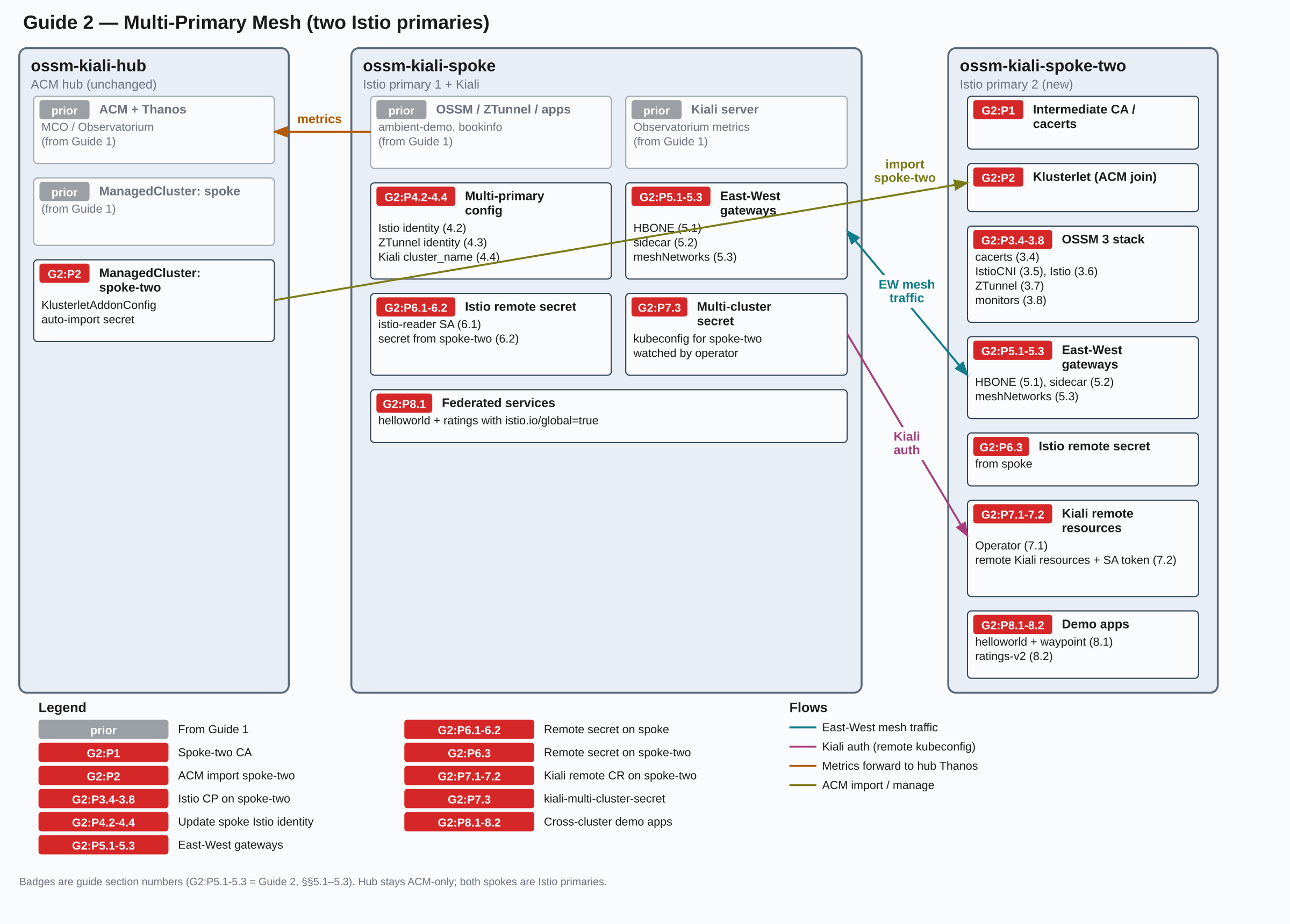
This guide requires OSSM 3.4+ (Istio 1.30+) on OpenShift 4.19+. The East-West gateway configuration for cross-cluster sidecar traffic relies on Gateway API behavior introduced in Istio 1.30. Istio 1.30’s oldest supported Kubernetes version is 1.32, which corresponds to OpenShift 4.19.
Prerequisites
- The MultiCluster on OpenShift guide completed successfully — ACM, OSSM 3, and Kiali must already be running on
ossm-kiali-hub and ossm-kiali-spoke.
- A second fresh OpenShift 4.19+ cluster accessible via kubeconfig context
ossm-kiali-spoke-two (same minimum as the hub/spoke guide).
istioctl installed locally (required to create Istio cross-cluster endpoint discovery secrets). Version must match ${ISTIO_VERSION}.- All three kubeconfig contexts reachable:
oc --context=ossm-kiali-hub       whoami --show-server
oc --context=ossm-kiali-spoke     whoami --show-server
oc --context=ossm-kiali-spoke-two whoami --show-server
- The Istio CA root certificate from the hub/spoke guide must still be available at
/tmp/istio-certs/root-cert.pem and /tmp/istio-certs/root-key.pem. The second spoke’s intermediate CA must be signed by the same root to establish mutual trust.
Environment Setup
Set these variables in the same shell session used for the hub/spoke guide, or re-export the variables from that guide first.
# Must match the hub/spoke guide values exactly
export SPOKE_CLUSTER_NAME="spoke"
export ISTIO_VERSION="1.30.1"
export MESH_ID="mesh1"

# Network names — each cluster must be on a different network
# (no direct pod-to-pod connectivity between clusters)
export SPOKE_NETWORK="network1"
export SPOKE_TWO_NETWORK="network2"

# Spoke-two ACM cluster name — also used as the Istio cluster identity and
# Kiali cluster name so that naming is consistent across all components
export SPOKE_TWO_CLUSTER_NAME="spoke-two"
Phase 1: Generate Spoke-Two CA Certificate
The second spoke needs its own intermediate CA certificate, signed by the same root CA used for the first spoke in the hub/spoke guide. This shared root establishes mutual mTLS trust between the two control planes.
mkdir -p /tmp/istio-certs/spoke-two && cd /tmp/istio-certs

cat > spoke-two/intermediate.conf <<'CONF'
[ req ]
encrypt_key = no
prompt = no
utf8 = yes
default_md = sha256
default_bits = 4096
req_extensions = req_ext
x509_extensions = req_ext
distinguished_name = req_dn
[ req_ext ]
subjectKeyIdentifier = hash
basicConstraints = critical, CA:true, pathlen:0
keyUsage = critical, digitalSignature, nonRepudiation, keyEncipherment, keyCertSign
subjectAltName=@san
[ san ]
DNS.1 = istiod.istio-system.svc
[ req_dn ]
O = Istio
CN = Intermediate CA
L = spoke-two
CONF

openssl genrsa -out spoke-two/ca-key.pem 4096 2>/dev/null

openssl req -new \
  -config spoke-two/intermediate.conf \
  -key spoke-two/ca-key.pem \
  -out spoke-two/cluster-ca.csr 2>/dev/null

openssl x509 -req -sha256 -days 3650 \
  -CA root-cert.pem \
  -CAkey root-key.pem -CAcreateserial \
  -extensions req_ext -extfile spoke-two/intermediate.conf \
  -in spoke-two/cluster-ca.csr \
  -out spoke-two/ca-cert.pem 2>/dev/null

cat spoke-two/ca-cert.pem root-cert.pem > spoke-two/cert-chain.pem
cp root-cert.pem spoke-two/root-cert.pem

echo "Spoke-two intermediate CA: $(openssl x509 -noout -subject -in spoke-two/ca-cert.pem)"

cd -
Phase 2: Import Spoke-Two into ACM
On the hub cluster, create a ManagedCluster resource and import ossm-kiali-spoke-two using the same auto-import approach as the hub/spoke guide.
oc --context=ossm-kiali-hub create namespace "${SPOKE_TWO_CLUSTER_NAME}" 2>/dev/null || true

oc --context=ossm-kiali-hub apply -f - <<EOF
apiVersion: cluster.open-cluster-management.io/v1
kind: ManagedCluster
metadata:
  name: ${SPOKE_TWO_CLUSTER_NAME}
  labels:
    cloud: auto-detect
    vendor: auto-detect
spec:
  hubAcceptsClient: true
EOF

oc --context=ossm-kiali-hub apply -f - <<EOF
apiVersion: agent.open-cluster-management.io/v1
kind: KlusterletAddonConfig
metadata:
  name: ${SPOKE_TWO_CLUSTER_NAME}
  namespace: ${SPOKE_TWO_CLUSTER_NAME}
spec:
  applicationManager:
    enabled: true
  certPolicyController:
    enabled: true
  policyController:
    enabled: true
  searchCollector:
    enabled: true
EOF
Extract the spoke-two kubeconfig and create the auto-import secret:
oc config view --context=ossm-kiali-spoke-two --minify --flatten \
  > /tmp/spoke-two-kubeconfig.yaml

oc --kubeconfig=/tmp/spoke-two-kubeconfig.yaml whoami --show-server

oc --context=ossm-kiali-hub create secret generic auto-import-secret \
  -n "${SPOKE_TWO_CLUSTER_NAME}" \
  --from-file=kubeconfig=/tmp/spoke-two-kubeconfig.yaml

rm -f /tmp/spoke-two-kubeconfig.yaml
Wait for spoke-two to join:
echo "Waiting for ${SPOKE_TWO_CLUSTER_NAME} to join..."
while true; do
  STATUS=$(oc --context=ossm-kiali-hub get managedcluster "${SPOKE_TWO_CLUSTER_NAME}" \
    -o jsonpath='{range .status.conditions[*]}{.type}={.status}{" "}{end}' 2>/dev/null)
  echo "  Status: ${STATUS}"
  if echo "${STATUS}" | grep -q "ManagedClusterJoined=True" && \
     echo "${STATUS}" | grep -q "ManagedClusterConditionAvailable=True"; then
    echo "${SPOKE_TWO_CLUSTER_NAME} is joined and available"
    break
  fi
  sleep 15
done
Phase 3: Install OSSM 3 on Spoke-Two
3.1 Enable User Workload Monitoring
Check if UWM is already enabled on the spoke cluster:
oc --context=ossm-kiali-spoke-two get configmap cluster-monitoring-config \
  -n openshift-monitoring \
  -o jsonpath='{.data.config\.yaml}' 2>/dev/null | \
  grep -q "enableUserWorkload: true" && \
  echo "Already enabled" || echo "Not enabled"
If UWM is not yet enabled, enable it following the instructions below. The following enables UWM safely — merge enableUserWorkload: true without clobbering other monitoring settings. If you created the ConfigMap from scratch, label it so cleanup knows it is safe to remove:
if oc --context=ossm-kiali-spoke-two get configmap cluster-monitoring-config \
    -n openshift-monitoring &>/dev/null 2>&1; then
  # ConfigMap already exists — patch only the enableUserWorkload key
  EXISTING=$(oc --context=ossm-kiali-spoke-two get configmap cluster-monitoring-config \
    -n openshift-monitoring -o jsonpath='{.data.config\.yaml}' 2>/dev/null || true)
  if echo "${EXISTING}" | grep -q "enableUserWorkload:"; then
    oc --context=ossm-kiali-spoke-two get configmap cluster-monitoring-config \
      -n openshift-monitoring -o json \
      | jq '.data["config.yaml"] |= sub("enableUserWorkload:\\s*\\w+"; "enableUserWorkload: true")' \
      | oc --context=ossm-kiali-spoke-two apply -f -
  else
    oc --context=ossm-kiali-spoke-two get configmap cluster-monitoring-config \
      -n openshift-monitoring -o json \
      | jq '.data["config.yaml"] = ((.data["config.yaml"] // "") + "\nenableUserWorkload: true\n")' \
      | oc --context=ossm-kiali-spoke-two apply -f -
  fi
else
  # ConfigMap does not exist — create it and label it as tutorial-owned
  oc --context=ossm-kiali-spoke-two create configmap cluster-monitoring-config \
    -n openshift-monitoring \
    --from-literal=config.yaml="enableUserWorkload: true"
  oc --context=ossm-kiali-spoke-two label configmap cluster-monitoring-config \
    -n openshift-monitoring kiali.io/tutorial-owned=true
fi
Wait for the User Workload Monitoring Prometheus pods to be created and become ready. This can take a few minutes after UWM is enabled.
until oc --context=ossm-kiali-spoke-two get pods \
  -l app.kubernetes.io/name=prometheus \
  -n openshift-user-workload-monitoring \
  --no-headers 2>/dev/null | grep -q .; do
  sleep 5
done
oc --context=ossm-kiali-spoke-two wait pod \
  --for=condition=Ready \
  -l app.kubernetes.io/name=prometheus \
  -n openshift-user-workload-monitoring \
  --timeout=300s
3.2 Install OSSM 3 Operator
# Merge this key into the existing ConfigMap without replacing unrelated UWM settings.
oc --context=ossm-kiali-spoke-two apply -f - <<'EOF'
apiVersion: operators.coreos.com/v1alpha1
kind: Subscription
metadata:
  name: openshift-service-mesh-operator
  namespace: openshift-operators
spec:
  channel: stable
  installPlanApproval: Automatic
  name: servicemeshoperator3
  source: redhat-operators
  sourceNamespace: openshift-marketplace
EOF

until oc --context=ossm-kiali-spoke-two get pods \
  -l app.kubernetes.io/created-by=servicemeshoperator3 \
  -n openshift-operators \
  --no-headers 2>/dev/null | grep -q .; do
  sleep 5
done
oc --context=ossm-kiali-spoke-two wait pod \
  --for=condition=Ready \
  -l app.kubernetes.io/created-by=servicemeshoperator3 \
  -n openshift-operators \
  --timeout=300s
3.3 Create Namespaces and Label ztunnel for Discovery
oc --context=ossm-kiali-spoke-two create namespace istio-system 2>/dev/null || true
oc --context=ossm-kiali-spoke-two create namespace istio-cni 2>/dev/null || true
oc --context=ossm-kiali-spoke-two create namespace ztunnel 2>/dev/null || true

# ztunnel namespace must be labeled so istiod distributes the CA cert ConfigMap there
oc --context=ossm-kiali-spoke-two label namespace ztunnel istio-discovery=enabled

# istio-system must be labeled for two reasons:
# 1. topology.istio.io/network - tells istiod which network the cluster is on (required for multi-network routing)
# 2. istio-discovery: enabled - required for the Gateway API controller to process Gateways in this namespace
oc --context=ossm-kiali-spoke-two label namespace istio-system \
  topology.istio.io/network="${SPOKE_TWO_NETWORK}" \
  istio-discovery=enabled
3.4 Load CA Certificates
oc --context=ossm-kiali-spoke-two get secret cacerts -n istio-system &>/dev/null || \
oc --context=ossm-kiali-spoke-two create secret generic cacerts -n istio-system \
  --from-file=ca-cert.pem=/tmp/istio-certs/spoke-two/ca-cert.pem \
  --from-file=ca-key.pem=/tmp/istio-certs/spoke-two/ca-key.pem \
  --from-file=root-cert.pem=/tmp/istio-certs/spoke-two/root-cert.pem \
  --from-file=cert-chain.pem=/tmp/istio-certs/spoke-two/cert-chain.pem
3.5 Install IstioCNI
oc --context=ossm-kiali-spoke-two apply -f - <<EOF
apiVersion: sailoperator.io/v1
kind: IstioCNI
metadata:
  name: default
spec:
  namespace: istio-cni
  profile: openshift-ambient
  version: v${ISTIO_VERSION}
EOF

oc --context=ossm-kiali-spoke-two wait istiocni default \
  --for=condition=Ready \
  --timeout=300s
3.6 Install Istio Control Plane (with Multi-Cluster Config)
The Istio CR for spoke-two sets the cluster identity, network identity, and enables AMBIENT_ENABLE_MULTI_NETWORK for ambient cross-network routing. The clusterName must match the value in the ZTunnel CR exactly — istiod uses it to identify the local cluster, and ztunnel uses it when authenticating to istiod. A mismatch causes ztunnel pods to fail with authentication failure:
oc --context=ossm-kiali-spoke-two apply -f - <<EOF
apiVersion: sailoperator.io/v1
kind: Istio
metadata:
  name: default
spec:
  namespace: istio-system
  profile: openshift-ambient
  updateStrategy:
    type: InPlace
  values:
    global:
      meshID: ${MESH_ID}
      multiCluster:
        clusterName: ${SPOKE_TWO_CLUSTER_NAME}
      network: ${SPOKE_TWO_NETWORK}
    meshConfig:
      discoverySelectors:
      - matchLabels:
          istio-discovery: enabled
    pilot:
      trustedZtunnelNamespace: ztunnel
      env:
        AMBIENT_ENABLE_MULTI_NETWORK: "true"
  version: v${ISTIO_VERSION}
EOF

oc --context=ossm-kiali-spoke-two wait istio default \
  --for=condition=Ready \
  --timeout=300s
3.7 Install ZTunnel (with Cluster and Network Identity)
oc --context=ossm-kiali-spoke-two apply -f - <<EOF
apiVersion: sailoperator.io/v1
kind: ZTunnel
metadata:
  name: default
spec:
  namespace: ztunnel
  version: v${ISTIO_VERSION}
  values:
    ztunnel:
      multiCluster:
        clusterName: ${SPOKE_TWO_CLUSTER_NAME}
      network: ${SPOKE_TWO_NETWORK}
EOF

oc --context=ossm-kiali-spoke-two wait ztunnel default \
  --for=condition=Ready \
  --timeout=300s

oc --context=ossm-kiali-spoke-two get pods -n ztunnel -l app=ztunnel
The hub-side MCOA configuration resources from Guide 1 are already registered with the placement. When spoke-two joins the cluster set, MCOA propagates the shared recording rule into mesh-observability on spoke-two so UWM can aggregate workload:istio_* series from all scraped namespaces there.
Ensure the aggregation namespace exists and is exempt from UWM label enforcement on spoke-two before MCOA propagates the recording rule:
oc --context=ossm-kiali-spoke-two create namespace mesh-observability --dry-run=client -o yaml | \
  oc --context=ossm-kiali-spoke-two apply -f -
oc --context=ossm-kiali-spoke-two apply -f - <<'EOF'
apiVersion: v1
kind: ConfigMap
metadata:
  name: user-workload-monitoring-config
  namespace: openshift-user-workload-monitoring
data:
  config.yaml: |
    namespacesWithoutLabelEnforcement:
    - mesh-observability
EOF
for NS in istio-system ztunnel ambient-demo bookinfo; do
  oc --context=ossm-kiali-spoke-two create namespace "${NS}" --dry-run=client -o yaml | \
    oc --context=ossm-kiali-spoke-two apply -f -
done
Create the UWM monitors so UWM Prometheus scrapes the raw Istio metrics that MCOA will then federate to hub Thanos:
oc --context=ossm-kiali-spoke-two apply -f - <<'EOF'
apiVersion: monitoring.coreos.com/v1
kind: ServiceMonitor
metadata:
  name: istiod-monitor
  namespace: istio-system
spec:
  targetLabels:
  - app
  selector:
    matchLabels:
      istio: pilot
  endpoints:
  - port: http-monitoring
    interval: 30s
EOF

oc --context=ossm-kiali-spoke-two apply -f - <<EOF
apiVersion: monitoring.coreos.com/v1
kind: PodMonitor
metadata:
  name: ztunnel-monitor
  namespace: ztunnel
spec:
  selector:
    matchExpressions:
    - key: istio-prometheus-ignore
      operator: DoesNotExist
  podMetricsEndpoints:
  - path: /stats/prometheus
    interval: 30s
    relabelings:
    - action: keep
      sourceLabels: ["__meta_kubernetes_pod_container_name"]
      regex: "istio-proxy"
    - action: keep
      sourceLabels: ["__meta_kubernetes_pod_annotationpresent_prometheus_io_scrape"]
    - action: replace
      regex: (\d+);(([A-Fa-f0-9]{1,4}::?){1,7}[A-Fa-f0-9]{1,4})
      replacement: '[\$2]:\$1'
      sourceLabels: ["__meta_kubernetes_pod_annotation_prometheus_io_port","__meta_kubernetes_pod_ip"]
      targetLabel: "__address__"
    - action: replace
      regex: (\d+);((([0-9]+?)(\.|$)){4})
      replacement: '\$2:\$1'
      sourceLabels: ["__meta_kubernetes_pod_annotation_prometheus_io_port","__meta_kubernetes_pod_ip"]
      targetLabel: "__address__"
    - sourceLabels: ["__meta_kubernetes_pod_label_app_kubernetes_io_name","__meta_kubernetes_pod_label_app"]
      separator: ";"
      targetLabel: "app"
      action: replace
      regex: "(.+);.*|.*;(.+)"
      replacement: "\${1}\${2}"
    - sourceLabels: ["__meta_kubernetes_pod_label_app_kubernetes_io_version","__meta_kubernetes_pod_label_version"]
      separator: ";"
      targetLabel: "version"
      action: replace
      regex: "(.+);.*|.*;(.+)"
      replacement: "\${1}\${2}"
    - action: replace
      regex: "(.+)"
      replacement: "\${1}"
      sourceLabels: ["__meta_kubernetes_pod_label_app_kubernetes_io_name"]
      targetLabel: "app_kubernetes_io_name"
    - action: replace
      regex: "(.+)"
      replacement: "\${1}"
      sourceLabels: ["__meta_kubernetes_pod_label_app_kubernetes_io_version"]
      targetLabel: "app_kubernetes_io_version"
    - sourceLabels: ["__meta_kubernetes_namespace"]
      action: replace
      targetLabel: namespace
    - action: replace
      replacement: "${MESH_ID}"
      targetLabel: mesh_id
EOF
Phase 4: Update Spoke (Cluster 1) for Multi-Primary
The first spoke’s Istio and ZTunnel CRs from the hub/spoke guide did not include cluster identity or multi-network settings. Patch them now.
4.1 Label Spoke istio-system with Network Identity
oc --context=ossm-kiali-spoke label namespace istio-system \
  topology.istio.io/network="${SPOKE_NETWORK}" \
  istio-discovery=enabled
4.2 Update Spoke Istio CR
oc --context=ossm-kiali-spoke patch istio default --type=merge -p "{
  \"spec\": {
    \"values\": {
      \"global\": {
        \"multiCluster\": {\"clusterName\": \"${SPOKE_CLUSTER_NAME}\"},
        \"network\": \"${SPOKE_NETWORK}\"
      },
      \"pilot\": {
        \"env\": {
          \"AMBIENT_ENABLE_MULTI_NETWORK\": \"true\"
        }
      }
    }
  }
}"

oc --context=ossm-kiali-spoke wait istio default \
  --for=condition=Ready \
  --timeout=300s
4.3 Update Spoke ZTunnel CR
Setting clusterName in the ZTunnel CR must match the value in the Istio CR above — both istiod and ztunnel must agree on the local cluster identity (see Notes #5):
oc --context=ossm-kiali-spoke patch ztunnel default --type=merge -p "{
  \"spec\": {
    \"values\": {
      \"ztunnel\": {
        \"multiCluster\": {\"clusterName\": \"${SPOKE_CLUSTER_NAME}\"},
        \"network\": \"${SPOKE_NETWORK}\"
      }
    }
  }
}"

oc --context=ossm-kiali-spoke wait ztunnel default \
  --for=condition=Ready \
  --timeout=300s
4.4 Update Kiali with the Cluster Name
Kiali was installed in the hub/spoke guide without a cluster name because only one cluster existed. Now that spoke has multiCluster.clusterName: spoke configured, Kiali must be updated to match so it correctly identifies the home cluster — without this, the Kiali login page will redirect in an infinite loop:
oc --context=ossm-kiali-spoke patch kiali kiali -n istio-system --type=merge -p "{
  \"spec\": {
    \"kubernetes_config\": {
      \"cluster_name\": \"${SPOKE_CLUSTER_NAME}\"
    }
  }
}"

oc --context=ossm-kiali-spoke rollout status deployment/kiali \
  -n istio-system --timeout=120s
Wait until the injector ConfigMap reflects ${SPOKE_CLUSTER_NAME}, then restart the
sidecar-injected pods in bookinfo so they pick up the new cluster identity. The OSSM/Sail operator publishes injection settings in the istio-sidecar-injector ConfigMap in istio-system. The first loop below polls that ConfigMap until global.multiCluster.clusterName equals ${SPOKE_CLUSTER_NAME} (see Notes #5 for why you must wait). Only then restart bookinfo so new sidecars pick up the identity. After the rollout, the final check reads ISTIO_META_CLUSTER_ID from a sample pod’s istio-proxy container to confirm injection used the new name — not Kubernetes:
echo "Waiting for sidecar injector to publish clusterName=${SPOKE_CLUSTER_NAME}..."
while true; do
  INJECTOR_CLUSTER=$(oc --context=ossm-kiali-spoke get configmap istio-sidecar-injector \
    -n istio-system \
    -o jsonpath='{.data.values}' | \
    jq -r '.global.multiCluster.clusterName // empty')
  echo "  injector clusterName=${INJECTOR_CLUSTER:-<empty>}"
  if [ "${INJECTOR_CLUSTER}" = "${SPOKE_CLUSTER_NAME}" ]; then
    echo "Sidecar injector is ready"
    break
  fi
  sleep 5
done

oc --context=ossm-kiali-spoke rollout restart deployment -n bookinfo

# Wait on Deployments — not `oc wait pods --all`, which races with Terminating pods during the restart
oc --context=ossm-kiali-spoke wait deployment --all \
  -n bookinfo \
  --for=condition=Available \
  --timeout=180s

# Confirm sidecars were injected with the new cluster identity (must not be "Kubernetes")
SAMPLE_POD=$(oc --context=ossm-kiali-spoke get pod -n bookinfo \
  -l app=productpage \
  -o jsonpath='{.items[0].metadata.name}')
PROXY_CLUSTER=$(oc --context=ossm-kiali-spoke get pod "${SAMPLE_POD}" -n bookinfo -o json | \
  jq -r '[.spec.containers[]?, .spec.initContainers[]?
    | select(.name == "istio-proxy")
    | .env[]? | select(.name == "ISTIO_META_CLUSTER_ID")
    | .value] | first // empty')
echo "productpage ISTIO_META_CLUSTER_ID=${PROXY_CLUSTER}"
if [ "${PROXY_CLUSTER}" != "${SPOKE_CLUSTER_NAME}" ]; then
  echo "ERROR: expected ISTIO_META_CLUSTER_ID=${SPOKE_CLUSTER_NAME}, got '${PROXY_CLUSTER}'."
  echo "Re-check the injector ConfigMap above, then re-run the rollout restart."
fi
Phase 5: East-West Gateways
East-West gateways bridge the two cluster networks. Two types of cross-network traffic need separate gateways because they use different protocols:
- Ambient traffic (ztunnel → ztunnel): uses HBONE on port 15008, handled by the
istio-east-west gatewayClassName
- Sidecar traffic (sidecar → sidecar): uses mTLS auto-passthrough on port 15443, handled by a standard
istio gatewayClassName gateway with TLS Passthrough
5.1 HBONE Gateway (Ambient Traffic)
Deploy the HBONE east-west gateway on each cluster. This handles cross-cluster traffic for ambient-mode workloads:
for CTX_AND_NET in "ossm-kiali-spoke:${SPOKE_NETWORK}" "ossm-kiali-spoke-two:${SPOKE_TWO_NETWORK}"; do
  CTX="${CTX_AND_NET%%:*}"
  NET="${CTX_AND_NET##*:}"
  oc --context="${CTX}" apply -f - <<EOF
apiVersion: gateway.networking.k8s.io/v1
kind: Gateway
metadata:
  name: istio-eastwestgateway
  namespace: istio-system
  labels:
    topology.istio.io/network: ${NET}
spec:
  gatewayClassName: istio-east-west
  listeners:
  - name: mesh
    port: 15008
    protocol: HBONE
    tls:
      mode: Terminate
      options:
        gateway.istio.io/tls-terminate-mode: ISTIO_MUTUAL
EOF
  oc --context="${CTX}" wait gateway/istio-eastwestgateway \
    -n istio-system \
    --for=condition=Programmed=True \
    --timeout=180s
done
5.2 Sidecar Gateway (mTLS Auto-Passthrough)
Sidecar proxies route cross-network traffic via mTLS on port 15443 — a different protocol than HBONE. The istio-east-west gatewayClassName only handles HBONE, so a second gateway using the standard istio gatewayClassName is needed.
A Gateway API resource with protocol: TLS and tls.mode: Passthrough on port 15443 is sufficient — Istio’s Gateway API implementation automatically generates SNI-based passthrough filter chains for all discovered mesh services.
Deploy the sidecar east-west gateway on each cluster:
for CTX_AND_NET in "ossm-kiali-spoke:${SPOKE_NETWORK}" "ossm-kiali-spoke-two:${SPOKE_TWO_NETWORK}"; do
  CTX="${CTX_AND_NET%%:*}"
  NET="${CTX_AND_NET##*:}"
  oc --context="${CTX}" apply -f - <<EOF
apiVersion: gateway.networking.k8s.io/v1
kind: Gateway
metadata:
  name: istio-eastwestgateway-sidecar
  namespace: istio-system
  labels:
    topology.istio.io/network: ${NET}
spec:
  gatewayClassName: istio
  listeners:
  - name: tls
    port: 15443
    protocol: TLS
    tls:
      mode: Passthrough
    allowedRoutes:
      namespaces:
        from: Same
EOF
  oc --context="${CTX}" wait gateway/istio-eastwestgateway-sidecar \
    -n istio-system \
    --for=condition=Programmed=True \
    --timeout=180s
done
The meshNetworks configuration tells each istiod where the East-West gateways are for each network. Each network entry has two gateways: the HBONE gateway (port 15008) for ambient workloads, and the sidecar gateway (port 15443) for sidecar-injected workloads. Istiod selects the correct gateway based on the proxy type of the requesting workload.
HBONE_IP1=$(oc --context=ossm-kiali-spoke get svc istio-eastwestgateway \
  -n istio-system -o jsonpath='{.status.loadBalancer.ingress[0].ip}')
SIDECAR_IP1=$(oc --context=ossm-kiali-spoke get svc istio-eastwestgateway-sidecar-istio \
  -n istio-system -o jsonpath='{.status.loadBalancer.ingress[0].ip}')
HBONE_IP2=$(oc --context=ossm-kiali-spoke-two get svc istio-eastwestgateway \
  -n istio-system -o jsonpath='{.status.loadBalancer.ingress[0].ip}')
SIDECAR_IP2=$(oc --context=ossm-kiali-spoke-two get svc istio-eastwestgateway-sidecar-istio \
  -n istio-system -o jsonpath='{.status.loadBalancer.ingress[0].ip}')
echo "Spoke:     HBONE=${HBONE_IP1}  Sidecar=${SIDECAR_IP1}"
echo "Spoke-two: HBONE=${HBONE_IP2}  Sidecar=${SIDECAR_IP2}"

for CTX in ossm-kiali-spoke ossm-kiali-spoke-two; do
  oc --context="${CTX}" patch istio default --type=merge -p "{
    \"spec\": {
      \"values\": {
        \"global\": {
          \"meshNetworks\": {
            \"${SPOKE_NETWORK}\": {
              \"endpoints\": [{\"fromRegistry\": \"${SPOKE_CLUSTER_NAME}\"}],
              \"gateways\": [
                {\"address\": \"${HBONE_IP1}\", \"port\": 15008},
                {\"address\": \"${SIDECAR_IP1}\", \"port\": 15443}
              ]
            },
            \"${SPOKE_TWO_NETWORK}\": {
              \"endpoints\": [{\"fromRegistry\": \"${SPOKE_TWO_CLUSTER_NAME}\"}],
              \"gateways\": [
                {\"address\": \"${HBONE_IP2}\", \"port\": 15008},
                {\"address\": \"${SIDECAR_IP2}\", \"port\": 15443}
              ]
            }
          }
        }
      }
    }
  }"
done
Phase 6: Cross-Cluster Endpoint Discovery
Each istiod must be able to watch the other cluster’s Kubernetes API server for services and endpoints. This requires a service account with cluster-reader permissions on each cluster and a cross-cluster secret generated via istioctl.
6.1 Create istio-reader Service Accounts
oc --context=ossm-kiali-spoke create serviceaccount istio-reader-service-account \
  -n istio-system 2>/dev/null || true
oc --context=ossm-kiali-spoke adm policy add-cluster-role-to-user cluster-reader \
  -z istio-reader-service-account -n istio-system

oc --context=ossm-kiali-spoke-two create serviceaccount istio-reader-service-account \
  -n istio-system 2>/dev/null || true
oc --context=ossm-kiali-spoke-two adm policy add-cluster-role-to-user cluster-reader \
  -z istio-reader-service-account -n istio-system
6.2 Install Remote Secret on Cluster 1 (from Cluster 2)
This lets cluster 1’s istiod discover cluster 2’s endpoints:
istioctl create-remote-secret \
  --context=ossm-kiali-spoke-two \
  --name="${SPOKE_TWO_CLUSTER_NAME}" \
  --create-service-account=false | \
  oc --context=ossm-kiali-spoke apply -f -
6.3 Install Remote Secret on Cluster 2 (from Cluster 1)
This lets cluster 2’s istiod discover cluster 1’s endpoints:
istioctl create-remote-secret \
  --context=ossm-kiali-spoke \
  --name="${SPOKE_CLUSTER_NAME}" \
  --create-service-account=false | \
  oc --context=ossm-kiali-spoke-two apply -f -
Verify remote secrets are present on both clusters:
oc --context=ossm-kiali-spoke get secrets \
  -n istio-system -l istio/multiCluster=true

oc --context=ossm-kiali-spoke-two get secrets \
  -n istio-system -l istio/multiCluster=true
Phase 7: Update Kiali for Multi-Cluster Access
Kiali runs on ossm-kiali-spoke and already queries ACM Thanos for metrics (set up in the hub/spoke guide). It now also needs API access to ossm-kiali-spoke-two to show workloads, services, and Istio config from that cluster.
7.1 Install Kiali Operator on Spoke-Two
The Kiali Operator on spoke-two creates the service account and RBAC that Kiali on spoke uses to access the cluster. No Kiali server is deployed on spoke-two.
oc --context=ossm-kiali-spoke-two apply -f - <<'EOF'
apiVersion: operators.coreos.com/v1alpha1
kind: Subscription
metadata:
  name: kiali-ossm
  namespace: openshift-operators
spec:
  channel: stable
  installPlanApproval: Automatic
  name: kiali-ossm
  source: redhat-operators
  sourceNamespace: openshift-marketplace
EOF

until oc --context=ossm-kiali-spoke-two get pods \
  -l app.kubernetes.io/name=kiali-operator \
  -n openshift-operators \
  --no-headers 2>/dev/null | grep -q .; do
  sleep 5
done
oc --context=ossm-kiali-spoke-two wait pod \
  --for=condition=Ready \
  -l app.kubernetes.io/name=kiali-operator \
  -n openshift-operators \
  --timeout=300s
7.2 Install Kiali CR on Spoke-Two (Remote Resources Only)
Create the Kiali CR with remote_cluster_resources_only: true. This creates the kiali-service-account ServiceAccount and RBAC but no Kiali server. The tutorial explicitly disables impersonation for compatibility with Kiali releases that do not support it.
The redirect URI points back to the home Kiali route and is required for the non-impersonation per-cluster OpenShift OAuth flow. Get the home Kiali route first:
KIALI_HOST=$(oc --context=ossm-kiali-spoke get route kiali -n istio-system \
  -o jsonpath='{.spec.host}')
echo "Kiali host: ${KIALI_HOST}"
oc --context=ossm-kiali-spoke-two apply -f - <<EOF
apiVersion: kiali.io/v1alpha1
kind: Kiali
metadata:
  name: kiali
  namespace: istio-system
spec:
  auth:
    openshift:
      impersonation:
        enabled: false
      redirect_uris:
      - "https://${KIALI_HOST}/api/auth/callback/${SPOKE_TWO_CLUSTER_NAME}"
  deployment:
    logger:
      log_level: debug
    namespace: istio-system
    remote_cluster_resources_only: true
EOF
Wait for the CR to reconcile successfully, then verify the SA and ClusterRoleBinding were created:
until oc --context=ossm-kiali-spoke-two get kiali kiali -n istio-system \
  -o jsonpath='{.status.conditions[?(@.type=="Successful")].status}' 2>/dev/null | grep -q "True"; do
  echo "Waiting for Kiali CR reconciliation..."
  sleep 10
done

oc --context=ossm-kiali-spoke-two get sa kiali-service-account -n istio-system
oc --context=ossm-kiali-spoke-two get clusterrolebinding kiali -o name
7.3 Create the Kiali Multi-Cluster Secret
Kiali reads remote cluster credentials from a secret named kiali-multi-cluster-secret in the Kiali deployment namespace. Each key in the secret is a cluster name; its value is a kubeconfig that grants Kiali API access to that cluster. This single-secret pattern scales naturally — to add more clusters later, add more keys to the same secret.
Labeling the secret with kiali.io/kiali-multi-cluster-secret: "true" tells the Kiali Operator to watch it and automatically roll out a new Kiali pod whenever the secret changes (no manual trigger needed).
In Kubernetes 1.24+, service account token secrets are not created automatically. Create one for kiali-service-account on spoke-two so that a long-lived token is available:
The kubernetes.io/service-account-token Secret created below produces a token with no expiration. For production environments, consider using oc create token kiali-service-account -n istio-system --duration=720h instead to create a time-bounded token. You will need to rotate the token (and update the kiali-multi-cluster-secret on the home cluster) before it expires. Kiali detects secret changes and reloads credentials automatically without a pod restart.
oc --context=ossm-kiali-spoke-two apply -f - <<'EOF'
apiVersion: v1
kind: Secret
metadata:
  name: "kiali-service-account"
  namespace: "istio-system"
  annotations:
    kubernetes.io/service-account.name: "kiali-service-account"
type: kubernetes.io/service-account-token
EOF

until oc --context=ossm-kiali-spoke-two get secret kiali-service-account \
  -n istio-system \
  -o jsonpath='{.data.token}' 2>/dev/null | grep -q .; do
  sleep 3
done
echo "SA token secret is ready"
Collect spoke-two’s connection details and write a kubeconfig to a temporary file:
SPOKE_TWO_SERVER=$(oc --context=ossm-kiali-spoke-two whoami --show-server | tr -d '[:space:]') && \
SPOKE_TWO_CA=$(oc --context=ossm-kiali-spoke-two get secret kiali-service-account \
  -n istio-system -o jsonpath='{.data.ca\.crt}') && \
SPOKE_TWO_TOKEN=$(oc --context=ossm-kiali-spoke-two get secret kiali-service-account \
  -n istio-system -o jsonpath='{.data.token}' | base64 -d) && \
cat > /tmp/cluster2-kubeconfig.yaml <<EOF
apiVersion: v1
kind: Config
current-context: ${SPOKE_TWO_CLUSTER_NAME}
contexts:
- name: ${SPOKE_TWO_CLUSTER_NAME}
  context:
    cluster: ${SPOKE_TWO_CLUSTER_NAME}
    user: ${SPOKE_TWO_CLUSTER_NAME}
clusters:
- name: ${SPOKE_TWO_CLUSTER_NAME}
  cluster:
    server: ${SPOKE_TWO_SERVER}
    certificate-authority-data: ${SPOKE_TWO_CA}
users:
- name: ${SPOKE_TWO_CLUSTER_NAME}
  user:
    token: ${SPOKE_TWO_TOKEN}
EOF
echo "Kubeconfig written — server: ${SPOKE_TWO_SERVER}"
Create kiali-multi-cluster-secret on spoke. The file key name must match the cluster name (${SPOKE_TWO_CLUSTER_NAME}):
oc --context=ossm-kiali-spoke create secret generic kiali-multi-cluster-secret \
  -n istio-system \
  --from-file="${SPOKE_TWO_CLUSTER_NAME}=/tmp/cluster2-kubeconfig.yaml"

oc --context=ossm-kiali-spoke label secret kiali-multi-cluster-secret \
  -n istio-system \
  "kiali.io/kiali-multi-cluster-secret=true"

rm -f /tmp/cluster2-kubeconfig.yaml
Verify the secret and confirm the kubeconfig can reach spoke-two:
oc --context=ossm-kiali-spoke get secret kiali-multi-cluster-secret \
  -n istio-system --show-labels

# Extract and test the embedded kubeconfig
oc --context=ossm-kiali-spoke get secret kiali-multi-cluster-secret \
  -n istio-system \
  -o jsonpath="{.data.${SPOKE_TWO_CLUSTER_NAME}}" | base64 -d > /tmp/verify-kubeconfig.yaml

oc --kubeconfig=/tmp/verify-kubeconfig.yaml whoami --show-server
# Expected: spoke-two's API server URL

rm -f /tmp/verify-kubeconfig.yaml
The kiali.io/kiali-multi-cluster-secret: "true" label causes the Kiali Operator to automatically detect the secret and roll out a new Kiali pod with the spoke-two credentials mounted.
Wait for the rollout to complete (triggered by the multi-cluster secret being detected):
oc --context=ossm-kiali-spoke rollout status deployment/kiali \
  -n istio-system --timeout=120s
Phase 8: Demo Applications (Spoke-Two)
8.1 Ambient Demo App — Helloworld
Deploy helloworld v1 and v2 on spoke-two’s ambient-demo namespace. Both clusters now have the same service name — Istio’s multi-cluster federation merges them into a single virtual service with endpoints from both clusters. Label the service istio.io/global=true so spoke’s istiod discovers spoke-two’s endpoints.
Once deployed, the existing traffic-gen on spoke (from the hub/spoke guide) will automatically start load-balancing requests across pods on both clusters through the East-West gateway.
oc --context=ossm-kiali-spoke-two create namespace ambient-demo 2>/dev/null || true
oc --context=ossm-kiali-spoke-two label namespace ambient-demo \
  istio.io/dataplane-mode=ambient \
  istio-discovery=enabled

ISTIO_MINOR=$(echo "${ISTIO_VERSION}" | cut -d. -f1-2)

# Download the helloworld manifest once to avoid GitHub rate limits on repeated requests
curl -sL "https://raw.githubusercontent.com/openshift-service-mesh/istio/release-${ISTIO_MINOR}/samples/helloworld/helloworld.yaml" \
  -o /tmp/helloworld.yaml

oc --context=ossm-kiali-spoke-two apply -n ambient-demo -l service=helloworld -f /tmp/helloworld.yaml
oc --context=ossm-kiali-spoke-two apply -n ambient-demo -l version=v1 -f /tmp/helloworld.yaml
oc --context=ossm-kiali-spoke-two apply -n ambient-demo -l version=v2 -f /tmp/helloworld.yaml
rm -f /tmp/helloworld.yaml

oc --context=ossm-kiali-spoke-two wait deployment/helloworld-v1 \
  -n ambient-demo --for=condition=Available --timeout=120s
oc --context=ossm-kiali-spoke-two wait deployment/helloworld-v2 \
  -n ambient-demo --for=condition=Available --timeout=120s

# Label service global on BOTH clusters so each istiod discovers the other's endpoints
oc --context=ossm-kiali-spoke label svc helloworld \
  -n ambient-demo \
  istio.io/global=true
oc --context=ossm-kiali-spoke-two label svc helloworld \
  -n ambient-demo \
  istio.io/global=true

oc --context=ossm-kiali-spoke-two get pods -n ambient-demo
# Each pod should show 1/1 READY — ambient mode, no sidecars
8.1.1 Deploy a Waypoint for L7 Metrics
Without a waypoint, ztunnel only produces TCP metrics. Deploy one to get full L7 HTTP visibility on spoke-two’s side of the cross-cluster traffic. See the hub/spoke guide’s section 5.1.1 for the explanation of why istio.io/waypoint-for: service is required.
oc --context=ossm-kiali-spoke-two apply -f - <<'EOF'
apiVersion: gateway.networking.k8s.io/v1
kind: Gateway
metadata:
  name: waypoint
  namespace: ambient-demo
  labels:
    istio.io/waypoint-for: service
spec:
  gatewayClassName: istio-waypoint
  listeners:
  - name: mesh
    port: 15008
    protocol: HBONE
EOF

oc --context=ossm-kiali-spoke-two wait gateway/waypoint \
  -n ambient-demo \
  --for=condition=Programmed=True \
  --timeout=120s

oc --context=ossm-kiali-spoke-two label namespace ambient-demo \
  istio.io/use-waypoint=waypoint
Add a PodMonitor to scrape waypoint Envoy metrics:
oc --context=ossm-kiali-spoke-two apply -f - <<EOF
apiVersion: monitoring.coreos.com/v1
kind: PodMonitor
metadata:
  name: istio-proxies-monitor
  namespace: ambient-demo
spec:
  selector:
    matchExpressions:
    - key: istio-prometheus-ignore
      operator: DoesNotExist
  podMetricsEndpoints:
  - path: /stats/prometheus
    interval: 30s
    relabelings:
    - action: keep
      sourceLabels: ["__meta_kubernetes_pod_container_name"]
      regex: "istio-proxy"
    - action: keep
      sourceLabels: ["__meta_kubernetes_pod_annotationpresent_prometheus_io_scrape"]
    - action: replace
      regex: (\d+);(([A-Fa-f0-9]{1,4}::?){1,7}[A-Fa-f0-9]{1,4})
      replacement: '[\$2]:\$1'
      sourceLabels: ["__meta_kubernetes_pod_annotation_prometheus_io_port","__meta_kubernetes_pod_ip"]
      targetLabel: "__address__"
    - action: replace
      regex: (\d+);((([0-9]+?)(\.|$)){4})
      replacement: '\$2:\$1'
      sourceLabels: ["__meta_kubernetes_pod_annotation_prometheus_io_port","__meta_kubernetes_pod_ip"]
      targetLabel: "__address__"
    - sourceLabels: ["__meta_kubernetes_pod_label_app_kubernetes_io_name","__meta_kubernetes_pod_label_app"]
      separator: ";"
      targetLabel: "app"
      action: replace
      regex: "(.+);.*|.*;(.+)"
      replacement: "\${1}\${2}"
    - sourceLabels: ["__meta_kubernetes_pod_label_app_kubernetes_io_version","__meta_kubernetes_pod_label_version"]
      separator: ";"
      targetLabel: "version"
      action: replace
      regex: "(.+);.*|.*;(.+)"
      replacement: "\${1}\${2}"
    - action: replace
      regex: "(.+)"
      replacement: "\${1}"
      sourceLabels: ["__meta_kubernetes_pod_label_app_kubernetes_io_name"]
      targetLabel: "app_kubernetes_io_name"
    - action: replace
      regex: "(.+)"
      replacement: "\${1}"
      sourceLabels: ["__meta_kubernetes_pod_label_app_kubernetes_io_version"]
      targetLabel: "app_kubernetes_io_version"
    - sourceLabels: ["__meta_kubernetes_namespace"]
      action: replace
      targetLabel: namespace
    - action: replace
      replacement: "${MESH_ID}"
      targetLabel: mesh_id
EOF
8.2 Sidecar Demo — Split Bookinfo
Spoke-one already has the full Bookinfo application running (from the hub/spoke guide). Here we extend it by deploying a ratings-v2 workload on spoke-two. Because the ratings Service is federated across the mesh, reviews-v2 and reviews-v3 on spoke will occasionally route their ratings calls to spoke-two via the East-West gateway — creating cross-cluster L7 traffic visible in Kiali.
No changes to spoke’s existing bookinfo are needed. Sidecars produce full L7 HTTP metrics natively so no waypoint is required.
Create the bookinfo namespace on spoke-two with sidecar injection enabled:
oc --context=ossm-kiali-spoke-two create namespace bookinfo 2>/dev/null || true
oc --context=ossm-kiali-spoke-two label namespace bookinfo \
  istio-injection=enabled \
  istio-discovery=enabled
Deploy ratings-v2 on spoke-two. This uses the same container image as ratings-v1 but with a version: v2 label so it appears as a distinct versioned workload in Kiali:
oc --context=ossm-kiali-spoke-two apply -f - <<'EOF'
apiVersion: v1
kind: ServiceAccount
metadata:
  name: bookinfo-ratings
  namespace: bookinfo
---
apiVersion: v1
kind: Service
metadata:
  name: ratings
  namespace: bookinfo
  labels:
    app: ratings
    service: ratings
spec:
  ports:
  - port: 9080
    name: http
  selector:
    app: ratings
---
apiVersion: apps/v1
kind: Deployment
metadata:
  name: ratings-v2
  namespace: bookinfo
  labels:
    app: ratings
    version: v2
spec:
  replicas: 1
  selector:
    matchLabels:
      app: ratings
      version: v2
  template:
    metadata:
      labels:
        app: ratings
        version: v2
    spec:
      serviceAccountName: bookinfo-ratings
      containers:
      - name: ratings
        image: docker.io/istio/examples-bookinfo-ratings-v1:1.20.3
        imagePullPolicy: IfNotPresent
        ports:
        - containerPort: 9080
EOF
Wait for ratings-v2 to be ready. Each pod should show 2/2 (app container + istio-proxy sidecar):
oc --context=ossm-kiali-spoke-two wait deployment/ratings-v2 \
  -n bookinfo --for=condition=Available --timeout=120s

oc --context=ossm-kiali-spoke-two get pods -n bookinfo
# Should show 2/2 READY
Label the ratings Service as global on both clusters so each istiod discovers the other’s endpoints:
oc --context=ossm-kiali-spoke label svc ratings \
  -n bookinfo \
  istio.io/global=true
oc --context=ossm-kiali-spoke-two label svc ratings \
  -n bookinfo \
  istio.io/global=true
Add a PodMonitor for the bookinfo namespace on spoke-two so its sidecar metrics reach hub Thanos:
oc --context=ossm-kiali-spoke-two apply -f - <<EOF
apiVersion: monitoring.coreos.com/v1
kind: PodMonitor
metadata:
  name: istio-proxies-monitor
  namespace: bookinfo
spec:
  selector:
    matchExpressions:
    - key: istio-prometheus-ignore
      operator: DoesNotExist
  podMetricsEndpoints:
  - path: /stats/prometheus
    interval: 30s
    relabelings:
    - action: keep
      sourceLabels: ["__meta_kubernetes_pod_container_name"]
      regex: "istio-proxy"
    - action: keep
      sourceLabels: ["__meta_kubernetes_pod_annotationpresent_prometheus_io_scrape"]
    - action: replace
      regex: (\d+);(([A-Fa-f0-9]{1,4}::?){1,7}[A-Fa-f0-9]{1,4})
      replacement: '[\$2]:\$1'
      sourceLabels: ["__meta_kubernetes_pod_annotation_prometheus_io_port","__meta_kubernetes_pod_ip"]
      targetLabel: "__address__"
    - action: replace
      regex: (\d+);((([0-9]+?)(\.|$)){4})
      replacement: '\$2:\$1'
      sourceLabels: ["__meta_kubernetes_pod_annotation_prometheus_io_port","__meta_kubernetes_pod_ip"]
      targetLabel: "__address__"
    - sourceLabels: ["__meta_kubernetes_pod_label_app_kubernetes_io_name","__meta_kubernetes_pod_label_app"]
      separator: ";"
      targetLabel: "app"
      action: replace
      regex: "(.+);.*|.*;(.+)"
      replacement: "\${1}\${2}"
    - sourceLabels: ["__meta_kubernetes_pod_label_app_kubernetes_io_version","__meta_kubernetes_pod_label_version"]
      separator: ";"
      targetLabel: "version"
      action: replace
      regex: "(.+);.*|.*;(.+)"
      replacement: "\${1}\${2}"
    - action: replace
      regex: "(.+)"
      replacement: "\${1}"
      sourceLabels: ["__meta_kubernetes_pod_label_app_kubernetes_io_name"]
      targetLabel: "app_kubernetes_io_name"
    - action: replace
      regex: "(.+)"
      replacement: "\${1}"
      sourceLabels: ["__meta_kubernetes_pod_label_app_kubernetes_io_version"]
      targetLabel: "app_kubernetes_io_version"
    - sourceLabels: ["__meta_kubernetes_namespace"]
      action: replace
      targetLabel: namespace
    - action: replace
      replacement: "${MESH_ID}"
      targetLabel: mesh_id
EOF
The cross-cluster traffic flow is: traffic-gen → productpage → reviews-v2/v3 → ratings (load-balanced: sometimes ratings-v1 on cluster1, sometimes ratings-v2 on cluster2 via the East-West gateway). Kiali will show this as a cross-cluster edge from the reviews workloads to ratings with the cluster label distinguishing which instance served each request.
Phase 9: Verification
9.1 Verify Both Control Planes
oc --context=ossm-kiali-spoke     get istio default
oc --context=ossm-kiali-spoke     get ztunnel default
oc --context=ossm-kiali-spoke-two get istio default
oc --context=ossm-kiali-spoke-two get ztunnel default
9.2 Verify East-West Gateways
Both the HBONE (ambient) and sidecar gateways should be Programmed=True with external IPs:
oc --context=ossm-kiali-spoke     get gateway -n istio-system
oc --context=ossm-kiali-spoke-two get gateway -n istio-system
# Each cluster should show istio-eastwestgateway (HBONE) and istio-eastwestgateway-sidecar (mTLS)
9.3 Verify Remote Secrets
oc --context=ossm-kiali-spoke     get secrets -n istio-system -l istio/multiCluster=true
oc --context=ossm-kiali-spoke-two get secrets -n istio-system -l istio/multiCluster=true
# Each cluster should show a secret for the other cluster
9.4 Verify ACM Sees Both Spokes
oc --context=ossm-kiali-hub get managedclusters
# Both spoke and spoke-two should show JOINED=True, AVAILABLE=True
9.4.1 Verify MCOA Propagation on Spoke-Two
Confirm the MCOA add-on is available and the federation recording rules have propagated:
# MCOA add-on must be Available on spoke-two
oc --context=ossm-kiali-hub get managedclusteraddon \
  multicluster-observability-addon -n "${SPOKE_TWO_CLUSTER_NAME}"

# PrometheusAgent should exist on spoke-two
oc --context=ossm-kiali-spoke-two get prometheusagent \
  -n open-cluster-management-agent-addon

# The shared aggregation rule should be propagated to the exempt namespace
oc --context=ossm-kiali-spoke-two get prometheusrule \
  kiali-istio-aggregation -n mesh-observability
9.5 Verify meshNetworks Configuration
Confirm that the meshNetworks settings from the Istio CR were applied to the istio ConfigMap on both clusters. Each cluster should show both network gateways with their correct external IPs:
oc --context=ossm-kiali-spoke get configmap istio \
  -n istio-system \
  -o jsonpath='{.data.meshNetworks}'

oc --context=ossm-kiali-spoke-two get configmap istio \
  -n istio-system \
  -o jsonpath='{.data.meshNetworks}'
Expected output on each cluster — each network should have two gateway entries (HBONE on 15008, sidecar on 15443):
networks:
  network1:
    endpoints:
    - fromRegistry: spoke
    gateways:
    - address: <spoke-hbone-gw-ip>
      port: 15008
    - address: <spoke-sidecar-gw-ip>
      port: 15443
  network2:
    endpoints:
    - fromRegistry: spoke-two
    gateways:
    - address: <spoke-two-hbone-gw-ip>
      port: 15008
    - address: <spoke-two-sidecar-gw-ip>
      port: 15443
9.6 Verify Cross-Cluster Traffic
The helloworld response includes the pod instance name. First, record the pod names on each cluster so you know what to look for in the logs:
echo "=== Spoke-one helloworld pods ==="
oc --context=ossm-kiali-spoke get pods -n ambient-demo -l app=helloworld \
  -o jsonpath='{range .items[*]}{.metadata.name}{"\n"}{end}'

echo "=== Spoke-two helloworld pods ==="
oc --context=ossm-kiali-spoke-two get pods -n ambient-demo -l app=helloworld \
  -o jsonpath='{range .items[*]}{.metadata.name}{"\n"}{end}'
Now check the traffic-gen logs — you should see instance names from both clusters appearing:
oc --context=ossm-kiali-spoke logs -n ambient-demo \
  deployment/traffic-gen --tail=20
# Expect lines like:
# Hello version: v1, instance: helloworld-v1-<spoke-suffix>
# Hello version: v1, instance: helloworld-v1-<spoke-two-suffix>   ← different pod name = cross-cluster
9.7 Verify Kiali Sees Both Clusters
oc --context=ossm-kiali-spoke get route kiali -n istio-system \
  -o jsonpath='https://{.spec.host}{"\n"}'
Open the URL and log in. In the top-right cluster dropdown you should see both spoke and spoke-two. After logging into spoke-two via the Kiali OAuth flow:
- Overview: namespaces from both clusters visible
- Traffic Graph: navigate to the Traffic Graph page and select
ambient-demo and bookinfo from the namespace dropdown — namespaces from both clusters appear in the same list. Traffic edges should appear showing traffic-gen → helloworld in ambient-demo and the bookinfo topology in bookinfo (allow 10–15 minutes for ACM metrics pipeline)
- Mesh page: both control planes represented
Hub metrics for both clusters should include distinct cluster labels. Verify hub Thanos contains metrics from both spokes:
# Query raw and recorded traffic metrics independently on each spoke
for CONTEXT in ossm-kiali-spoke ossm-kiali-spoke-two; do
  echo "=== ${CONTEXT}: edge UWM ==="
  PROM_POD=$(oc --context="${CONTEXT}" \
    -n openshift-user-workload-monitoring \
    get pods -l app.kubernetes.io/name=prometheus \
    -o jsonpath='{.items[0].metadata.name}')

  # Raw counters scraped from Istio proxies
  oc --context="${CONTEXT}" \
    -n openshift-user-workload-monitoring \
    exec -c prometheus "${PROM_POD}" -- \
    wget -qO- \
    'http://localhost:9090/api/v1/query?query=sum%28istio_requests_total%29' \
    | jq '.data.result'

  # Aggregates produced by the recording rules
  oc --context="${CONTEXT}" \
    -n openshift-user-workload-monitoring \
    exec -c prometheus "${PROM_POD}" -- \
    wget -qO- \
    'http://localhost:9090/api/v1/query?query=sum%28workload%3Aistio_requests_total%29' \
    | jq '.data.result'

  # Edge UWM metric names, including workload:* recording-rule series
  oc --context="${CONTEXT}" \
    -n openshift-user-workload-monitoring \
    exec -c prometheus "${PROM_POD}" -- \
    wget -qO- \
    'http://localhost:9090/api/v1/label/__name__/values' \
    | jq -r '
    [.data[] | select(test("istio|envoy"; "i"))] | unique
    | .[] ,
    "===\nTOTAL COUNT OF istio_ AND envoy_ METRICS: \(length)"'
done

# Hub Thanos: federated and relabeled totals, separated by managed cluster
oc --context=ossm-kiali-hub get --raw \
  "/api/v1/namespaces/open-cluster-management-observability/services/http:observability-thanos-query-frontend:9090/proxy/api/v1/query?query=sum%20by%20%28cluster%29%20%28istio_requests_total%29" \
  | jq '.data.result'
# Should return non-empty values for both ${SPOKE_CLUSTER_NAME} and
# ${SPOKE_TWO_CLUSTER_NAME}.

# Hub metric names; workload:* is absent after federation relabeling
oc --context=ossm-kiali-hub get --raw \
  "/api/v1/namespaces/open-cluster-management-observability/services/http:observability-thanos-query-frontend:9090/proxy/api/v1/label/__name__/values" \
  | jq -r '
  [.data[] | select(test("istio|envoy"; "i"))] | unique
  | .[] ,
  "===\nTOTAL COUNT OF istio_ AND envoy_ METRICS: \(length)"'
Generate traffic on both spokes before running these commands. The edge raw and
recorded queries should be non-empty on each cluster. Allow at least one
five-minute MCOA collection interval for hub Thanos. Hub values lag the edge,
so compare presence and approximately corresponding counter values rather than
expecting exact point-in-time equality. Each edge should list workload:*
metrics and substantially more metric names than hub Thanos, where the
workload: prefix has been removed.
Cleanup
Remove cross-cluster additions from spoke:
oc --context=ossm-kiali-spoke delete gateway istio-eastwestgateway -n istio-system --ignore-not-found
oc --context=ossm-kiali-spoke delete gateway istio-eastwestgateway-sidecar -n istio-system --ignore-not-found
oc --context=ossm-kiali-spoke delete secrets -n istio-system -l istio/multiCluster=true --ignore-not-found
Remove OSSM, Kiali, and demo apps from spoke-two:
oc --context=ossm-kiali-spoke-two delete gateway istio-eastwestgateway-sidecar -n istio-system --ignore-not-found
oc --context=ossm-kiali-spoke-two adm policy remove-cluster-role-from-user cluster-reader \
  -z istio-reader-service-account -n istio-system 2>/dev/null || true
oc --context=ossm-kiali-spoke-two delete namespace ambient-demo bookinfo --ignore-not-found
oc --context=ossm-kiali-spoke-two delete kiali kiali -n istio-system --ignore-not-found
oc --context=ossm-kiali-spoke-two delete ztunnel default --ignore-not-found
oc --context=ossm-kiali-spoke-two delete istio default --ignore-not-found
oc --context=ossm-kiali-spoke-two delete istiocni default --ignore-not-found
oc --context=ossm-kiali-spoke-two delete namespace ztunnel istio-system istio-cni --ignore-not-found

# Remove Subscriptions
oc --context=ossm-kiali-spoke-two delete subscriptions.operators.coreos.com \
  kiali-ossm openshift-service-mesh-operator \
  -n openshift-operators --ignore-not-found

# Delete pending install plans before removing CSVs — otherwise OLM may recreate CSVs from in-flight plans
oc --context=ossm-kiali-spoke-two delete installplan -n openshift-operators --all --ignore-not-found

# Remove ALL CSVs — delete the CSV in the operator namespace only; OLM cascades deletion to all copied namespaces automatically
CSV=$(oc --context=ossm-kiali-spoke-two get csv -n openshift-operators \
  -l operators.coreos.com/kiali-ossm.openshift-operators \
  --no-headers -o custom-columns=NAME:.metadata.name 2>/dev/null | head -1)
if [ -n "${CSV}" ]; then oc --context=ossm-kiali-spoke-two delete csv "${CSV}" -n openshift-operators --ignore-not-found; fi
CSV=$(oc --context=ossm-kiali-spoke-two get csv -n openshift-operators \
  -l operators.coreos.com/servicemeshoperator3.openshift-operators \
  --no-headers -o custom-columns=NAME:.metadata.name 2>/dev/null | head -1)
if [ -n "${CSV}" ]; then oc --context=ossm-kiali-spoke-two delete csv "${CSV}" -n openshift-operators --ignore-not-found; fi

# Remove ALL CRDs — you must remove every CRD installed by the OSSM and Kiali operators or reinstallation will conflict
for suffix in sailoperator.io istio.io kiali.io; do
  CRDS=$(oc --context=ossm-kiali-spoke-two get crd \
    --no-headers -o custom-columns=NAME:.metadata.name 2>/dev/null \
    | grep "\.${suffix}$")
  [ -n "${CRDS}" ] && echo "${CRDS}" | xargs oc --context=ossm-kiali-spoke-two delete crd --ignore-not-found
done

# Remove cluster-scoped and cross-namespace resources left by Istio
oc --context=ossm-kiali-spoke-two delete gatewayclass \
  istio istio-remote istio-waypoint istio-east-west --ignore-not-found
for NS in $(oc --context=ossm-kiali-spoke-two get configmap -A \
  -o custom-columns='NS:.metadata.namespace,NAME:.metadata.name' --no-headers 2>/dev/null \
  | grep -E 'istio-ca-root-cert|istio-ca-crl' | awk '{print $1}' | sort -u); do
  oc --context=ossm-kiali-spoke-two delete configmap istio-ca-root-cert istio-ca-crl \
    -n "${NS}" --ignore-not-found
done
CRDS=$(oc --context=ossm-kiali-spoke-two get crd -o name 2>/dev/null \
  | grep -E '\.(gateway\.networking\.k8s\.io|inference\.networking\.(k8s|x-k8s)\.io)$' || true)
[ -z "${CRDS}" ] || echo "${CRDS}" \
  | xargs oc --context=ossm-kiali-spoke-two delete --ignore-not-found

# Remove the ClusterRole installed by the OSSM operator
oc --context=ossm-kiali-spoke-two delete clusterrole servicemeshoperator3-metrics-reader --ignore-not-found
Detach spoke-two from ACM — tear down the Klusterlet on spoke-two before waiting for the hub namespace, then clean up all ACM/MCOA/COO/UWM residue:
oc --context=ossm-kiali-hub delete klusterletaddonconfig "${SPOKE_TWO_CLUSTER_NAME}" \
  -n "${SPOKE_TWO_CLUSTER_NAME}" --ignore-not-found

# Tear down the Klusterlet agent on spoke-two
oc --context=ossm-kiali-spoke-two delete klusterlet klusterlet \
  --ignore-not-found --wait=false 2>/dev/null || true
until ! oc --context=ossm-kiali-spoke-two get klusterlet klusterlet &>/dev/null 2>&1; do
  echo "Waiting for Klusterlet removal on spoke-two..."
  sleep 10
done
oc --context=ossm-kiali-spoke-two delete namespace \
  open-cluster-management-agent open-cluster-management-agent-addon \
  open-cluster-management-policies \
  --ignore-not-found --wait=false 2>/dev/null || true

oc --context=ossm-kiali-hub delete managedcluster "${SPOKE_TWO_CLUSTER_NAME}" \
  --ignore-not-found --wait=false
until ! oc --context=ossm-kiali-hub get managedcluster "${SPOKE_TWO_CLUSTER_NAME}" &>/dev/null 2>&1; do
  echo "Waiting for ManagedCluster removal..."
  sleep 10
done
oc --context=ossm-kiali-hub delete namespace "${SPOKE_TWO_CLUSTER_NAME}" --ignore-not-found

# Clean up spoke-two ACM residue (objects that linger after Klusterlet teardown)
if oc --context=ossm-kiali-spoke-two get crd appliedmanifestworks.work.open-cluster-management.io &>/dev/null; then
  AMWS=$(oc --context=ossm-kiali-spoke-two get appliedmanifestwork -o name 2>/dev/null || true)
  [ -n "${AMWS}" ] && echo "${AMWS}" | xargs oc --context=ossm-kiali-spoke-two delete --ignore-not-found
fi

# Release orphaned ConfigurationPolicy finalizers — scoped to the spoke-two
# namespace, cluster-name label, terminating state, and the specific finalizer
SPOKE_TWO_NS="${SPOKE_TWO_CLUSTER_NAME}"
if oc --context=ossm-kiali-spoke-two get crd \
    configurationpolicies.policy.open-cluster-management.io &>/dev/null 2>&1; then
  oc --context=ossm-kiali-spoke-two get configurationpolicy \
    -n "${SPOKE_TWO_NS}" -o json 2>/dev/null | \
    jq -r --arg cluster "${SPOKE_TWO_NS}" '.items[] |
      select(.metadata.deletionTimestamp != null) |
      select(.metadata.labels["policy.open-cluster-management.io/cluster-name"] == $cluster) |
      select(any(.metadata.finalizers[]?;
        . == "policy.open-cluster-management.io/delete-related-objects")) |
      .metadata.name' | \
  while read -r policy; do
    echo "Releasing finalizer: ${SPOKE_TWO_NS}/${policy}"
    oc --context=ossm-kiali-spoke-two patch configurationpolicy "${policy}" \
      -n "${SPOKE_TWO_NS}" \
      --type=merge -p '{"metadata":{"finalizers":[]}}' 2>/dev/null || true
  done
fi

PROM_RULES=$(oc --context=ossm-kiali-spoke-two get prometheusrule \
  -n openshift-monitoring -o name 2>/dev/null | grep '/acm-rs-' || true)
[ -n "${PROM_RULES}" ] && echo "${PROM_RULES}" | xargs oc --context=ossm-kiali-spoke-two \
  -n openshift-monitoring delete --ignore-not-found

RBAC=$(oc --context=ossm-kiali-spoke-two get clusterrole,clusterrolebinding -o name 2>/dev/null | \
  grep -E '/(ocm:|.*open-cluster-management|.*multicluster-observability|.*observability.*mco)' || true)
[ -n "${RBAC}" ] && echo "${RBAC}" | xargs oc --context=ossm-kiali-spoke-two delete --ignore-not-found

WEBHOOKS=$(oc --context=ossm-kiali-spoke-two get \
  validatingwebhookconfiguration,mutatingwebhookconfiguration -o name 2>/dev/null | \
  grep -E '/.*(open-cluster-management|multicluster|observability)' || true)
[ -n "${WEBHOOKS}" ] && echo "${WEBHOOKS}" | xargs oc --context=ossm-kiali-spoke-two delete --ignore-not-found

# APIServices: ACM/MCE + Observatorium; Hive only when no live workloads
APIS=$(oc --context=ossm-kiali-spoke-two get apiservice -o name 2>/dev/null | \
  grep -E '\.(open-cluster-management\.io|multicluster\.openshift\.io|multicluster\.x-k8s\.io|observatorium\.io)$' || true)
[ -n "${APIS}" ] && echo "${APIS}" | xargs oc --context=ossm-kiali-spoke-two delete --ignore-not-found
HIVE_WORKLOADS=$(oc --context=ossm-kiali-spoke-two get deploy,statefulset,daemonset,pod \
  -n hive -o name 2>/dev/null || true)
if ! oc --context=ossm-kiali-spoke-two get namespace hive &>/dev/null || \
   [ -z "${HIVE_WORKLOADS}" ]; then
  HIVE_APIS=$(oc --context=ossm-kiali-spoke-two get apiservice -o name 2>/dev/null | \
    grep -E '\.(hive\.openshift\.io|hiveinternal\.openshift\.io)$' || true)
  [ -n "${HIVE_APIS}" ] && echo "${HIVE_APIS}" | xargs oc --context=ossm-kiali-spoke-two delete --ignore-not-found
fi

# CRDs last — the cleanup above still needs their APIs
ACM_CRDS=$(oc --context=ossm-kiali-spoke-two get crd -o name 2>/dev/null | \
  grep -E '\.(open-cluster-management\.io|multicluster\.openshift\.io|multicluster\.x-k8s\.io|observatorium\.io)$' || true)
[ -n "${ACM_CRDS}" ] && echo "${ACM_CRDS}" | xargs oc --context=ossm-kiali-spoke-two delete --ignore-not-found
HIVE_WORKLOADS=$(oc --context=ossm-kiali-spoke-two get deploy,statefulset,daemonset,pod \
  -n hive -o name 2>/dev/null || true)
if ! oc --context=ossm-kiali-spoke-two get namespace hive &>/dev/null || \
   [ -z "${HIVE_WORKLOADS}" ]; then
  HIVE_CRDS=$(oc --context=ossm-kiali-spoke-two get crd -o name 2>/dev/null | \
    grep -E '\.(hive\.openshift\.io|hiveinternal\.openshift\.io)$' || true)
  [ -n "${HIVE_CRDS}" ] && echo "${HIVE_CRDS}" | xargs oc --context=ossm-kiali-spoke-two delete --ignore-not-found
fi

# Remove UWM config from spoke-two — only if the tutorial created it
# (skip if cluster-monitoring-config was pre-existing or not labeled as tutorial-owned)
OWNED=$(oc --context=ossm-kiali-spoke-two get configmap cluster-monitoring-config \
  -n openshift-monitoring \
  -o jsonpath='{.metadata.labels.kiali\.io/tutorial-owned}' 2>/dev/null || true)
[ "${OWNED}" = "true" ] && oc --context=ossm-kiali-spoke-two delete configmap \
  cluster-monitoring-config -n openshift-monitoring --ignore-not-found
Remove Kiali remote access and endpoint discovery resources from spoke:
# Remove Kiali remote cluster secret
oc --context=ossm-kiali-spoke delete secret kiali-multi-cluster-secret -n istio-system --ignore-not-found

# Remove istio-reader SA — unbind the role first while the SA still exists
oc --context=ossm-kiali-spoke adm policy remove-cluster-role-from-user cluster-reader \
  -z istio-reader-service-account -n istio-system 2>/dev/null || true
oc --context=ossm-kiali-spoke delete serviceaccount istio-reader-service-account -n istio-system --ignore-not-found
Revert spoke Istio, ZTunnel, and Kiali CRs to single-cluster configuration:
oc --context=ossm-kiali-spoke patch istio default --type=json \
  -p '[{"op":"remove","path":"/spec/values/global/multiCluster"},{"op":"remove","path":"/spec/values/global/network"},{"op":"remove","path":"/spec/values/global/meshNetworks"},{"op":"remove","path":"/spec/values/pilot/env"}]'

oc --context=ossm-kiali-spoke patch ztunnel default --type=json \
  -p '[{"op":"remove","path":"/spec/values/ztunnel/multiCluster"},{"op":"remove","path":"/spec/values/ztunnel/network"}]'

# Remove the multi-cluster network and discovery labels from istio-system
oc --context=ossm-kiali-spoke label namespace istio-system \
  topology.istio.io/network- \
  istio-discovery-

# Revert Kiali cluster name to default
oc --context=ossm-kiali-spoke patch kiali kiali -n istio-system --type=json \
  -p '[{"op":"remove","path":"/spec/kubernetes_config/cluster_name"}]'
Notes and Considerations
1. Hub Stays ACM-Only
The hub cluster (ossm-kiali-hub) is not changed by this guide. It remains dedicated to fleet management and centralized Thanos metrics collection. Istio is not installed on the hub. All mesh control planes run on the spoke clusters.
2. Two East-West Gateways: Ambient and Sidecar Use Different Cross-Network Protocols
Cross-cluster traffic uses different protocols depending on the proxy type:
- Ambient workloads (ztunnel): use HBONE on port 15008. The
istio-east-west gatewayClassName handles this.
- Sidecar workloads (envoy sidecar proxy): use mTLS auto-passthrough on port 15443. A standard
istio gatewayClassName gateway with protocol: TLS, tls.mode: Passthrough on port 15443 provides this — Istio’s Gateway API implementation automatically generates the required SNI-based passthrough filter chains.
The istio-east-west gatewayClassName only processes HBONE — it does not create a 15443 listener. That is why this guide deploys two east-west gateways per cluster: one for ambient (HBONE, port 15008) and one for sidecar (TLS passthrough, port 15443). Both gateways are registered in meshNetworks so istiod can route each proxy type to the correct gateway.
3. East-West Gateways Require External Load Balancers
Both east-west gateways (istio-eastwestgateway and istio-eastwestgateway-sidecar) create LoadBalancer-type Services. On bare-metal or on-premise OpenShift without cloud load balancers, install and configure the MetalLB Operator to assign external IPs. Alternatively, you can patch the Services to use NodePort and provide the node IP manually — Istio will use spec.externalIPs or the Service status address for routing, so as long as ports 15008 and 15443 are reachable from the remote cluster, either approach works.
4. istio.io/global=true Required for Cross-Cluster Service Discovery
In multi-primary multi-network mode, a Service must be labeled istio.io/global=true on both clusters for its endpoints to be discoverable across the mesh. This applies to both ambient mode services (such as helloworld in ambient-demo) and sidecar mode services (such as ratings in bookinfo). Without this label on a given cluster, the remote cluster’s istiod will not import that cluster’s endpoints and cross-cluster traffic will not be routed to it.
5. Cluster Naming Must Be Consistent Across All Components
In a multi-primary setup, the same cluster name must be used in every place that references cluster identity. A mismatch between any of these will cause failures ranging from Kiali redirect loops to Istio endpoint discovery silently not working.
The table below shows where each cluster’s name appears. Each cluster (spoke and spoke-two) has its own name applied in all the same locations:
| Component |
Field / location |
Cluster name value |
ACM ManagedCluster resource |
metadata.name on the hub |
spoke or spoke-two |
| Istio CR |
spec.values.global.multiCluster.clusterName |
spoke or spoke-two |
| ZTunnel CR |
spec.values.ztunnel.multiCluster.clusterName |
must match the Istio CR on the same cluster |
| Istio CR |
spec.values.global.meshNetworks.<network>.endpoints[].fromRegistry |
spoke and spoke-two (one per network entry) |
| Istio remote secrets |
--name= passed to istioctl create-remote-secret |
name of the remote cluster being described |
| Kiali CR (home cluster) |
spec.kubernetes_config.cluster_name |
spoke (spoke's own name) |
| Kiali CR (remote cluster) |
spec.auth.openshift.redirect_uris — the /api/auth/callback/<name> path segment used by the non-impersonation per-cluster OAuth flow |
spoke-two |
kiali-multi-cluster-secret key |
secret key name in the secret on spoke |
spoke-two (the remote cluster being added) |
OTEL collector resource processor (tracing only) |
k8s.cluster.name attribute stamped on spans — only required if setting up distributed tracing (see the Dashboards and Tracing guide) |
spoke or spoke-two |
Critical rule for Istio and ZTunnel CRs: clusterName must be set in both the Istio CR and the ZTunnel CR with the same value on each cluster. istiod uses the Istio CR value to register the local cluster identity; ztunnel uses the ZTunnel CR value when authenticating to istiod. If they differ, istiod rejects ztunnel connections with:
client claims to be in cluster "spoke-two", but we only know about local cluster "Kubernetes"
The same error appears for sidecar proxies when ISTIO_META_CLUSTER_ID does not match istiod’s local cluster name. The sidecar injector template sets that env var from global.multiCluster.clusterName and defaults to Kubernetes when the value is missing. After you patch clusterName on an existing mesh (Phase 4.2), wait until istio-sidecar-injector’s .data.values shows the new name before restarting sidecar-injected workloads (Phase 4.4). Istio Ready alone is not enough — Sail updates the injector ConfigMap asynchronously. Restarting too early permanently bakes Kubernetes into the pod spec until another restart runs against the updated injector. Confirm a sample pod’s istio-proxy env shows ISTIO_META_CLUSTER_ID=<your-cluster-name> (for example spoke), not Kubernetes.
6. Kiali OAuth Redirect / Optional Kiali Impersonation Mode
Impersonation is disabled by default in this tutorial.
When not using impersonation, logging into spoke-two through Kiali’s multi-cluster UI will cause Kiali to redirect to spoke-two’s OpenShift OAuth endpoint. The redirect URI must therefore be reachable from the user’s browser. If spoke-two’s OAuth route is on a different domain, ensure the redirect back to the Kiali URL is reachable.
If your installed Kiali version supports OpenShift impersonation and you want users to only need to authenticate once to the home cluster, set spec.auth.openshift.impersonation.enabled to true on both Kiali CRs. Kiali then accesses remote clusters on the user’s behalf, subject to the user’s RBAC permissions. Keep the remote redirect_uris entry as a fallback if you later disable impersonation, but it is not needed when impersonation is enabled. See the Kiali impersonation documentation for configuration and security considerations.
3 - Dashboards and Tracing
Add Perses metrics dashboards and Tempo distributed tracing to the multi-primary mesh, both backed by aggregated multi-cluster data.
This guide extends the result of the Multi-Primary Mesh guide by adding two observability tools that operate across both spoke clusters. Both tools are delivered through the Red Hat Cluster Observability Operator (COO), which manages their deployment and integrates them into the OpenShift console:
- Phase 1 — Perses: Deploys a Perses metrics dashboard server and OpenShift console plugin via COO. The datasource is pointed at hub Thanos so it queries aggregated metrics from both spokes, giving a true multi-cluster view.
- Phase 2 — Tempo: Deploys a distributed tracing server and OpenShift console plugin via COO. A central Tempo instance on
spoke collects traces from both clusters via OpenTelemetry collectors. Kiali links to the console tracing UI and can filter traces by cluster. Neither ACM Observability nor any other component already in place aggregates traces — that requires an explicit OTEL pipeline, which this guide sets up.
The diagram below shows the environment after this guide completes. Components from Guides 1–2 are marked prior; badges such as G3:P2.4-2.5 mark which guide section(s) add each piece (Guide 3, §§2.4–2.5). Click the diagram to open a full-size SVG in a new tab.
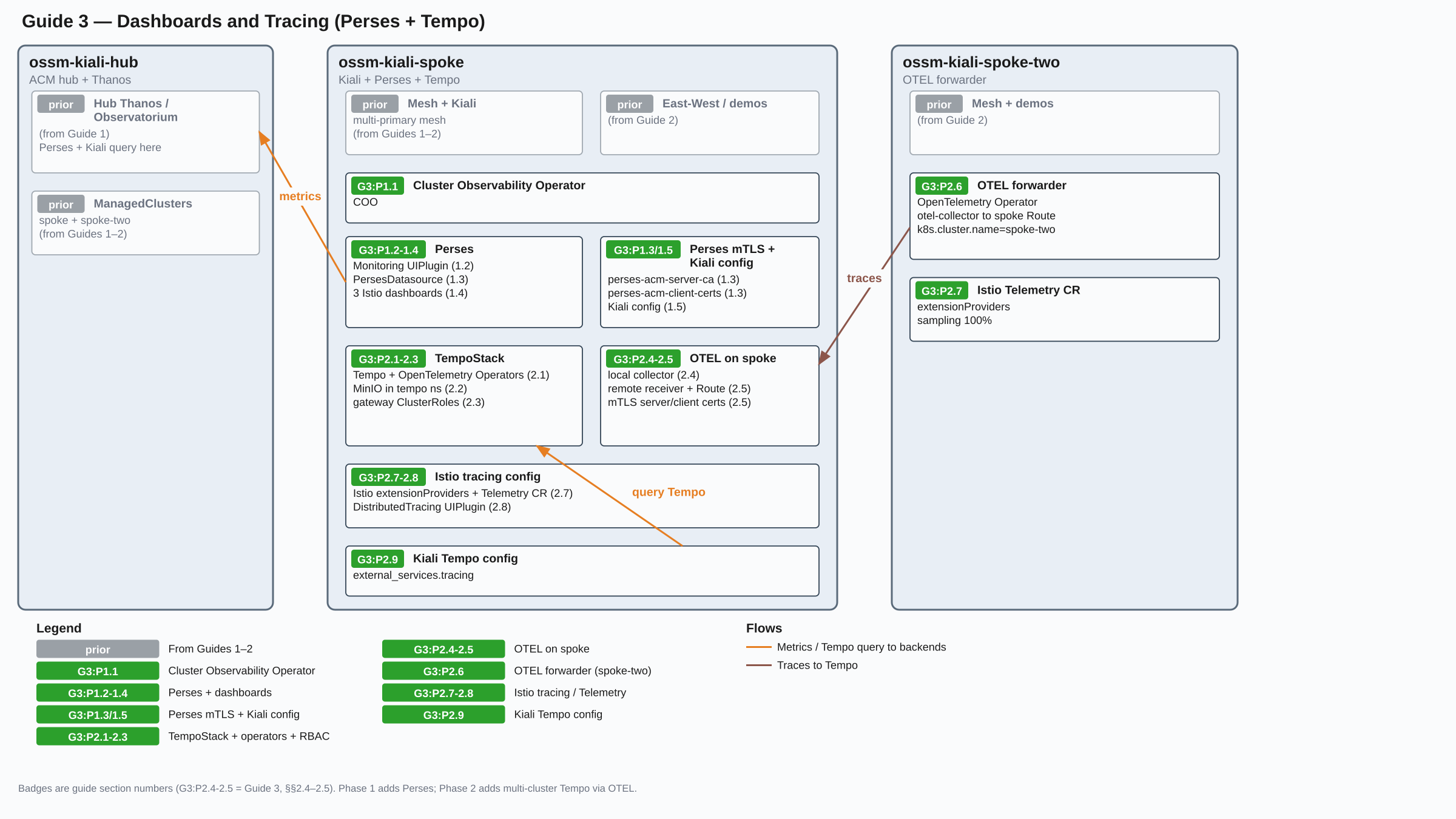
Prerequisites
The Multi-Primary Mesh guide must be complete:
- OpenShift 4.19+ on all clusters used in the series
- ACM hub with both
spoke and spoke-two managed clusters
- OSSM 3 running on both spokes with East-West gateways
- Kiali running on
spoke
- ACM Observability (Thanos) running on the hub
- Demo apps (
ambient-demo, bookinfo) deployed on both spokes
Environment Setup
These variables extend the multi-primary environment. Re-export all variables from that guide first, then add:
# Namespace where the TempoStack and SeaweedFS are deployed
export TEMPO_NAMESPACE="tempo"

# Development credentials for the in-cluster SeaweedFS S3 endpoint
export SEAWEEDFS_ACCESS_KEY="seaweedfs"
export SEAWEEDFS_SECRET_KEY="seaweedfs123"

# Name of the TempoStack CR — becomes part of service names
# (e.g. tempo-${TEMPO_STACK_NAME}-gateway). Use one stack per independent
# Tempo deployment; if you run multiple meshes, each mesh can share this
# stack by using a separate tenant.
export TEMPO_STACK_NAME="istio"

# Tempo tenant name — a logical partition within the TempoStack that
# isolates one mesh's traces from another's. Matches MESH_ID from the
# hub/spoke guide so the tenant name reflects the mesh it belongs to.
# If you add a second mesh later, create a second tenant rather than
# a second TempoStack.
export TEMPO_TENANT="mesh1"
Phase 1: Perses — Multi-Cluster Metrics Dashboards
Perses is a metrics dashboard platform. On OpenShift it is managed by the Cluster Observability Operator (COO), which provides native CRDs (Perses, PersesDatasource, PersesDashboard) and integrates with the OpenShift console as a UI plugin. Kiali links to Perses dashboards from its workload and service metrics pages.
The key multi-cluster aspect: Perses is configured with a datasource pointing at hub Thanos (the ACM Observatorium endpoint) rather than a local Prometheus. This gives Perses visibility into metrics from both spoke clusters without any additional aggregation work.
1.1 Install or Verify the Cluster Observability Operator
MCOA installs its own managed-cluster Prometheus component for metric federation; that component is not the full Cluster Observability Operator. Perses requires the full COO product, so install it here unless a COO Subscription is already present.
Check whether a full COO Subscription is already installed. Do not use the ScrapeConfig CRD for this check because MCOA also installs that API:
COO_SUB=$(oc --context=ossm-kiali-spoke get subscriptions.operators.coreos.com -A -o json 2>/dev/null | \
  jq -r '[.items[] | select(.spec.name == "cluster-observability-operator")][0] |
    select(. != null) | "\(.metadata.namespace)/\(.metadata.name)"')
[ -n "${COO_SUB}" ] && echo "COO Subscription found: ${COO_SUB}" || \
  echo "COO Subscription is not found"
If COO is not yet installed, install it:
oc --context=ossm-kiali-spoke apply -f - <<'EOF'
apiVersion: v1
kind: Namespace
metadata:
  labels:
    openshift.io/cluster-monitoring: "true"
  name: openshift-cluster-observability-operator
---
apiVersion: operators.coreos.com/v1
kind: OperatorGroup
metadata:
  name: cluster-observability-operator
  namespace: openshift-cluster-observability-operator
spec: {}
---
apiVersion: operators.coreos.com/v1alpha1
kind: Subscription
metadata:
  name: cluster-observability-operator
  namespace: openshift-cluster-observability-operator
spec:
  channel: stable
  installPlanApproval: Automatic
  name: cluster-observability-operator
  source: redhat-operators
  sourceNamespace: openshift-marketplace
EOF
Wait for COO and its CRDs to be ready (skip if COO was already installed):
until oc --context=ossm-kiali-spoke get crd perses.perses.dev &>/dev/null; do
  echo "Waiting for Perses CRDs..."
  sleep 10
done
echo "COO CRDs ready"

until oc --context=ossm-kiali-spoke get pods \
  -l app.kubernetes.io/name=perses-operator \
  -n openshift-cluster-observability-operator \
  --no-headers 2>/dev/null | grep -q .; do sleep 5; done
oc --context=ossm-kiali-spoke wait pod \
  --for=condition=Ready \
  -l app.kubernetes.io/name=perses-operator \
  -n openshift-cluster-observability-operator \
  --timeout=300s
echo "COO Perses operator ready"
1.2 Create the Monitoring UIPlugin to Deploy the Perses Server
The Perses server is deployed by a UIPlugin CR with spec.monitoring.perses.enabled: true. This also adds the Observe > Dashboards (Perses) menu to the OpenShift console. The Perses CR that COO creates under the covers is a configuration holder — the UIPlugin is what triggers the actual Perses server pod:
oc --context=ossm-kiali-spoke apply -f - <<'EOF'
apiVersion: observability.openshift.io/v1alpha1
kind: UIPlugin
metadata:
  name: monitoring
spec:
  type: Monitoring
  monitoring:
    perses:
      enabled: true
EOF
Wait for the Perses server pod. The COO creates it as a StatefulSet in the openshift-cluster-observability-operator namespace:
until oc --context=ossm-kiali-spoke get pods \
  -l app.kubernetes.io/name=perses \
  -n openshift-cluster-observability-operator \
  --no-headers 2>/dev/null | grep -q .; do
  echo "Waiting for Perses pod..."
  sleep 5
done
oc --context=ossm-kiali-spoke wait pod \
  --for=condition=Ready \
  -l app.kubernetes.io/name=perses \
  -n openshift-cluster-observability-operator \
  --timeout=300s
echo "Perses ready"
1.3 Create the Hub Thanos Datasource
The Observatorium API on the hub requires mutual TLS (mTLS): Perses must verify the server’s certificate (using a custom ACM CA, not the OCP service CA) and also present a client certificate to authenticate. The Perses server handles this through two mechanisms:
- Server CA — mounted into
/etc/ssl/certs/ so Go’s system cert pool trusts the hub Thanos route’s certificate
- Client cert — the
PersesDatasource CR’s spec.client.tls.userCert field tells the Perses operator which K8s Secret holds the client cert. The operator reads it and creates a Perses-internal secret. The spec.config.plugin.spec.proxy.spec.secret field then wires that internal secret to the HTTP proxy transport, completing the mTLS handshake
Get the Observatorium URL:
export OBSERVATORIUM_URL=$(oc --context=ossm-kiali-hub get route observatorium-api \
  -n open-cluster-management-observability \
  -o jsonpath='https://{.spec.host}/api/metrics/v1/default')
echo "Observatorium URL: ${OBSERVATORIUM_URL}"
Two credentials need to be prepared before creating the datasource:
- Server CA — the hub Observatorium API route’s TLS certificate is signed by a custom ACM CA (
observability-server-ca-certificate), not the standard OCP service CA. Extract it from the hub and store it in a ConfigMap in openshift-cluster-observability-operator on spoke so it can be mounted into the Perses pod.
- Client cert — Perses will use the same mTLS client certificate that Kiali uses to authenticate to hub Thanos. That certificate is the
acm-observability-certs secret in istio-system on spoke. Copy it to openshift-cluster-observability-operator under a new name so it can be mounted into the Perses pod as a volume (the Perses pod runs in openshift-cluster-observability-operator and can only mount secrets from its own namespace).
# Server CA — extracted from the hub, stored as a ConfigMap on spoke
oc --context=ossm-kiali-hub get secret observability-server-ca-certs \
  -n open-cluster-management-observability \
  -o jsonpath='{.data.ca\.crt}' | base64 -d > /tmp/obs-server-ca.crt

oc --context=ossm-kiali-spoke create configmap perses-acm-server-ca \
  -n openshift-cluster-observability-operator \
  --from-file=ca.crt=/tmp/obs-server-ca.crt \
  --dry-run=client -o yaml | oc --context=ossm-kiali-spoke apply -f -
rm -f /tmp/obs-server-ca.crt

# Client cert — copied from istio-system to openshift-cluster-observability-operator
oc --context=ossm-kiali-spoke get secret acm-observability-certs \
  -n istio-system -o json | \
  jq 'del(.metadata.namespace, .metadata.resourceVersion, .metadata.uid, .metadata.creationTimestamp, .metadata.ownerReferences) | .metadata.namespace = "openshift-cluster-observability-operator" | .metadata.name = "perses-acm-client-certs"' | \
  oc --context=ossm-kiali-spoke apply -f -
Mount the CA ConfigMap into /etc/ssl/certs/ in the Perses pod using the Perses CR’s spec.volumes and spec.volumeMounts. Placing it there adds it to Go’s system certificate pool, so the Perses server trusts the hub Thanos route’s TLS certificate for all outgoing connections:
oc --context=ossm-kiali-spoke patch perses perses \
  -n openshift-cluster-observability-operator --type=merge -p '{
  "spec": {
    "volumes": [
      {
        "name": "acm-server-ca",
        "configMap": {"name": "perses-acm-server-ca"}
      }
    ],
    "volumeMounts": [
      {
        "name": "acm-server-ca",
        "mountPath": "/etc/ssl/certs/acm-thanos-ca.crt",
        "subPath": "ca.crt",
        "readOnly": true
      }
    ]
  }
}'

oc --context=ossm-kiali-spoke wait pod \
  --for=condition=Ready \
  -l app.kubernetes.io/name=perses \
  -n openshift-cluster-observability-operator \
  --timeout=120s
Create the perses namespace if it does not yet exist.
This is where PersesDatasource and PersesDashboard CRs live — the Perses Operator maps this namespace to a Perses project, making dashboards available in the console under the perses project:
oc --context=ossm-kiali-spoke create namespace perses
Create the PersesDatasource CR. The client.tls.userCert field references the perses-acm-client-certs secret created above. The Perses operator reads that K8s Secret and creates a Perses-internal secret automatically named <datasource-name>-secret — in this case acm-thanos-secret. The proxy.spec.secret: acm-thanos-secret field tells the Perses server to use that internal secret (with the client cert and key) when building the mTLS transport for this datasource:
oc --context=ossm-kiali-spoke apply -f - <<EOF
apiVersion: perses.dev/v1alpha2
kind: PersesDatasource
metadata:
  name: acm-thanos
  namespace: perses
spec:
  config:
    display:
      name: "ACM Hub Thanos"
    default: false
    plugin:
      kind: PrometheusDatasource
      spec:
        proxy:
          kind: HTTPProxy
          spec:
            url: "${OBSERVATORIUM_URL}"
            secret: acm-thanos-secret
  client:
    tls:
      enable: true
      caCert:
        type: file
        certPath: /etc/ssl/certs/acm-thanos-ca.crt
      userCert:
        type: secret
        name: perses-acm-client-certs
        namespace: openshift-cluster-observability-operator
        certPath: tls.crt
        privateKeyPath: tls.key
EOF
Verify the datasource was accepted:
oc --context=ossm-kiali-spoke get persesdatasource acm-thanos \
  -n perses \
  -o jsonpath='{.status.conditions[?(@.type=="Available")].message}{"\n"}'
# Expected: Datasource (acm-thanos) created successfully
1.4 Create Istio Dashboards
Create three Istio dashboards, each focusing on a different layer of observability:
- Istio Mesh Overview — cluster-wide HTTP request rates, 5xx error rates, and ambient L4 TCP throughput. Use this to get a top-down view of overall mesh health across both spoke clusters.
- Istio Workload Dashboard — per-workload inbound and outbound HTTP request rates, p99 latency, and success rate. Accepts
$workload and $namespace variables to filter to a specific workload.
- Istio Ztunnel Dashboard — ambient-mode L4 TCP connection counts and byte throughput, showing traffic handled by ztunnel across the mesh.
The PersesDashboard resources below contain the full Prometheus queries for each panel. You can modify the queries, add panels, or create entirely new dashboards to suit your environment — these are a starting point. All panels use the acm-thanos datasource so data from both spoke clusters is included.
The rate windows below are selected for the ACM federation cadence. Before
changing the scrape, federation, or query intervals, review
Scrape Intervals
so the windows remain compatible with the rate at which samples arrive in hub
Thanos.
Istio Mesh Overview — cluster-wide HTTP and TCP traffic rates:
oc --context=ossm-kiali-spoke apply -f - <<'EOF'
apiVersion: perses.dev/v1alpha2
kind: PersesDashboard
metadata:
  name: istio-mesh-overview
  namespace: perses
spec:
  config:
    display:
      name: "Istio Mesh Overview"
    duration: 30m
    layouts:
    - kind: Grid
      spec:
        display:
          title: "HTTP Traffic"
        items:
        - content:
            $ref: '#/spec/panels/request_rate'
          height: 8
          width: 12
          x: 0
          "y": 0
        - content:
            $ref: '#/spec/panels/error_rate'
          height: 8
          width: 12
          x: 12
          "y": 0
    - kind: Grid
      spec:
        display:
          title: "TCP Traffic (Ambient / Ztunnel)"
        items:
        - content:
            $ref: '#/spec/panels/tcp_sent'
          height: 8
          width: 12
          x: 0
          "y": 0
        - content:
            $ref: '#/spec/panels/tcp_received'
          height: 8
          width: 12
          x: 12
          "y": 0
    panels:
      request_rate:
        kind: Panel
        spec:
          display:
            name: "Request Rate (rps)"
          plugin:
            kind: TimeSeriesChart
            spec:
              legend:
                mode: list
                position: bottom
          queries:
          - kind: TimeSeriesQuery
            spec:
              plugin:
                kind: PrometheusTimeSeriesQuery
                spec:
                  datasource:
                    kind: PrometheusDatasource
                    name: acm-thanos
                  query: sum(rate(istio_requests_total{reporter=~"destination|waypoint"}[10m])) by (destination_service_name)
      error_rate:
        kind: Panel
        spec:
          display:
            name: "5xx Error Rate"
          plugin:
            kind: TimeSeriesChart
            spec:
              legend:
                mode: list
                position: bottom
          queries:
          - kind: TimeSeriesQuery
            spec:
              plugin:
                kind: PrometheusTimeSeriesQuery
                spec:
                  datasource:
                    kind: PrometheusDatasource
                    name: acm-thanos
                  query: sum(rate(istio_requests_total{reporter=~"destination|waypoint",response_code=~"5.*"}[10m])) by (destination_service_name)
      tcp_sent:
        kind: Panel
        spec:
          display:
            name: "TCP Bytes Sent"
          plugin:
            kind: TimeSeriesChart
            spec:
              legend:
                mode: list
                position: bottom
          queries:
          - kind: TimeSeriesQuery
            spec:
              plugin:
                kind: PrometheusTimeSeriesQuery
                spec:
                  datasource:
                    kind: PrometheusDatasource
                    name: acm-thanos
                  query: sum(rate(istio_tcp_sent_bytes_total[10m])) by (destination_workload)
      tcp_received:
        kind: Panel
        spec:
          display:
            name: "TCP Bytes Received"
          plugin:
            kind: TimeSeriesChart
            spec:
              legend:
                mode: list
                position: bottom
          queries:
          - kind: TimeSeriesQuery
            spec:
              plugin:
                kind: PrometheusTimeSeriesQuery
                spec:
                  datasource:
                    kind: PrometheusDatasource
                    name: acm-thanos
                  query: sum(rate(istio_tcp_received_bytes_total[10m])) by (destination_workload)
EOF
Istio Workload Dashboard — per-workload inbound/outbound HTTP rates and latency, with $workload and $namespace variables:
oc --context=ossm-kiali-spoke apply -f - <<'EOF'
apiVersion: perses.dev/v1alpha2
kind: PersesDashboard
metadata:
  name: istio-workload-dashboard
  namespace: perses
spec:
  config:
    display:
      name: "Istio Workload Dashboard"
    duration: 30m
    variables:
    - kind: TextVariable
      spec:
        name: workload
        display:
          name: Workload
        value: ""
    - kind: TextVariable
      spec:
        name: namespace
        display:
          name: Namespace
        value: ""
    layouts:
    - kind: Grid
      spec:
        display:
          title: "Inbound HTTP"
        items:
        - content:
            $ref: '#/spec/panels/inbound_rps'
          height: 8
          width: 12
          x: 0
          "y": 0
        - content:
            $ref: '#/spec/panels/inbound_latency'
          height: 8
          width: 12
          x: 12
          "y": 0
    - kind: Grid
      spec:
        display:
          title: "Outbound HTTP"
        items:
        - content:
            $ref: '#/spec/panels/outbound_rps'
          height: 8
          width: 12
          x: 0
          "y": 0
        - content:
            $ref: '#/spec/panels/success_rate'
          height: 8
          width: 12
          x: 12
          "y": 0
    panels:
      inbound_rps:
        kind: Panel
        spec:
          display:
            name: "Inbound Request Rate"
          plugin:
            kind: TimeSeriesChart
            spec:
              legend:
                mode: list
                position: bottom
          queries:
          - kind: TimeSeriesQuery
            spec:
              plugin:
                kind: PrometheusTimeSeriesQuery
                spec:
                  datasource:
                    kind: PrometheusDatasource
                    name: acm-thanos
                  query: sum(rate(istio_requests_total{reporter=~"destination|waypoint",destination_workload="$workload",destination_workload_namespace=~"$namespace"}[10m])) by (source_app)
      inbound_latency:
        kind: Panel
        spec:
          display:
            name: "Inbound Request Latency (p99)"
          plugin:
            kind: TimeSeriesChart
            spec:
              legend:
                mode: list
                position: bottom
          queries:
          - kind: TimeSeriesQuery
            spec:
              plugin:
                kind: PrometheusTimeSeriesQuery
                spec:
                  datasource:
                    kind: PrometheusDatasource
                    name: acm-thanos
                  query: histogram_quantile(0.99, sum(rate(istio_request_duration_milliseconds_bucket{reporter=~"destination|waypoint",destination_workload="$workload",destination_workload_namespace=~"$namespace"}[10m])) by (le))
      outbound_rps:
        kind: Panel
        spec:
          display:
            name: "Outbound Request Rate"
          plugin:
            kind: TimeSeriesChart
            spec:
              legend:
                mode: list
                position: bottom
          queries:
          - kind: TimeSeriesQuery
            spec:
              plugin:
                kind: PrometheusTimeSeriesQuery
                spec:
                  datasource:
                    kind: PrometheusDatasource
                    name: acm-thanos
                  query: sum(rate(istio_requests_total{reporter=~"source|waypoint",source_workload="$workload",source_workload_namespace=~"$namespace"}[10m])) by (destination_service_name)
      success_rate:
        kind: Panel
        spec:
          display:
            name: "Success Rate (non-5xx)"
          plugin:
            kind: TimeSeriesChart
            spec:
              legend:
                mode: list
                position: bottom
          queries:
          - kind: TimeSeriesQuery
            spec:
              plugin:
                kind: PrometheusTimeSeriesQuery
                spec:
                  datasource:
                    kind: PrometheusDatasource
                    name: acm-thanos
                  query: sum(rate(istio_requests_total{reporter=~"destination|waypoint",destination_workload="$workload",destination_workload_namespace=~"$namespace",response_code!~"5.*"}[10m])) / sum(rate(istio_requests_total{reporter=~"destination|waypoint",destination_workload="$workload",destination_workload_namespace=~"$namespace"}[10m]))
EOF
Istio Ztunnel Dashboard — ambient L4 TCP connection and throughput metrics:
oc --context=ossm-kiali-spoke apply -f - <<'EOF'
apiVersion: perses.dev/v1alpha2
kind: PersesDashboard
metadata:
  name: istio-ztunnel-dashboard
  namespace: perses
spec:
  config:
    display:
      name: "Istio Ztunnel Dashboard"
    duration: 30m
    layouts:
    - kind: Grid
      spec:
        display:
          title: "Ambient L4 Traffic"
        items:
        - content:
            $ref: '#/spec/panels/tcp_connections_opened'
          height: 8
          width: 12
          x: 0
          "y": 0
        - content:
            $ref: '#/spec/panels/tcp_bytes'
          height: 8
          width: 12
          x: 12
          "y": 0
    panels:
      tcp_connections_opened:
        kind: Panel
        spec:
          display:
            name: "TCP Connections Opened"
          plugin:
            kind: TimeSeriesChart
            spec:
              legend:
                mode: list
                position: bottom
          queries:
          - kind: TimeSeriesQuery
            spec:
              plugin:
                kind: PrometheusTimeSeriesQuery
                spec:
                  datasource:
                    kind: PrometheusDatasource
                    name: acm-thanos
                  query: sum(rate(istio_tcp_connections_opened_total[10m])) by (destination_workload)
      tcp_bytes:
        kind: Panel
        spec:
          display:
            name: "TCP Throughput (bytes/s)"
          plugin:
            kind: TimeSeriesChart
            spec:
              legend:
                mode: list
                position: bottom
          queries:
          - kind: TimeSeriesQuery
            spec:
              plugin:
                kind: PrometheusTimeSeriesQuery
                spec:
                  datasource:
                    kind: PrometheusDatasource
                    name: acm-thanos
                  query: sum(rate(istio_tcp_sent_bytes_total[10m]) + rate(istio_tcp_received_bytes_total[10m])) by (destination_workload)
EOF
Confirm all three dashboards are registered:
oc --context=ossm-kiali-spoke get persesdashboard -n perses | grep istio
# Expected: istio-mesh-overview, istio-workload, istio-ztunnel
Get the OpenShift console URL — this is where the COO Perses plugin lives:
CONSOLE_URL=$(oc --context=ossm-kiali-spoke get route console \
  -n openshift-console \
  -o jsonpath='https://{.spec.host}')
echo "Console URL: ${CONSOLE_URL}"
Patch the Kiali CR on spoke. Key settings:
url_format: "openshift" — Kiali builds dashboard links pointing to the OpenShift console Perses plugin. In this mode internal_url must not be set — COO Perses uses OpenShift OAuth, so Kiali cannot authenticate to its API. Without internal_url, Kiali skips dashboard validation and generates the links unconditionallyhealth_check_url — points at the in-cluster Perses /api/v1/health endpoint so Kiali can verify reachability. This endpoint does not require authentication. Without it, Kiali’s cluster status shows Perses as “Unreachable” because the health check falls back to external_url (the OCP console), which is not a Perses APIproject — the Perses project name, which COO sets to the Kubernetes namespace where the dashboards live (perses)variables — maps Kiali’s semantic names to the exact Perses variable names defined in the dashboards created in the previous step.
oc --context=ossm-kiali-spoke patch kiali kiali -n istio-system --type=merge -p "{
  \"spec\": {
    \"external_services\": {
      \"perses\": {
        \"enabled\": true,
        \"url_format\": \"openshift\",
        \"external_url\": \"${CONSOLE_URL}\",
        \"health_check_url\": \"https://perses.openshift-cluster-observability-operator.svc.cluster.local:8080/api/v1/health\",
        \"project\": \"perses\",
        \"dashboards\": [
          {\"name\": \"Istio Mesh Overview\"},
          {\"name\": \"Istio Workload Dashboard\",
           \"variables\": {
             \"namespace\": \"namespace\",
             \"workload\": \"workload\"}},
          {\"name\": \"Istio Ztunnel Dashboard\"}
        ]
      }
    }
  }
}"

oc --context=ossm-kiali-spoke wait kiali kiali \
  -n istio-system \
  --for=condition=Successful \
  --timeout=300s

oc --context=ossm-kiali-spoke rollout status deployment/kiali \
  -n istio-system --timeout=120s
1.6 Verify Perses
# Confirm Perses pod is running
oc --context=ossm-kiali-spoke get pods \
  -l app.kubernetes.io/name=perses \
  -n openshift-cluster-observability-operator

# Check the Istio dashboards are registered
oc --context=ossm-kiali-spoke get persesdashboard -n perses | grep istio

# Confirm Kiali's Perses config is applied
oc --context=ossm-kiali-spoke get kiali kiali -n istio-system \
  -o jsonpath='{.spec.external_services.perses.enabled}{"\n"}'
# Expected: true
The Perses links appear in specific Kiali pages depending on the dashboard:
- Istio Workload Dashboard — navigate to Workloads, select any workload (e.g.
productpage-v1 in bookinfo), and open the Inbound Metrics or Outbound Metrics tab. The View in Perses link appears in the metrics toolbar.
- Istio Ztunnel Dashboard — navigate to Workloads, select the
ztunnel workload in the ztunnel namespace, and open its Metrics tab found in the ZTunnel subtab.
- Istio Mesh Overview — this dashboard is not linked automatically from any Kiali page. Access it directly from the OpenShift console at Observe > Dashboards (Perses) and select it from the list.
Clicking a View in Perses link opens the OpenShift console Perses plugin on spoke. If you are not already logged in, the console will prompt for credentials.
Due to a known Kiali bug (
kiali/kiali#10021), the link lands on the dashboard list rather than navigating directly to the specific dashboard with variables pre-filled. Until the bug is fixed: click the dashboard by name from the list, then manually fill in the
Workload and
Namespace fields for the
Istio Workload Dashboard (e.g.
productpage-v1 and
bookinfo). When the bug is fixed, the link will open the correct dashboard with the workload already selected.
Phase 2: Tempo — Multi-Cluster Distributed Tracing
Tempo is a distributed tracing backend. The architecture deployed here:
- A central TempoStack runs on
spoke, backed by in-cluster SeaweedFS
- A local OTEL collector on
spoke receives traces from spoke’s Istio proxies and forwards them to Tempo
- A remote OTEL collector on
spoke receives traces from spoke-two’s OTEL collector over a passthrough mTLS Route
- A remote forwarder on
spoke-two receives traces from spoke-two’s Istio proxies and forwards them to spoke via the mTLS Route
- Each cluster’s Istio is patched with an
extensionProvider and a Telemetry CR to send traces to the local OTEL collector
Kiali on spoke queries the single Tempo endpoint. Traces from both clusters land in the same Tempo tenant. Each OTEL collector stamps a k8s.cluster.name resource attribute on every span using its resource processor — spoke for the spoke collector and spoke-two for the spoke-two forwarder. This attribute is set at collector deploy time and can be used to filter traces by cluster in the Kiali tracing view.
2.1 Install Tempo and OpenTelemetry Operators
Install the Tempo Operator and OpenTelemetry Operator on spoke, and the OpenTelemetry Operator on spoke-two. Both operators go into openshift-operators — the same namespace used by OSSM and Kiali:
# Tempo Operator on spoke only
oc --context=ossm-kiali-spoke apply -f - <<'EOF'
apiVersion: operators.coreos.com/v1alpha1
kind: Subscription
metadata:
  name: tempo-product
  namespace: openshift-operators
spec:
  channel: stable
  installPlanApproval: Automatic
  name: tempo-product
  source: redhat-operators
  sourceNamespace: openshift-marketplace
EOF

# OpenTelemetry Operator on both clusters
for CTX in ossm-kiali-spoke ossm-kiali-spoke-two; do
  oc --context="${CTX}" apply -f - <<'EOF'
apiVersion: operators.coreos.com/v1alpha1
kind: Subscription
metadata:
  name: opentelemetry-product
  namespace: openshift-operators
spec:
  channel: stable
  installPlanApproval: Automatic
  name: opentelemetry-product
  source: redhat-operators
  sourceNamespace: openshift-marketplace
EOF
done
Wait for the CRDs to be established:
until oc --context=ossm-kiali-spoke get crd tempostacks.tempo.grafana.com &>/dev/null; do
  echo "Waiting for TempoStack CRD on spoke..."
  sleep 10
done
echo "Tempo CRD ready"

until oc --context=ossm-kiali-spoke get crd opentelemetrycollectors.opentelemetry.io &>/dev/null; do
  echo "Waiting for OpenTelemetryCollector CRD on spoke..."
  sleep 10
done
echo "OTel CRD ready on spoke"

until oc --context=ossm-kiali-spoke-two get crd opentelemetrycollectors.opentelemetry.io &>/dev/null; do
  echo "Waiting for OpenTelemetryCollector CRD on spoke-two..."
  sleep 10
done
echo "OTel CRD ready on spoke-two"
2.2 Deploy SeaweedFS and TempoStack on Spoke
Deploy SeaweedFS mini mode as a single-pod S3-compatible object store for Tempo, then create the TempoStack. The stack runs in multi-tenant OpenShift mode with tenant ${TEMPO_TENANT} for trace writes and reads.
oc --context=ossm-kiali-spoke create namespace "${TEMPO_NAMESPACE}" 2>/dev/null || true

# SeaweedFS deployment and PVC
oc --context=ossm-kiali-spoke apply -n "${TEMPO_NAMESPACE}" -f - <<EOF
apiVersion: v1
kind: PersistentVolumeClaim
metadata:
  name: seaweedfs-pv-claim
spec:
  accessModes:
  - ReadWriteOnce
  resources:
    requests:
      storage: 256Mi
---
apiVersion: apps/v1
kind: Deployment
metadata:
  name: seaweedfs
spec:
  selector:
    matchLabels:
      app: seaweedfs
  strategy:
    type: Recreate
  template:
    metadata:
      labels:
        app: seaweedfs
    spec:
      volumes:
      - name: storage
        persistentVolumeClaim:
          claimName: seaweedfs-pv-claim
      containers:
      - name: seaweedfs
        image: ghcr.io/chrislusf/seaweedfs:4.47
        args:
        - mini
        - -dir=/data
        - -admin.port=12646
        - -master.telemetry=false
        env:
        - name: AWS_ACCESS_KEY_ID
          value: "${SEAWEEDFS_ACCESS_KEY}"
        - name: AWS_SECRET_ACCESS_KEY
          value: "${SEAWEEDFS_SECRET_KEY}"
        - name: S3_BUCKET
          value: "tempo-data"
        ports:
        - containerPort: 8333
          name: s3
        volumeMounts:
        - name: storage
          mountPath: "/data"
        readinessProbe:
          tcpSocket:
            port: 8333
          initialDelaySeconds: 10
          periodSeconds: 5
        livenessProbe:
          tcpSocket:
            port: 8333
          initialDelaySeconds: 10
          periodSeconds: 5
---
apiVersion: v1
kind: Service
metadata:
  name: seaweedfs
spec:
  type: ClusterIP
  ports:
  - port: 8333
    targetPort: 8333
    protocol: TCP
    name: s3
  selector:
    app: seaweedfs
EOF

oc --context=ossm-kiali-spoke rollout status deployment/seaweedfs \
  -n "${TEMPO_NAMESPACE}" --timeout=120s
Create the SeaweedFS object storage secret and the TempoStack CR:
oc --context=ossm-kiali-spoke create secret generic tempostack-dev-seaweedfs \
  -n "${TEMPO_NAMESPACE}" \
  --from-literal=bucket="tempo-data" \
  --from-literal=endpoint="http://seaweedfs.${TEMPO_NAMESPACE}.svc.cluster.local:8333" \
  --from-literal=access_key_id="${SEAWEEDFS_ACCESS_KEY}" \
  --from-literal=access_key_secret="${SEAWEEDFS_SECRET_KEY}" \
  --dry-run=client -o yaml | oc --context=ossm-kiali-spoke apply -f -

oc --context=ossm-kiali-spoke apply -f - <<EOF
apiVersion: tempo.grafana.com/v1alpha1
kind: TempoStack
metadata:
  name: ${TEMPO_STACK_NAME}
  namespace: ${TEMPO_NAMESPACE}
spec:
  managementState: Managed
  storageSize: 1Gi
  storage:
    secret:
      type: s3
      name: tempostack-dev-seaweedfs
  tenants:
    mode: openshift
    authentication:
    - tenantName: ${TEMPO_TENANT}
      tenantId: a1b2c3d4-e5f6-7890-abcd-ef1234567890
  template:
    gateway:
      enabled: true
EOF

echo "Waiting for TempoStack gateway service..."
until oc --context=ossm-kiali-spoke get svc \
  "tempo-${TEMPO_STACK_NAME}-gateway" \
  -n "${TEMPO_NAMESPACE}" &>/dev/null; do sleep 5; done
echo "TempoStack ready"
2.3 RBAC for Tempo Gateway
Grant the OTEL collectors permission to write and read traces through the Tempo gateway:
REMOTE_COLLECTOR_NAME="otel-remote-${SPOKE_TWO_CLUSTER_NAME}"

# Write role — used by both the local and remote collectors
oc --context=ossm-kiali-spoke apply -f - <<EOF
apiVersion: rbac.authorization.k8s.io/v1
kind: ClusterRole
metadata:
  name: tempostack-traces-write
rules:
- apiGroups:
  - tempo.grafana.com
  resources:
  - ${TEMPO_TENANT}
  resourceNames:
  - traces
  verbs:
  - create
---
apiVersion: rbac.authorization.k8s.io/v1
kind: ClusterRoleBinding
metadata:
  name: tempostack-traces-write-collectors
roleRef:
  apiGroup: rbac.authorization.k8s.io
  kind: ClusterRole
  name: tempostack-traces-write
subjects:
- kind: ServiceAccount
  name: otel-collector
  namespace: istio-system
- kind: ServiceAccount
  name: ${REMOTE_COLLECTOR_NAME}-collector
  namespace: istio-system
EOF

# Read role — allows authenticated users (including Kiali) to query traces
oc --context=ossm-kiali-spoke apply -f - <<EOF
apiVersion: rbac.authorization.k8s.io/v1
kind: ClusterRole
metadata:
  name: tempostack-traces-reader-${TEMPO_TENANT}
rules:
- apiGroups:
  - tempo.grafana.com
  resources:
  - ${TEMPO_TENANT}
  resourceNames:
  - traces
  verbs:
  - get
---
apiVersion: rbac.authorization.k8s.io/v1
kind: ClusterRoleBinding
metadata:
  name: tempostack-traces-reader-${TEMPO_TENANT}
roleRef:
  apiGroup: rbac.authorization.k8s.io
  kind: ClusterRole
  name: tempostack-traces-reader-${TEMPO_TENANT}
subjects:
- kind: Group
  apiGroup: rbac.authorization.k8s.io
  name: system:authenticated
EOF
echo "RBAC applied"
2.4 Local OTEL Collector on Spoke
Deploy the local collector in istio-system. It receives OTLP traces from spoke’s Istio proxies and forwards them to the Tempo gateway using the pod’s service account token for authentication:
oc --context=ossm-kiali-spoke apply -f - <<EOF
apiVersion: opentelemetry.io/v1beta1
kind: OpenTelemetryCollector
metadata:
  name: otel
  namespace: istio-system
spec:
  mode: deployment
  replicas: 1
  config:
    receivers:
      otlp:
        protocols:
          grpc:
            endpoint: 0.0.0.0:4317
          http:
            endpoint: 0.0.0.0:4318
    extensions:
      bearertokenauth:
        filename: /var/run/secrets/kubernetes.io/serviceaccount/token
    processors:
      batch: {}
      resource:
        attributes:
        - key: k8s.cluster.name
          action: upsert
          value: ${SPOKE_CLUSTER_NAME}
    exporters:
      otlp_http/tempo:
        auth:
          authenticator: bearertokenauth
        endpoint: https://tempo-${TEMPO_STACK_NAME}-gateway.${TEMPO_NAMESPACE}.svc.cluster.local:8080/api/traces/v1/${TEMPO_TENANT}
        headers:
          X-Scope-OrgID: ${TEMPO_TENANT}
        tls:
          ca_file: /var/run/secrets/kubernetes.io/serviceaccount/service-ca.crt
    service:
      extensions:
      - bearertokenauth
      pipelines:
        traces:
          receivers:
          - otlp
          processors:
          - resource
          - batch
          exporters:
          - otlp_http/tempo
EOF

until oc --context=ossm-kiali-spoke get deployment otel-collector \
  -n istio-system &>/dev/null; do sleep 5; done

oc --context=ossm-kiali-spoke rollout status deployment/otel-collector \
  -n istio-system --timeout=300s
echo "Local OTEL collector ready"
2.5 Remote Receiver on Spoke with mTLS
Traces from spoke-two arrive at spoke via an mTLS-secured passthrough Route. This step creates the remote receiver collector, the Route, and the mTLS certificates (generated with openssl — no additional operators required).
First, create the remote receiver collector (it will stay in CrashLoopBackOff until the certs are ready — that is expected):
REMOTE_COLLECTOR_NAME="otel-remote-${SPOKE_TWO_CLUSTER_NAME}"
REMOTE_MTLS_CA_SECRET="${REMOTE_COLLECTOR_NAME}-ca"
REMOTE_MTLS_SERVER_SECRET="${REMOTE_COLLECTOR_NAME}-server-tls"
REMOTE_MTLS_CLIENT_SECRET="${REMOTE_COLLECTOR_NAME}-client-tls"
REMOTE_MTLS_CLIENT_BUNDLE="${REMOTE_COLLECTOR_NAME}-client-bundle"

oc --context=ossm-kiali-spoke apply -f - <<EOF
apiVersion: opentelemetry.io/v1beta1
kind: OpenTelemetryCollector
metadata:
  name: ${REMOTE_COLLECTOR_NAME}
  namespace: istio-system
spec:
  mode: deployment
  replicas: 1
  volumeMounts:
  - name: server-certs
    mountPath: /etc/otel/server
    readOnly: true
  - name: ca-cert
    mountPath: /etc/otel/ca
    readOnly: true
  volumes:
  - name: server-certs
    secret:
      secretName: ${REMOTE_MTLS_SERVER_SECRET}
  - name: ca-cert
    secret:
      secretName: ${REMOTE_MTLS_CA_SECRET}
  config:
    receivers:
      otlp:
        protocols:
          http:
            endpoint: 0.0.0.0:4318
            tls:
              cert_file: /etc/otel/server/tls.crt
              key_file: /etc/otel/server/tls.key
              client_ca_file: /etc/otel/ca/tls.crt
    processors:
      batch: {}
      resource:
        attributes:
        - key: receiving.cluster
          action: upsert
          value: ${SPOKE_CLUSTER_NAME}
        - key: source.cluster
          action: upsert
          value: ${SPOKE_TWO_CLUSTER_NAME}
    extensions:
      bearertokenauth:
        filename: /var/run/secrets/kubernetes.io/serviceaccount/token
    exporters:
      otlp_http/tempo:
        auth:
          authenticator: bearertokenauth
        endpoint: https://tempo-${TEMPO_STACK_NAME}-gateway.${TEMPO_NAMESPACE}.svc.cluster.local:8080/api/traces/v1/${TEMPO_TENANT}
        headers:
          X-Scope-OrgID: ${TEMPO_TENANT}
        tls:
          ca_file: /var/run/secrets/kubernetes.io/serviceaccount/service-ca.crt
    service:
      extensions:
      - bearertokenauth
      pipelines:
        traces:
          receivers:
          - otlp
          processors:
          - resource
          - batch
          exporters:
          - otlp_http/tempo
EOF
Create the passthrough Route that exposes the remote receiver:
oc --context=ossm-kiali-spoke apply -f - <<EOF
apiVersion: route.openshift.io/v1
kind: Route
metadata:
  name: ${REMOTE_COLLECTOR_NAME}
  namespace: istio-system
spec:
  to:
    kind: Service
    name: ${REMOTE_COLLECTOR_NAME}-collector
    weight: 100
  port:
    targetPort: otlp-http
  tls:
    termination: passthrough
  wildcardPolicy: None
EOF

# Wait for the route hostname to be assigned
REMOTE_ROUTE_HOST=""
until [ -n "${REMOTE_ROUTE_HOST}" ]; do
  REMOTE_ROUTE_HOST=$(oc --context=ossm-kiali-spoke get route "${REMOTE_COLLECTOR_NAME}" \
    -n istio-system \
    -o jsonpath='{.spec.host}' 2>/dev/null || true)
  sleep 3
done
echo "Remote receiver Route: https://${REMOTE_ROUTE_HOST}"
Generate the mTLS certificates with openssl. The same approach used for the Istio CA in the hub/spoke guide. The server certificate includes the Route hostname as a SAN so the spoke-two forwarder can verify it:
OTEL_CERT_DIR="/tmp/otel-mtls"
mkdir -p "${OTEL_CERT_DIR}"

# Self-signed CA
openssl req -x509 -newkey ec -pkeyopt ec_paramgen_curve:P-256 \
  -days 3650 -nodes \
  -keyout "${OTEL_CERT_DIR}/ca.key" \
  -out "${OTEL_CERT_DIR}/ca.crt" \
  -subj "/CN=${REMOTE_COLLECTOR_NAME}-ca" 2>/dev/null

# Server cert (signed by CA) — SANs cover both the in-cluster service and the Route hostname
openssl req -newkey ec -pkeyopt ec_paramgen_curve:P-256 -nodes \
  -keyout "${OTEL_CERT_DIR}/server.key" \
  -out "${OTEL_CERT_DIR}/server.csr" \
  -subj "/CN=${REMOTE_COLLECTOR_NAME}-server" 2>/dev/null

printf "subjectAltName=DNS:%s,DNS:%s.istio-system.svc,DNS:%s.istio-system.svc.cluster.local,DNS:%s" \
  "${REMOTE_COLLECTOR_NAME}-collector" \
  "${REMOTE_COLLECTOR_NAME}-collector" \
  "${REMOTE_COLLECTOR_NAME}-collector" \
  "${REMOTE_ROUTE_HOST}" > "${OTEL_CERT_DIR}/server-ext.cnf"

openssl x509 -req -days 3650 \
  -in "${OTEL_CERT_DIR}/server.csr" \
  -CA "${OTEL_CERT_DIR}/ca.crt" \
  -CAkey "${OTEL_CERT_DIR}/ca.key" -CAcreateserial \
  -extfile "${OTEL_CERT_DIR}/server-ext.cnf" \
  -out "${OTEL_CERT_DIR}/server.crt" 2>/dev/null

# Client cert (signed by same CA)
openssl req -newkey ec -pkeyopt ec_paramgen_curve:P-256 -nodes \
  -keyout "${OTEL_CERT_DIR}/client.key" \
  -out "${OTEL_CERT_DIR}/client.csr" \
  -subj "/CN=${REMOTE_COLLECTOR_NAME}-client" 2>/dev/null

openssl x509 -req -days 3650 \
  -in "${OTEL_CERT_DIR}/client.csr" \
  -CA "${OTEL_CERT_DIR}/ca.crt" \
  -CAkey "${OTEL_CERT_DIR}/ca.key" -CAcreateserial \
  -out "${OTEL_CERT_DIR}/client.crt" 2>/dev/null

echo "Certs generated: $(openssl x509 -noout -subject -in ${OTEL_CERT_DIR}/server.crt)"

# Load certs into Kubernetes Secrets on spoke
oc --context=ossm-kiali-spoke create secret generic "${REMOTE_MTLS_CA_SECRET}" \
  -n istio-system \
  --from-file=tls.crt="${OTEL_CERT_DIR}/ca.crt" \
  --from-file=tls.key="${OTEL_CERT_DIR}/ca.key" \
  --dry-run=client -o yaml | oc --context=ossm-kiali-spoke apply -f -

oc --context=ossm-kiali-spoke create secret tls "${REMOTE_MTLS_SERVER_SECRET}" \
  -n istio-system \
  --cert="${OTEL_CERT_DIR}/server.crt" \
  --key="${OTEL_CERT_DIR}/server.key" \
  --dry-run=client -o yaml | oc --context=ossm-kiali-spoke apply -f -

oc --context=ossm-kiali-spoke create secret tls "${REMOTE_MTLS_CLIENT_SECRET}" \
  -n istio-system \
  --cert="${OTEL_CERT_DIR}/client.crt" \
  --key="${OTEL_CERT_DIR}/client.key" \
  --dry-run=client -o yaml | oc --context=ossm-kiali-spoke apply -f -

echo "Certificates ready"

# Kubernetes may take a moment to restart the crashlooping pod after secrets appear.
# Wait until the deployment has at least one ready replica before checking rollout status.
until oc --context=ossm-kiali-spoke get deployment \
  "${REMOTE_COLLECTOR_NAME}-collector" \
  -n istio-system &>/dev/null; do sleep 3; done

oc --context=ossm-kiali-spoke rollout restart \
  "deployment/${REMOTE_COLLECTOR_NAME}-collector" \
  -n istio-system

oc --context=ossm-kiali-spoke rollout status \
  "deployment/${REMOTE_COLLECTOR_NAME}-collector" \
  -n istio-system --timeout=300s
echo "Remote receiver collector ready"
2.6 Remote Forwarder on Spoke-Two
Sync the mTLS client certificate bundle from spoke to spoke-two, then deploy the forwarder collector on spoke-two. The forwarder receives traces from spoke-two’s Istio proxies and ships them to spoke’s Route with mTLS client authentication:
# Extract the client bundle from spoke
CA_BUNDLE=$(oc --context=ossm-kiali-spoke get secret "${REMOTE_MTLS_CA_SECRET}" \
  -n istio-system -o jsonpath='{.data.tls\.crt}' | base64 -d)
CLIENT_CRT=$(oc --context=ossm-kiali-spoke get secret "${REMOTE_MTLS_CLIENT_SECRET}" \
  -n istio-system -o jsonpath='{.data.tls\.crt}' | base64 -d)
CLIENT_KEY=$(oc --context=ossm-kiali-spoke get secret "${REMOTE_MTLS_CLIENT_SECRET}" \
  -n istio-system -o jsonpath='{.data.tls\.key}' | base64 -d)

# Create the bundle secret on spoke-two
oc --context=ossm-kiali-spoke-two create secret generic "${REMOTE_MTLS_CLIENT_BUNDLE}" \
  -n istio-system \
  --from-literal=ca.crt="${CA_BUNDLE}" \
  --from-literal=tls.crt="${CLIENT_CRT}" \
  --from-literal=tls.key="${CLIENT_KEY}" \
  --dry-run=client -o yaml | oc --context=ossm-kiali-spoke-two apply -f -

# Deploy the forwarder on spoke-two
oc --context=ossm-kiali-spoke-two apply -f - <<EOF
apiVersion: opentelemetry.io/v1beta1
kind: OpenTelemetryCollector
metadata:
  name: otel
  namespace: istio-system
spec:
  mode: deployment
  replicas: 1
  volumeMounts:
  - name: mtls-bundle
    mountPath: /etc/otel/mtls
    readOnly: true
  volumes:
  - name: mtls-bundle
    secret:
      secretName: ${REMOTE_MTLS_CLIENT_BUNDLE}
  config:
    receivers:
      otlp:
        protocols:
          grpc:
            endpoint: 0.0.0.0:4317
          http:
            endpoint: 0.0.0.0:4318
    processors:
      batch: {}
      resource:
        attributes:
        - key: k8s.cluster.name
          action: upsert
          value: ${SPOKE_TWO_CLUSTER_NAME}
    exporters:
      otlp_http/central:
        endpoint: https://${REMOTE_ROUTE_HOST}
        tls:
          cert_file: /etc/otel/mtls/tls.crt
          key_file: /etc/otel/mtls/tls.key
          ca_file: /etc/otel/mtls/ca.crt
    service:
      pipelines:
        traces:
          receivers:
          - otlp
          processors:
          - resource
          - batch
          exporters:
          - otlp_http/central
EOF

until oc --context=ossm-kiali-spoke-two get deployment otel-collector \
  -n istio-system &>/dev/null; do sleep 5; done

oc --context=ossm-kiali-spoke-two rollout status deployment/otel-collector \
  -n istio-system --timeout=300s
echo "Spoke-two remote forwarder ready"
Patch both clusters’ Istio CRs to add the OTEL collector as a tracing extension provider, then apply a mesh-level Telemetry CR to enable 100% sampling. Also apply per-namespace Telemetry CRs in the demo namespaces to ensure trace generation from both ambient and sidecar workloads:
# Patch meshConfig on spoke
oc --context=ossm-kiali-spoke patch istio default --type=merge -p '{
  "spec": {
    "values": {
      "meshConfig": {
        "enableTracing": true,
        "extensionProviders": [
          {
            "name": "otel-tracing",
            "opentelemetry": {
              "service": "otel-collector.istio-system.svc.cluster.local",
              "port": 4317
            }
          }
        ]
      }
    }
  }
}'

# Patch meshConfig on spoke-two
oc --context=ossm-kiali-spoke-two patch istio default --type=merge -p '{
  "spec": {
    "values": {
      "meshConfig": {
        "enableTracing": true,
        "extensionProviders": [
          {
            "name": "otel-tracing",
            "opentelemetry": {
              "service": "otel-collector.istio-system.svc.cluster.local",
              "port": 4317
            }
          }
        ]
      }
    }
  }
}'

# Mesh-level Telemetry on both clusters
for CTX in ossm-kiali-spoke ossm-kiali-spoke-two; do
  oc --context="${CTX}" apply -f - <<'EOF'
apiVersion: telemetry.istio.io/v1
kind: Telemetry
metadata:
  name: otel-tracing
  namespace: istio-system
spec:
  tracing:
  - providers:
    - name: otel-tracing
    randomSamplingPercentage: 100
EOF
done

# Per-namespace Telemetry in demo namespaces
for CTX in ossm-kiali-spoke ossm-kiali-spoke-two; do
  for NS in ambient-demo bookinfo; do
    if oc --context="${CTX}" get namespace "${NS}" &>/dev/null; then
      oc --context="${CTX}" apply -f - <<EOF
apiVersion: telemetry.istio.io/v1
kind: Telemetry
metadata:
  name: ${NS}-tracing
  namespace: ${NS}
spec:
  tracing:
  - providers:
    - name: otel-tracing
    randomSamplingPercentage: 100
EOF
    fi
  done
done
echo "Telemetry CRs applied"

# Restart waypoints so they pick up the new tracing config
for NS in ambient-demo; do
  for CTX in ossm-kiali-spoke ossm-kiali-spoke-two; do
    if oc --context="${CTX}" get deployment waypoint -n "${NS}" &>/dev/null; then
      oc --context="${CTX}" rollout restart deployment/waypoint -n "${NS}"
    fi
  done
done
2.8 Enable the Distributed Tracing Console Plugin
The COO distributed tracing plugin adds Observe > Traces to the OpenShift console, providing a UI for browsing and filtering traces from the TempoStack. Kiali’s url_format: "openshift" links go directly to this console page. COO discovers the multi-tenant TempoStack automatically — no additional configuration is needed beyond creating the UIPlugin:
oc --context=ossm-kiali-spoke apply -f - <<'EOF'
apiVersion: observability.openshift.io/v1alpha1
kind: UIPlugin
metadata:
  name: distributed-tracing
spec:
  type: DistributedTracing
EOF

until oc --context=ossm-kiali-spoke get uiplugin distributed-tracing \
  -o jsonpath='{.status.conditions[?(@.type=="Reconciled")].status}' 2>/dev/null | grep -q "True"; do
  echo "Waiting for distributed tracing plugin..."
  sleep 5
done
echo "Distributed tracing plugin ready"
Patch the Kiali CR on spoke to enable mesh tracing with Tempo and to emit Kiali server self-traces through the local OTEL collector from §2.4 (otel-collector.istio-system.svc:4317, OTLP gRPC). Self-traces flow through the same collector pipeline as Istio mesh traces and appear on the Kiali workload Traces tab once external_services.tracing is configured.
The url_format: "openshift" and tempo_config settings cause Kiali to use the OpenShift console distributed tracing plugin for UI links. When tenant is set in tempo_config, Kiali automatically appends the tenant API path to internal_url — so providing just the gateway base URL is sufficient.
With url_format: "openshift", Kiali appends /observe/traces?... to external_url, so external_url must be the OCP console base URL — not the Tempo route:
CONSOLE_URL=$(oc --context=ossm-kiali-spoke get route console \
  -n openshift-console \
  -o jsonpath='https://{.spec.host}')
echo "Console URL: ${CONSOLE_URL}"

oc --context=ossm-kiali-spoke patch kiali kiali -n istio-system --type=merge -p "{
  \"spec\": {
    \"server\": {
      \"observability\": {
        \"tracing\": {
          \"enabled\": true,
          \"collector_type\": \"otel\",
          \"collector_url\": \"otel-collector.istio-system.svc:4317\",
          \"otel\": {
            \"protocol\": \"grpc\"
          }
        }
      }
    },
    \"external_services\": {
      \"tracing\": {
        \"enabled\": true,
        \"provider\": \"tempo\",
        \"use_grpc\": false,
        \"internal_url\": \"https://tempo-${TEMPO_STACK_NAME}-gateway.${TEMPO_NAMESPACE}.svc.cluster.local:8080/\",
        \"external_url\": \"${CONSOLE_URL}\",
        \"auth\": {
          \"type\": \"bearer\",
          \"use_kiali_token\": true
        },
        \"tempo_config\": {
          \"name\": \"${TEMPO_STACK_NAME}\",
          \"namespace\": \"${TEMPO_NAMESPACE}\",
          \"tenant\": \"${TEMPO_TENANT}\",
          \"org_id\": \"${TEMPO_TENANT}\",
          \"url_format\": \"openshift\"
        }
      }
    }
  }
}"

oc --context=ossm-kiali-spoke wait kiali kiali \
  -n istio-system \
  --for=condition=Successful \
  --timeout=300s

oc --context=ossm-kiali-spoke rollout status deployment/kiali \
  -n istio-system --timeout=120s
echo "Kiali updated with Tempo config"
2.10 Verify Tempo
# Confirm collectors are running on both clusters
echo "=== Spoke collectors ==="
oc --context=ossm-kiali-spoke get pods -n istio-system \
  -l app.kubernetes.io/managed-by=opentelemetry-operator

echo "=== Spoke-two forwarder ==="
oc --context=ossm-kiali-spoke-two get pods -n istio-system \
  -l app.kubernetes.io/managed-by=opentelemetry-operator

# Confirm Telemetry CRs are in place on both clusters
echo "=== Telemetry CRs ==="
oc --context=ossm-kiali-spoke get telemetry -A
oc --context=ossm-kiali-spoke-two get telemetry -A

# Confirm TempoStack is healthy
oc --context=ossm-kiali-spoke get tempostack "${TEMPO_STACK_NAME}" \
  -n "${TEMPO_NAMESPACE}"
# Confirm the distributed tracing console plugin is reconciled
oc --context=ossm-kiali-spoke get uiplugin distributed-tracing \
  -o jsonpath='{.status.conditions[?(@.type=="Reconciled")].status}{"\n"}'
# Expected: True
Allow a few minutes for traces to accumulate, then verify. Both the OpenShift console and Kiali are running on the spoke cluster — use the ossm-kiali-spoke context to get their URLs:
echo "OpenShift console: $(oc --context=ossm-kiali-spoke get route console -n openshift-console -o jsonpath='https://{.spec.host}')"
echo "Kiali:             $(oc --context=ossm-kiali-spoke get route kiali -n istio-system -o jsonpath='https://{.spec.host}')"
- In the OpenShift console, navigate to Observe > Traces — the distributed tracing plugin should show the TempoStack and allow browsing traces by service and duration. To identify which cluster a trace came from, open a trace and look for the
k8s.cluster.name resource attribute in the span details, or filter using TraceQL: { resource.k8s.cluster.name = "spoke" }
- In the Kiali UI, navigate to Distributed Tracing in the left nav. Confirm:
- Traces are visible from both
spoke and spoke-two clusters (open a trace and check the k8s.cluster.name resource attribute in the span details to identify the cluster)
- Cross-cluster traces appear when bookinfo traffic routes from
spoke’s productpage through the East-West gateway to spoke-two’s ratings-v2
- The View in Tracing link from a workload detail page opens the OCP console Observe > Traces page scoped to that workload
- On the Kiali workload in the
istio-system namespace, the Traces tab lists Kiali server spans (service name matches the Kiali instance, for example kiali.istio-system)
Cleanup
Remove Perses
MCOA does not require the full COO subscription. After removing the Perses and Tempo resources below, you can remove the COO subscription installed by this guide. Do not delete the shared monitoring.rhobs CRDs: MCOA owns and uses those APIs independently.
# Revert Kiali Perses config
oc --context=ossm-kiali-spoke patch kiali kiali -n istio-system --type=json \
  -p '[{"op":"remove","path":"/spec/external_services/perses"}]' 2>/dev/null || true

# Remove UIPlugin (disables the Dashboards (Perses) console menu)
oc --context=ossm-kiali-spoke delete uiplugin monitoring --ignore-not-found

# Delete dashboard and datasource resources from the perses namespace
oc --context=ossm-kiali-spoke delete persesdashboard --all -n perses --ignore-not-found
oc --context=ossm-kiali-spoke delete persesdatasource --all -n perses --ignore-not-found

# Delete the Perses server instance (lives in openshift-cluster-observability-operator namespace)
oc --context=ossm-kiali-spoke delete perses perses \
  -n openshift-cluster-observability-operator --ignore-not-found

# Remove cert resources created for Perses mTLS
oc --context=ossm-kiali-spoke delete configmap perses-acm-server-ca \
  -n openshift-cluster-observability-operator --ignore-not-found
oc --context=ossm-kiali-spoke delete secret perses-acm-client-certs \
  -n openshift-cluster-observability-operator --ignore-not-found

# Delete the perses namespace
oc --context=ossm-kiali-spoke delete namespace perses --ignore-not-found

# Remove Perses CRDs only (do NOT remove monitoring.rhobs or observability.openshift.io CRDs —
# those are needed by COO for MCOA and are removed in Guide 1 cleanup)
for suffix in perses.dev; do
  CRDS=$(oc --context=ossm-kiali-spoke get crd \
    --no-headers -o custom-columns=NAME:.metadata.name 2>/dev/null \
    | grep "\.${suffix}$")
  [ -n "${CRDS}" ] && echo "${CRDS}" | xargs oc --context=ossm-kiali-spoke delete crd --ignore-not-found
done
Remove Tempo
# Re-export variables if running cleanup in a fresh shell
export SPOKE_TWO_CLUSTER_NAME="spoke-two"
export TEMPO_NAMESPACE="tempo"
export TEMPO_STACK_NAME="istio"
export TEMPO_TENANT="mesh1"
REMOTE_COLLECTOR_NAME="otel-remote-${SPOKE_TWO_CLUSTER_NAME}"
REMOTE_MTLS_CLIENT_BUNDLE="${REMOTE_COLLECTOR_NAME}-client-bundle"

# Revert Kiali mesh and self-tracing config
oc --context=ossm-kiali-spoke patch kiali kiali -n istio-system --type=json \
  -p '[{"op":"remove","path":"/spec/external_services/tracing"},{"op":"remove","path":"/spec/server/observability/tracing"}]' 2>/dev/null || true

# Remove the distributed tracing console plugin
oc --context=ossm-kiali-spoke delete uiplugin distributed-tracing --ignore-not-found

# Remove Telemetry CRs and meshConfig tracing from both clusters
for CTX in ossm-kiali-spoke ossm-kiali-spoke-two; do
  oc --context="${CTX}" delete telemetry otel-tracing -n istio-system --ignore-not-found
  for NS in ambient-demo bookinfo; do
    oc --context="${CTX}" delete telemetry "${NS}-tracing" -n "${NS}" --ignore-not-found
  done
  oc --context="${CTX}" patch istio default --type=json \
    -p '[{"op":"remove","path":"/spec/values/meshConfig/extensionProviders"},{"op":"remove","path":"/spec/values/meshConfig/enableTracing"}]' \
    2>/dev/null || true
done

# Remove spoke-two forwarder and client bundle secret
oc --context=ossm-kiali-spoke-two delete opentelemetrycollector otel \
  -n istio-system --ignore-not-found
oc --context=ossm-kiali-spoke-two delete secret "${REMOTE_MTLS_CLIENT_BUNDLE}" \
  -n istio-system --ignore-not-found

# Remove spoke collectors, Route, certs, and RBAC
oc --context=ossm-kiali-spoke delete opentelemetrycollector otel \
  "${REMOTE_COLLECTOR_NAME}" -n istio-system --ignore-not-found
oc --context=ossm-kiali-spoke delete route "${REMOTE_COLLECTOR_NAME}" \
  -n istio-system --ignore-not-found
oc --context=ossm-kiali-spoke delete secret \
  "${REMOTE_COLLECTOR_NAME}-ca" \
  "${REMOTE_COLLECTOR_NAME}-server-tls" \
  "${REMOTE_COLLECTOR_NAME}-client-tls" \
  -n istio-system --ignore-not-found
oc --context=ossm-kiali-spoke delete clusterrolebinding \
  tempostack-traces-write-collectors \
  "tempostack-traces-reader-${TEMPO_TENANT}" --ignore-not-found
oc --context=ossm-kiali-spoke delete clusterrole \
  tempostack-traces-write \
  "tempostack-traces-reader-${TEMPO_TENANT}" --ignore-not-found

# Remove TempoStack, SeaweedFS, and namespace
oc --context=ossm-kiali-spoke delete tempostack "${TEMPO_STACK_NAME}" \
  -n "${TEMPO_NAMESPACE}" --ignore-not-found
oc --context=ossm-kiali-spoke delete deployment seaweedfs -n "${TEMPO_NAMESPACE}" --ignore-not-found
oc --context=ossm-kiali-spoke delete pvc seaweedfs-pv-claim -n "${TEMPO_NAMESPACE}" --ignore-not-found
oc --context=ossm-kiali-spoke delete secret tempostack-dev-seaweedfs \
  -n "${TEMPO_NAMESPACE}" --ignore-not-found
oc --context=ossm-kiali-spoke delete namespace "${TEMPO_NAMESPACE}" --ignore-not-found

# Remove Subscriptions (OpenTelemetry on both clusters, Tempo on spoke only)
for CTX in ossm-kiali-spoke ossm-kiali-spoke-two; do
  oc --context="${CTX}" delete subscriptions.operators.coreos.com opentelemetry-product \
    -n openshift-operators --ignore-not-found
done
oc --context=ossm-kiali-spoke delete subscriptions.operators.coreos.com tempo-product \
  -n openshift-operators --ignore-not-found

# Delete pending install plans before removing CSVs — otherwise OLM may recreate CSVs from in-flight plans
for CTX in ossm-kiali-spoke ossm-kiali-spoke-two; do
  oc --context="${CTX}" delete installplan -n openshift-operators --all --ignore-not-found
done

# Remove ALL CSVs — delete the CSV in the operator namespace only; OLM cascades deletion to all copied namespaces automatically
for CTX in ossm-kiali-spoke ossm-kiali-spoke-two; do
  CSV=$(oc --context="${CTX}" get csv -n openshift-operators \
    -l operators.coreos.com/opentelemetry-product.openshift-operators \
    --no-headers -o custom-columns=NAME:.metadata.name 2>/dev/null | head -1)
  if [ -n "${CSV}" ]; then oc --context="${CTX}" delete csv "${CSV}" -n openshift-operators --ignore-not-found; fi
done
CSV=$(oc --context=ossm-kiali-spoke get csv -n openshift-operators \
  -l operators.coreos.com/tempo-product.openshift-operators \
  --no-headers -o custom-columns=NAME:.metadata.name 2>/dev/null | head -1)
if [ -n "${CSV}" ]; then oc --context=ossm-kiali-spoke delete csv "${CSV}" -n openshift-operators --ignore-not-found; fi

# Remove ALL CRDs — you must remove every CRD installed by the Tempo and OpenTelemetry operators or reinstallation will conflict
for CTX in ossm-kiali-spoke ossm-kiali-spoke-two; do
  CRDS=$(oc --context="${CTX}" get crd \
    --no-headers -o custom-columns=NAME:.metadata.name 2>/dev/null \
    | grep "\.opentelemetry\.io$")
  [ -n "${CRDS}" ] && echo "${CRDS}" | xargs oc --context="${CTX}" delete crd --ignore-not-found
done
CRDS=$(oc --context=ossm-kiali-spoke get crd \
  --no-headers -o custom-columns=NAME:.metadata.name 2>/dev/null \
  | grep "\.tempo\.grafana\.com$")
[ -n "${CRDS}" ] && echo "${CRDS}" | xargs oc --context=ossm-kiali-spoke delete crd --ignore-not-found

# Remove the ClusterRole installed by the OpenTelemetry Operator
for CTX in ossm-kiali-spoke ossm-kiali-spoke-two; do
  oc --context="${CTX}" delete clusterrole opentelemetry-operator-metrics-reader --ignore-not-found
done
Remove COO
After the Perses resources have been removed, remove the full COO installation created in Phase 1.1. Leave the monitoring.rhobs CRDs in place because they are managed by MCOA for metric federation:
COO_CSV=$(oc --context=ossm-kiali-spoke get subscription cluster-observability-operator \
  -n openshift-cluster-observability-operator \
  -o jsonpath='{.status.installedCSV}' 2>/dev/null || true)
oc --context=ossm-kiali-spoke delete subscription cluster-observability-operator \
  -n openshift-cluster-observability-operator --ignore-not-found
[ -z "${COO_CSV}" ] || oc --context=ossm-kiali-spoke delete csv "${COO_CSV}" \
  -n openshift-cluster-observability-operator --ignore-not-found
oc --context=ossm-kiali-spoke delete namespace openshift-cluster-observability-operator \
  --ignore-not-found --wait=false
4 - Health Status Alerts
Export Kiali health status as Prometheus metrics, scrape them with User Workload Monitoring, and define recording rules and alerts for OpenShift Observability and NetObserv Network Health.
Overview
This guide is the fourth in the series but also works standalone. The earlier guides focus on setting up a multi-cluster OpenShift environment; this guide applies to any OpenShift cluster running Kiali — single-cluster or multi-cluster. Follow Phases 1–5 on any cluster to set up health-status alerting. Phase 6 adds optional multi-cluster integration with ACM for readers who completed the earlier guides. Phase 7 is also optional: it installs the Network Observability Operator on the Kiali cluster and surfaces the same health rules on Observe > Network Health.
This guide shows how to export Kiali’s mesh health (Healthy / Not Ready / Degraded / Failure) as the Prometheus gauge kiali_health_status, scrape it with OpenShift User Workload Monitoring (UWM), and define useful recording rules and alerts that appear in the OpenShift console under Observe > Alerting. Optionally, Phase 7 installs NetObserv so those same rules also appear under Observe > Network Health.
Kiali computes traffic health and workload readiness for apps, services, workloads, and namespaces (see Traffic Health). When health-status metrics are enabled, each entity’s status is exported as the Prometheus gauge kiali_health_status — Kiali does not deploy Prometheus or act as Alertmanager; it only exports the gauge for your existing OpenShift monitoring stack to scrape and evaluate. The gauge values are:
0: Healthy1: Not Ready2: Degraded3: Failure
Those series can drive OpenShift Observability alerts on each cluster, and after federation via MCOA (Phase 6) they are available on ACM’s central Thanos for fleet-wide queries and hub alerts.
With ACM, you can alert on the managed cluster, on the hub, or both:
- Managed cluster — alerts fire under that cluster’s Observe > Alerting.
- Pros: low latency (UWM scrape + local
for); per-cluster ownership and routing
- Cons: you must install and maintain a
PrometheusRule on every cluster that runs Kiali
- Hub — alerts fire in ACM Observability (Grafana / Alertmanager on the hub).
- Pros: one place for fleet-wide rules; see health across managed clusters
- Cons: extra delay from ACM metric collection (often about five minutes) before the hub can evaluate
Which phases of this guide you need depends on your environment:
- Single-cluster OpenShift — Phases 1–5 cover everything: enable the metric, scrape it, create alerts, and optionally run the hands-on demo. Add Phase 7 if you want NetObserv Network Health on the same cluster.
- Multi-cluster with ACM Observability — start with Phases 1–3 on each cluster that runs Kiali (enable the metric and scrape it). Then complete Phase 6 on the hub to federate
kiali_health_status to hub Thanos via MCOA and add fleet-wide hub alerts. If you also want per-cluster alerts under each cluster’s Observe > Alerting, complete Phases 4–5 on the managed clusters. Phase 7 installs NetObserv on each Kiali cluster where you want Network Health.
In either case, you can optionally route fired alerts to third-party systems such as Slack, email, or generic webhooks — see Routing alerts to Slack, email, or webhooks at the end of this guide.
The diagram below shows the alerting pipeline this guide configures. Badges such as G4:P5.2-5.3 mark which guide section(s) install each piece (Guide 4, §§5.2–5.3). Phases 1–5 run on the cluster that hosts Kiali; Phase 6 is optional hub integration with ACM; Phase 7 is optional NetObserv Network Health on the Kiali cluster. Click the diagram to open a full-size SVG in a new tab.
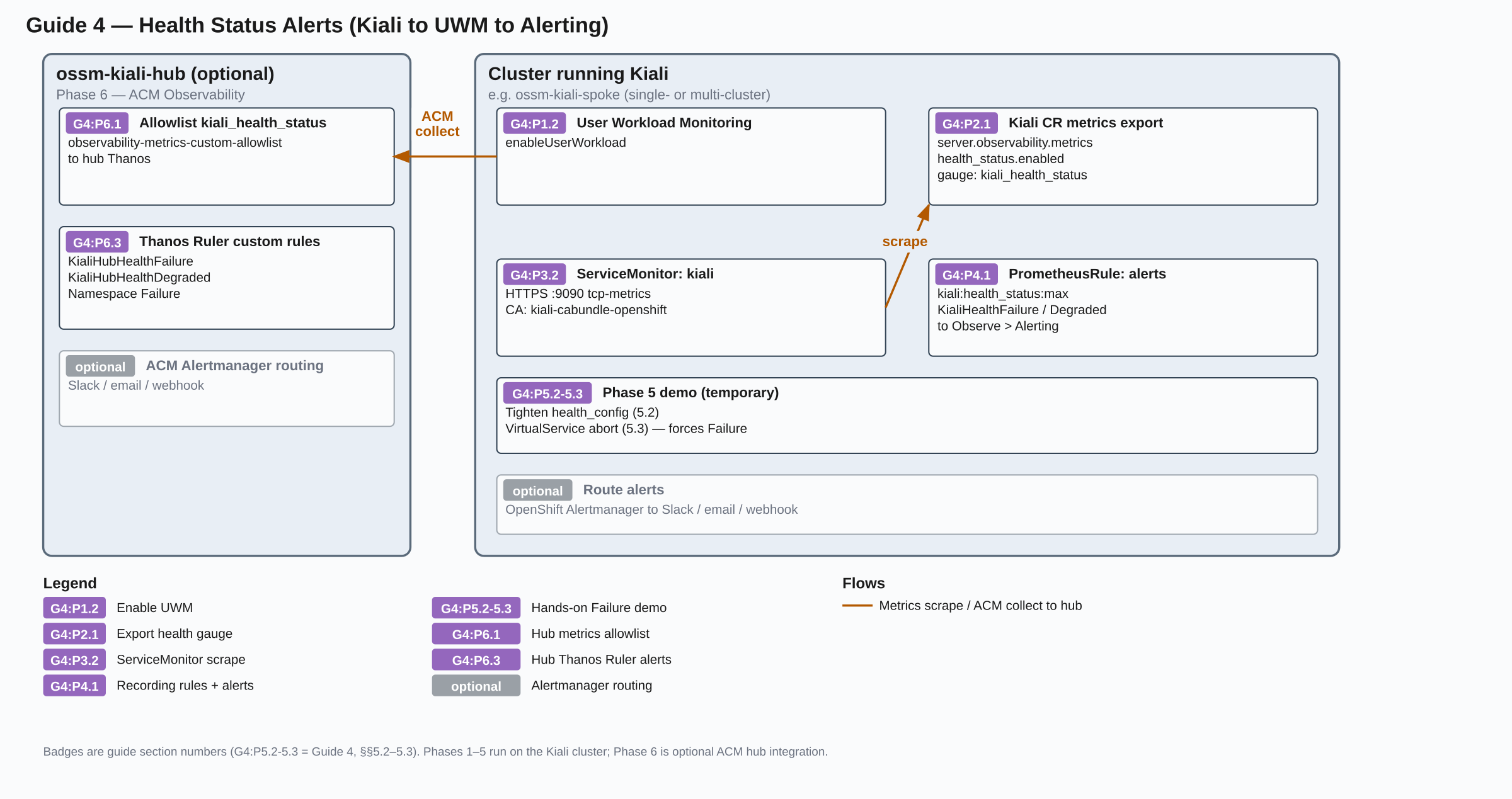
Prerequisites
Single-cluster readers: You do not need ACM or the earlier multi-cluster guides. Commands below use --context=ossm-kiali-spoke (same name as the hub/spoke guide); substitute your cluster’s context if needed, and skip Phase 6. Phase 7 (NetObserv Network Health) is optional on the same cluster after Phases 1–4.
Multi-cluster readers: This guide builds on the same UWM and MCOA federation concepts as the
MultiCluster on OpenShift tutorial series. You do not need to re-install ACM. Completing the
hub/spoke guide (at minimum) is recommended so Istio metrics, Kiali, and the Bookinfo demo are already in place.
- OpenShift 4.19 or later with cluster monitoring (
openshift-monitoring).
- Kiali installed with access to mesh namespaces
- A mesh with workloads Kiali can score. The Phase 5 demo commands use the Bookinfo application — if you want to follow them exactly, have Bookinfo deployed (the hub/spoke guide installs it, or see the Istio Bookinfo sample)
oc CLI with a kubeconfig context for the cluster where Kiali runs (commands use --context=ossm-kiali-spoke; substitute your context name if different)- Phase 6 only: a kubeconfig context for the ACM hub (
--context=ossm-kiali-hub) and ACM Observability (MultiClusterObservability) ready on the hub (set up in the hub/spoke guide)
- Phase 7 only: OpenShift 4.19 or later on the Kiali cluster, access to
redhat-operators for the Network Observability Operator, and Phases 1–4 already completed on that cluster (Guides 1–3 are not required)
Set namespace variables for the cluster that runs Kiali:
KIALI_NS — namespace of the Kiali server (typically istio-system).KIALI_CR_NS — namespace of the Kiali CR. Often the same as KIALI_NS.
export KIALI_CR_NS=$(oc --context=ossm-kiali-spoke get kiali -A -o jsonpath='{.items[0].metadata.namespace}')
export KIALI_NS=$(oc --context=ossm-kiali-spoke get kiali -A -o jsonpath='{.items[0].spec.deployment.namespace}')
echo "KIALI_CR_NS=${KIALI_CR_NS}"
echo "KIALI_NS=${KIALI_NS}"
Non-default instance names: This guide assumes the default Kiali instance name kiali. If your Kiali CR uses a different spec.deployment.instance_name, the Kiali installer names resources after that value. The resources in this guide affected by the instance name are:
- Service —
<kiali-instance-name> (default: kiali)
- CA ConfigMap —
<kiali-instance-name>-cabundle-openshift (default: kiali-cabundle-openshift)
- ServiceMonitor
serverName — <kiali-instance-name>.<namespace>.svc (default: kiali.istio-system.svc)
Substitute accordingly. The Kiali CR name itself may or may not be kiali and is independent of the instance name — use oc get kiali -A to confirm the name of your Kiali CR.
Phase 1: Enable User Workload Monitoring
Already have UWM enabled? If you completed the hub/spoke guide or already have User Workload Monitoring running, step 1.1 will confirm it. Skip ahead to
Phase 2.
Enable UWM on each cluster where Kiali runs. UWM’s Prometheus scrapes targets selected by user-namespace ServiceMonitor / PodMonitor resources (including Kiali’s metrics endpoint) and evaluates user PrometheusRule objects. You do not need UWM on an ACM hub unless Kiali also runs there.
1.1 Check whether UWM is enabled
oc --context=ossm-kiali-spoke get configmap cluster-monitoring-config \
  -n openshift-monitoring \
  -o jsonpath='{.data.config\.yaml}' 2>/dev/null | \
  grep -q "enableUserWorkload: true" && \
  echo "Already enabled" || echo "Not enabled"
1.2 Enable UWM
If not enabled, ensure enableUserWorkload: true is set under data.config.yaml in cluster-monitoring-config. Do not replace the whole ConfigMap if it already has other settings — merge this key into the existing config.yaml.
If the ConfigMap does not exist yet:
oc --context=ossm-kiali-spoke create configmap cluster-monitoring-config \
  -n openshift-monitoring \
  --from-literal=config.yaml="enableUserWorkload: true"
If it already exists, patch it to set the flag without removing other keys:
oc --context=ossm-kiali-spoke get configmap cluster-monitoring-config \
  -n openshift-monitoring -o json \
  | jq '.data["config.yaml"] as $cfg
        | if ($cfg | test("enableUserWorkload"))
          then .data["config.yaml"] = ($cfg | sub("enableUserWorkload:\\s*\\w+"; "enableUserWorkload: true"))
          else .data["config.yaml"] = ($cfg + "\nenableUserWorkload: true\n")
          end' \
  | oc --context=ossm-kiali-spoke apply -f -
1.3 Wait for UWM Prometheus
Wait for the user-workload Prometheus to become ready:
until oc --context=ossm-kiali-spoke get pods \
  -l app.kubernetes.io/name=prometheus \
  -n openshift-user-workload-monitoring \
  --no-headers 2>/dev/null | grep -q .; do
  echo "Waiting for UWM Prometheus pods..."
  sleep 5
done

oc --context=ossm-kiali-spoke wait pod \
  --for=condition=Ready \
  -l app.kubernetes.io/name=prometheus \
  -n openshift-user-workload-monitoring \
  --timeout=300s
1.4 Verify UWM
Confirm User Workload Monitoring is enabled and its Prometheus pods are Ready:
oc --context=ossm-kiali-spoke get configmap cluster-monitoring-config \
  -n openshift-monitoring \
  -o jsonpath='{.data.config\.yaml}'
echo

oc --context=ossm-kiali-spoke get pods \
  -l app.kubernetes.io/name=prometheus \
  -n openshift-user-workload-monitoring
You should see enableUserWorkload: true and at least one Ready Prometheus pod in openshift-user-workload-monitoring.
Phase 2: Enable Kiali health-status metrics
The kiali_health_status Prometheus gauge is the per-entity health score Kiali computes. Each time series represents one mesh entity with these labels:
cluster — cluster name as known to Kialihealth_type — app, service, workload, or namespacenamespace — entity namespacename — entity name (for health_type="namespace", this is the namespace name)
Gauge values are 0–3 as listed in Overview. NA is not written as a gauge value — after max_consecutive_na consecutive refresh cycles (default: 3) when an entity is unavailable or missing, Kiali stops exporting its series.
This gauge needs to be exported in order for Prometheus to scrape its value. This export is controlled by server.observability.metrics.health_status.enabled (default: false). The health cache that computes the gauge is enabled by default; you only need to re-enable it if you previously disabled it via kiali_internal.health_cache.enabled: false.
Both flags are required: server.observability.metrics.enabled: true tells the Kiali installer (operator or server Helm chart) to expose the metrics Service port and to add pod scrape annotations, and server.observability.metrics.health_status.enabled: true activates the health gauge on that endpoint.
2.1 Patch the Kiali CR
Patch the Kiali CR (merge with your existing spec):
oc --context=ossm-kiali-spoke patch kiali kiali -n "${KIALI_CR_NS}" --type=merge -p '
spec:
  server:
    observability:
      metrics:
        enabled: true
        health_status:
          enabled: true
'
2.2 Wait for reconciliation
oc --context=ossm-kiali-spoke wait kiali kiali \
-n "${KIALI_CR_NS}" \
--for=condition=Successful \
--timeout=300s
2.3 Verify health-status metrics are enabled
Confirm the CR settings and that the Service exposes the metrics port:
oc --context=ossm-kiali-spoke get kiali kiali -n "${KIALI_CR_NS}" \
-o jsonpath='{.spec.server.observability.metrics}' ; echo
oc --context=ossm-kiali-spoke get svc kiali -n "${KIALI_NS}" \
-o jsonpath='{range .spec.ports[*]}{.name}{" "}{.port}{"\n"}{end}'
You should see metrics.enabled and health_status.enabled both true, and a tcp-metrics (or http-metrics) port on 9090.
Phase 3: Scrape Kiali with a ServiceMonitor
Create a ServiceMonitor in the Kiali server namespace so User Workload Monitoring scrapes Kiali’s HTTPS metrics endpoint (tcp-metrics / port 9090) and ingests kiali_health_status into UWM Prometheus. Without this scrape, Prometheus never ingests the gauge and it never appears under Observe or in alert evaluation.
Kiali’s metrics endpoint uses HTTPS (service-serving certificates on OpenShift), so the ServiceMonitor must include TLS configuration with the correct CA. The Kiali installation creates a ConfigMap named <kial-instance-name>-cabundle-openshift (default: kiali-cabundle-openshift) that OpenShift automatically populates with the service CA via service.beta.openshift.io/inject-cabundle. The ServiceMonitor below references this ConfigMap.
The relabelings copy app and version from the Kiali Service labels (app.kubernetes.io/name / app, and app.kubernetes.io/version / version) onto scraped time series so the Kiali Internal Metrics workload dashboard can filter by the same labels as the Kiali deployment.
Do not use tlsConfig.caFile in the ServiceMonitor. UWM blocks filesystem access (arbitraryFSAccessThroughSMs.deny: true), so caFile paths that work for platform Prometheus will be rejected. Use the ConfigMap-based tlsConfig.ca form shown below instead.
3.1 Confirm the CA ConfigMap
Confirm the CA ConfigMap has the injected cert before creating the ServiceMonitor that references it. It is normally already present after install; wait if OpenShift has not filled it yet:
until oc --context=ossm-kiali-spoke get configmap kiali-cabundle-openshift \
-n "${KIALI_NS}" \
-o jsonpath='{.data.service-ca\.crt}' 2>/dev/null | grep -q .; do
echo "Waiting for service-ca.crt in kiali-cabundle-openshift..."
sleep 2
done
echo "CA bundle ready"
3.2 Apply the ServiceMonitor
oc --context=ossm-kiali-spoke apply -f - <<EOF
apiVersion: monitoring.coreos.com/v1
kind: ServiceMonitor
metadata:
name: kiali
namespace: ${KIALI_NS}
spec:
endpoints:
- interval: 30s
port: tcp-metrics
relabelings:
- action: replace
regex: "(.+);.*|.*;(.+)"
replacement: "\${1}\${2}"
separator: ";"
sourceLabels:
- __meta_kubernetes_service_label_app_kubernetes_io_name
- __meta_kubernetes_service_label_app
targetLabel: app
- action: replace
regex: "(.+)"
replacement: "\${1}"
sourceLabels:
- __meta_kubernetes_service_label_app_kubernetes_io_name
targetLabel: app_kubernetes_io_name
- action: replace
regex: "(.+);.*|.*;(.+)"
replacement: "\${1}\${2}"
separator: ";"
sourceLabels:
- __meta_kubernetes_service_label_app_kubernetes_io_version
- __meta_kubernetes_service_label_version
targetLabel: version
- action: replace
regex: "(.+)"
replacement: "\${1}"
sourceLabels:
- __meta_kubernetes_service_label_app_kubernetes_io_version
targetLabel: app_kubernetes_io_version
scheme: https
tlsConfig:
ca:
configMap:
key: service-ca.crt
name: kiali-cabundle-openshift
serverName: kiali.${KIALI_NS}.svc
namespaceSelector:
matchNames:
- ${KIALI_NS}
selector:
matchLabels:
app.kubernetes.io/name: kiali
EOF
3.3 Verify the scrape
Kiali’s health cache refreshes every 3 minutes by default. After the first refresh cycle completes and a UWM scrape picks it up (another 30 seconds), kiali_health_status series will appear. Allow up to 5 minutes after applying the ServiceMonitor before checking.
In the OpenShift console, go to Observe > Metrics and add the query:
Or query UWM Prometheus with oc:
PROM_POD=$(oc --context=ossm-kiali-spoke -n openshift-user-workload-monitoring \
get pods -l app.kubernetes.io/name=prometheus \
-o jsonpath='{.items[0].metadata.name}')
oc --context=ossm-kiali-spoke -n openshift-user-workload-monitoring \
exec -c prometheus "${PROM_POD}" -- \
wget -qO- 'http://localhost:9090/api/v1/query?query=kiali_health_status' | jq .
Either way, you should see series with health_type, name, and exported_namespace labels. If the result is empty:
- Confirm Kiali shows health for the demo namespace in the Kiali UI
- Confirm
server.observability.metrics.enabled and server.observability.metrics.health_status.enabled are both true in the Kiali CR
- Confirm UWM is scraping the Kiali target. In the OpenShift console, go to Observe > Targets and look for a target with endpoint
https://...:9090/metrics in the istio-system namespace — it should show UP. If it shows DOWN with a TLS error, check the serverName and CA ConfigMap. If the ServiceMonitor was rejected entirely (no target appears), check for events on the ServiceMonitor with oc describe servicemonitor kiali -n ${KIALI_NS} — a common cause is using tlsConfig.caFile instead of the ConfigMap ca form.
- TLS mismatches usually mean a wrong
serverName (must be <kiali-instance-name>.<namespace>.svc), a wrong CA ConfigMap name (must match your instance: <kiali-instance-name>-cabundle-openshift), or a ConfigMap that does not yet have the injected service-ca.crt key
Phase 4: Recording rules and baseline alerts
Create a PrometheusRule in the Kiali server namespace. This defines recording rules — pre-computed aggregations that Prometheus evaluates on a schedule and stores as new time series — and a set of baseline alerts you can use as a starting point and customize for your environment. Those alerts surface under Observe > Alerting; the Kiali installer (operator or Helm chart) does not install this rule for you.
4.1 Apply the baseline PrometheusRule
UWM namespace label rewrite: User Workload Monitoring overwrites the Prometheus namespace label with the namespace of the ServiceMonitor / PrometheusRule (usually istio-system). Kiali’s original mesh namespace is preserved as exported_namespace. Use exported_namespace in PromQL, recording rules, and alert annotations — not namespace.
Apply this PrometheusRule in ${KIALI_NS} — the same namespace as the ServiceMonitor. UWM only lets a rule query metrics whose Prometheus namespace label matches the rule’s own namespace. Put the rule anywhere else and the expressions see no series.
Also set the label openshift.io/prometheus-rule-evaluation-scope: leaf-prometheus so UWM’s Prometheus evaluates the rules locally (faster than Thanos Ruler for user-workload alerts).
The recording rules use max by (cluster, exported_namespace, health_type, name) to aggregate across Kiali replicas — if you run more than one replica, each pod exports its own series for the same entity, and max ensures the worst health wins (Failure 3 beats Degraded 2). This pattern stays correct for a single replica too. Always keep cluster in the aggregation set in multi-cluster environments.
oc --context=ossm-kiali-spoke apply -f - <<EOF
apiVersion: monitoring.coreos.com/v1
kind: PrometheusRule
metadata:
name: kiali-health-status
namespace: ${KIALI_NS}
labels:
openshift.io/prometheus-rule-evaluation-scope: leaf-prometheus
spec:
groups:
- name: kiali.health.recording
rules:
- record: kiali:health_status:max
expr: |
max by (cluster, exported_namespace, health_type, name) (kiali_health_status)
- record: kiali:health_status:namespace_max
expr: |
max by (cluster, exported_namespace, name) (
kiali_health_status{health_type="namespace"}
)
- name: kiali.health.alerts
rules:
- alert: KialiHealthFailure
expr: |
kiali:health_status:max{health_type=~"app|service|workload"} == 3
for: 5m
labels:
severity: critical
annotations:
summary: >-
{{ \$labels.health_type }} {{ \$labels.name }} in {{ \$labels.exported_namespace }}
(cluster {{ \$labels.cluster }}) is in Failure
description: >-
Kiali reported Failure (kiali_health_status == 3) for at least 5 minutes.
- alert: KialiHealthDegraded
expr: |
kiali:health_status:max{health_type=~"app|service|workload"} == 2
for: 10m
labels:
severity: warning
annotations:
summary: >-
{{ \$labels.health_type }} {{ \$labels.name }} in {{ \$labels.exported_namespace }}
(cluster {{ \$labels.cluster }}) is Degraded
description: >-
Kiali reported Degraded (kiali_health_status == 2) for at least 10 minutes.
- alert: KialiNamespaceHealthFailure
expr: |
kiali:health_status:namespace_max == 3
for: 5m
labels:
severity: critical
annotations:
summary: >-
Namespace {{ \$labels.exported_namespace }} (cluster {{ \$labels.cluster }})
is in Failure
description: >-
Kiali namespace aggregate health status is Failure (kiali_health_status == 3)
for at least 5 minutes.
EOF
Shell note: The summaries use \$labels... so your shell does not expand $labels before oc apply. Prometheus still receives normal {{ $labels... }} templates. If you put the same YAML in a file and apply with oc apply -f, use $labels without the backslash.
That PrometheusRule creates two rule groups:
kiali.health.recording — recording rules kiali:health_status:max and kiali:health_status:namespace_max (per-entity aggregates used by the alerts below)kiali.health.alerts — three baseline alerts:
KialiHealthFailure — fires when an app, service, or workload has Failure health status (== 3), severity critical, for: 5mKialiHealthDegraded — fires when an app, service, or workload has Degraded health status (== 2), severity warning, for: 10mKialiNamespaceHealthFailure — fires when a namespace aggregate has Failure health status (== 3), severity critical, for: 5m
Not Ready (== 1) is omitted from these baseline alerts. It is often transient during rollouts; add a custom alert if you need it.
4.2 Verify the rules
Confirm the PrometheusRule is present, then check that the recording rule produces series (console Observe > Metrics, or oc):
oc --context=ossm-kiali-spoke get prometheusrule kiali-health-status -n "${KIALI_NS}"
PROM_POD=$(oc --context=ossm-kiali-spoke -n openshift-user-workload-monitoring \
get pods -l app.kubernetes.io/name=prometheus \
-o jsonpath='{.items[0].metadata.name}')
oc --context=ossm-kiali-spoke -n openshift-user-workload-monitoring \
exec -c prometheus "${PROM_POD}" -- \
wget -qO- 'http://localhost:9090/api/v1/query?query=kiali:health_status:max' | jq .
You should see aggregated series with cluster, exported_namespace, health_type, and name. Alerts stay pending until health is Degraded/Failure long enough to satisfy for (see Phase 5 to trigger one).
Phase 5: Custom alerts and a hands-on trigger demo
This phase has two parts: first, adding your own alerts tailored to your namespaces and severities. Then, an optional hands-on demo that forces Failure health so you can see KialiHealthFailure fire under Observe > Alerting.
5.1 Add custom alerts
- Edit the
kiali-health-status PrometheusRule (or create a new one in ${KIALI_NS} with the same leaf-prometheus label).
- Add another
- alert: entry under kiali.health.alerts (or a new group).
oc apply the manifest.
Useful knobs:
- Filter by label — e.g.
exported_namespace="bookinfo", name="reviews", cluster="spoke" (under UWM, mesh namespace is exported_namespace)
for — how long the alert expression must stay true before the alert actually fires. While it is true but that duration has not elapsed, the alert is only pending. If the expression becomes false before for completes, the pending alert is cleared and the clock resets. Longer for values ignore brief blips; shorter values (as in the demo below) surface problems faster.severity — a label on the alert (critical, warning, or info). The OpenShift console uses it to filter and prioritize alerts under Observe > Alerting (for example, show only critical). It does not change when the alert fires; that is controlled by expr and for.
Alert expressions for kiali_health_status operate on the gauge value (0–3), not on raw HTTP error percentages. To change when Kiali marks Degraded/Failure, adjust health_config.rate tolerances; to change when OpenShift fires an alert, adjust the alert expr / for.
The two examples below each create a separate PrometheusRule so you do not have to hand-edit the one created in Phase 4. Use \$labels in the heredoc (see the “shell note” from Phase 4).
Example — Failure only in bookinfo:
Fires when any app, service, or workload in the bookinfo namespace reaches Failure health status for at least 5 minutes.
oc --context=ossm-kiali-spoke apply -f - <<EOF
apiVersion: monitoring.coreos.com/v1
kind: PrometheusRule
metadata:
name: kiali-health-status-bookinfo
namespace: ${KIALI_NS}
labels:
openshift.io/prometheus-rule-evaluation-scope: leaf-prometheus
spec:
groups:
- name: kiali.health.bookinfo
rules:
- alert: KialiBookinfoHealthFailure
expr: |
kiali:health_status:max{
health_type=~"app|service|workload",
exported_namespace="bookinfo"
} == 3
for: 5m
labels:
severity: critical
annotations:
summary: "Bookinfo {{ \$labels.health_type }} {{ \$labels.name }} is in Failure"
EOF
Example — sustained Not Ready for workloads:
Fires when any workload stays in Not Ready health status for at least 15 minutes, catching prolonged rollout or scaling issues that outlast normal transient periods.
oc --context=ossm-kiali-spoke apply -f - <<EOF
apiVersion: monitoring.coreos.com/v1
kind: PrometheusRule
metadata:
name: kiali-health-status-not-ready
namespace: ${KIALI_NS}
labels:
openshift.io/prometheus-rule-evaluation-scope: leaf-prometheus
spec:
groups:
- name: kiali.health.not-ready
rules:
- alert: KialiWorkloadNotReady
expr: |
kiali:health_status:max{health_type="workload"} == 1
for: 15m
labels:
severity: warning
annotations:
summary: "Workload {{ \$labels.name }} in {{ \$labels.exported_namespace }} is Not Ready"
EOF
Steps 5.2–5.4 below walk through a hands-on demo: force a Failure, shorten for on KialiHealthFailure so you are not waiting five minutes, view the alert in the OpenShift console, then clean up.
5.2 Shorten the Failure alert for the demo
Phase 4 sets for: 5m on KialiHealthFailure, so the Failure expression must hold for five minutes before the alert leaves pending state and fires. For the demo, temporarily set for to 1m so you are not waiting too long to see the alert fire:
oc --context=ossm-kiali-spoke get prometheusrule kiali-health-status -n "${KIALI_NS}" -o json \
| jq 'del(.status)
| (.spec.groups[] | select(.name == "kiali.health.alerts").rules[]
| select(.alert == "KialiHealthFailure").for) = "1m"' \
| oc --context=ossm-kiali-spoke apply -f -
Note that for production alerts, the recommendations remain for: 5m (Failure) and for: 10m (Degraded).
5.3 Force Failure health
Tighten traffic-health tolerances for the demo namespace so even a small 5xx rate becomes a Failure which then generate errors.
Warning: The patch below replaces spec.health_config on the Kiali CR (including any existing rate list). Back up the current health_config first so it can be restored during the Cleanup phase, then apply the patch and wait for reconciliation:
oc --context=ossm-kiali-spoke get kiali kiali -n "${KIALI_CR_NS}" -o json \
| jq '.spec.health_config // {}' > /tmp/kiali-health-config-backup.json
oc --context=ossm-kiali-spoke patch kiali kiali -n "${KIALI_CR_NS}" --type=merge -p '
spec:
health_config:
compute:
duration: 10m
rate:
- namespace: "bookinfo"
kind: ".*"
name: ".*"
tolerance:
- code: "^5\\d\\d$"
direction: ".*"
protocol: "http"
degraded: 0
failure: 1
'
oc --context=ossm-kiali-spoke wait kiali kiali \
-n "${KIALI_CR_NS}" \
--for=condition=Successful \
--timeout=300s
Threshold semantics: In
health_config.rate tolerances, a
failure value of
0 with a
degraded value of
0 does not trigger Failure — instead, matching traffic is marked Degraded (see
issue #10072). Use
failure: 1 as the lowest effective Failure threshold (triggers Failure for any 5xx error rate at or above 1%). See
Traffic Health for the full priority table.
compute.duration and hub Thanos: The health calculation duration must be
compatible with the ACM federation cadence. See
Scrape Intervals
before changing the federation interval or this duration.
Now inject abort faults on Bookinfo ratings (or another service you care about):
oc --context=ossm-kiali-spoke apply -f - <<'EOF'
apiVersion: networking.istio.io/v1
kind: VirtualService
metadata:
name: kiali-health-alert-demo
namespace: bookinfo
spec:
hosts:
- ratings
http:
- fault:
abort:
httpStatus: 500
percentage:
value: 100
route:
- destination:
host: ratings
EOF
Send traffic through the productpage > reviews > ratings path. Only some Bookinfo reviews versions call ratings, so not every request produces a ratings 5xx but this is enough for the demo.
If you already have a traffic generator running (such as the traffic-gen deployment from the hub/spoke guide), it is already driving requests through this path — skip the command below. Otherwise, generate traffic from inside the cluster:
oc --context=ossm-kiali-spoke -n bookinfo exec deploy/ratings-v1 -c ratings -- \
sh -c 'for i in $(seq 1 60); do curl -s -o /dev/null -w "%{http_code}\n" http://productpage:9080/productpage; sleep 2; done'
Kiali’s health cache refreshes every 3m (controlled by health_config.compute.refresh_interval). After generating errors, wait for a refresh cycle (or watch the Kiali UI) until the ratings (or related) entity shows Failure. Then go to Observe > Metrics in the OpenShift console and run this query to confirm Failure series exist:
kiali:health_status:max{exported_namespace="bookinfo", health_type=~"app|service|workload"} == 3
Because we shortened for to 1m on the alert rule above, the Failure condition must stay true for one full minute before KialiHealthFailure fires (until then it stays pending).
5.4 View the alert in the OpenShift console
- Log in to the OpenShift web console with a user that can view alerting (kubeadmin or a monitoring-capable role).
- Go to Observe > Alerting > Alerts.
- Filter or search for
KialiHealthFailure. With the zero-tolerance health_config applied above, any 5xx traffic goes straight to Failure — KialiHealthDegraded should not appear for the affected entities.
- Open the alert and confirm
exported_namespace (mesh namespace), name, health_type, cluster, and the annotation summary. The Prometheus namespace label will be the rule namespace (for example istio-system).
You can also confirm under Observe > Metrics with:
ALERTS{alertname=~"KialiHealthFailure|KialiHealthDegraded"}
Single-cluster readers can stop here, or continue to Phase 7 for NetObserv Network Health. Multi-cluster readers who want hub Thanos queries and/or hub alerts can continue to Phase 6 (Phase 7 remains available afterward on each Kiali cluster).
Phase 6: Multi-cluster with ACM Observability
Complete Phases 1–3 on each managed cluster that should export kiali_health_status (UWM, metric export, ServiceMonitor). Phases 4–5 are optional if you only want hub alerts and do not need per-cluster Observe > Alerting.
MCOA federates metrics from each managed cluster’s UWM to hub Thanos. This phase adds the health recording group to the shared mesh-observability aggregation rule and reuses the shared user-workload ScrapeConfig, then configures hub Thanos Ruler alert rules.
If you already applied Phase 4 on the managed clusters, you can keep those local alerts, replace them with hub-only rules, or run both — see the trade-offs in Overview. Hub evaluation follows the MCOA federation cadence; see Scrape Intervals for the timing implications.
6.1 Add kiali_health_status MCOA Federation Resources
Already followed Guide 1 (hub/spoke)? The
kiali-istio-aggregation PrometheusRule and
kiali-istio-federation ScrapeConfig were created in
Guide 1, §1.5 Configure MCOA Federation. Add the health recording group and health match expression to those existing resources; do not create another namespace-specific rule. If you followed that Guide, skip the resource creation below and go directly to
§6.2.
On the hub, identify the MCOA placement (if you already did this in the hub/spoke guide, re-export the variables):
ADDON_JSON=$(oc --context=ossm-kiali-hub get clustermanagementaddon \
multicluster-observability-addon -o json)
MCOA_PLACEMENT_NAME=$(echo "${ADDON_JSON}" | \
jq -r '.spec.installStrategy.placements[0].name')
MCOA_PLACEMENT_NS=$(echo "${ADDON_JSON}" | \
jq -r '.spec.installStrategy.placements[0].namespace')
For a standalone health-only setup, create the shared aggregation PrometheusRule in mesh-observability. MCOA propagates it into that namespace on each managed cluster. The max without expression deduplicates samples across Kiali HA replicas:
oc --context=ossm-kiali-hub apply -f - <<'EOF'
apiVersion: monitoring.coreos.com/v1
kind: PrometheusRule
metadata:
annotations:
observability.open-cluster-management.io/target-namespace: mesh-observability
labels:
app.kubernetes.io/component: user-workload-metrics-collector
app.kubernetes.io/managed-by: kiali-mcoa-federation
openshift.io/prometheus-rule-evaluation-scope: leaf-prometheus
name: kiali-istio-aggregation
namespace: open-cluster-management-observability
spec:
groups:
- interval: 30s
name: kiali.aggregation
rules:
- expr: max without (pod, pod_template_hash, instance, job, node) (kiali_health_status)
record: kiali:kiali_health_status
EOF
Use the existing kiali-istio-federation user-workload ScrapeConfig (or create it once for a health-only setup) to federate the aggregated kiali:kiali_health_status series and relabel it back to kiali_health_status for Thanos Ruler queries. Merge this match expression with the core and Kiali metric matches; do not create a second ScrapeConfig with the same name.
oc --context=ossm-kiali-hub apply -f - <<'EOF'
apiVersion: monitoring.rhobs/v1alpha1
kind: ScrapeConfig
metadata:
labels:
app.kubernetes.io/component: user-workload-metrics-collector
app.kubernetes.io/managed-by: kiali-mcoa-federation
name: kiali-istio-federation
namespace: open-cluster-management-observability
spec:
honorLabels: true
jobName: kiali-istio-federation
metricRelabelings:
- action: replace
regex: 'kiali:(.*)'
replacement: '${1}'
sourceLabels: [__name__]
targetLabel: __name__
metricsPath: /federate
params:
match[]:
- '{__name__="kiali:kiali_health_status"}'
EOF
Register both resources with the MCOA placement (the bash code below is idempotent):
add_mcoa_ref() {
local group=$1 resource=$2 name=$3
local exists idx configs op path
ADDON_JSON=$(oc --context=ossm-kiali-hub get clustermanagementaddon \
multicluster-observability-addon -o json)
exists=$(echo "${ADDON_JSON}" | jq -r \
--arg g "${group}" --arg r "${resource}" --arg n "${name}" \
--arg ns "open-cluster-management-observability" \
--arg pn "${MCOA_PLACEMENT_NAME}" --arg pns "${MCOA_PLACEMENT_NS}" \
'[.spec.installStrategy.placements[] |
select(.name == $pn and .namespace == $pns) |
.configs[]? |
select(.group == $g and .resource == $r and .name == $n and .namespace == $ns)] | length')
if [ "${exists}" -eq 0 ]; then
idx=$(echo "${ADDON_JSON}" | jq -r \
--arg pn "${MCOA_PLACEMENT_NAME}" --arg pns "${MCOA_PLACEMENT_NS}" \
'.spec.installStrategy.placements | to_entries[] |
select(.value.name == $pn and .value.namespace == $pns) | .key')
configs=$(echo "${ADDON_JSON}" | jq -r \
--argjson i "${idx}" \
'.spec.installStrategy.placements[$i].configs | type == "array"')
if [ "${configs}" = true ]; then
op="add"; path="/spec/installStrategy/placements/${idx}/configs/-"
else
op="add"; path="/spec/installStrategy/placements/${idx}/configs"
fi
oc --context=ossm-kiali-hub patch clustermanagementaddon \
multicluster-observability-addon --type=json -p="[{
\"op\": \"${op}\", \"path\": \"${path}\",
\"value\": {\"group\": \"${group}\", \"resource\": \"${resource}\",
\"name\": \"${name}\",
\"namespace\": \"open-cluster-management-observability\"}
}]"
echo "Added ${resource}/${name} to placement"
else
echo "Reference ${resource}/${name} already present — skipping"
fi
}
add_mcoa_ref monitoring.coreos.com prometheusrules kiali-istio-aggregation
add_mcoa_ref monitoring.rhobs scrapeconfigs kiali-istio-federation
6.2 Verify on the hub
After applying the MCOA resources, follow the timing guidance in Scrape Intervals before verifying the pipeline:
# Confirm source PrometheusRule and ScrapeConfig exist on the hub
oc --context=ossm-kiali-hub get prometheusrule kiali-istio-aggregation \
-n open-cluster-management-observability
oc --context=ossm-kiali-hub get scrapeconfig kiali-istio-federation \
-n open-cluster-management-observability
# Confirm the PrometheusRule propagated to the shared aggregation namespace on the spoke
oc --context=ossm-kiali-spoke get prometheusrule kiali-istio-aggregation \
-n mesh-observability
# Query hub Thanos for kiali_health_status (relabeled from kiali:kiali_health_status by the ScrapeConfig)
oc --context=ossm-kiali-hub get --raw \
"/api/v1/namespaces/open-cluster-management-observability/services/http:observability-thanos-query-frontend:9090/proxy/api/v1/query?query=kiali_health_status" \
| jq .
Confirm the kiali_health_status metric appears and includes cluster identity labels so you can filter by managed cluster.
6.3 Apply hub alert rules
In Phase 4 we created recording rules on each managed cluster to pre-aggregate kiali_health_status into kiali:health_status:max. Those recording rules stay on each cluster’s UWM Prometheus — they are not pushed to the hub. For the hub alerts below, we take a simpler approach and inline the max by (...) aggregation directly in each alert expression rather than creating separate recording rules on the hub. You can opt to use recording rules on the hub as well if you prefer that approach.
Create ACM Thanos Ruler custom rules on the hub. ACM loads the ConfigMap named thanos-ruler-custom-rules in open-cluster-management-observability (data key must be custom_rules.yaml). These alerts parallel the Phase 4 baseline alerts but use distinct names so you can tell hub alerts from managed-cluster alerts:
oc --context=ossm-kiali-hub apply -f - <<'EOF'
apiVersion: v1
kind: ConfigMap
metadata:
name: thanos-ruler-custom-rules
namespace: open-cluster-management-observability
data:
custom_rules.yaml: |
groups:
- name: kiali.health.hub.alerts
rules:
- alert: KialiHubHealthFailure
expr: |
max by (cluster, exported_namespace, health_type, name) (
kiali_health_status{health_type=~"app|service|workload"}
) == 3
for: 5m
labels:
severity: critical
annotations:
summary: >-
{{ $labels.health_type }} {{ $labels.name }} in {{ $labels.exported_namespace }}
(cluster {{ $labels.cluster }}) has Failure health status
description: >-
Hub Thanos Ruler: Kiali reported Failure (kiali_health_status == 3)
for at least 5 minutes.
- alert: KialiHubHealthDegraded
expr: |
max by (cluster, exported_namespace, health_type, name) (
kiali_health_status{health_type=~"app|service|workload"}
) == 2
for: 10m
labels:
severity: warning
annotations:
summary: >-
{{ $labels.health_type }} {{ $labels.name }} in {{ $labels.exported_namespace }}
(cluster {{ $labels.cluster }}) has Degraded health status
description: >-
Hub Thanos Ruler: Kiali reported Degraded (kiali_health_status == 2)
for at least 10 minutes.
- alert: KialiHubNamespaceHealthFailure
expr: |
max by (cluster, exported_namespace, name) (
kiali_health_status{health_type="namespace"}
) == 3
for: 5m
labels:
severity: critical
annotations:
summary: >-
Namespace {{ $labels.exported_namespace }} (cluster {{ $labels.cluster }})
has Failure health status
description: >-
Hub Thanos Ruler: Kiali namespace aggregate health status is Failure
(kiali_health_status == 3) for at least 5 minutes.
EOF
Do not drop existing hub rules. If thanos-ruler-custom-rules already exists, merge the kiali.health.hub.alerts group into the existing custom_rules.yaml instead of replacing the ConfigMap with a shorter file that only contains the Kiali group.
That ConfigMap creates one rule group, kiali.health.hub.alerts, with three baseline alerts:
KialiHubHealthFailure — app, service, or workload Failure (== 3), severity critical, for: 5mKialiHubHealthDegraded — app, service, or workload Degraded (== 2), severity warning, for: 10mKialiHubNamespaceHealthFailure — namespace aggregate Failure (== 3), severity critical, for: 5m
6.4 Verify hub alerts
Confirm the ConfigMap is present:
oc --context=ossm-kiali-hub -n open-cluster-management-observability \
get configmap thanos-ruler-custom-rules -o yaml
After ACM has collected Failure/Degraded samples and the alert for duration has elapsed, check for firing alerts on the hub (not the managed cluster’s Observe > Alerting):
- ACM Observability Grafana Explore — query
ALERTS{alertname=~"KialiHub.*"}
- Or proxy Thanos:
oc --context=ossm-kiali-hub -n open-cluster-management-observability \
get --raw \
"/api/v1/namespaces/open-cluster-management-observability/services/http:observability-thanos-query-frontend:9090/proxy/api/v1/query?query=ALERTS%7Balertname%3D~%22KialiHub.%2A%22%7D" \
| jq .
Phase 7: Network Health (NetObserv)
Network Health is NetObserv’s console dashboard under Observe > Network Health. It is distinct from OpenShift Observe > Alerting: Alerting shows firing/pending Prometheus alerts, while Network Health summarizes network and custom health signals (alerts and recording-rule scores) in Global / Namespaces / Nodes / Workloads tabs. This phase installs the Network Observability Operator on the same cluster that runs Kiali (ossm-kiali-spoke, or your substituted context — not the ACM hub), then re-applies the Phase 4 PrometheusRule with NetObserv metadata so Kiali health appears on that dashboard. Phases 1–4 must already be complete; Guides 1–3 and Phase 6 are not required. OpenShift 4.19+ and Network Observability Operator 1.11+ are required for Network Health.
7.1 Install the Network Observability Operator
Install the operator into openshift-netobserv-operator (required namespace for NetObserv OLM install) from redhat-operators on the stable channel (1.11+):
oc --context=ossm-kiali-spoke apply -f - <<'EOF'
apiVersion: v1
kind: Namespace
metadata:
name: openshift-netobserv-operator
labels:
openshift.io/cluster-monitoring: "true"
---
apiVersion: operators.coreos.com/v1
kind: OperatorGroup
metadata:
name: openshift-netobserv-operator
namespace: openshift-netobserv-operator
spec: {}
---
apiVersion: operators.coreos.com/v1alpha1
kind: Subscription
metadata:
name: netobserv-operator
namespace: openshift-netobserv-operator
spec:
channel: stable
installPlanApproval: Automatic
name: netobserv-operator
source: redhat-operators
sourceNamespace: openshift-marketplace
EOF
Wait for the FlowCollector CRD to be Established, then for the operator pod to become Ready:
until oc --context=ossm-kiali-spoke get crd \
flowcollectors.flows.netobserv.io &>/dev/null; do
echo "Waiting for FlowCollector CRD..."
sleep 10
done
oc --context=ossm-kiali-spoke wait crd/flowcollectors.flows.netobserv.io \
--for=condition=Established \
--timeout=300s
echo "FlowCollector CRD ready"
until oc --context=ossm-kiali-spoke get pods \
-l app=netobserv-operator \
-n openshift-netobserv-operator \
--no-headers 2>/dev/null | grep -q .; do
echo "Waiting for NetObserv operator pod..."
sleep 5
done
oc --context=ossm-kiali-spoke wait pod \
--for=condition=Ready \
-l app=netobserv-operator \
-n openshift-netobserv-operator \
--timeout=300s
echo "Network Observability Operator ready"
7.2 Create the FlowCollector
Create the cluster-scoped FlowCollector named cluster. This guide uses a Loki-less install: Network Health is driven by Prometheus alerts and recording rules, so Loki (and object storage) are not required. The console plugin still deploys and provides Observe > Network Health. Full Network Traffic flow-table features need Loki — see Installing the Network Observability Operator if you want that later.
oc --context=ossm-kiali-spoke apply -f - <<'EOF'
apiVersion: flows.netobserv.io/v1beta2
kind: FlowCollector
metadata:
name: cluster
spec:
namespace: netobserv
agent:
type: eBPF
loki:
enable: false
consolePlugin:
enable: true
EOF
Wait for the FlowCollector to report Ready and for the console plugin deployment to appear:
oc --context=ossm-kiali-spoke wait flowcollector/cluster \
--for=condition=Ready \
--timeout=600s
echo "FlowCollector Ready"
until oc --context=ossm-kiali-spoke get deploy -n netobserv \
--no-headers 2>/dev/null | grep -qi netobserv-plugin; do
echo "Waiting for NetObserv console plugin deployment..."
sleep 10
done
PLUGIN_DEPLOY=$(oc --context=ossm-kiali-spoke get deploy -n netobserv \
--no-headers -o custom-columns=NAME:.metadata.name 2>/dev/null \
| grep -i netobserv-plugin | head -1)
oc --context=ossm-kiali-spoke rollout status deployment/"${PLUGIN_DEPLOY}" \
-n netobserv \
--timeout=300s
echo "NetObserv console plugin ready"
In the OpenShift console (refresh if needed), confirm Observe > Network Health is listed. Non-kubeadmin users need cluster-monitoring-view to query alerts for that page.
7.3 Annotate Kiali PrometheusRules for Network Health
Re-apply the Phase 4 PrometheusRule in ${KIALI_NS} with NetObserv labels and annotations. Keep the rule in the Kiali namespace so UWM can still evaluate it (leaf-prometheus); do not move it into the netobserv namespace. NetObserv discovers recording rules cluster-wide via the netobserv: "true" label.
Use exported_namespace in namespaceLabels so scores and alerts land on the Namespaces tab (UWM rewrites the mesh namespace to exported_namespace). Recording-rule thresholds map to the Kiali gauge: Not Ready 1 (info), Degraded 2 (warning), Failure 3 (critical), with upperBound: "3".
The netobserv: "true" labels are inert if NetObserv is not installed; with Network Health present they select the rules for that dashboard.
oc --context=ossm-kiali-spoke apply --server-side --force-conflicts -f - <<EOF
apiVersion: monitoring.coreos.com/v1
kind: PrometheusRule
metadata:
name: kiali-health-status
namespace: ${KIALI_NS}
labels:
netobserv: "true"
openshift.io/prometheus-rule-evaluation-scope: leaf-prometheus
annotations:
netobserv.io/network-health: |
{
"kiali:health_status:max": {
"summary": "Kiali health status for {{ \$labels.health_type }} {{ \$labels.name }} in {{ \$labels.exported_namespace }} is {{ \$value }}",
"description": "Worst Kiali health score (0=Healthy, 1=Not Ready, 2=Degraded, 3=Failure) for the entity.",
"netobserv_io_network_health": "{\"unit\":\"status\",\"upperBound\":\"3\",\"namespaceLabels\":[\"exported_namespace\"],\"recordingThresholds\":{\"info\":\"1\",\"warning\":\"2\",\"critical\":\"3\"}}"
},
"kiali:health_status:namespace_max": {
"summary": "Kiali namespace health for {{ \$labels.exported_namespace }} is {{ \$value }}",
"description": "Worst Kiali namespace aggregate health score (0=Healthy, 1=Not Ready, 2=Degraded, 3=Failure).",
"netobserv_io_network_health": "{\"unit\":\"status\",\"upperBound\":\"3\",\"namespaceLabels\":[\"exported_namespace\"],\"recordingThresholds\":{\"info\":\"1\",\"warning\":\"2\",\"critical\":\"3\"}}"
}
}
spec:
groups:
- name: kiali.health.recording
rules:
- record: kiali:health_status:max
expr: |
max by (cluster, exported_namespace, health_type, name) (kiali_health_status)
labels:
netobserv: "true"
- record: kiali:health_status:namespace_max
expr: |
max by (cluster, exported_namespace, name) (
kiali_health_status{health_type="namespace"}
)
labels:
netobserv: "true"
- name: kiali.health.alerts
rules:
- alert: KialiHealthFailure
expr: |
kiali:health_status:max{health_type=~"app|service|workload"} == 3
for: 5m
labels:
netobserv: "true"
severity: critical
annotations:
summary: >-
{{ \$labels.health_type }} {{ \$labels.name }} in {{ \$labels.exported_namespace }}
(cluster {{ \$labels.cluster }}) is in Failure
description: >-
Kiali reported Failure (kiali_health_status == 3) for at least 5 minutes.
netobserv_io_network_health: '{"namespaceLabels":["exported_namespace"],"threshold":"3","unit":"status","upperBound":"3"}'
- alert: KialiHealthDegraded
expr: |
kiali:health_status:max{health_type=~"app|service|workload"} == 2
for: 10m
labels:
netobserv: "true"
severity: warning
annotations:
summary: >-
{{ \$labels.health_type }} {{ \$labels.name }} in {{ \$labels.exported_namespace }}
(cluster {{ \$labels.cluster }}) is Degraded
description: >-
Kiali reported Degraded (kiali_health_status == 2) for at least 10 minutes.
netobserv_io_network_health: '{"namespaceLabels":["exported_namespace"],"threshold":"2","unit":"status","upperBound":"3"}'
- alert: KialiNamespaceHealthFailure
expr: |
kiali:health_status:namespace_max == 3
for: 5m
labels:
netobserv: "true"
severity: critical
annotations:
summary: >-
Namespace {{ \$labels.exported_namespace }} (cluster {{ \$labels.cluster }})
is in Failure
description: >-
Kiali namespace aggregate health status is Failure (kiali_health_status == 3)
for at least 5 minutes.
netobserv_io_network_health: '{"namespaceLabels":["exported_namespace"],"threshold":"3","unit":"status","upperBound":"3"}'
EOF
Shell note: As in Phase 4, summaries use \$labels... so the shell does not expand $labels before oc apply.
7.4 Verify Network Health
Confirm the annotated rule is present:
oc --context=ossm-kiali-spoke get prometheusrule kiali-health-status \
-n "${KIALI_NS}" -o yaml | grep -E 'netobserv|network-health|exported_namespace'
You should see netobserv: "true", the netobserv.io/network-health annotation, and namespaceLabels referencing exported_namespace.
In the OpenShift console:
- Go to Observe > Network Health.
- Open the Namespaces tab.
- Confirm Kiali recording-rule scores (and any pending/firing
KialiHealth* alerts) appear for mesh namespaces such as bookinfo.
To force a Failure and watch it on Network Health as well as Observe > Alerting, run the Phase 5 hands-on demo (shorten for, tighten health_config, inject the ratings abort VirtualService, generate traffic). After the Failure condition holds for the alert for duration, KialiHealthFailure should show under Network Health > Namespaces for bookinfo.
Routing alerts to Slack, email, or webhooks
This section is optional. It shows how to route fired alerts to a third-party notification system such as Slack, email, or generic webhooks.
Which Alertmanager you configure depends on where your alerts emit from. If you set up hub alerts in Phase 6, follow the steps below to override ACM’s Alertmanager via the alertmanager-config secret in open-cluster-management-observability. If you set up managed-cluster or single-cluster alerts in Phases 1–5, configure OpenShift’s own Alertmanager instead — via the alertmanager-main secret in openshift-monitoring.
On the hub, back up the current secret contents:
oc --context=ossm-kiali-hub -n open-cluster-management-observability \
get secret alertmanager-config \
-o jsonpath='{.data.alertmanager\.yaml}' | base64 -d > /tmp/alertmanager.yaml
cp /tmp/alertmanager.yaml /tmp/alertmanager.yaml.bak
Edit /tmp/alertmanager.yaml (or write a new file from one of the examples below) to define route and receivers. Replace the secret when finished:
oc --context=ossm-kiali-hub -n open-cluster-management-observability \
create secret generic alertmanager-config \
--from-file=alertmanager.yaml=/tmp/alertmanager.yaml \
--dry-run=client -o yaml \
| oc --context=ossm-kiali-hub -n open-cluster-management-observability replace -f -
ACM reloads Alertmanager from that secret. Keep /tmp/alertmanager.yaml.bak so you can restore the previous config the same way.
Example: Slack
Create an Incoming Webhook in Slack, then use a config like this (substitute your webhook URL and channel). The nested route sends only the Phase 6 KialiHub* alerts to Slack:
global:
resolve_timeout: 5m
slack_api_url: 'https://hooks.slack.com/services/REPLACE/WITH/WEBHOOK'
route:
group_by: ['alertname', 'cluster']
group_wait: 30s
group_interval: 5m
repeat_interval: 3h
receiver: 'default'
routes:
- matchers:
- alertname =~ "KialiHub.*"
receiver: 'kiali-slack'
receivers:
- name: 'default'
- name: 'kiali-slack'
slack_configs:
- channel: '#alerts'
send_resolved: true
Alertmanager posts a default Slack message with the alert status, name, and labels. To customize the message, add title, text, or blocks fields to slack_configs using Go templates — see the upstream Alertmanager Slack configuration docs.
Example: email
global:
resolve_timeout: 5m
smtp_smarthost: 'smtp.example.com:587'
smtp_from: 'alertmanager@example.com'
smtp_auth_username: 'alertmanager'
smtp_auth_password: 'REPLACE_ME'
route:
group_by: ['alertname', 'cluster']
group_wait: 30s
group_interval: 5m
repeat_interval: 3h
receiver: 'kiali-email'
receivers:
- name: 'kiali-email'
email_configs:
- to: 'oncall@example.com'
send_resolved: true
Alertmanager uses default templates for the email subject and body. The subject includes the alert state, count, and alert name (e.g. [FIRING:2] KialiHubHealthFailure critical), and the body lists the full label set and annotations. To customize, add headers and text or html fields to email_configs — see the upstream Alertmanager email configuration docs.
Example: generic webhook
Sends a JSON POST to any HTTP endpoint — useful for integrating with custom tooling, chat bots, or incident management systems that accept webhooks:
route:
group_by: ['alertname', 'cluster']
receiver: 'kiali-webhook'
receivers:
- name: 'kiali-webhook'
webhook_configs:
- url: 'https://example.com/alerts/webhook'
send_resolved: true
Alertmanager POSTs a JSON payload containing the alert status, labels, annotations, and timing information. The payload format is documented in the upstream Alertmanager webhook configuration docs.
You can combine multiple receivers (e.g. Slack + email), add routes that match on severity or alertname, and more — see Configuring Alertmanager for external notification systems in the Red Hat ACM docs and the upstream Alertmanager configuration docs.
Cleanup
Remove the resources this guide created. Re-export ${KIALI_NS} and ${KIALI_CR_NS} if you are in a new shell.
On each cluster where you completed Phases 1–5:
# Phase 5 demo: remove fault injection and restore health_config
oc --context=ossm-kiali-spoke delete virtualservice kiali-health-alert-demo \
-n bookinfo --ignore-not-found
BACKUP=$(cat /tmp/kiali-health-config-backup.json 2>/dev/null)
if [ -n "${BACKUP}" ] && [ "${BACKUP}" != "{}" ]; then
oc --context=ossm-kiali-spoke patch kiali kiali -n "${KIALI_CR_NS}" --type=merge \
-p "{\"spec\":{\"health_config\":${BACKUP}}}"
else
oc --context=ossm-kiali-spoke patch kiali kiali -n "${KIALI_CR_NS}" --type=json \
-p='[{"op": "remove", "path": "/spec/health_config"}]' 2>/dev/null || true
fi
# Phase 5 demo: restore production "for" on KialiHealthFailure
oc --context=ossm-kiali-spoke get prometheusrule kiali-health-status -n "${KIALI_NS}" -o json 2>/dev/null \
| jq 'del(.status)
| (.spec.groups[] | select(.name == "kiali.health.alerts").rules[]
| select(.alert == "KialiHealthFailure").for) = "5m"' \
| oc --context=ossm-kiali-spoke apply -f - 2>/dev/null || true
# PrometheusRules (baseline from Phase 4 + optional custom rules from Phase 5)
oc --context=ossm-kiali-spoke delete prometheusrule \
kiali-health-status \
kiali-health-status-bookinfo \
kiali-health-status-not-ready \
-n "${KIALI_NS}" --ignore-not-found
# ServiceMonitor from Phase 3
oc --context=ossm-kiali-spoke delete servicemonitor kiali \
-n "${KIALI_NS}" --ignore-not-found
# Turn off health-status metric export (leave other observability settings alone)
oc --context=ossm-kiali-spoke patch kiali kiali -n "${KIALI_CR_NS}" --type=merge -p '
spec:
server:
observability:
metrics:
health_status:
enabled: false
'
oc --context=ossm-kiali-spoke wait kiali kiali \
-n "${KIALI_CR_NS}" \
--for=condition=Successful \
--timeout=300s
Do not delete kiali-cabundle-openshift — the Kiali operator or Helm chart owns that ConfigMap.
This guide may have enabled User Workload Monitoring via cluster-monitoring-config. Leave that ConfigMap in place if you still need UWM (for example after the hub/spoke guide). Remove it only if you enabled UWM solely for this guide and want monitoring for user projects turned off:
# Optional — disables UWM cluster-wide
# oc --context=ossm-kiali-spoke delete configmap cluster-monitoring-config \
# -n openshift-monitoring --ignore-not-found
Multi-cluster (Phase 6)
If you added the MCOA federation resources for kiali_health_status, remove the placement references first (while MCOA and ACM are still running), then delete the source resources:
# Remove placement references
ADDON_JSON=$(oc --context=ossm-kiali-hub get clustermanagementaddon \
multicluster-observability-addon -o json 2>/dev/null || true)
if [ -n "${ADDON_JSON}" ]; then
remove_mcoa_ref() {
local group=$1 resource=$2 name=$3
local patch
patch=$(echo "${ADDON_JSON}" | jq -c \
--arg g "${group}" --arg r "${resource}" --arg n "${name}" \
--arg ns "open-cluster-management-observability" \
'[(.spec.installStrategy.placements // []) | to_entries[] as $p |
($p.value.configs // []) | to_entries[] |
select(.value.group == $g and .value.resource == $r and
.value.name == $n and .value.namespace == $ns) |
{op:"remove",
path:("/spec/installStrategy/placements/"+($p.key|tostring)+"/configs/"+(.key|tostring))}]
| sort_by(.path) | reverse')
[ "${patch}" = "[]" ] || \
oc --context=ossm-kiali-hub patch clustermanagementaddon \
multicluster-observability-addon --type=json -p="${patch}"
ADDON_JSON=$(oc --context=ossm-kiali-hub get clustermanagementaddon \
multicluster-observability-addon -o json 2>/dev/null || echo "${ADDON_JSON}")
}
remove_mcoa_ref monitoring.rhobs scrapeconfigs kiali-istio-federation
remove_mcoa_ref monitoring.coreos.com prometheusrules kiali-istio-aggregation
fi
# Delete the hub-side source resources
oc --context=ossm-kiali-hub delete scrapeconfig kiali-istio-federation \
-n open-cluster-management-observability --ignore-not-found
oc --context=ossm-kiali-hub delete prometheusrule kiali-istio-aggregation \
-n open-cluster-management-observability --ignore-not-found
If you added hub Thanos Ruler rules, delete the ConfigMap if this guide created it and you have no other custom hub rules:
oc --context=ossm-kiali-hub -n open-cluster-management-observability \
delete configmap thanos-ruler-custom-rules --ignore-not-found
If thanos-ruler-custom-rules has other groups you want to keep, edit the ConfigMap and remove only the kiali.health.hub.alerts group from custom_rules.yaml, leaving other groups intact:
oc --context=ossm-kiali-hub -n open-cluster-management-observability \
edit configmap thanos-ruler-custom-rules
If you changed ACM Alertmanager routing in Routing alerts to Slack, email, or webhooks, restore from your backup (/tmp/alertmanager.yaml.bak) with the same create secret … | replace command, or leave the receivers in place if you still want third-party notifications.
Network Health (Phase 7)
If you completed Phase 7, remove NetObserv first, then leave (or restore) the Phase 4 PrometheusRule without NetObserv annotations. Loki was not installed in this guide’s Loki-less path.
# Delete FlowCollector first — the operator must still be running to finalize its managed resources
oc --context=ossm-kiali-spoke delete flowcollector cluster --ignore-not-found
# Wait for the FlowCollector to be fully removed
oc --context=ossm-kiali-spoke wait flowcollector/cluster --for=delete --timeout=120s 2>/dev/null || true
# Delete the netobserv workload namespace (created by the FlowCollector, not removed automatically)
oc --context=ossm-kiali-spoke delete namespace netobserv --ignore-not-found
# Now remove the operator — all CRs are gone so the operator can be safely uninstalled
oc --context=ossm-kiali-spoke delete subscription netobserv-operator \
-n openshift-netobserv-operator --ignore-not-found
# Delete pending install plans before removing CSVs — otherwise OLM may recreate CSVs from in-flight plans
oc --context=ossm-kiali-spoke delete installplan --all \
-n openshift-netobserv-operator --ignore-not-found
# Remove ALL CSVs — delete the CSV in the operator namespace only; OLM cascades deletion to all copied namespaces automatically
oc --context=ossm-kiali-spoke delete csv -n openshift-netobserv-operator --all --ignore-not-found
# Remove OperatorGroup and operator namespace
oc --context=ossm-kiali-spoke delete operatorgroup openshift-netobserv-operator \
-n openshift-netobserv-operator --ignore-not-found
oc --context=ossm-kiali-spoke delete namespace openshift-netobserv-operator --ignore-not-found
# Remove orphaned ConsolePlugin
oc --context=ossm-kiali-spoke delete consoleplugin netobserv-plugin-static --ignore-not-found
# Remove orphaned ClusterRoles
oc --context=ossm-kiali-spoke get clusterrole -o name | grep netobserv | \
xargs -r oc --context=ossm-kiali-spoke delete --ignore-not-found
# Remove ALL CRDs — you must remove every CRD installed by the Network Observability Operator or reinstallation will conflict
for suffix in flows.netobserv.io; do
CRDS=$(oc --context=ossm-kiali-spoke get crd \
--no-headers -o custom-columns=NAME:.metadata.name 2>/dev/null \
| grep "\.${suffix}$")
[ -n "${CRDS}" ] && echo "${CRDS}" | xargs oc --context=ossm-kiali-spoke delete crd --ignore-not-found
done
If you still want Phase 4 alerts under Observe > Alerting without Network Health metadata, re-apply the Phase 4 PrometheusRule from §4.1. If you are removing all health alerts, the Phases 1–5 cleanup above already deletes kiali-health-status.