This is the multi-page printable view of this section. Click here to print.
AI
- 1: Chatbot
- 1.1: Chatbot
- 1.2: Token prices
- 1.3: Budgets
- 1.4: Tools (schemas)
- 2: Kiali MCP
1 - Chatbot
1.1 - Chatbot
Kiali Chatbot is Kiali’s built-in AI assistant in the Kiali UI. It lets you ask questions about your service mesh and get answers backed by live data from Kiali and its configured backends (Prometheus, tracing, Kubernetes, etc.).
It does not require an external MCP server. Kiali includes its own set of MCP-style tools internally, so the AI can call them without depending on a separate MCP deployment.
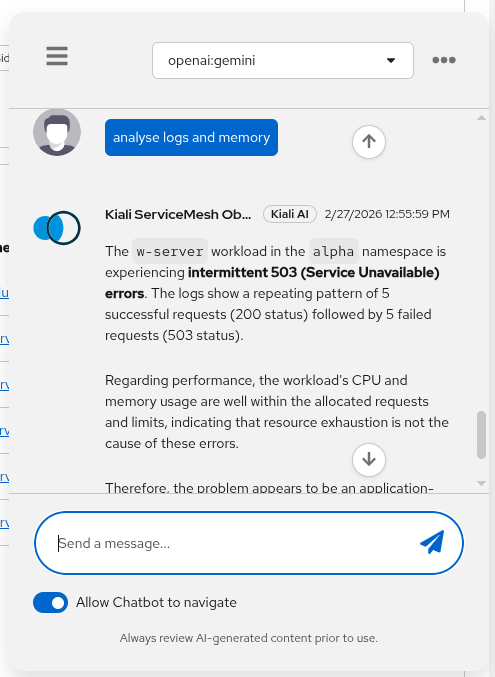
Status
The Kiali chatbot was first released in Kiali version 2.22 and it is in Dev preview.
How does it work
At a high level:
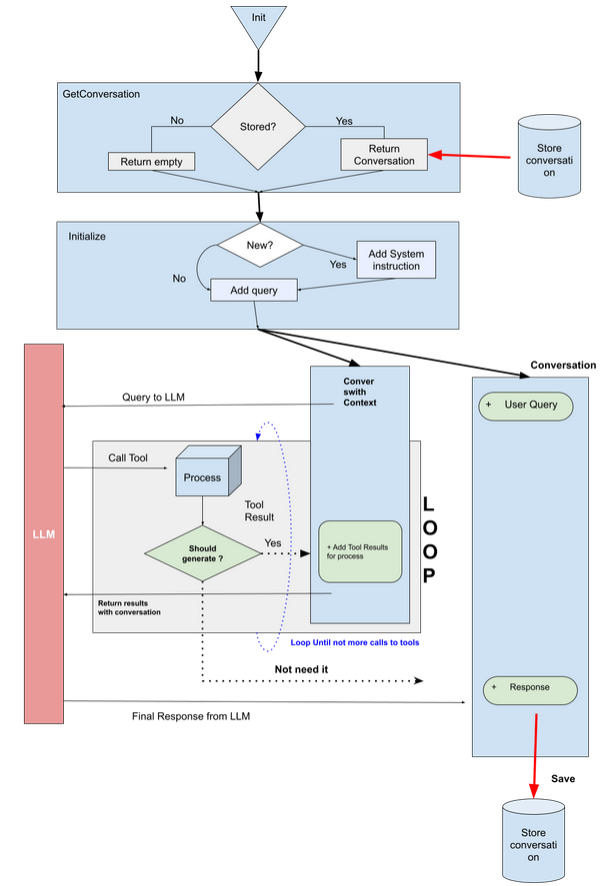
- The Kiali UI sends your chat request (prompt + context + selected model) to the Kiali backend.
- Kiali selects the configured provider/model from
ai.chat. - The provider calls the LLM with a set of internal MCP tools (defined in Kiali under
kiali/ai/mcp). - The LLM may request tool calls (e.g. mesh graph, traces, resource details, workload logs, Istio config operations).
- Kiali executes those tool calls against Kiali/Kubernetes/Prometheus/tracing backends and returns the final answer, including optional UI navigation actions and documentation citations.
- The response is delivered as streaming events (for example:
start,token,tool_call,tool_result,end,error) so the UI can progressively render tokens and tool activity in real time.
For configuration keys (enable/disable, tool filters, providers/models, store), see the ai.chat section in the Kiali CR spec.
To estimate ChatAI cost from token usage, ai.metrics must be enabled. You can then set a custom price catalog and optional per-user budgets. If you do not set ai.consumption.prices_config_map, Kiali uses the built-in catalog. See Token prices and Budgets.
Tool schemas (inputs/outputs)
Kiali Chatbot uses internal tools with defined input schemas and structured outputs.
Configuring the Kiali Chatbot
chat_ai configuration is deprecated since v2.31 and has been moved under ai.chat.
The Kiali Chatbot is disabled by default. To enable it, set ai.enabled: true and ai.chat.enabled: true.
When enabled, you will see the chatbot icon in the Kiali UI:
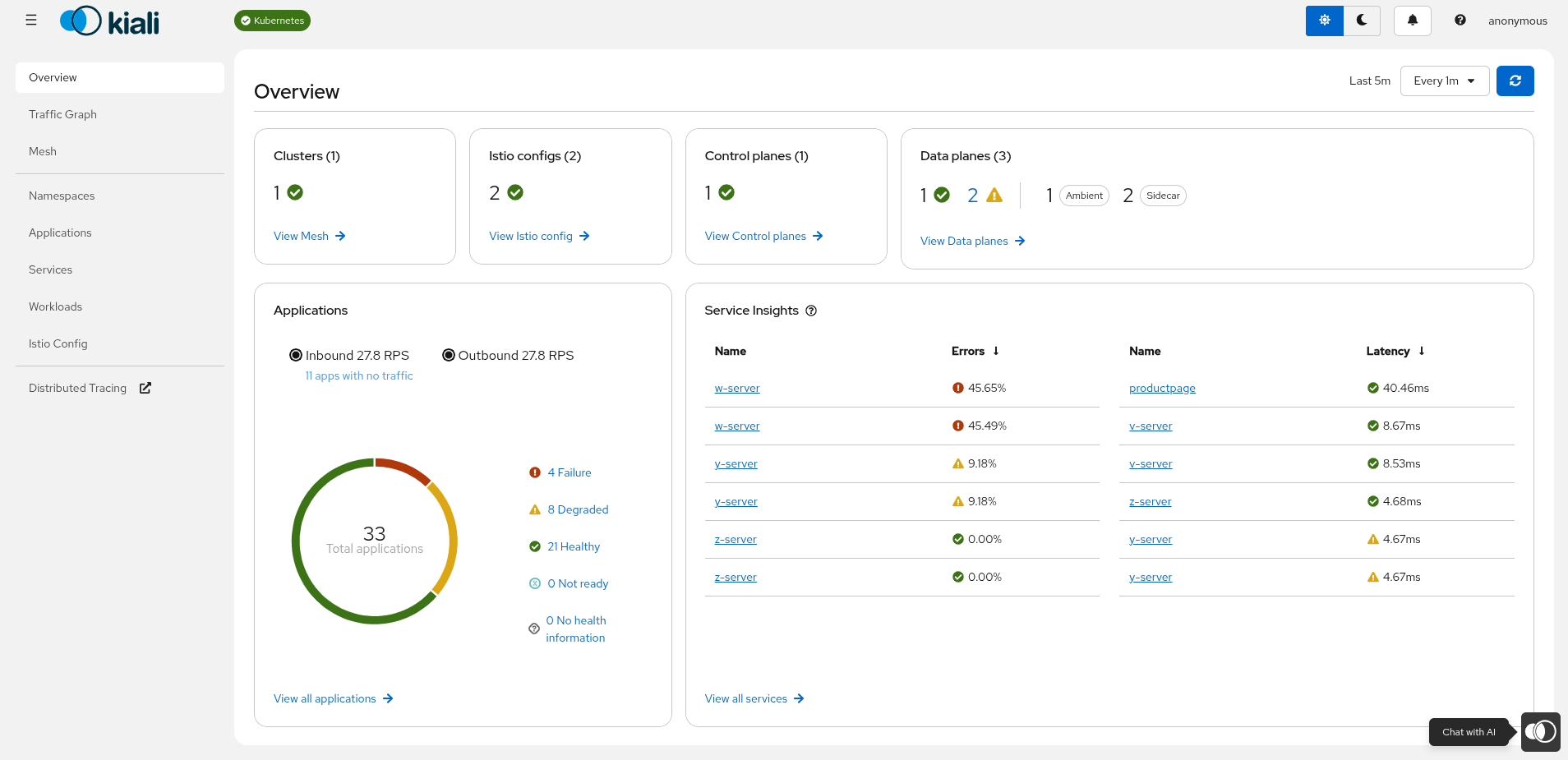
You must also configure at least one provider and model (including an API key), and pick a default provider/model.
Restricting access
By default, when the Chatbot is enabled, it is available to all users. You can restrict access to specific users by configuring the allowed_users list:
ai:
  enabled: true
  chat:
    enabled: true
    allowed_users:
      - "user1"
      - "user2"
If allowed_users is empty (the default), all users have access. If it is not empty, only the users listed will see and be able to use the Chatbot.
Switching model providers
Kiali Chatbot providers and models are configured in ai.chat:
- Providers: OpenAI (
type: openai), Google (type: google), Anthropic (type: anthropic), and LightSpeed (type: lightspeed). - Models are selected by name (per-provider) and can be enabled/disabled.
- API keys can be set inline (not recommended) or via
secret:<secret-name>:<key-in-secret>. - Tool exposure can be filtered globally with
ai.chat.toolsand further restricted per provider withai.chat.providers[].tools.
Example configuration (showing three providers: OpenAI, Google, and Anthropic):
ai:
  enabled: true
  chat:
    default_provider: "openai"
    tools:
      disabled_tools:
        - "manage_istio_config"
    providers:
      - name: "openai"
        enabled: true
        description: "OpenAI provider"
        type: "openai"
        config: "default"
        default_model: "gpt"
        tools:
          enabled_tools:
            - "get_logs"
            - "get_mesh_status"
            - "list_traces"
        models:
          - name: "gpt"
            enabled: true
            model: "<openai-model-name>"
            key: "secret:my-key-secret:openai-api-key"
      - name: "google"
        enabled: true
        description: "Google provider"
        type: "google"
        config: "gemini"
        default_model: "gemini"
        models:
          - name: "gemini"
            enabled: true
            model: "gemini-2.5-pro"
            description: "Model provided by Google with OpenAI API Support"
            endpoint: "https://generativelanguage.googleapis.com/v1beta/openai"
            key: "secret:my-key-secret:google-api-key"
      - name: "anthropic"
        enabled: true
        description: "Anthropic provider"
        type: "anthropic"
        config: "default"
        default_model: "claude-haiku"
        key: "secret:my-key-secret:claude-api-key"
        models:
          - name: claude-sonnet
            model: "claude-sonnet-4-5"
            enabled: true
            endpoint: "https://api.anthropic.com/"
          - name: claude-haiku
            model: "claude-haiku-4-5"
            enabled: true
enabled_tools acts as an allowlist: when set, only the listed tool names are exposed. disabled_tools acts as a denylist and is applied afterwards. You can define these filters globally under ai.chat.tools and/or per provider under ai.chat.providers[].tools. Provider-level filters can only further restrict the already-allowed global toolset.
To see the available built-in tool names you can use in these lists, see Kiali Chatbot tools.
LightSpeed provider example:
ai:
  enabled: true
  chat:
    providers:
      - name: "LightSpeed"
        description: "Openshift LightSpeed"
        type: "lightspeed"
        endpoint: "<LightSpeed endpoint>"
        enabled: true
TLS verification
By default, Kiali verifies the TLS certificate of AI provider endpoints. Kiali uses its CA bundle (kiali-cabundle ConfigMap) and the platform TLS policy when connecting to providers.
If the provider uses a self-signed certificate that is not in Kiali’s CA bundle, you can disable TLS verification per provider:
ai:
  enabled: true
  chat:
    providers:
      - name: "LightSpeed"
        type: "lightspeed"
        endpoint: "https://lightspeed-app-server.openshift-lightspeed.svc:8443"
        enabled: true
        insecure_skip_verify: true
insecure_skip_verify: true disables certificate validation for that provider. Use this only for development or testing. In production, add the provider’s CA certificate to the kiali-cabundle ConfigMap instead.
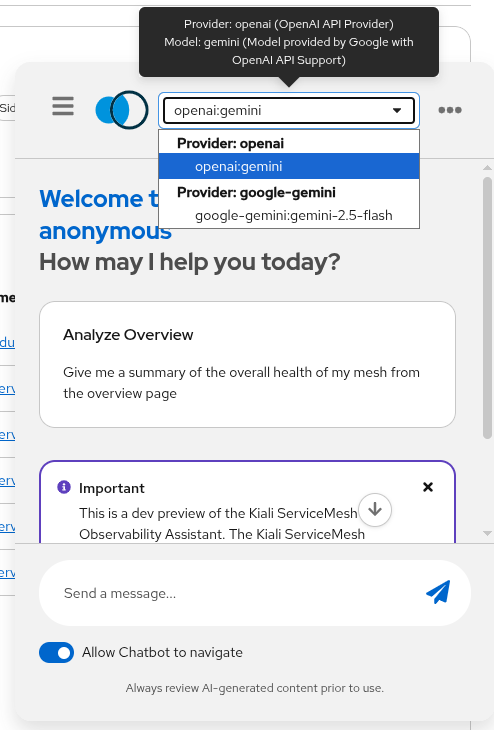
You can also select the configured models and providers in the chatbot window:
When the assistant uses a tool, Kiali shows a tool-result card directly in the chat so you can see which tool was executed:
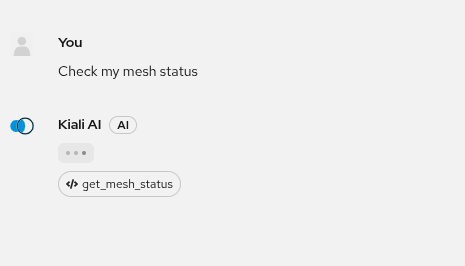
You can click the square tool-result card to open the full tool output in a modal window:
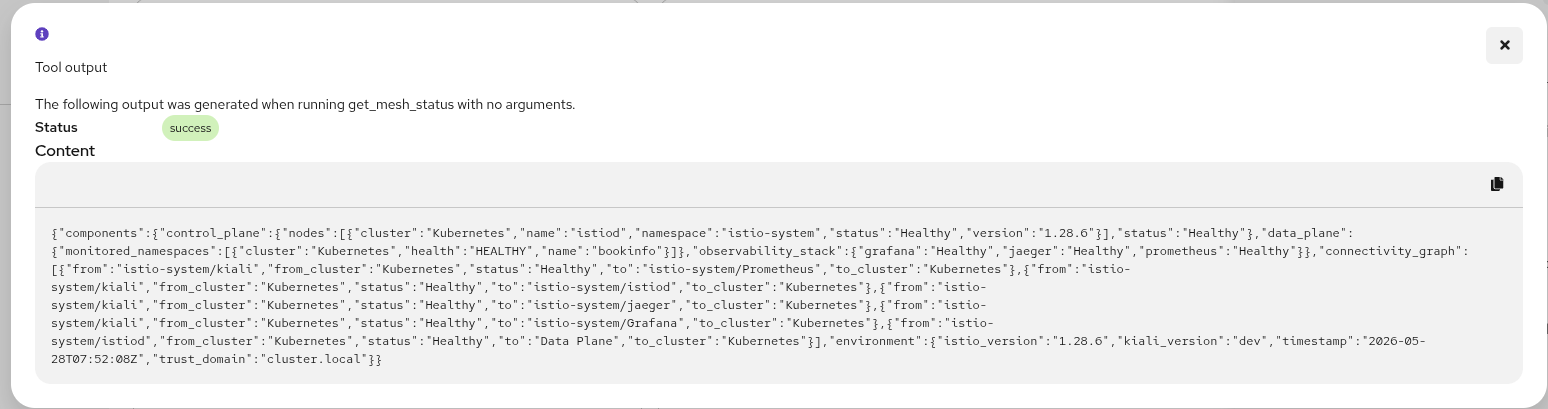
In this modal view you can inspect the complete tool response in detail (for example returned resources, metrics, or logs) before continuing the conversation.
Streaming events in the chat
Kiali Chatbot UI updates are powered by server-sent streaming events from the backend. This is why responses appear incrementally (token by token), and why tool usage is shown as it happens.
In practice:
tokenevents render incremental assistant text.tool_callandtool_resultevents render the tool card and its status/output.endfinalizes the answer, including optional UI actions and documentation references.errorreports failures without waiting for a full response timeout.
What you can ask
Examples of tasks that work well:
- Mesh/namespace topology and summaries (graph, status)
- Basic observability questions (metrics, traces)
- Troubleshooting workflows (get logs for a workload, identify failing namespaces)
Predefined prompts
Kiali Chatbot displays a set of suggested prompts tailored to the page you are currently viewing. The suggestions change as you navigate between pages (Overview, Graph, Mesh, Namespaces, Applications, Services, Workloads, Istio Config), so the most relevant questions for your current context are always one click away.
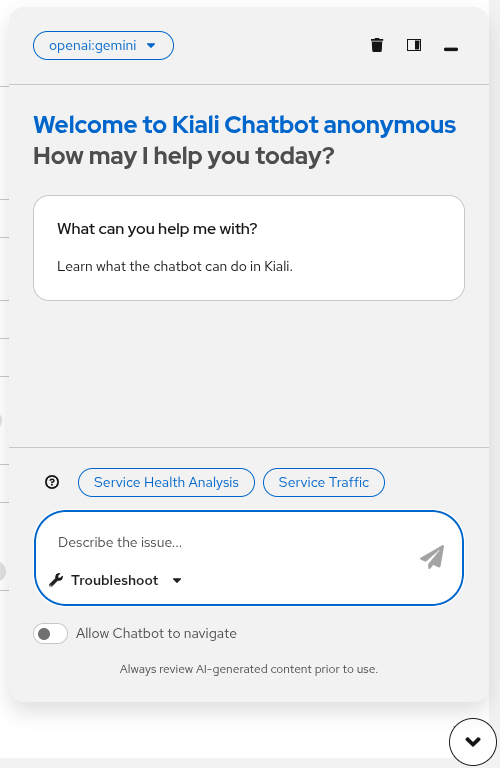
The prompts are served by a built-in server-side catalog through the GET /api/chat/prompts endpoint. Use the optional ?category=<page> query parameter to fetch prompts for a specific page. If the endpoint is unavailable, the chatbot falls back to a set of static prompts.
Clicking a suggested prompt populates the message input so you can review or edit the text before sending it.
Example prompts
- “Show me the mesh graph for namespace
bookinfo.” - “Which workloads in
istio-systemlook unhealthy and why?” - “Get traces for service
productpageinbookinfofor the last 30m.”
Ask vs. Troubleshoot mode
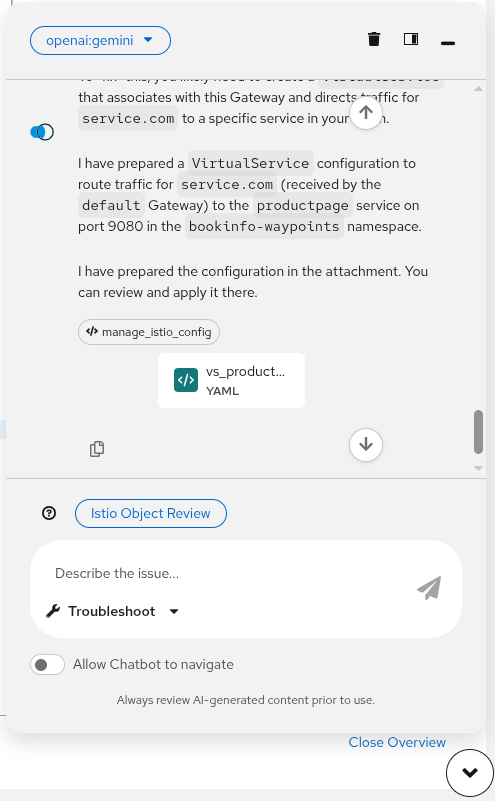
The chatbot input area includes a mode selector (the dropdown next to the send button) that lets you switch between two interaction modes: Ask and Troubleshoot.
Ask mode is a conversational Q&A mode. Use it to ask general questions about your mesh, namespaces, services, or Istio configuration. The assistant answers using its knowledge and the available internal tools, but the interaction is free-form and exploratory.
Troubleshoot mode is a structured diagnostic mode. Use it when you have a specific issue to investigate. In this mode, the chatbot:
- Accepts a description of the problem as the starting point.
- Automatically selects a relevant set of tools (logs, traces, metrics, Istio config checks) to gather evidence.
- Follows a systematic diagnostic workflow and summarizes its findings with a recommended course of action.
The difference between the two modes depends a lot on the model used. In the case of LightSpeed, the modes are handled natively by the provider. For other models, the system prompt is adapted for each mode.
Next step
If you want to use an AI assistant outside the Kiali UI (for example, in an IDE), see Kiali MCP.
1.2 - Token prices
Kiali can estimate the monetary cost of ChatAI usage from a per-model token price catalog. Those estimates appear on the AI consumption dashboard and can be used with optional per-user budgets.
To use consumption tracking, token prices, and the AI consumption dashboard, ai.metrics must be enabled (ai.metrics: true). If metrics are disabled, Kiali does not record token usage, does not estimate cost, and does not show consumption data.
Cost estimates, dashboard access, and the price catalog are configured under ai.consumption. For the configuration keys, see ai.metrics and ai.consumption in the Kiali CR spec.
Default catalog
You do not have to configure token prices. If ai.consumption.prices_config_map is omitted or left empty (""), Kiali automatically uses the built-in catalog shipped in the Kiali binary:
That file lists USD prices per million tokens for Anthropic, OpenAI, and Google models (and optional cache read/write rates where the provider publishes them). The operator and Helm chart do not mount an extra volume in this default case.
Enable metrics (required) and leave pricing unset:
ai:
  enabled: true
  metrics: true
  consumption:
    prices_config_map: ""   # default: built-in catalog
How cost is calculated
Kiali matches each usage record to a catalog row by provider and model_id, then estimates:
input cost  = (prompt tokens / 1,000,000)     × input_cost_per_million
output cost = (completion tokens / 1,000,000) × output_cost_per_million
total       = input cost + output cost
If no catalog row matches the provider and model, tokens are still shown and cost is omitted.
Custom prices (prices_config_map)
To replace the built-in catalog (for example with your contract rates, a model not listed yet, or LightSpeed prices), create a ConfigMap in the Kiali deployment namespace and set ai.consumption.prices_config_map to its name.
The ConfigMap is user-managed. The operator never creates or writes it. The catalog in the ConfigMap replaces the built-in list; it is not merged.
- Create a ConfigMap whose data key is
prices.yaml, using the same schema as ai_default_prices.yaml:
apiVersion: v1
kind: ConfigMap
metadata:
  name: kiali-ai-prices
  namespace: istio-system   # Kiali's namespace
data:
  prices.yaml: |
    models:
      - provider: openai          # openai | anthropic | google | lightspeed
        model_id: gpt-4o          # must match the model ID recorded in usage
        currency: USD
        prices:
          input_cost_per_million: 2.50
          output_cost_per_million: 10.00
          cache_write_cost_per_million: 0      # optional
          cache_read_cost_per_million: 1.25    # optional
- Point Kiali at that ConfigMap.
Operator (Kiali CR):
spec:
  ai:
    enabled: true
    metrics: true
    consumption:
      prices_config_map: kiali-ai-prices
Helm (kiali-server values):
ai:
  enabled: true
  metrics: true
  consumption:
    prices_config_map: kiali-ai-prices
When prices_config_map is a non-empty name, the operator (and the kiali-server Helm chart) mounts that ConfigMap at /kiali-ai-pricing (optional: true, readOnly: true). Kiali reads /kiali-ai-pricing/prices.yaml.
If the file is missing or invalid, Kiali logs an error and falls back to the built-in ai_default_prices.yaml catalog.
Restart the Kiali pod after you change ConfigMap contents. Prices are loaded when configuration is read, not watched for live updates.
Catalog schema
Each entry under models::
| Field | Description |
|---|---|
provider |
Provider type: openai, anthropic, google, or lightspeed. |
model_id |
Provider model ID. Must match the model recorded in ChatAI usage. |
currency |
Pricing currency (typically USD). |
prices.input_cost_per_million |
Cost per million prompt tokens. |
prices.output_cost_per_million |
Cost per million completion tokens. |
prices.cache_write_cost_per_million |
Optional. Prompt-cache write rate, when the provider publishes one. |
prices.cache_read_cost_per_million |
Optional. Cached-input rate, when the provider publishes one. |
Copy rows from the built-in catalog and adjust the amounts you want Kiali to use.
Dashboard access
ai.consumption.allowed_users_dashboard lists usernames that may open the consumption dashboard. If the list is empty (the default), all authenticated users have access. This is independent of ai.chat.allowed_users, which controls who can use the Chatbot.
ai:
  enabled: true
  metrics: true
  consumption:
    allowed_users_dashboard:
      - "alice"
      - "bob"
Next step
To limit cost or tokens per user, see Budgets.
1.3 - Budgets
You can cap ChatAI usage per user with ai.consumption.budgets. Each budget sets a reset interval, optional cost and token limits, and optional provider/model allowlists. Cost limits use the same catalog described in Token prices.
To use consumption tracking, token prices, and budgets, ai.metrics must be enabled (ai.metrics: true). If metrics are disabled, budgets are not enforced and remaining-budget data is not shown.
If budgets is empty (the default), there are no budget restrictions.
For the field list, see ai.consumption in the Kiali CR spec.
Budget fields
Each item under ai.consumption.budgets is applied to one or more users:
| Field | Description |
|---|---|
usernames |
Users this budget applies to. Required and must not be empty. Use * as a catch-all for everyone else. |
interval |
When the budget resets: weekly or monthly. |
max_cost |
Maximum estimated cost in the interval, in the catalog currency (typically USD). |
max_tokens |
Maximum tokens in the interval, in millions of tokens (for example 10 means 10 million tokens). |
allowed_providers |
Provider types this budget allows: openai, anthropic, google, lightspeed. Empty means all configured providers. |
allowed_models |
Model names or IDs this budget allows. Supports * wildcards (for example claude-sonnet-*). Empty means all models of the allowed providers. |
allowed_providers and allowed_models must refer to providers and models already defined in ai.chat.providers.
How a budget is chosen
On each chat request, Kiali picks one budget for the current user:
- An exact username match (the
anonymous-shareduser is treated asanonymous). - Otherwise a
*catch-all budget, if one exists. - Otherwise no budget (the request is not limited).
An exact match always wins over *. Put specific users in their own entries, then optionally add a * entry for everyone else.
What is enforced
When metrics are enabled and a budget applies, Kiali:
- Rejects the request if the selected provider type is not in
allowed_providers. - Rejects the request if the selected model is not in
allowed_models. - Rejects the request if used cost in the current interval is at or above
max_cost, or used tokens are at or abovemax_tokensmillion tokens.
The chatbot and consumption dashboard can show remaining cost and tokens for the current user.
Example
ai:
  enabled: true
  metrics: true                 # required for usage, cost, and budgets
  consumption:
    budgets:
      - usernames: ["alice", "bob"]
        interval: monthly
        max_cost: 50
        max_tokens: 10          # 10 million tokens
        allowed_providers: ["openai", "anthropic"]
        allowed_models: ["gpt-4o", "claude-sonnet-*"]
      - usernames: ["*"]
        interval: weekly
        max_cost: 5
In this example:
- Alice and Bob share a monthly budget of 50 (USD, unless you changed the catalog currency) and 10 million tokens, and may only use the listed OpenAI and Anthropic models.
- Every other user shares a weekly budget of 5 in cost, with no token cap and no provider/model restriction.
Operator (Kiali CR) uses the same keys under spec.ai. Helm (kiali-server) uses them under ai.consumption.budgets.
1.4 - Tools (schemas)
Kiali Chatbot uses internal MCP-style tools (implemented inside Kiali) to fetch live data and perform safe actions. These are not external MCP server tools.
Administrators can control which of these tools are exposed to the AI by using ai.chat.tools for global filtering and ai.chat.providers[].tools for provider-specific filtering. Use the exact tool names below in enabled_tools and disabled_tools.
The tool input schemas are defined in Kiali under kiali/ai/mcp/tools/*.yaml. The tool outputs are JSON structures returned by the Kiali backend and consumed by the model and/or UI.
Tool list
get_action_ui: returns UI navigation actions (buttons/links).get_logs: returns workload or pod logs with optional filtering.get_mesh_status: returns high-level mesh health, control plane, observability stack, and connectivity status.get_mesh_traffic_graph: returns a compact service-to-service traffic topology with metrics such as throughput, response time, and mTLS.get_metrics: returns Istio or Envoy metrics for services, workloads, or apps.get_pod_performance: returns current pod CPU and memory usage versus requests and limits.get_referenced_docs: returns relevant Istio and Kiali documentation links.get_trace_details: returns the hierarchy and span details for a specific trace.list_or_get_resources: lists resources or returns details for services, workloads, apps, and namespaces.list_traces: returns a compact list of distributed traces for a service.manage_istio_config_read: lists or gets Istio config in read-only mode.manage_istio_config: creates, patches, or deletes Istio config with a confirmation flow for sensitive actions.
2 - Kiali MCP
Kiali MCP lets an MCP-capable assistant query a live service mesh, and optionally change Istio configuration, by calling tools that Kiali already implements. The assistant does not talk to Kiali directly. It talks to an MCP server, and that server calls the Kiali API with the caller’s Kubernetes token.
This is separate from the Kiali Chatbot. The chatbot runs inside the Kiali UI and uses Kiali’s own tools. Kiali MCP is for an assistant outside Kiali, for example an IDE, that should use the same mesh data.
The toolset is published by the Kubernetes MCP Server. Enable the kiali toolset and the tools are named with the kiali_ prefix. The same list is in Tools and functionalities. The catalog below is generated from that server’s schema.
Prerequisites
- A Kiali URL the MCP server can reach (Route, Ingress, or in-cluster Service).
- Kubernetes credentials for the MCP server (kubeconfig, or in-cluster configuration). Kiali authorizes that token. A token that cannot list namespaces, or cannot read pods and Istio resources, will see empty or failed tool calls.
- For writes (
kiali_manage_istio_config), permission to create, update, and delete the Istio resources you want the assistant to change. Start the server with--read-onlywhen the assistant should not be offered that tool.
Enable the toolset
Kubernetes MCP Server reads a TOML file. kiali is not on by default. When it is enabled, url is required and the server will not start without it.
toolsets = ["core", "kiali"]

[toolset_configs.kiali]
url = "https://kiali.example" # Route or Ingress for the Kiali console
# insecure = true  # optional: skip TLS verification (not recommended in production)
# certificate_authority = "/path/to/ca.crt"  # CA bundle for Kiali's TLS certificate
If url is https:// and insecure is false, set certificate_authority. Relative CA paths are resolved from the directory that contains the TOML file.
Connect a client
How you register the server depends on the client. The server process itself is started with the kubeconfig and the TOML file:
kubernetes-mcp-server --config /path/to/config.toml --read-only
Drop --read-only only when the assistant is allowed to create, patch, or delete Istio, Gateway API, and Inference API configuration.
Authentication
The MCP server uses the Kubernetes credentials it was started with and sends that bearer token to Kiali. An Authorization header on the MCP HTTP endpoint is not what Kiali sees.
Kiali then enforces that token. Most tools are limited to namespaces and resources the token can get or list. Mesh status and the mesh cluster list are broader: Kiali aggregates control-plane and observability backends, so those two calls are not tied to a single Kubernetes resource. Binding the identity to the kiali-viewer role (read) or the kiali role (read and write) is the practical way to cover the whole toolset.
Upstream detail: Kubernetes MCP Server Kiali guide.
Multi-cluster
Most tools accept meshCluster. When it is omitted, Kiali uses its home cluster. The value must be a name returned by kiali_list_mesh_clusters. These tools do not take a kubeconfig context. Core Kubernetes tools on the same MCP server still use context when that server’s multi-cluster mode is enabled.
Tools
Generated from the Kubernetes MCP Server Kiali tool schema. Refresh this list with make gen-kiali-mcp-doc.
| Tool | Access | Purpose |
|---|---|---|
kiali_get_logs |
Read-only | Workload: Logs |
kiali_get_mesh_status |
Read-only | Get Mesh Status |
kiali_get_mesh_traffic_graph |
Read-only | Get Mesh Traffic Graph |
kiali_get_metrics |
Read-only | Get Metrics for a Resource |
kiali_get_pod_performance |
Read-only | Get Pod Performance |
kiali_get_resource_details |
Read-only | List or Resource Details |
kiali_get_trace_details |
Read-only | Get Trace Details |
kiali_list_mesh_clusters |
Read-only | List Mesh Clusters |
kiali_list_traces |
Read-only | List Traces by Service Name |
kiali_manage_istio_config |
Writes config | Manage Istio, Gateway API, and Inference API Config: Create, Patch, Delete |
kiali_manage_istio_config_read |
Read-only | Manage Istio, Gateway API, and Inference API Config: List or Get |
kiali_get_logs
Workload: Logs. Read-only.
Get the logs of a Kubernetes Pod (or workload name that will be resolved to a pod) in a namespace. Output is plain text, matching kubernetes-mcp-server pods_log. The line_count field tells you the total number of log lines returned. Analyze ALL of them, but summarize the results unless the user explicitly asks for the raw output. Do not omit any error or warning lines.
| Parameter | Type | Required | Default | Description |
|---|---|---|---|---|
name |
string | yes | Name of the Pod to get the logs from. If it does not exist, it will be treated as a workload name and a running pod will be selected. | |
namespace |
string | yes | Namespace to get the Pod logs from | |
container |
string | no | Optional. Name of the Pod container to get the logs from. | |
format |
string (codeblock, plain) |
no | Output formatting for chat. ‘codeblock’ wraps logs in ~~~ fences (recommended). ‘plain’ returns raw text like kubernetes-mcp-server pods_log. | |
meshCluster |
string | no | Optional Istio mesh cluster name from kiali_list_mesh_clusters (e.g. west). When omitted, Kiali defaults to its home cluster. | |
previous |
boolean | no | Optional. Return previous terminated container logs | |
severity |
string | no | Optional severity filter applied client-side. Accepts ‘ERROR’, ‘WARN’ or combinations like ‘ERROR,WARN’. | |
tail |
integer | no | 50 |
Number of lines to retrieve from the end of the logs (Optional, defaults to 50). Cannot exceed 200 lines. Minimum: 1. |
workload |
string | no | Optional. Workload name override (used when name lookup fails). |
kiali_get_mesh_status
Get Mesh Status. Read-only.
Retrieves the high-level health, topology, and environment details of the Istio service mesh. Returns multi-cluster control plane status (istiod), data plane namespace health (including ambient mesh status), observability stack health (Prometheus, Grafana…), and component connectivity. Use this tool as the first step to diagnose mesh-wide issues, verify Istio/Kiali versions, or check overall health before drilling into specific workloads.
This tool takes no parameters.
kiali_get_mesh_traffic_graph
Get Mesh Traffic Graph. Read-only.
Returns service-to-service traffic topology, dependencies, and network metrics (throughput, response time, mTLS) for the specified namespaces. Use this to diagnose routing issues, latency, or find upstream/downstream dependencies.
| Parameter | Type | Required | Default | Description |
|---|---|---|---|---|
namespaces |
string | yes | Comma-separated list of namespaces to map | |
graphType |
string (app, versionedApp, service, workload) |
no | versionedApp |
Granularity of the graph. ‘app’ aggregates by app name, ‘versionedApp’ separates by versions, ‘workload’ maps specific pods/deployments. Default: versionedApp. |
meshCluster |
string | no | Optional Istio mesh cluster name from kiali_list_mesh_clusters (e.g. west). When omitted, Kiali defaults to its home cluster. |
kiali_get_metrics
Get Metrics for a Resource. Read-only.
Returns a compact JSON summary of Istio metrics (latency quantiles, traffic trends, throughput, payload sizes) for the given resource.
| Parameter | Type | Required | Default | Description |
|---|---|---|---|---|
namespace |
string | yes | Namespace to get metrics from | |
resourceName |
string | yes | Name of the resource to get metrics for | |
resourceType |
string (service, workload, app) |
yes | Type of resource to get metrics | |
byLabels |
string | no | Comma-separated list of labels to group metrics by (e.g., ‘source_workload,destination_service’). Optional | |
direction |
string (inbound, outbound) |
no | outbound |
Traffic direction. Optional, defaults to ‘outbound’ |
meshCluster |
string | no | Optional Istio mesh cluster name from kiali_list_mesh_clusters (e.g. west). When omitted, Kiali defaults to its home cluster. | |
quantiles |
string | no | 0.5,0.95,0.99,0.999 |
Comma-separated list of quantiles for histogram metrics (e.g., ‘0.5,0.95,0.99’). Optional |
rateInterval |
string | no | 10m |
Rate interval for metrics (e.g., ‘1m’, ‘5m’). Optional, defaults to ‘10m’ |
reporter |
string | no | source |
Metrics reporter(s). Comma-separated list of: ‘source’, ‘destination’, ‘waypoint’, or the special value ‘both’ (no reporter filter). Optional, defaults to ‘source’. Example: ‘source,waypoint’ |
requestProtocol |
string | no | Filter by request protocol (e.g., ‘http’, ‘grpc’, ’tcp’). Optional | |
step |
string | no | 15 |
Step between data points in seconds (e.g., ‘15’). Optional, defaults to 15 seconds |
kiali_get_pod_performance
Get Pod Performance. Read-only.
Returns a human-readable text summary with current Pod CPU/memory usage (from Prometheus) compared to Kubernetes requests/limits (from the Pod spec). Useful to answer questions like ‘Is this workload using too much memory?’
| Parameter | Type | Required | Default | Description |
|---|---|---|---|---|
namespace |
string | yes | Kubernetes namespace of the Pod. | |
meshCluster |
string | no | Optional Istio mesh cluster name from kiali_list_mesh_clusters (e.g. west). When omitted, Kiali defaults to its home cluster. | |
podName |
string | no | Kubernetes Pod name. If workloadName is provided, the tool will attempt to resolve a Pod from that workload first. | |
queryTime |
string | no | Optional end timestamp (RFC3339) for the query. Defaults to now. | |
timeRange |
string | no | 10m |
Time window used to compute CPU rate (Prometheus duration like ‘5m’, ‘10m’, ‘1h’, ‘1d’). Defaults to ‘10m’. |
workloadName |
string | no | Kubernetes Workload name (e.g. Deployment/StatefulSet/etc). Tool will look up the workload and pick one of its Pods. If not found, it will fall back to treating this value as a podName. |
kiali_get_resource_details
List or Resource Details. Read-only.
Fetches a list of resources OR retrieves detailed data for a specific resource. If ‘resourceName’ is omitted, it returns a list. If ‘resourceName’ is provided, it returns details for that specific resource.
| Parameter | Type | Required | Default | Description |
|---|---|---|---|---|
resourceType |
string (app, argoapp, namespace, service, workload) |
yes | The type of resource to query. Use ‘app’ for Kiali applications (grouped by the Kubernetes ‘app’ label). Use ‘argoapp’ for ArgoCD Application CRDs (requires ArgoCD installed and the Kiali service account must have read permissions on applications.argoproj.io). | |
meshCluster |
string | no | Optional Istio mesh cluster name from kiali_list_mesh_clusters (e.g. west). When omitted, Kiali defaults to its home cluster. | |
namespaces |
string | no | Comma-separated list of namespaces to query (e.g., ‘bookinfo’ or ‘bookinfo,default’). If not provided, it will query across all accessible namespaces. | |
resourceName |
string | no | Optional. The specific name of the resource. If left empty, the tool returns a list of all resources of the specified type. If provided, the tool returns deep details for this specific resource. |
kiali_get_trace_details
Get Trace Details. Read-only.
Fetches a single distributed trace by trace_id and returns its call hierarchy (service tree with duration, status, and nested calls). Use this after list_traces to drill into a specific trace.
| Parameter | Type | Required | Default | Description |
|---|---|---|---|---|
traceId |
string | yes | Trace ID to fetch and summarize. If provided, namespace/service_name are ignored. |
kiali_list_mesh_clusters
List Mesh Clusters. Read-only.
Returns the list of Istio mesh clusters that Kiali can access. Each entry includes its name and whether it is the home cluster (where Kiali is deployed). Call this tool before using meshCluster on other Kiali tools when the target cluster is unknown.
This tool takes no parameters.
kiali_list_traces
List Traces by Service Name. Read-only.
Lists distributed traces for a service in a namespace. Returns a summary (namespace, service, total_found, avg_duration_ms) and a list of traces with id, duration_ms, spans_count, root_op, slowest_service, has_errors. Use get_trace_details with a trace id to get full hierarchy.
| Parameter | Type | Required | Default | Description |
|---|---|---|---|---|
namespace |
string | yes | Kubernetes namespace of the service. | |
serviceName |
string | yes | Service name to search traces for (required). Returns multiple traces up to limit. | |
errorOnly |
boolean | no | false |
If true, only consider traces that contain errors. Default false. |
limit |
integer | no | 10 |
Maximum number of traces to return. Default 10. |
lookbackSeconds |
integer | no | 600 |
How far back to search. Default 600 (10m). |
meshCluster |
string | no | Optional Istio mesh cluster name from kiali_list_mesh_clusters (e.g. west). When omitted, Kiali defaults to its home cluster. |
kiali_manage_istio_config
Manage Istio, Gateway API, and Inference API Config: Create, Patch, Delete. Writes config.
Create, patch, or delete Istio, Gateway API, and Inference API config. Supports Istio resources (networking.istio.io, security.istio.io), Gateway API resources (gateway.networking.k8s.io), and Inference API resources (inference.networking.k8s.io) when installed on the cluster. For list and get (read-only) use manage_istio_config_read.
| Parameter | Type | Required | Default | Description |
|---|---|---|---|---|
action |
string (create, patch, delete) |
yes | Action to perform (write) | |
group |
string (networking.istio.io, security.istio.io, gateway.networking.k8s.io, inference.networking.k8s.io) |
yes | API group of the Istio object. Use ‘gateway.networking.k8s.io’ for Gateway API resources. Use ‘inference.networking.k8s.io’ for Inference API resources. | |
kind |
string (VirtualService, DestinationRule, Gateway, ServiceEntry, Sidecar, WorkloadEntry, WorkloadGroup, EnvoyFilter, AuthorizationPolicy, PeerAuthentication, RequestAuthentication, HTTPRoute, GRPCRoute, ReferenceGrant, TCPRoute, TLSRoute, InferencePool) |
yes | Kind of the Istio object (e.g., ‘VirtualService’, ‘DestinationRule’). | |
namespace |
string | yes | Namespace containing the Istio object. | |
object |
string | yes | Name of the Istio object. | |
version |
string | yes | API version. Use ‘v1’ for all resource types. | |
data |
string | no | JSON or YAML data for the resource. Required for create and patch actions. For create, you can provide partial content (e.g. only spec) and it will be merged onto a valid template with defaults. Arrays (like servers, http, etc.) are REPLACED entirely, so include ALL elements you want. | |
meshCluster |
string | no | Optional Istio mesh cluster name from kiali_list_mesh_clusters (e.g. west). When omitted, Kiali defaults to its home cluster. |
kiali_manage_istio_config_read
Manage Istio, Gateway API, and Inference API Config: List or Get. Read-only.
Read Istio, Gateway API, and Inference API config. ’list’ groups by namespace→’group/version/kind’→{valid:[…],invalid:[…]} where valid/invalid arrays contain resource names; omit group/kind to retrieve ALL config types in a single call. Supports Istio (networking.istio.io, security.istio.io), Gateway API (gateway.networking.k8s.io), and Inference API (inference.networking.k8s.io) when installed. ‘get’ returns full YAML. For writes use manage_istio_config.
| Parameter | Type | Required | Default | Description |
|---|---|---|---|---|
action |
string (list, get) |
yes | Action to perform (read-only) | |
group |
string (networking.istio.io, security.istio.io, gateway.networking.k8s.io, inference.networking.k8s.io) |
no | API group of the Istio object. Required ONLY for ‘get’ action. For ’list’, OMIT group and kind to retrieve ALL config types in a single call. Use ‘gateway.networking.k8s.io’ for Gateway API resources. Use ‘inference.networking.k8s.io’ for Inference API resources. | |
kind |
string (VirtualService, DestinationRule, Gateway, ServiceEntry, Sidecar, WorkloadEntry, WorkloadGroup, EnvoyFilter, AuthorizationPolicy, PeerAuthentication, RequestAuthentication, HTTPRoute, GRPCRoute, ReferenceGrant, TCPRoute, TLSRoute, InferencePool) |
no | Kind of the Istio object. Required ONLY for ‘get’ action. For ’list’, OMIT to return all kinds at once — do NOT call separately for each kind. | |
meshCluster |
string | no | Optional Istio mesh cluster name from kiali_list_mesh_clusters (e.g. west). When omitted, Kiali defaults to its home cluster. | |
namespace |
string | no | Namespace containing the Istio object. For ’list’, if not provided, returns objects across all namespaces. For ‘get’, required. | |
object |
string | no | Name of the Istio object. Required for ‘get’ action. | |
serviceName |
string | no | Filter Istio configurations (VirtualServices, DestinationRules, and their referenced Gateways) that affect a specific service. Only applicable for ’list’ action | |
version |
string | no | API version. Use ‘v1’ for all resource types. Required for ‘get’ action. |
Troubleshooting
- The server exits because the Kiali toolset is enabled but not configured. Set
[toolset_configs.kiali].url. - The URL is rejected. Use an
http://orhttps://URL with a host. - HTTPS fails certificate verification. Set
certificate_authorityto the CA file, or, outside production,insecure = true. - Tool calls return empty data or authorization errors. The token presented to Kiali cannot read that namespace or resource.
kiali_manage_istio_configdoes not appear. The server was started with--read-only.